Actual behavior
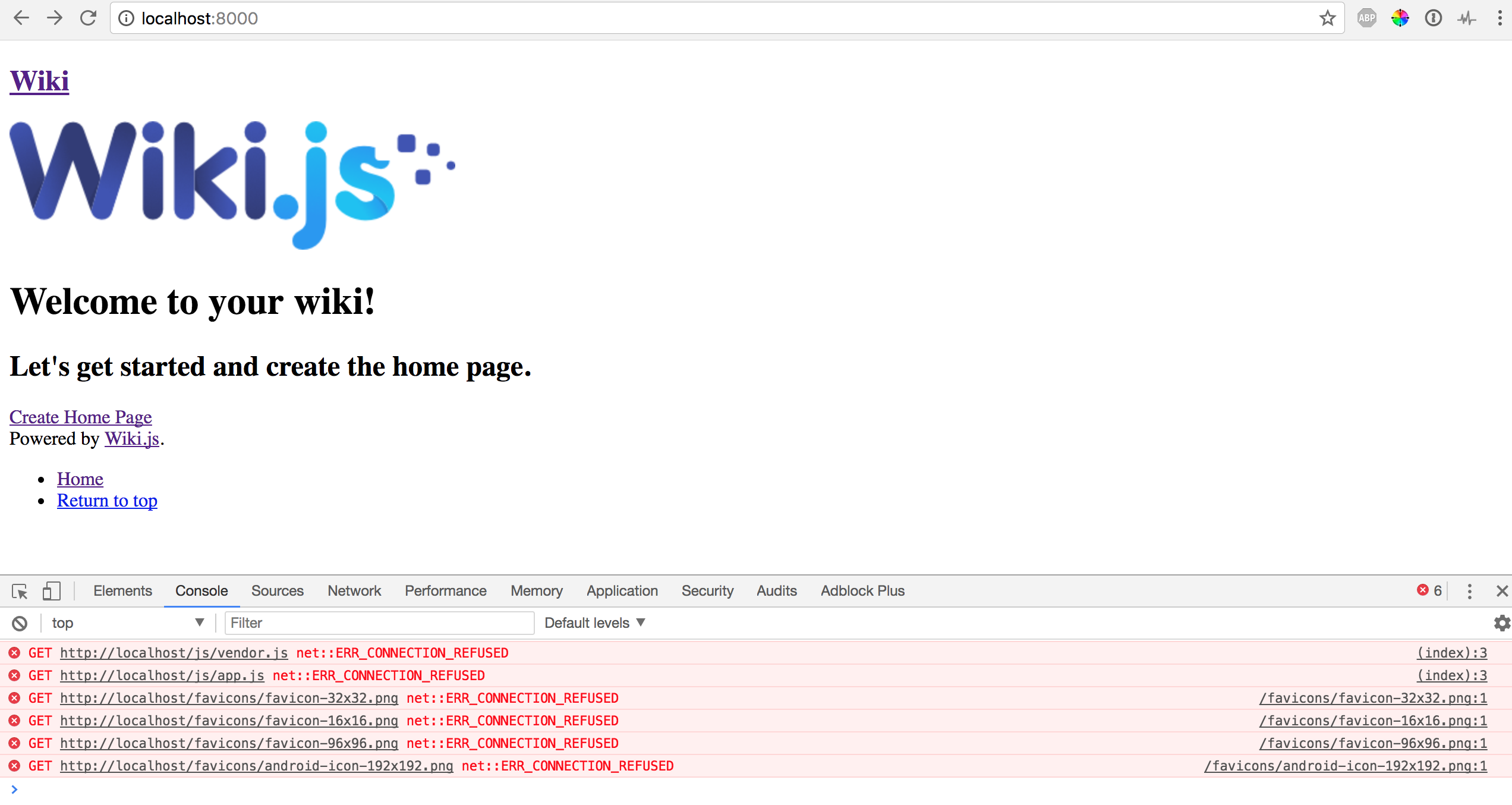
Page displays raw html without some of the assets/styles. Some page links also try to redirect to localhost/page not localhost:8000/page even though port: 8000 in config.yml
chrome console:
GET http://localhost/js/vendor.js net::ERR_CONNECTION_REFUSED
(index):3 GET http://localhost/js/app.js net::ERR_CONNECTION_REFUSED
/favicons/favicon-32x32.png:1 GET http://localhost/favicons/favicon-32x32.png net::ERR_CONNECTION_REFUSED
/favicons/favicon-16x16.png:1 GET http://localhost/favicons/favicon-16x16.png net::ERR_CONNECTION_REFUSED
/favicons/favicon-96x96.png:1 GET http://localhost/favicons/favicon-96x96.png net::ERR_CONNECTION_REFUSED
/favicons/android-icon-192x192.png:1 GET http://localhost/favicons/android-icon-192x192.png net::ERR_CONNECTION_REFUSED
Steps to reproduce the behavior
npm install
node wiki configure 8000
node wiki start
Do I need to 'Set $(PORT) to use PORT environment variable'?
 jhowarth15
All 7 comments
jhowarth15
on 3 Oct 2017
You must set the host parameter correctly in your config.yml.
 NGPixel
on 3 Oct 2017
NGPixel
on 3 Oct 2017
So for anyone else who hits this issue, the host parameter in config.yml must also include the port you are trying to use like this host: 'http://localhost:8000'.
I had expected setting port: 8000 in config.yml for the port would be sufficient..
jhowarth15
on 4 Oct 2017
@NGPixel FWIW, I ran into this issue, too. I didn't realize the port needs to be included in the host value. I incorrectly assumed it was implicit.
IMO, a slight change to the how the config wizard describes host would be helpful.
Before:
Section title: Host
[input with initial value = "http://localhost"]
The full URL to your wiki, without the trailing slash. E.g.: http://wiki.domain.com. Note that sub-folders are not supported.
After:
Section title: Wiki URL Origin
[input with initial value = "http://localhost:8080"]
The full URL to your wiki, as entered into the browser address bar, without a path or trailing slash. Note: sub-folders are not supported, and the port should be included if it's not a standard port (80 for http or 443 for https). E.g.: https://wiki.domain.com or http://localhost:8080.
Also, AWESOME project. A few months ago I did a bit of a survey of OSS wiki projects in an effort to find a great note taking / personal data management tool. And, yeah, wiki.js is suuuuper awesome :+1: :+1:
Great work!
 tiffon
on 29 Oct 2017
tiffon
on 29 Oct 2017
@jhowarth15 After about an hour of digging through the issues and strange corners of the web, I finally found your comment about putting the port number in the host as well as the host setting. This should be automatically set in the config.yml when the port has been set to custom in the browser config.
 jecompton
on 31 Dec 2017
jecompton
on 31 Dec 2017
Issue still occurs.
 LocalHeroPro
on 27 Dec 2018
LocalHeroPro
on 27 Dec 2018
In my opinion it makes no sense to specify port in "host" config variable. It should always use host + port while looking for local files, shouldn't it?
 sangio90
on 27 May 2019
sangio90
on 27 May 2019
Related issues
 ahkimkoo
·
4Comments
ahkimkoo
·
4Comments
 sbonaime
·
3Comments
sbonaime
·
3Comments
 failover88
·
4Comments
failover88
·
4Comments
 ramirahikkala
·
3Comments
ramirahikkala
·
3Comments
 touhoku-japan
·
3Comments
touhoku-japan
·
3Comments
Most helpful comment
So for anyone else who hits this issue, the
hostparameter inconfig.ymlmust also include the port you are trying to use like thishost: 'http://localhost:8000'.I had expected setting
port: 8000inconfig.ymlfor the port would be sufficient..