Wifimanager: WiFi settings are not persistent after reboot on ESP32
Basic Infos
Hardware
WiFimanager Branch/Release:
- [ ] Master
- [X] Development
Esp8266/Esp32:
- [ ] ESP8266
- [X] ESP32
Hardware: ESP-12e, esp01, esp25
- [ ] ESP01
- [ ] ESP12 E/F/S (nodemcu, wemos, feather)
- [X] Other DOIT ESP32 DEVKIT V1
ESP Core
- [ ] 2.3.0
- [ ] 2.4.0
- [ ] staging (master/dev)
- [X] 1.0.3
Description
WiFi settings are not persistent after reboot/power off, despite connection is successfully established and WiFi.persistent(true) is called before anything else
Sketch is the default OnDemandConfigPortal with minimal modifications.
Settings in IDE
Module: DOIT ESP32 DEVKIT V1
Additional libraries:
Sketch
**
 * OnDemandConfigPortal.ino
 * example of running the configPortal AP manually, independantly from the captiveportal
 * trigger pin will start a configPortal AP for 120 seconds then turn it off.
 *
 */
#include <WiFiManager.h> // https://github.com/tzapu/WiFiManager

int timeout = 120; // seconds to run for

void setup() {
  WiFi.persistent(true);
   Serial.begin(115200);
   Serial.println("\n Starting");

  if (WiFi.SSID()=="") {
    Serial.println("No Wi-Fi credentials stored, launch portal");
    WiFi.mode(WIFI_STA); // explicitly set mode, esp defaults to STA+AP
      // put your setup code here, to run once:

    // is configuration portal requested?

    WiFiManager wm;

    //reset settings - for testing
    //wifiManager.resetSettings();

    // set configportal timeout
    wm.setConfigPortalTimeout(timeout);

    if (!wm.startConfigPortal("OnDemandAP")) {
      Serial.println("failed to connect and hit timeout");
      delay(3000);
      //reset and try again, or maybe put it to deep sleep
      ESP.restart();
      delay(5000);
    }

    //if you get here you have connected to the WiFi
    Serial.println("connected...yeey :)");

  } else {
    Serial.println("Wi-Fi credentials are present");
  }
  delay(2000);
  // put your main code here, to run repeatedly:
}

void loop() {
  Serial.print("WiFi status: ");
  Serial.print(WiFi.status());
    Serial.print(", local ip: ");
    Serial.println(WiFi.localIP());
    delay(5000);
}
Debug Messages
 Starting
No Wi-Fi credentials stored, launch portal
*WM: [2] Starting Config Portal
*WM: [3] WIFI station disconnect
*WM: [3] WiFi station enable
*WM: [2] Disabling STA
*WM: [2] Enabling AP
*WM: [1] StartAP with SSID:  OnDemandAP
*WM: [2] AP has anonymous access!
*WM: [1] SoftAP Configuration
*WM: [1] --------------------
*WM: [1] ssid:             OnDemandAP
*WM: [1] password:
*WM: [1] ssid_len:         10
*WM: [1] channel:          1
*WM: [1] authmode:
*WM: [1] ssid_hidden:
*WM: [1] max_connection:   4
*WM: [1] country:          CN
*WM: [1] beacon_interval:  100(ms)
*WM: [1] --------------------
*WM: [1] AP IP address: 192.168.4.1
*WM: [3] setupConfigPortal
*WM: [1] Starting Web Portal
*WM: [3] dns server started with ip:  192.168.4.1
*WM: [2] HTTP server started
*WM: [2] WiFi Scan completed in 1903 ms
*WM: [2] Config Portal Running, blocking, waiting for clients...
*WM: [3] -> connectivitycheck.gstatic.com
*WM: [2] <- Request redirected to captive portal
*WM: [2] <- HTTP Root
*WM: [3] -> cp.cloudflare.com
*WM: [2] <- Request redirected to captive portal
*WM: [3] -> connectivitycheck.android.com
*WM: [2] <- Request redirected to captive portal
*WM: [3] -> connectivitycheck.gstatic.com
*WM: [2] <- Request redirected to captive portal
*WM: [2] <- HTTP Root
*WM: [3] -> 192.168.4.1
*WM: [3] lastconxresulttmp: WL_IDLE_STATUS
*WM: [3] lastconxresult: WL_DISCONNECTED
*WM: [2] Scan is cached 9764 ms ago
*WM: [3] -> 192.168.4.1
*WM: [3] -> connectivitycheck.gstatic.com
*WM: [2] <- Request redirected to captive portal
*WM: [2] <- HTTP Wifi
*WM: [2] Scan is cached 10851 ms ago
*WM: [1] 3 networks found
*WM: [2] AP:  -45 Stazione Wi-Fi
*WM: [2] AP:  -45 garageeks
*WM: [2] AP:  -58 DIRECT-0E-HP OfficeJet Pro 7740
*WM: [3] lastconxresulttmp: WL_IDLE_STATUS
*WM: [3] lastconxresult: WL_DISCONNECTED
*WM: [3] Sent config page
*WM: [3] -> connectivitycheck.gstatic.com
*WM: [2] <- Request redirected to captive portal
*WM: [3] -> connectivitycheck.gstatic.com
*WM: [2] <- Request redirected to captive portal
*WM: [2] <- HTTP Root
*WM: [3] -> cp.cloudflare.com
*WM: [2] <- Request redirected to captive portal
*WM: [3] -> connectivitycheck.gstatic.com
*WM: [2] <- Request redirected to captive portal
*WM: [3] -> connectivitycheck.gstatic.com
*WM: [2] <- Request redirected to captive portal
*WM: [2] <- HTTP Root
*WM: [3] -> cp.cloudflare.com
*WM: [2] <- Request redirected to captive portal
*WM: [3] -> connectivitycheck.gstatic.com
*WM: [2] <- Request redirected to captive portal
*WM: [2] <- HTTP Root
*WM: [3] -> cp.cloudflare.com
*WM: [2] <- Request redirected to captive portal
*WM: [2] <- HTTP Root
*WM: [3] -> cp.cloudflare.com
*WM: [2] <- Request redirected to captive portal
*WM: [2] <- HTTP Root
*WM: [3] -> cp.cloudflare.com
*WM: [2] <- Request redirected to captive portal
*WM: [2] <- HTTP WiFi save
*WM: [3] Method: POST
*WM: [3] Sent wifi save page
*WM: [2] process connect
*WM: [2] Connecting as wifi client...
*WM: [1] STA static IP:
*WM: [2] setSTAConfig static ip not set
*WM: [3] WIFI station disconnect
*WM: [1] CONNECTED:
*WM: [1] Connecting to NEW AP: Stazione Wi-Fi
*WM: [3] Using Password: XXXXX
*WM: [3] WiFi station enable
*WM: [1] connectTimeout not set, ESP waitForConnectResult...
*WM: [2] Connection result: WL_CONNECTED
*WM: [3] lastconxresult: WL_CONNECTED
*WM: [1] Connect to new AP [SUCCESS]
*WM: [1] Got IP Address:
*WM: [1] 192.168.1.92
*WM: [2] disconnect configportal
*WM: [2] restoring usermode STA
*WM: [2] wifi status: WL_CONNECTED
*WM: [2] wifi mode: STA
*WM: [1] config portal exiting
connected...yeey :)
*WM: [3] unloading
WiFi status: 3, local ip: 192.168.1.92
WiFi status: 3, local ip: 192.168.1.92
WiFi status: 3, local ip: 192.168.1.92
WiFi status: 3, local ip: 192.168.1.92
ets Jun  8 2016 00:22:57

rst:0x1 (POWERON_RESET),boot:0x13 (SPI_FAST_FLASH_BOOT)
configsip: 0, SPIWP:0xee
clk_drv:0x00,q_drv:0x00,d_drv:0x00,cs0_drv:0x00,hd_drv:0x00,wp_drv:0x00
mode:DIO, clock div:1
load:0x3fff0018,len:4
load:0x3fff001c,len:928
ho 0 tail 12 room 4
load:0x40078000,len:8740
load:0x40080400,len:5788
entry 0x4008069c

 Starting
No Wi-Fi credentials stored, launch portal
*WM: [2] Starting Config Portal
*WM: [3] WIFI station disconnect
*WM: [3] WiFi station enable
*WM: [2] Disabling STA
*WM: [2] Enabling AP
*WM: [1] StartAP with SSID:  OnDemandAP
*WM: [2] AP has anonymous access!
*WM: [1] SoftAP Configuration
*WM: [1] --------------------
*WM: [1] ssid:             OnDemandAP
*WM: [1] password:
*WM: [1] ssid_len:         10
*WM: [1] channel:          1
*WM: [1] authmode:
*WM: [1] ssid_hidden:
*WM: [1] max_connection:   4
*WM: [1] country:          CN
*WM: [1] beacon_interval:  100(ms)
*WM: [1] --------------------
*WM: [1] AP IP address: 192.168.4.1
*WM: [3] setupConfigPortal
*WM: [1] Starting Web Portal
*WM: [3] dns server started with ip:  192.168.4.1
*WM: [2] HTTP server started
*WM: [2] WiFi Scan completed in 1903 ms
*WM: [2] Config Portal Running, blocking, waiting for clients...
 garageeks
All 12 comments
It seems the credentials are stored indeed but WiFi.SSID() response is empty for some reason, it used to work fine on ESP8266...
I tried the autoconnect portal and it connected straight away
rst:0x1 (POWERON_RESET),boot:0x13 (SPI_FAST_FLASH_BOOT)
configsip: 0, SPIWP:0xee
clk_drv:0x00,q_drv:0x00,d_drv:0x00,cs0_drv:0x00,hd_drv:0x00,wp_drv:0x00
mode:DIO, clock div:1
load:0x3fff0018,len:4
load:0x3fff001c,len:928
ho 0 tail 12 room 4
load:0x40078000,len:8740
load:0x40080400,len:5788
entry 0x4008069c
*WM: [1] AutoConnect
*WM: [2] ESP32 event handler enabled
*WM: [2] Connecting as wifi client...
*WM: [1] STA static IP:
*WM: [2] setSTAConfig static ip not set
*WM: [3] WIFI station disconnect
*WM: [1] Connecting to SAVED AP: Stazione Wi-Fi
*WM: [3] Using Password: binariolastazione
*WM: [3] WiFi station enable
*WM: [1] connectTimeout not set, ESP waitForConnectResult...
*WM: [2] Connection result: WL_CONNECTED
*WM: [3] lastconxresult: WL_CONNECTED
*WM: [1] AutoConnect: SUCCESS
*WM: [1] STA IP Address: 192.168.1.92
connected...yeey :)
*WM: [3] unloading
WiFi status: 3, local ip: 192.168.1.92
WiFi status: 3, local ip: 192.168.1.92
WiFi status: 3, local ip: 192.168.1.92
WiFi status: 3, local ip: 192.168.1.92
Esp32 is different, you can only get wifi if wifi is initialized
 tablatronix
on 27 Sep 2019
tablatronix
on 27 Sep 2019
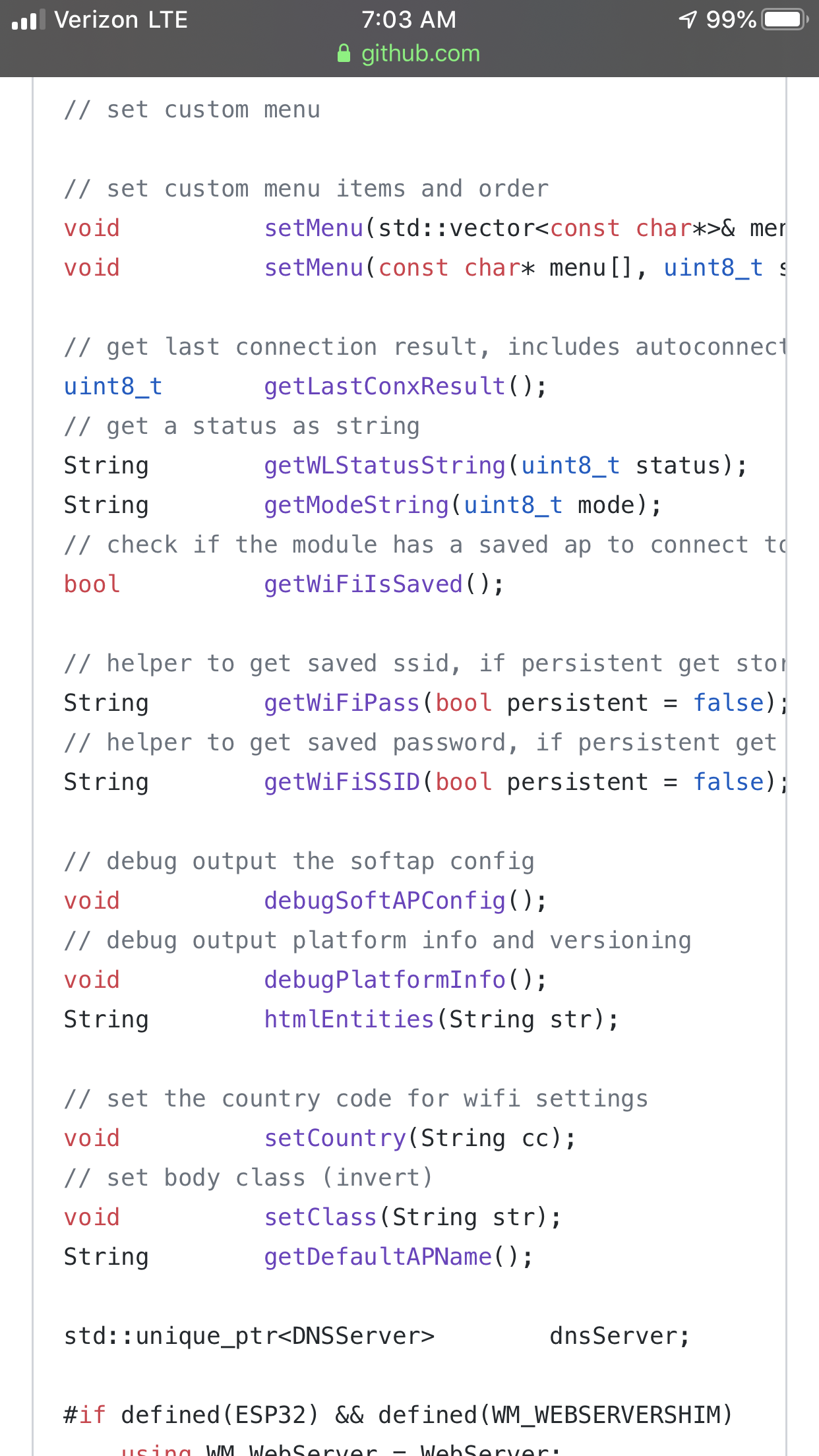
Use the wm wrappers I made for this
Wifiissaved and wifissid
tablatronix
on 27 Sep 2019
Thank you @tablatronix for the quick reply. I didn't find this in the documentation, will give it a try and let you know.
garageeks
on 27 Sep 2019
There is no documentation for development yet
tablatronix
on 27 Sep 2019
@garageeks Have you got past this? I'm running into the same issue that the Wifi config gets lost on reboot
Edit: It was my mistake. I called wifi.disconnect() which erased the config.
 viperk1
on 3 Oct 2019
viperk1
on 3 Oct 2019
/**
 * OnDemandConfigPortal.ino
 * example of running the configPortal AP manually, independantly from the captiveportal
 * trigger pin will start a configPortal AP for 120 seconds then turn it off.
 *
 */

#include <WiFiManager.h> // https://github.com/tzapu/WiFiManager
WiFiManager wm;

// select which pin will trigger the configuration portal when set to LOW
#define TRIGGER_PIN 15

int timeout = 120; // seconds to run for

void setup() {
  Serial.begin(115200);

  pinMode(TRIGGER_PIN, INPUT_PULLUP);

  WiFi.mode(WIFI_STA); // explicitly set mode, esp defaults to STA+AP
  WiFi.begin(wm.getWiFiSSID(true).c_str(), wm.getWiFiPass(true).c_str());

  while (WiFi.status() != WL_CONNECTED) {
    delay(500);
    checkStartConfigPortal();
    Serial.print(".");
  }

  Serial.println("");
  Serial.print("Connected to ");
  Serial.println(WiFi.SSID());
  Serial.print("IP address: ");
  Serial.println(WiFi.localIP());
}

void checkStartConfigPortal(){
  if ( digitalRead(TRIGGER_PIN) == LOW or wm.getWiFiSSID(true) == "") {
    wm.setConfigPortalTimeout(timeout);
    if (!wm.startConfigPortal("MiGatewayConfig")) {
      ESP.restart();
      delay(5000);
    }
  }
}

void loop() {
  checkStartConfigPortal();
}
If not use wm.autoConnect(), you must manually start WiFi.begin(wm.getWiFiSSID(true).c_str(), wm.getWiFiPass(true).c_str()) + need to add function wachdog, which would restart the wifi when it falls off, can implement such a method in WiFiManager. That everything would work out of the box and it would not be necessary to fence their crutches.
 egrekov
on 6 Dec 2019
egrekov
on 6 Dec 2019
Wrote a small wrapper, it would be great if the similar functionality was out of the box
#include "WiFiManagerExt.h"
WiFiManagerExt wm;

// select which pin will trigger the configuration portal when set to LOW
#define TRIGGER_PIN 15

void setup() {
  Serial.begin(115200);

  wm.setConfigPortalAP("MiGatewayConfig");
  wm.wifi_connect(TRIGGER_PIN);
}

void loop() {
  wm.checkStartConfigPortal();
  wm.wifi_watchdog();
}
WiFiManagerExt.h
#include <WiFiManager.h> // https://github.com/tzapu/WiFiManager

#define CONFIG_PORTAL_TIMEOUT 200
#define WATCHDOG_WIFI_WAIT_RECONECT 30

class WiFiManagerExt: public WiFiManager {
  public:
    void wifi_connect();
    void wifi_connect(byte trigger_gpio);
    void checkStartConfigPortal();
    void setConfigPortalAP(const char* ssid);
    void wifi_watchdog();

  private:
    bool _is_trigger_gpio = false;
    byte _trigger_gpio;
    const char* _config_portal_ap;
    int _watchdog_attempt_count = 0;
    unsigned long _watchdog_timer = 0;
    bool _watchdog_reconnect_start = false;
};
WiFiManagerExt.cpp
#include "WiFiManagerExt.h"

void WiFiManagerExt::wifi_connect(){
    WiFi.mode(WIFI_STA);
    if (getWiFiSSID(true) != ""){
        WiFi.begin(getWiFiSSID(true).c_str(), getWiFiPass(true).c_str());
    }

    Serial.print(F("*WMEXT: Connecting "));
    while (WiFi.status() != WL_CONNECTED) {
        delay(500);
        checkStartConfigPortal();
        Serial.print(".");
    }

    Serial.println("");
    Serial.print(F("*WMEXT: Connected to: "));
    Serial.println(WiFi.SSID());
    Serial.print(F("*WMEXT: IP address: "));
    Serial.println(WiFi.localIP());
}

void WiFiManagerExt::wifi_connect(byte trigger_gpio){
    _is_trigger_gpio = true;
    _trigger_gpio = trigger_gpio;
    pinMode(trigger_gpio, INPUT_PULLUP);
    wifi_connect();
}

void WiFiManagerExt::checkStartConfigPortal(){
  if ( (_is_trigger_gpio and digitalRead(_trigger_gpio) == LOW) or getWiFiSSID(true) == "") {
    setConfigPortalTimeout(CONFIG_PORTAL_TIMEOUT);
    bool res = _config_portal_ap == "" ? startConfigPortal() : startConfigPortal(_config_portal_ap);
    if (!res) {
        ESP.restart();
        delay(5000);
    }
  }
}

void WiFiManagerExt::setConfigPortalAP(const char* ssid){
    _config_portal_ap = ssid;
}

void WiFiManagerExt::wifi_watchdog(){
    if (WiFi.status() != WL_CONNECTED){
        if (_watchdog_reconnect_start){
            if (millis()-_watchdog_timer > WATCHDOG_WIFI_WAIT_RECONECT * 1000){
              _watchdog_reconnect_start = false;
            }
        } else {
            _watchdog_attempt_count++;
            Serial.println("*WMEXT [watchdog]: start connect to wifi(" + String(_watchdog_attempt_count) + ")... wait " + String(WATCHDOG_WIFI_WAIT_RECONECT) + "sec.");

            WiFi.begin(getWiFiSSID(true).c_str(), getWiFiPass(true).c_str());
            _watchdog_reconnect_start = true;
            _watchdog_timer = millis();
        }
    }

    if (WiFi.status() == WL_CONNECTED && _watchdog_reconnect_start){
        Serial.print("*WMEXT [watchdog]: connected OK. IP address: ");
        Serial.println(WiFi.localIP());
        _watchdog_reconnect_start = false;
        _watchdog_attempt_count = 0;
    }
}
I redid the function a bit, it turned out that the configurator also uses port 80, but it cannot be changed in any way.
void WiFiManagerExt::checkStartConfigPortal(){
    if (_is_trigger_gpio and digitalRead(_trigger_gpio) == LOW){
        Serial.print(F("*WMEXT: reset wifi setting. "));
        resetSettings();
        ESP.restart();
        delay(5000);
    }

    if (getWiFiSSID(true) == "") {
        setConfigPortalTimeout(CONFIG_PORTAL_TIMEOUT);
        bool res = _config_portal_ap == "" ? startConfigPortal() : startConfigPortal(_config_portal_ap);
        if (!res) {
            ESP.restart();
            delay(5000);
        }
    }
}
What is the point of this? Esp32 has persistent credential storage, calling begin() should work fine.
It also has autoreconnect, which should also work fine, if neither does then you have bugs. If not you can always add an event handler for disconnect and start your own retry timer.
tablatronix
on 7 Dec 2019
@tablatronix Thank you, I didn’t know that in esp32 login the password is stored independently, it is exactly checked, the begin() works. Yes, and check and vachdog is not needed, in version espressif 1.0.4 reconnect works independently. Sorry for disturbing.
egrekov
on 9 Dec 2019
I have been using autoconnect on ESP32 these week on Boards release 1.0.3, works fine.
If needed more control, we can use the getWiFiIsSaved wrapper as @tablatronix said
I think we can close this, one less issue to worry about :)
garageeks
on 11 Dec 2019
Related issues
 Bolukan
·
12Comments
Bolukan
·
12Comments
 reynolga
·
9Comments
reynolga
·
9Comments
 au190
·
7Comments
tablatronix
·
7Comments
au190
·
7Comments
tablatronix
·
7Comments
 tarzan115
·
3Comments
tarzan115
·
3Comments