Widescreenfixespack: [Far Cry] Improper masking of light sources and improperly placed text cursor
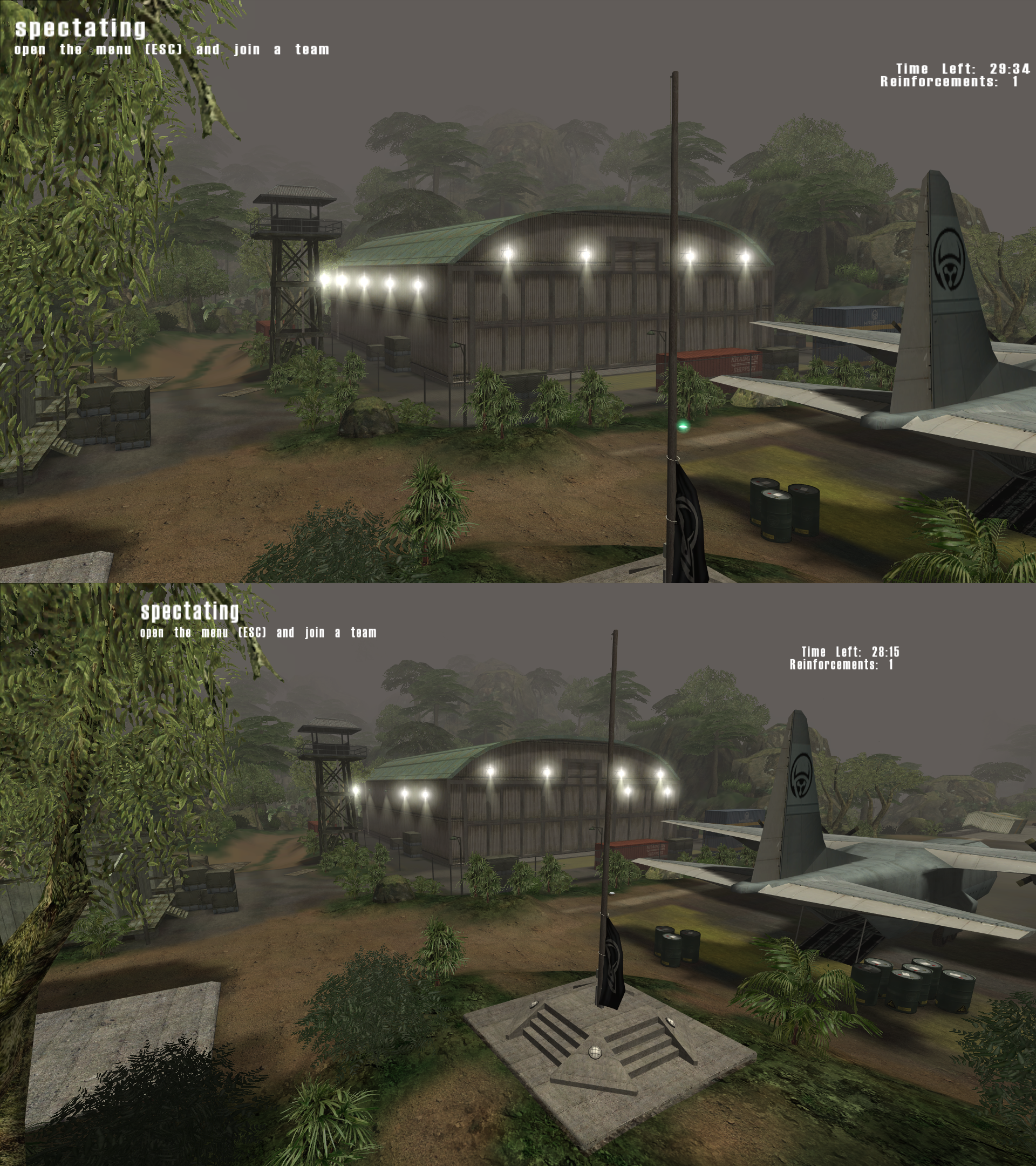
In Far Cry, when using the widescreen fix, light sources are not masked properly, some of them disappear as you look around and others appear from behind walls. This is noticeable for example in the mp_airstrip map, around the hangar and airstrip.
Also when typing into a field in the game's menu, the text cursor is misplaced, possibly (I'm not sure) in the position it would be in the 16:9-stretched menu.
 Fanatic-64
All 5 comments
Does it happen in singleplayer?
 ThirteenAG
on 20 Jan 2019
ThirteenAG
on 20 Jan 2019
Yes. It can be observed as early as the Carrier level, although it is more noticeable in Treehouse and subsequent levels.
I also noticed that the figure of Jack Carver walking in the Options menu is misplaced, it appears too far to the right.
I'm running 1.32 64-bit, 32-bit does not work on my computer (Windows 10 x64).
Fanatic-64
on 20 Jan 2019
I would need a savegame at the exact location and maybe a screenshot.
ThirteenAG
on 20 Jan 2019
I don't have a savegame available right now, but you can add -devmode to the end of the Target field of the shortcut to Far Cry to get immediate access to all levels. See this page for more information on enabling dev mode and also using Fly Mode and Screenshot Mode to wander freely around levels (under the Devmode.lua section): http://www.tweakguides.com/Farcry_9.html Multiplayer levels are also accessible even without other players.
I include a screenshot below so you know what to look for (note that it is more noticeable in motion):
Fanatic-64
on 20 Jan 2019
Please try a new dev build and let me know it's okay now!
Some stretched text and cursor issue still there, but it's a problem for another time.

ThirteenAG
on 12 Feb 2019
Related issues
 D3xxtr
·
10Comments
D3xxtr
·
10Comments
 AeroWidescreen
·
12Comments
AeroWidescreen
·
12Comments
 Brunn0121
·
6Comments
Brunn0121
·
6Comments
 FunkyDarkKnight
·
3Comments
FunkyDarkKnight
·
3Comments
 vrubayka
·
8Comments
vrubayka
·
8Comments