Wicked_pdf: wicked pdf with custom fonts
Hello!
I am using wicked_pdf gem for the pdf generation! There is some problems using custom fonts. I have tried using it like this:
@font-face {
    font-family:'ITC Franklin Gothic STD';
    font-weight:300;
    font-style:normal;
    src:font-url('itcfranklingothicstd-book.eot');
    src:font-url('itcfranklingothicstd-book.eot?#iefix') format('embedded-opentype'),
        font-url('itcfranklingothicstd-book.woff') format('woff'),
        font-url('itcfranklingothicstd-book.ttf') format('truetype'),
        font-url('itcfranklingothicstd-book.svg#iefix') format('svg');
    }
I even tried to convert convert font to base64 but without success.
@font-face {
    font-family: 'ITC Franklin Gothic STD';
    font-style: normal;
    font-weight: 300;
    src: url(data:font/opentype;charset=utf-8;base64,d09GRgABAAAAAD00AA4A---[large string ommited]----3MAuAH/hbAEjQA=) format("woff"),
    url(data:font/truetype;charset=utf-8;base64,AAEAAAARAQAABAAQRFNJRwAAAAEAAJUIAAA---[large string ommited]-----wAAAAAAAAAAAAEAAAAA) format("truetype");
}
Should it work by default or am i missing something?
 maaris
All 25 comments
In my project, I specified absolute path for the font file:
src: url('file:///opt/PlaSec/share/fonts/truetype/ttf-dejavu/DejaVuSerif.ttf') format('truetype')
It worked.
 nengxu
on 19 Sep 2014
nengxu
on 19 Sep 2014
@maaris Does that work for you?
I might extract that part into an ERB file and handle it like so:
# app/assets/styleshsheets/fonts.css.erb
@font-face {
  font-family: 'ITC Franklin Gothic STD';
  font-style: normal;
  font-weight: 300;
  src: url('<%= Rails.root.join('app', 'assets', 'fonts', 'itcfranklingothicstd-book.eot') %>') format('eot')
}
 unixmonkey
on 26 Sep 2014
unixmonkey
on 26 Sep 2014
Thanks for answers guys! @unixmonkey your solution worked perfectly!
maaris
on 30 Sep 2014
@unixmonkey I'm trying to use/embed Open Sans light, regular and bold in a pdf. Currently I use the same method you suggested in this post with an absolute url. I have also tried the base64 encoding the reference and that seemed to work as well. The issue however, is that I specify them with different names,
ie: @font-face { font-family: 'Open Sans Light'; ... }
@font-face { font-family: 'Open Sans Regular'; ... }
@font-face { font-family: 'Open Sans Bold'; ... }
But in production it only ever uses regular and bold. and in my css file, when I want a specific element to be a certain one, I use "font-famil: 'Open Sans Light' !important;" and those elements still just get rendered as regular. Even when I specify bold on certain elements, it makes it regular.
EDIT: I tried using only one @font-face declaration and have found that even when I use ONLY Open sans light, it still only uses regular/bold. It's like it refuses to load open sans light.
Any solutions to this? I feel like I can't be the first one to experience this.
 ldrbrandon
on 17 Mar 2015
ldrbrandon
on 17 Mar 2015
I'm not 100% sure, but this looks like it might help:
http://stackoverflow.com/a/25533201/23915
It seems to me from reading a handful of pages that browsers don't all ship with Open Sans Light variant, so you'll need to download or include it yourself, or use Google Fonts, then use CSS to specify the font-weight yourself:
body {
  font-family: 'Open Sans';
  font-style: Light;
}
Let me know how it goes!
unixmonkey
on 18 Mar 2015
Unfortunately that didn't work either. I'm actually using the base64 encoding method you've shown in another post @unixmonkey to base64 encode my fonts. I have them in the app/assets/fonts folder in my Rails app. If that helps to better diagnose the issue.
And actually, locally, I can specify them like so: "Open Sans Light", "Open Sans", "Open Sans Bold" and everything works how I want it. However, it does not use light in our production environment.
@font-face {
    font-family: 'Open Sans Light';
    font-style: normal;
    font-weight: 300;
    src: url(asset_data_base64('OpenSans-Light-webfont.ttf')),
    url(asset_data_base64('OpenSans-Light-webfont.woff'));
}
@font-face {
    font-family: 'Open Sans';
    font-style: normal;
    font-weight: 400;
    src: url(asset_data_base64('OpenSans-Regular-webfont.ttf')),
    url(asset_data_base64('OpenSans-Regular-webfont.woff'));
}
@font-face {
    font-family: 'Open Sans Bold';
    font-style: normal;
    font-weight: 600;
    src: url(asset_data_base64('OpenSans-Bold-webfont.ttf')),
    url(asset_data_base64('OpenSans-Bold-webfont.woff'));
}
Oh, also right now I'm just trying to get it to render my pdfs correctly on chrome. I use send_data to just download it.
ldrbrandon
on 18 Mar 2015
I have uploaded the font to my server /usr/share/fonts/truetype/freefont, and it works from now on :)
 GoodJob
on 16 Nov 2015
GoodJob
on 16 Nov 2015
@GoodJob Yea I actually figured out that installing the fonts on the server fixes this issue too! Thanks for confirming. This issue is probably good to close at this point.
ldrbrandon
on 16 Nov 2015

Hi there! I'm having trouble with font style/size when I deployed by Rails app in Amazon EC2 Linux.
The rendering of font style and sizes are bit different in my local development.
Even I already set the font, as @unixmonkey suggested.
That's why I got some misalignment issues.
Please help!
 aldrienht
on 26 Jul 2016
aldrienht
on 26 Jul 2016
@aldrienht @unixmonkey i have same issue with fonts on AWS, i have tried different ways to fix it
1) use font-face from google fonts
2) use font-face from assets
 alexshenia
on 11 Aug 2016
alexshenia
on 11 Aug 2016
Hi @alexshenia , i fixed it. I created a gist, please check here Matching System Font with your local environment and Amazon Linux
That is manual way. I dont know if there is other way to do it.
But for now, that fixed my problem.
aldrienht
on 12 Aug 2016
I tried everything, spent a day trying to figure it out, encoding in base64 etc. Turns out simply converting from ttf to otf got it to work for me! Hope this helps somebody....
 katebeavis
on 28 Apr 2017
katebeavis
on 28 Apr 2017
@unixmonkey thank you
you saved my day
 abo-elleef
on 19 Jun 2017
abo-elleef
on 19 Jun 2017
@unixmonkey I used your solution but my fonts are with low quality

 valterbarros
on 30 Nov 2017
valterbarros
on 30 Nov 2017
@unixmonkey I am trying to load a custom font: dameron
In my html, which is converted to pdf, there is style tag.
in my span:
            <span style='font-family: demarow !important'>

            NAME
        </span>
But the font is not loaded in pdf. It is loading in html format. What can be the problem? Thanks
 alikazmilwl
on 5 Apr 2018
alikazmilwl
on 5 Apr 2018
@alikazmilwl See this comment for a working example: https://github.com/mileszs/wicked_pdf/issues/334#issuecomment-56982265
I'm not sure if the src: local('☺') might be confusing something, so until you get it working, I'd remove it to make sure, and add it back once you get a working solution.
I'd also suggest removing the ?1522910532 from the url. Once the temporary file that gets converted to a PDF is on disk, I think that would be a bad filename. And crazy as it is, I'd suggest quoting the font-family: 'demarow' with single quotes. I've seen it make a difference.
Let me know how it goes!
unixmonkey
on 6 Apr 2018
I was having a weird issue where installing the custom font locally (on Windows) was causing the rendered PDF to render font as blank text. The issue wasn't occurring before I had installed the font locally on Windows.
However by changing the HTML PDF to use a <link> tag, rather than @importing it in the CSS, this resolved the font rendering issue. In other words, I removed
@import url("https://fonts.googleapis.com/css?family=Hind:300,500,700");
and replaced it with
<link href="https://fonts.googleapis.com/css?family=Hind:300,500,700" rel="stylesheet" type="text/css">
and everything works again.
EDIT: This has since stopped working, so I don't think this is actually a solution. What did end up working was downloading the CSS file (https://fonts.googleapis.com/css?family=Hind:300,500,700) and adding that locally as an @import in SCSS. Perhaps the font renderer can't support more than one level of font source?
 soundasleep
on 22 May 2018
soundasleep
on 22 May 2018
I was having issues with the custom fonts showing in my development environment after cloning an existing repository. Running this commend resolved the issue for me...
RAILS_ENV=development bundle exec rake assets:precompile
 daveomcd
on 14 Jan 2019
daveomcd
on 14 Jan 2019
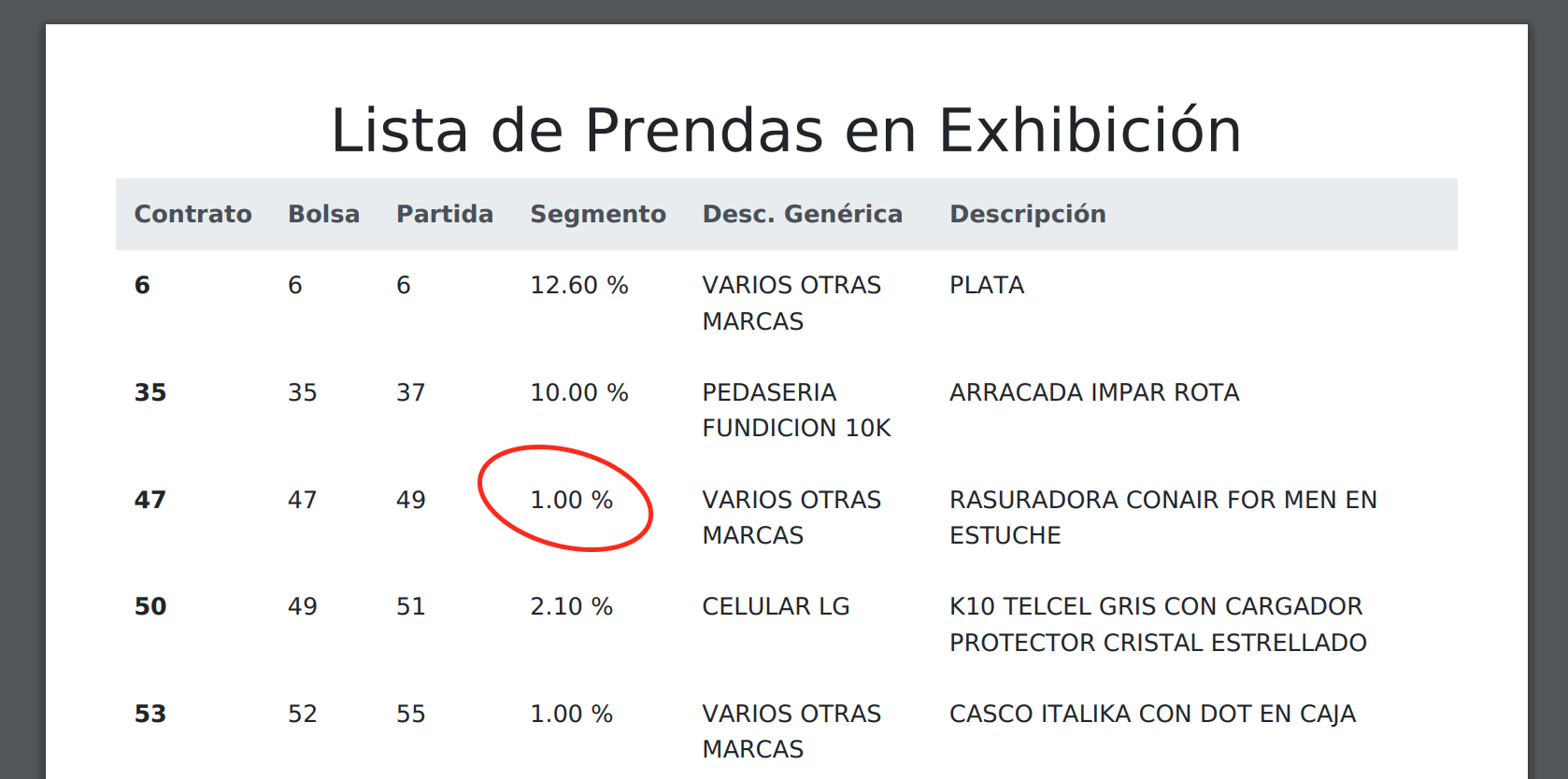
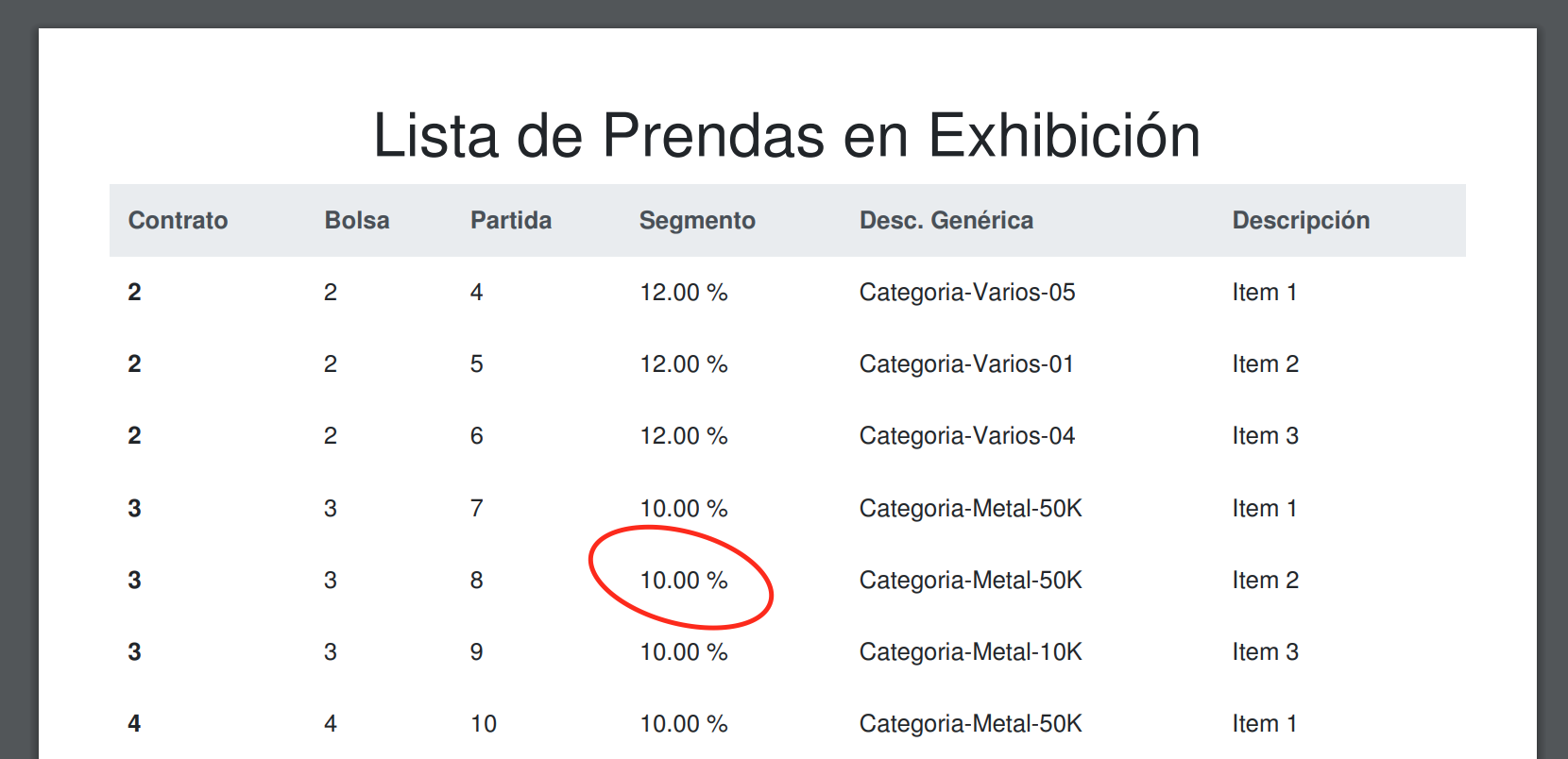
Hey guys I'm having kind of the same issue. I'm using bootstrap 4 but I'm getting different font in the PDF report in production droplet from DigitalOcean.
I also deployed the same app to Heroku and it is showing the same bootstrap 4 font as in development.
Not sure what should be causing this difference, any thoughts?
Production droplet DigitalOcean:
Production dyne Heroku
Local development machine
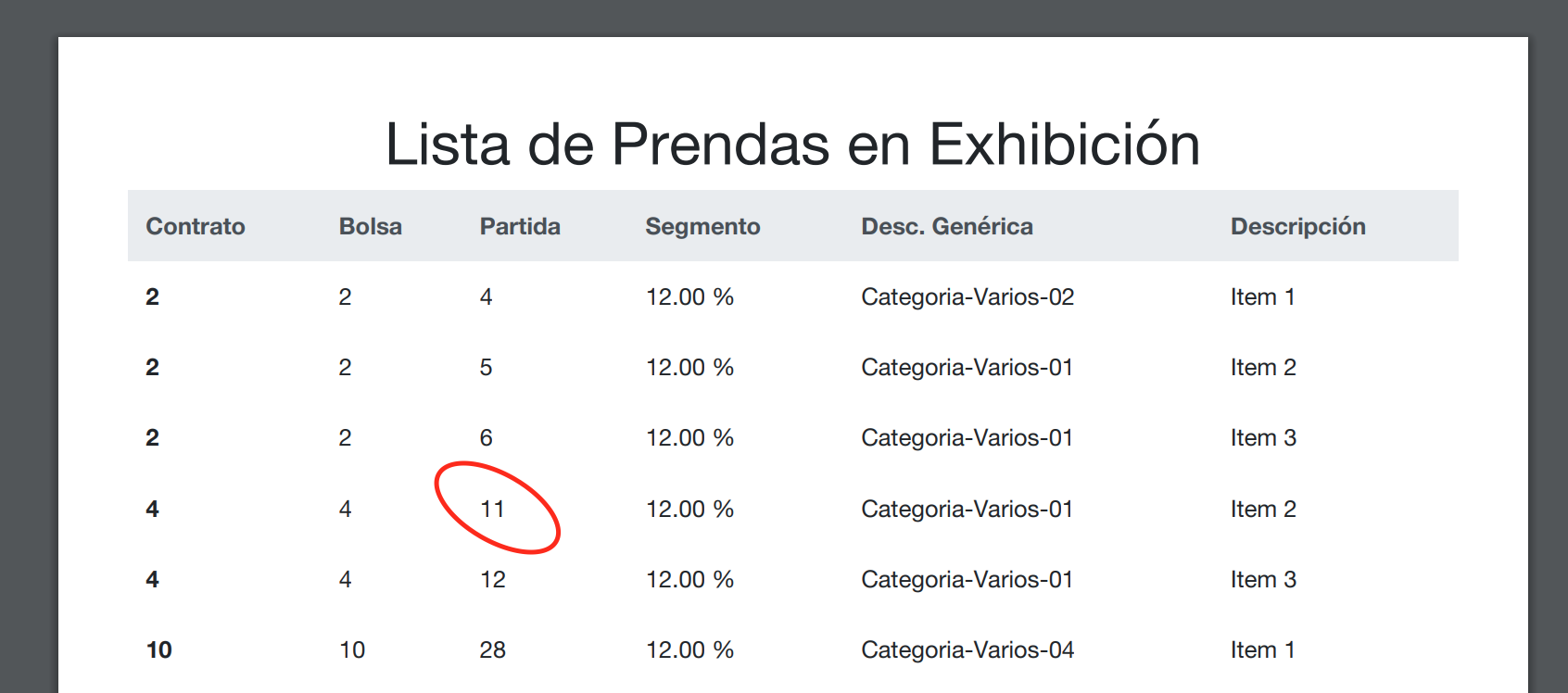
Clearly the number 1 in the first image which is production server in DO renders a different font than production in Heroku and in local machine. This is my layout:
<!DOCTYPE html>
<html lang='es'>
<head>
  <meta charset='utf-8'>
  <title>MyBusinessApp</title>
  <%= wicked_pdf_stylesheet_link_tag "https://stackpath.bootstrapcdn.com/bootstrap/4.1.3/css/bootstrap.min.css" -%>
</head>
<body>
  <%= yield %>
</body>
</html>
Any idea what's going on?
 alexventuraio
on 21 Feb 2019
alexventuraio
on 21 Feb 2019
@AlexVentura When you view an HTML webpage (that doesn't provide it's own font files) locally, the browser uses your local fonts installed as part of your OS or browser. When you are generating a PDF, that's still happening, but it's happening on the server, which may have different fonts installed, or may be missing some fonts, and falling back to something different.
Even the same font can be different on some systems. This StackOverflow answer says it way better than I could.
You probably either need to install and configure some font packages on one (or all) of your systems, or override the Bootstrap styles with a custom font, and providing that font file in your CSS like what's shown above.
If your site is multilingual, make sure you have the font support for other languages installed too, or you could get squares or question marks for some characters or glyphs.
unixmonkey
on 21 Feb 2019
@unixmonkey thanks for your quickly response and also for elaborating this for me. So this is the way I should go ?
alexventuraio
on 21 Feb 2019
@AlexVentura In general, I think so. In general I find it's often easier to control for the code you can deploy than the system it runs on, especially if you are running on different platforms.
unixmonkey
on 21 Feb 2019
@unixmonkey Great! I'm going to try that out and if it fixes this situation, I'll come back to confirm your solution for reference for anyone else. Thx in advance dude!
alexventuraio
on 21 Feb 2019
@AlexVentura how dit it go, have you found a solution? Having the same issue now. Thanks!
 mirelaf
on 8 Mar 2019
mirelaf
on 8 Mar 2019
@mirelaf I followed this to install Helvetica font, I did everything but I haven't found a way to render reports using that font.
alexventuraio
on 28 Apr 2019
Related issues
 EdouardPan
·
6Comments
EdouardPan
·
6Comments
 VladFarion
·
4Comments
VladFarion
·
4Comments
 lsarni
·
5Comments
lsarni
·
5Comments
 thomasbalsloev
·
3Comments
thomasbalsloev
·
3Comments
 lisamburns
·
3Comments
lisamburns
·
3Comments
Most helpful comment
@maaris Does that work for you?
I might extract that part into an ERB file and handle it like so: