Wicked_pdf: Tiny border on the bottom of generated pdf
Hi there,
I have setup no borders for pdf layout. There is still tiny white border on the bottom of every page of document. Do you know a work around how to set properly layout to have borderless pdf document?
Specification:
A6, image background, html layout - height: 1746px, width: 2490px.
I have tried to change height and width of layout various times. I could make it
generate pdf without tiny border either on the bottom or on right side of page after resizing layout.
Thanks.
Vlad
 vladimeeer
All 16 comments
A white border? Are you trying to do full bleed printing - edge to edge color?
Maybe these links will help:
http://stackoverflow.com/questions/6057781/wkhtmltopdf-with-full-page-background
https://code.google.com/p/wkhtmltopdf/issues/detail?id=359
 unixmonkey
on 9 Jun 2013
unixmonkey
on 9 Jun 2013
Yes. That's what I am looking for.
Thanks.
On Jun 9, 2013, at 12:00 AM, David Jones wrote:
A white border? Are you trying to do full bleed printing - edge to edge color?
Maybe these links will help:
http://stackoverflow.com/questions/6057781/wkhtmltopdf-with-full-page-background
https://code.google.com/p/wkhtmltopdf/issues/detail?id=359—
Reply to this email directly or view it on GitHub.
vladimeeer
on 9 Jun 2013
Any luck with this?
I tried to test a full bleed printing and no matter the css I use I always get some margin/border of 4px on bottom and 1 or 2 on the left.
 joaovpmamede
on 11 Jun 2015
joaovpmamede
on 11 Jun 2015
I'm experiencing this too. Small white border on the bottom of the page. Makes full page PDF's impossible. One of the links above is dead and the other offers no solutions.
Wondering why is this closed?
 gregblass
on 27 Jan 2016
gregblass
on 27 Jan 2016
There seems to be many solutions in the linked StackOverflow post here:
http://stackoverflow.com/questions/6057781/wkhtmltopdf-with-full-page-background
Do any of these work for you?
unixmonkey
on 27 Jan 2016
No, none of those do anything. And even more importantly, those are all hacks and not getting to the root of the problem.
gregblass
on 27 Jan 2016
I don't think setting all margins to zero and making sure CSS isn't adding whitespace, or adding a little page bleed with zoom are hacks.
The real hack is that do do this, wkhtmltopdf spins up a virtual web browser to render your content and basically does a print-to-pdf on it. That's a huge hack, and I'm quite thankful for it :smiley:
Are you certain there isn't something adding padding or margin to the outer bounds of your document? Are you sure your document is tall enough in pixels that it fills the screen all the way to the bottom of the page?
unixmonkey
on 27 Jan 2016
First, thanks for taking time to help here. Trust me, I am thankful for every level of the tech stack that allows me to write software! I do think there is something going on here.
I am fairly certain that nothing in my setup is adding this. All of my margins are set to zero (in wkhtmltopdf/wickedpdf), in CSS (body { margin: 0; padding: 0;}. Zoom does nothing; the white line is still there.
I have a background image that is covering the entire page. It was slightly too tall for A1, and it spilled over - BUT with a small white line on the bottom (maybe a couple of pixels).
Then I made the image exactly the right aspect ratio - and it will actually put a ~4 pixel white border on the bottom of the page, and then extend the image 4 pixels onto the next page.
gregblass
on 27 Jan 2016
@gregblass I think your issue is related to this one.
I just encountered the same problem on a portrait PDF: I had a thin white border on the right side of the PDF.
I was already setting all margins to 0 but, inspired by @sdwolf, it magically worked when I added --page-height 297mm --page-width 212mm.
@unixmonkey I agree these are not hack at all, but I think what we're discussing here might actually be a bug. Why would we want this white border by default ?
 jerefrer
on 31 Aug 2016
jerefrer
on 31 Aug 2016
Thanks for the workable solution. I don't know why there's such a small difference, or whether it's an issue with wkhtmltopdf or with webkit in general.
unixmonkey
on 31 Aug 2016
@unixmonkey Sorry I thought we were in wkhtmltopdf's issues. My bad. I just posted a new issue there.
jerefrer
on 31 Aug 2016
I am getting the same issue also, seems like the tiny white border is set by default on each corner, any solutions yet? I need that border removed.
 heraldsuva
on 23 Feb 2017
heraldsuva
on 23 Feb 2017
Hello, has anyone solved this issue?
 elcortez
on 6 Dec 2017
elcortez
on 6 Dec 2017
Did you try specifying the page height and page width as shown above?
unixmonkey
on 6 Dec 2017
Yes, but it's weird, I set all margins to 0 and set page height in options, but I still get a very tiny margin. I'll keep looking, thanks!
elcortez
on 7 Dec 2017
Same problem here, it happens with 11x8.5in but if we change to another size it gets fixed. We're using the following arguments: L, R, T, B, page-width, page-height, zoom, dpi.
In this example the content it's bigger than intented, but if we fit the content to the page size we still get the same result. It's interesting to note that on the other borders (T, L, R) the color arrives to the edge.
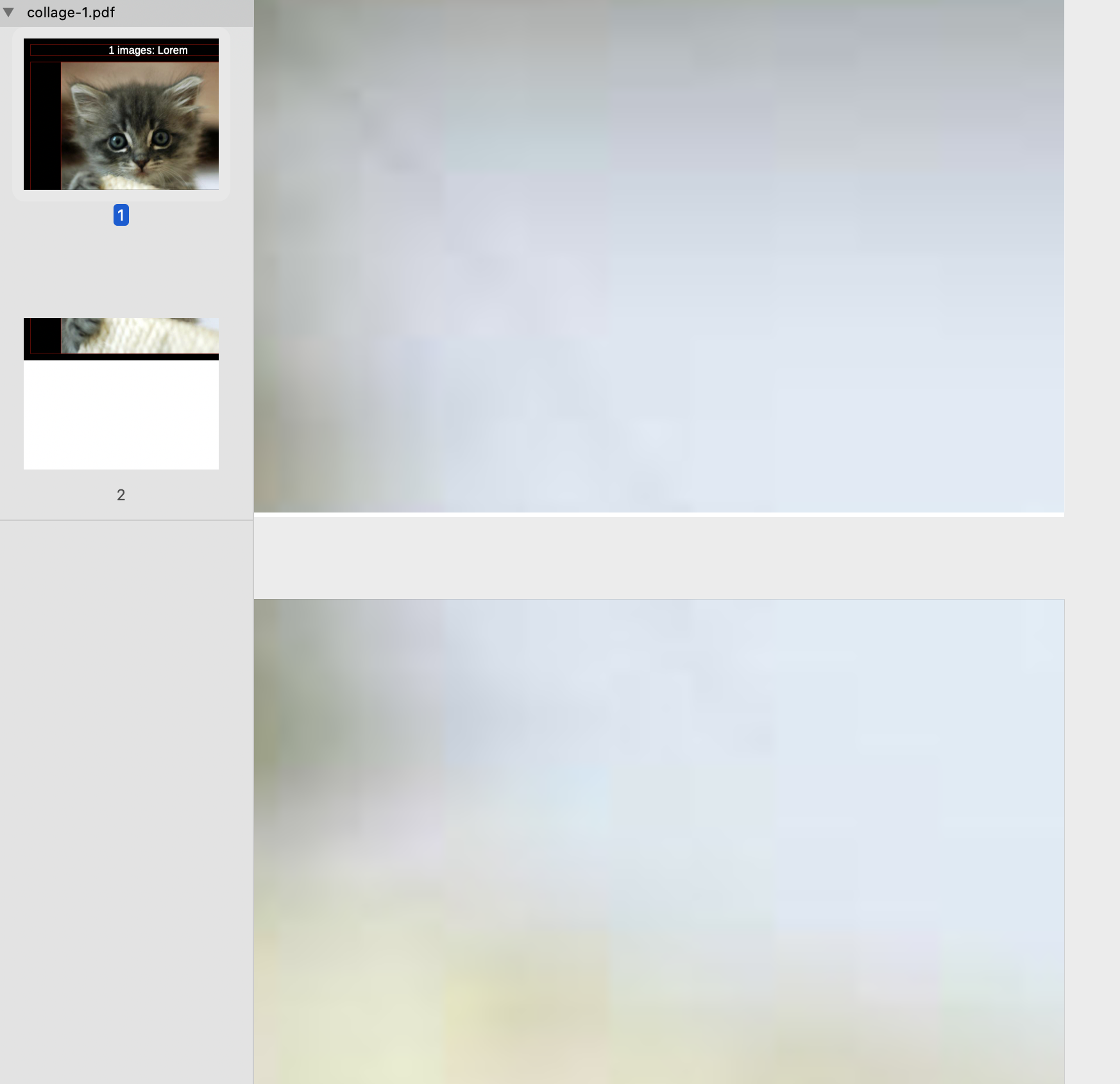
 doup
on 26 Mar 2020
doup
on 26 Mar 2020
Related issues
 panniru
·
5Comments
panniru
·
5Comments
 BlakeWard
·
3Comments
BlakeWard
·
3Comments
 lsarni
·
5Comments
lsarni
·
5Comments
 EdouardPan
·
6Comments
EdouardPan
·
6Comments
 chaudard
·
5Comments
chaudard
·
5Comments
Most helpful comment
@gregblass I think your issue is related to this one.
I just encountered the same problem on a portrait PDF: I had a thin white border on the right side of the PDF.
I was already setting all margins to 0 but, inspired by @sdwolf, it magically worked when I added
--page-height 297mm --page-width 212mm.@unixmonkey I agree these are not hack at all, but I think what we're discussing here might actually be a bug. Why would we want this white border by default ?