Wicked_pdf: Hindi characters are shown as boxes
Any idea why हिन्दी is shown as boxes:

 kavitakanojiya
All 5 comments
It is likely because the server doesn't have those fonts installed.
See this issue for a similar issue/solution description:
https://github.com/mileszs/wicked_pdf/issues/456
 unixmonkey
on 7 Mar 2016
unixmonkey
on 7 Mar 2016
Yes, @kavitakanojiya, i think you need to manually install the font on Server, I encountered the same problem when using Japanese fonts.
 aldrienht
on 27 Jul 2016
aldrienht
on 27 Jul 2016
Almost same thing happened to Korean language. sudo apt-get install fonts-nanum fixed it.
 jd1386
on 17 Mar 2017
jd1386
on 17 Mar 2017
🎉1
👍1
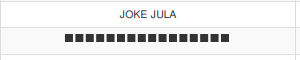
I am having this problem. Thai fonts are not loading and Showing me boxes.
 Ali-raza-khan
on 31 Jul 2019
Ali-raza-khan
on 31 Jul 2019
@Ali-raza-khan Do you have them installed on your PDF-generating servers?
A quick web search turns up sudo apt-get install fonts-thai-tlwg to install Thai fonts, if you are using an apt-based system.
unixmonkey
on 31 Jul 2019
❤1
Was this page helpful?
0 / 5 - 0 ratings
Related issues
 olleolleolle
·
4Comments
olleolleolle
·
4Comments
 lisamburns
·
3Comments
lisamburns
·
3Comments
 andheiberg
·
3Comments
andheiberg
·
3Comments
 EdouardPan
·
6Comments
EdouardPan
·
6Comments
 gregblass
·
4Comments
gregblass
·
4Comments
Most helpful comment
Almost same thing happened to Korean language. sudo apt-get install fonts-nanum fixed it.