Whatsapp-web.js: Chrome becomes unresponsive
Hi Pedro,
we are developing a messaging system using your repository.
If the whatsapp account has more than 3000 chats, chrome instance goes unresponsive in few minutes.
We have an account with 11K+ chats in the phone, almost immediate freeze...
any suggestions?
 trustedadvisor2020
All 16 comments
same here
 biscoitin
on 29 May 2020
biscoitin
on 29 May 2020
Doesn't archiving old messages solve it?
With that, make a filter returning messages not archived
 franciscol99
on 29 May 2020
franciscol99
on 29 May 2020
Doesn't archiving old messages solve it?
With that, make a filter returning messages not archived
I tried that, and left only ~1500 chats as unarchived. Didnt help...
trustedadvisor2020
on 29 May 2020
Try filtering like this:
await client.getChats().then(async chats => {
    let inbox = chats.filter((chat) => {
        return !chat.isGroup && !chat.archived;
    })
})
franciscol99
on 29 May 2020
@franciscol99 I think trustedadvisor is referring to just a general unresponsiveness with WhatsApp and not specifically when getting chats. Archiving should probably help because I believe messages archived don’t get loaded into memory, but it’s still a big number of messages and chats to have.
This can happen because of the big memory consumption that occurs by keeping all those messages in memory. If you’re also receiving a lot of messages, it can be an issue. I’m not sure if there are ways to manually clear this message cache on WhatsApp Web, it’s something we should look into.
Do you notice the same occur when using regular WhatsApp Web in Google Chrome, without the library?
 pedroslopez
on 29 May 2020
pedroslopez
on 29 May 2020
@franciscol99 I think trustedadvisor is referring to just a general unresponsiveness with WhatsApp and not specifically when getting chats. Archiving should probably help because I believe messages archived don’t get loaded into memory, but it’s still a big number of messages and chats to have.
This can happen because of the big memory consumption that occurs by keeping all those messages in memory. If you’re also receiving a lot of messages, it can be an issue. I’m not sure if there are ways to manually clear this message cache on WhatsApp Web, it’s something we should look into.
Do you notice the same occur when using regular WhatsApp Web in Google Chrome, without the library?
Nope.
Whatsapp web is working smoothly.
trustedadvisor2020
on 29 May 2020
@trustedadvisor2020 do you have Discord? You should join the discord server linked in #155. I would love to have a chat and see how we can maybe address this together since you seem to have more chats than anyone I've seen.
pedroslopez
on 29 May 2020
Hi @pedroslopez, i did install Discord and ready to exchange ideas.
trustedadvisor2020
on 1 Jun 2020
Any ideas? Happy to try...
trustedadvisor2020
on 3 Jun 2020
I also had this problem, I had something like 10,000 chats, I had to delete them all ... moreover, in the current version (v1.6.0), it was not working, I had to go back to version v1.4.1. I have now 2000 chats.... working
 pauloboc
on 4 Jun 2020
pauloboc
on 4 Jun 2020
@trustedadvisor2020 great! I'll message you this weekend to see if we can work something out. This week has been pretty busy for me.
@pauloboc Oh this is very unfortunate. When you say it was not working on v1.6.0, what exactly wasn't working? Were you getting errors? Please describe the issue in more detail so I can know if there was a regression and fix it if necessary.
pedroslopez
on 4 Jun 2020
@pedroslopez
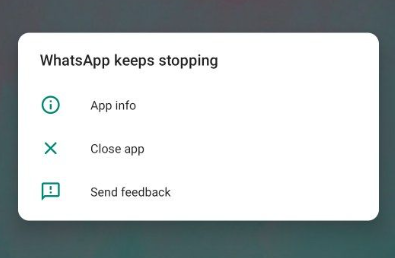
In version 1.6.0, every 15 minutes I get an error on my phone screen and whatsapp web stops working.
I have already done all the installation of the system and packages, it didn't work ..... it only worked by going back to version 1.4.1
pauloboc
on 4 Jun 2020
@pauloboc Oh that’s odd. It seems like another issue, but were you getting any errors being thrown from WhatsApp web / the library?
pedroslopez
on 4 Jun 2020
Not really, just this error on the phone screen.
pauloboc
on 4 Jun 2020
This issue has been automatically marked as stale because it has not had recent activity. It will be closed if no further activity occurs. Thank you for your contributions.
![stale[bot] picture](https://avatars.githubusercontent.com/in/1724?v=4&s=40) stale[bot]
on 4 Jul 2020
stale[bot]
on 4 Jul 2020
Hi,
You can fix this issue by increasing the "authTimeoutMs" value.
const client = new Client({
session: sessionData,
takeoverOnConflict:true,
takeoverTimeoutMs : 30000,
authTimeoutMs : 6000000,
 tinuvj
on 25 Nov 2020
tinuvj
on 25 Nov 2020
Related issues
 marcopandolfo
·
5Comments
marcopandolfo
·
5Comments
 centralderastreamentogps
·
7Comments
centralderastreamentogps
·
7Comments
 ngekoding
·
5Comments
ngekoding
·
5Comments
 nicolascav
·
6Comments
nicolascav
·
6Comments
 andersondeoliveiramachado
·
7Comments
andersondeoliveiramachado
·
7Comments
Most helpful comment
@franciscol99 I think trustedadvisor is referring to just a general unresponsiveness with WhatsApp and not specifically when getting chats. Archiving should probably help because I believe messages archived don’t get loaded into memory, but it’s still a big number of messages and chats to have.
This can happen because of the big memory consumption that occurs by keeping all those messages in memory. If you’re also receiving a lot of messages, it can be an issue. I’m not sure if there are ways to manually clear this message cache on WhatsApp Web, it’s something we should look into.
Do you notice the same occur when using regular WhatsApp Web in Google Chrome, without the library?