Wgpu-rs: Slow Render (I must be doing something wrong)
Hello,
I've been working on creating a little rendering engine with WGPU, but I can't quite figure out how to render many shapes quickly. I had become quite adept with webASM(rust)/webGL and hoped that it would be a light hop over to WGPU, but I guess my attempts to use wgpu in a similar way to how I was using webGL, were incorrect. I'd really like to know in what way the system would like to be used.
Here I have some test code I've written that is going much slower than I had expected. It simply prints out 10,000 rectangles of random position, angle and colour. I'm not so worried about all the set up of buffers and uniforms, etc; I'm just trying to get the actual render itself to run correctly ("//begin main render pass"). One frame takes around 240ms on my machine. I know that I should really be using instance drawing here, but I'm expecting to have a number of different shapes drawn in an unknown order, so my test uses the same shape over and over as if they are different.
I'm sorry if I'm missing something obvious; I've been thinking about this for the last week and looking over examples, but can't seem to find anything that can help me.
let rectangle_count = 10_000;
//adapter
let adapter = futures::executor::block_on(
self.instance.request_adapter(
&wgpu::RequestAdapterOptions {
power_preference: wgpu::PowerPreference::Default,
compatible_surface: Some(&self.surface),
}
)
).unwrap();
//device and queue
let (device, queue) = futures::executor::block_on(
adapter.request_device(
&wgpu::DeviceDescriptor {
features: wgpu::Features::empty(),
limits: wgpu::Limits::default(),
shader_validation: true,
},
None,
)
).unwrap();
//swap chain
let swap_chain_descriptor = wgpu::SwapChainDescriptor {
usage: wgpu::TextureUsage::OUTPUT_ATTACHMENT,
format: wgpu::TextureFormat::Bgra8UnormSrgb,
width: self.size.width,
height: self.size.height,
present_mode: wgpu::PresentMode::Fifo,
};
let mut swap_chain = device.create_swap_chain( &self.surface, &swap_chain_descriptor );
//framebuffer
let multisampled_texture_extent = wgpu::Extent3d {
width: swap_chain_descriptor.width,
height: swap_chain_descriptor.height,
depth: 1,
};
let multisampled_frame_descriptor = &wgpu::TextureDescriptor {
size: multisampled_texture_extent,
mip_level_count: 1,
sample_count: 4,
dimension: wgpu::TextureDimension::D2,
format: swap_chain_descriptor.format,
usage: wgpu::TextureUsage::all(),
label: Some("multisampled framebuffer"),
};
let framebuffer = device.create_texture(multisampled_frame_descriptor).create_view(&wgpu::TextureViewDescriptor::default());
//create shader modules
let vertex_shader_module = device.create_shader_module( wgpu::include_spirv!("shader.vert.spv") );
let fragment_shader_module = device.create_shader_module( wgpu::include_spirv!("shader.frag.spv") );
//uniforms
let uniform_bind_group_layout = device.create_bind_group_layout(
&wgpu::BindGroupLayoutDescriptor {
label: Some(&"Uniform Bind Group Layout"),
entries: &[
wgpu::BindGroupLayoutEntry {
binding: 0,
visibility: wgpu::ShaderStage::VERTEX,
ty: wgpu::BindingType::UniformBuffer {
dynamic: false,
min_binding_size: None,
},
count: None,
},
wgpu::BindGroupLayoutEntry {
binding: 1,
visibility: wgpu::ShaderStage::FRAGMENT,
ty: wgpu::BindingType::UniformBuffer {
dynamic: false,
min_binding_size: None,
},
count: None,
},
],
}
);
let mut rng = rand::thread_rng();
let mut uniform_bind_group_vector:Vec<wgpu::BindGroup> = vec![];
for index in 0..rectangle_count {
//uniform buffers
//vertex
let vertex_data = VertexUniformData::new(
500.0*rng.gen::<f32>(), //x
400.0*rng.gen::<f32>(), //y
1.0, //scale
2.0 * std::f32::consts::PI * rng.gen::<f32>(), //angle
Dimensions::<u32>::new(500,400), //dimensions
30.0, //width
30.0, //height
Point::new(0.5,0.5), //anchor
);
let vertex_uniform_printing_buffer = device.create_buffer(
&wgpu::BufferDescriptor {
label: Some(&"Vertex Uniform Printing Buffer"),
size: std::mem::size_of::<VertexUniformData>() as wgpu::BufferAddress,
usage: wgpu::BufferUsage::UNIFORM | wgpu::BufferUsage::COPY_DST,
mapped_at_creation: false,
}
);
queue.write_buffer(
&vertex_uniform_printing_buffer,
0,
bytemuck::cast_slice(&[vertex_data])
);
//fragment
let fragment_data = FragmentUniformData::new(
Colour::new(rng.gen::<f32>(), rng.gen::<f32>(), rng.gen::<f32>(), 1.0),
);
let fragment_uniform_printing_buffer = device.create_buffer(
&wgpu::BufferDescriptor {
label: Some(&"Fragment Uniform Printing Buffer"),
size: std::mem::size_of::<FragmentUniformData>() as wgpu::BufferAddress,
usage: wgpu::BufferUsage::UNIFORM | wgpu::BufferUsage::COPY_DST,
mapped_at_creation: false,
}
);
queue.write_buffer(
&fragment_uniform_printing_buffer,
0,
bytemuck::cast_slice(&[fragment_data])
);
//uniform bind group
let uniform_bind_group = device.create_bind_group(
&wgpu::BindGroupDescriptor {
label: Some(&"Uniform Bind Group"),
layout: &uniform_bind_group_layout,
entries: &[
wgpu::BindGroupEntry {
binding: 0,
resource: wgpu::BindingResource::Buffer(vertex_uniform_printing_buffer.slice(..))
},
wgpu::BindGroupEntry {
binding: 1,
resource: wgpu::BindingResource::Buffer(fragment_uniform_printing_buffer.slice(..))
}
],
}
);
//add to vector
uniform_bind_group_vector.push(
uniform_bind_group
);
}
//vertex buffer
let rectangle_point: [f32; 8] = [
0.0,0.0,
1.0,0.0,
1.0,1.0,
0.0,1.0,
];
let triangle_list_points = [
rectangle_point[0*2 + 0], rectangle_point[0*2 + 1],
rectangle_point[1*2 + 0], rectangle_point[1*2 + 1],
rectangle_point[2*2 + 0], rectangle_point[2*2 + 1],
rectangle_point[0*2 + 0], rectangle_point[0*2 + 1],
rectangle_point[2*2 + 0], rectangle_point[2*2 + 1],
rectangle_point[3*2 + 0], rectangle_point[3*2 + 1],
];
let mut vertex_point_data:Vec<library::Vertex> = vec![];
for index in (0..triangle_list_points.len()).step_by(2) {
vertex_point_data.push(
library::Vertex::new(
[
triangle_list_points[index + 0],
triangle_list_points[index + 1],
]
),
);
}
let vertex_buffer = device.create_buffer_init(
&wgpu::util::BufferInitDescriptor {
label: Some(&"Vertex Buffer"),
contents: bytemuck::cast_slice(&*vertex_point_data),
usage: wgpu::BufferUsage::VERTEX,
}
);
//render pipelines
//layout
let render_pipeline_layout = device.create_pipeline_layout(
&wgpu::PipelineLayoutDescriptor {
label: Some(&"Render Pipeline Layout"),
bind_group_layouts: &[
&uniform_bind_group_layout
],
push_constant_ranges: &[],
}
);
//pipelines
let render_pipeline = device.create_render_pipeline(
&wgpu::RenderPipelineDescriptor {
label: Some(&"Render Pipeline"),
layout: Some(&render_pipeline_layout),
vertex_stage: wgpu::ProgrammableStageDescriptor {
module: &vertex_shader_module,
entry_point: "main",
},
fragment_stage: Some(wgpu::ProgrammableStageDescriptor {
module: &fragment_shader_module,
entry_point: "main",
}),
rasterization_state: Some(wgpu::RasterizationStateDescriptor {
front_face: wgpu::FrontFace::Cw,
cull_mode: wgpu::CullMode::Back,
depth_bias: 0,
depth_bias_slope_scale: 0.0,
depth_bias_clamp: 0.0,
clamp_depth: false,
}),
primitive_topology: wgpu::PrimitiveTopology::TriangleList,
color_states: &[wgpu::ColorStateDescriptor {
format: swap_chain_descriptor.format,
color_blend: wgpu::BlendDescriptor {
src_factor: wgpu::BlendFactor::One,
dst_factor: wgpu::BlendFactor::OneMinusSrcAlpha,
operation: wgpu::BlendOperation::Add,
},
alpha_blend: wgpu::BlendDescriptor::REPLACE,
write_mask: wgpu::ColorWrite::ALL,
}],
depth_stencil_state: None,
vertex_state: wgpu::VertexStateDescriptor {
index_format: wgpu::IndexFormat::Uint16,
vertex_buffers: &[library::Vertex::desc()],
},
sample_count: 4,
sample_mask: !0,
alpha_to_coverage_enabled: false,
}
);
//setup frame
let frame = match swap_chain.get_current_frame() {
Err(e) => {
println!("ERROR - Renderer : swap_chain.get_current_frame failed! {}", e);
return;
},
Ok(frame) => frame.output,
};
//create encoder
let mut encoder = device.create_command_encoder(
&wgpu::CommandEncoderDescriptor {
label: Some("Renderer : Command Encoder"),
}
);
//clear frame
{
encoder.begin_render_pass(
&wgpu::RenderPassDescriptor {
color_attachments: &[
wgpu::RenderPassColorAttachmentDescriptor {
attachment: &framebuffer,
resolve_target: Some(&frame.view),
ops: wgpu::Operations {
load: wgpu::LoadOp::Clear(
wgpu::Color {
r: 1.0,
g: 1.0,
b: 1.0,
a: 1.0,
}
),
store: true,
},
}
],
depth_stencil_attachment: None,
}
);
}
//begin main render pass
let start_time = std::time::Instant::now();
{
let mut render_pass = encoder.begin_render_pass(
&wgpu::RenderPassDescriptor {
color_attachments: &[
wgpu::RenderPassColorAttachmentDescriptor {
attachment: &framebuffer,
resolve_target: Some(&frame.view),
ops: wgpu::Operations {
load: wgpu::LoadOp::Load,
store: true,
},
}
],
depth_stencil_attachment: None,
}
);
//set pipeline
render_pass.set_pipeline(&render_pipeline);
//set vertex buffer
render_pass.set_vertex_buffer(0, vertex_buffer.slice(..));
for index in 0..uniform_bind_group_vector.len() {
//set uniform buffer group
render_pass.set_bind_group(0, &uniform_bind_group_vector[index], &[]);
//draw
render_pass.draw(0..vertex_point_data.len() as u32, 0..1);
}
}
let end_time = std::time::Instant::now();
println!("{:?}", end_time.checked_duration_since(start_time) );
//submit encoder to queue, to be rendered
queue.submit(std::iter::once(encoder.finish()));`
 metasophiea
All 17 comments
Are you running that code every single frame? If so that is going to be very slow as all the creation functions are non-trivial and should be made and kept around. We can talk more synchronously on our users matrix and we'll get to the bottom of this problem https://matrix.to/#/#wgpu-users:matrix.org.
 cwfitzgerald
on 7 Jan 2021
cwfitzgerald
on 7 Jan 2021
No no, not at all. I've just include all the set up just incase there's a mistake there. The section I'm most interested in for timing is just under "//begin main render pass" within the curly brackets. That would be what I was attempting to run every frame.
metasophiea
on 7 Jan 2021
The code looks fine, except for 2 small things:
- you use a separate render pass for clearing a frame. You should do everything in a single render pass, instead.
- you render rectangles as 6 vertices. You should do indexed draws instead, i.e. 6 indices of 4 vertices (with lists), or 4 vertices with triangle strips.
As for your numbers, getting 10,000 draw calls, each with a different bind group (of 2 buffers) taking 240ms is definitely not the best, but it isn't a huge surprise either. What backend are you running on? What's your hardware? How big are the rectangles on screen? Since they appear to all be overwriting the pixels, you might be seeing the fillrate limit here, not anything related to wgpu.
 kvark
on 7 Jan 2021
kvark
on 7 Jan 2021
Thanks for your advice, I will certainly follow it in future (I've already fallen into the trap of having way too many render passes per frame)
I'm running this on a pretty powerful MacOS system, which I believe means it is using Metal as a backend. The window is set at 500x400, with the squares all being 30x30.
I'm completely new to host-level rendering, having only done in-browser before, so its entirely likely that I am just overlooking some important concept. If you could point me towards some resources on the matter I would be very grateful.
metasophiea
on 7 Jan 2021
There is nothing specific about host-level rendering, at least nothing that would make it slower than on the Web. I'd be surprised if WebGL can get anywhere with 10000 draw calls :)
kvark
on 7 Jan 2021
I like to test the renderers I make by seeing how many rectangles like these they can produce in one second. With webGL I got to 960k, so, perhaps you can understand my concern.
metasophiea
on 7 Jan 2021
Well, first of all, you aren't doing 960k draw calls in WebGL, you are doing something else. Instancing, perhaps, with a single draw call? It makes a big difference to the driver.
Secondly, rasterization and filling rectangles like this will not show you any difference. All of the APIs (OpenGL, DX, Vulkan, Metal, WebGL, whatever) in the end will just pass this work to the driver and be done with it. It's going to be limited by hardware.
If you want to test API overhead, you'd want to come up with a scenario where you have many different draw calls, potentially different render passes, recording on different threads, etc.
kvark
on 7 Jan 2021
I hunted through some old code to find it, but I believe I am making the draw calling many times (unless webGL is somehow recognising the repeated calls and forming a instance render on its own) I over shot with 960k though, my code is only doing 700k (I must have calculated 960k from another test)
(ignoring the setup)
    for index in 0..700_000 {
        context.uniform2f(
            adjust_xy.as_ref(),
            (800.0 * js_sys::Math::random()) as f32,
            (600.0 * js_sys::Math::random()) as f32,
        );
        context.uniform1f(adjust_scale.as_ref(), 1.0);
        context.uniform1f(adjust_angle.as_ref(), 3.14 * js_sys::Math::random() as f32);
        context.uniform2f(resolution.as_ref(), 800.0, 600.0);
        context.uniform2f(dimensions.as_ref(), 30.0, 30.0);
        context.uniform2f(anchor.as_ref(), 0.5, 0.5);
        context.uniform4f(colour.as_ref(), js_sys::Math::random() as f32, js_sys::Math::random() as f32, js_sys::Math::random() as f32, 1.0);
        context.draw_arrays( WebGl2RenderingContext::TRIANGLE_FAN, 0, 4);
    }
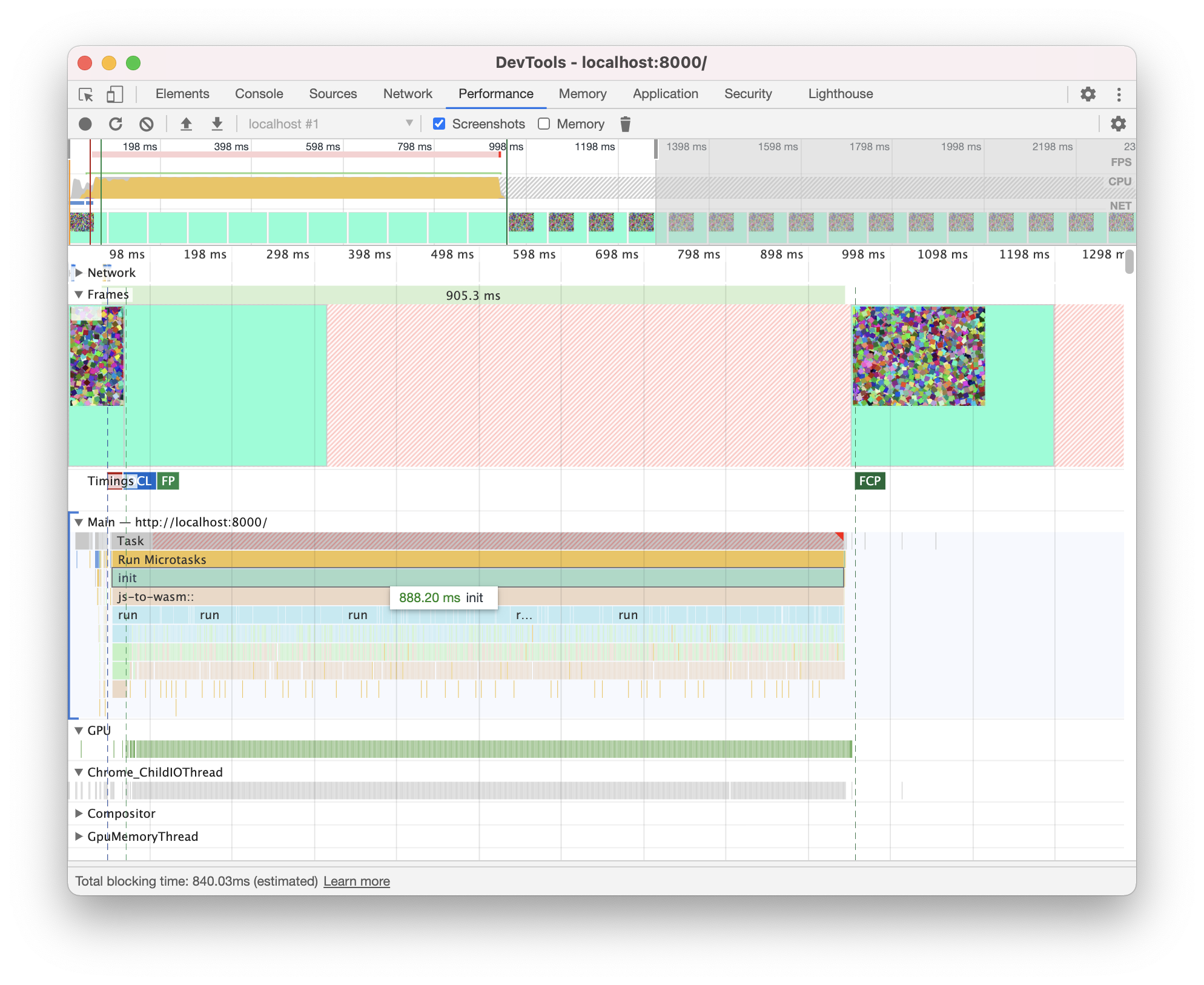
I'm sorry to keep badgering on about webGL, but there must be something I'm missing here between webGL and WGPU
metasophiea
on 10 Jan 2021
Interesting! Would you be able to share the full WebGL page source for me to play with? I'm curious about what's going on there.
kvark
on 10 Jan 2021
Sure thing, here is everything. I've taken out the auto-generated rust files, but have already compiled for you a version in debug mode. The "comp.sh" script should be all you need to compile, and all the web files are in "web-serving-area"
metasophiea
on 11 Jan 2021
@metasophiea thank you!
Your screenshot shows that in WebGL each frame takes 900ms. I thought you were talking about realtime rendering, which this is not.
Would you want to try bumping the draw call count to 700k to match that, to see what frame time you'd get with wgpu?
kvark
on 11 Jan 2021
No problem!
No no, I plan on doing multiple, but I was testing with one.
I tried raising it like so
for round in 0..70 {
    for index in 0..uniform_bind_group_vector.len() {
        //set uniform buffer group
            render_pass.set_bind_group(0, &uniform_bind_group_vector[index], &[]);
        //draw
            render_pass.draw(0..vertex_point_data.len() as u32, 0..1);
    }
}
as raising the actual number of rectangles (meaning uniform buffers in a vector, "uniform_bind_group_vector") to be rendered resulted in the program crashing before reaching this loop. I only tested up to 50k however in this way.
Using the method above, the result is that it took around 13 seconds for one frame.
metasophiea
on 11 Jan 2021
Could you share the whole test case please? i.e. push it to a branch on github, so that we can pull and run.
kvark
on 11 Jan 2021
Sure thing, here you go
https://github.com/metasophiea/wgpu_experiment_1
All the main wgpu code is in src/renderer/test.rs. The basic structure is a main "orchestrator" which starts a new "renderer" thread. The orchestrator then asks the renderer to run a test. Hopefully its not too confusing.
metasophiea
on 12 Jan 2021
It looks like you are trying to literally do the same thing as you do in WebGL. If we could make that faster, we'd not invent a new API and instead just made WebGL implementations fast. The performance can only be gained from changing the model applications use when talking to us. I recommend reading the examples to get a sense of what an application should be doing.
So, if I understand the code correctly, you don't really have a "render" routine. Instead, there is a test1 function, which effectively rebuilds the world. The only things you keep is Instance and Surface. Instead, you should keep the resources you aren't changing between frames:
- adapter
- device
- pipelines
- buffers (even if their contents are to be changed)
- etc
Another issue is that you are creating a separate pair of uniform buffers per object, and a separate bind group. This can be better if:
- you create one buffer and put all the data for the rectangles in there, or at least put data for N rectangles in there. Note that the data for each has to be aligned to
wgpu::BIND_BUFFER_ALIGNMENT. - you make the binding to have "dynamic: true", so that you can have a single bind group that you bind at different offsets, instead of creating separate bind groups per object. See the
shadowexample about using the dynamic offsets.
One other thing I noticed is that you are doing multi-sampled rendering (sample_count: 4). Is this desired? Are you doing the same on WebGL test?
Finally, you can do write_buffer with larger chunks of data. This shouldn't make a difference in the end, but one TODO of the current implementation we have is that each write_buffer still ends up creating a temporary buffer. So it's not good for benchmarking 10000 of calls yet. This is something we'll fix soon, just wasn't a priority so far.
kvark
on 12 Jan 2021
I guess I've become too comfortable with the webGL way
I understand your concerns; the test code I sent you is what I wrote after putting together the more complicated version that held onto the adapter, device, pipelines, etc. I just didn't want to give you way too much to read.
I've taken your suggestions and modified the test code, and I think I've got it now! Thank you! I have it producing 2m rectangles in just about 1 second, thanks to your pointers on having a single large buffer and using offset values in the set_bind_group command. Though this happens on a second render - the first taking 5 seconds or so - I guess there's some form of setup in the first?
I removed the multi-sample configuration, though I've not noticed a difference either way. I've updated the repository if you are interested.
metasophiea
on 16 Jan 2021
That's wonderful news!
Though this happens on a second render - the first taking 5 seconds or so - I guess there's some form of setup in the first?
If you are measuring time it takes to allocate the buffer, create the bind groups, etc, then that would be more or less fine. In any way, worth profiling and seeing where time goes. wgpu has tracing integration, so we should be able to generate the CPU profiles. I don't recall the exact instructions, but a starting point would be in https://github.com/tokio-rs/tracing#in-applications.
I removed the multi-sample configuration, though I've not noticed a difference either way. I've updated the repository if you are interested.
We have a multisample example. In your case it doesn't make a difference because the code is CPU-bound.
On that note, I believe the issue can be closed :tada:
kvark
on 16 Jan 2021
Related issues
 bvssvni
·
5Comments
bvssvni
·
5Comments
 Lokathor
·
3Comments
Lokathor
·
3Comments
 m4b
·
5Comments
m4b
·
5Comments
 roman-holovin
·
4Comments
roman-holovin
·
4Comments
 yutannihilation
·
4Comments
yutannihilation
·
4Comments