It would be wonderful to have an example that renders water, to feature the following use cases:
- separation of rendering into opaque and transparent passes
- depth testing and writing
- blending
- read-only depth/stencil attachments - requires https://github.com/gfx-rs/wgpu/issues/680
- procedural geometry (possibly, with dynamic updates?)
- fancy shaders with reflection and refraction
 kvark
kvark
All 10 comments
I'm working on porting water from an old project of mine to wgpu, and would love to use this to gain experience. For reference, here is a screenshot of the water:

Note however, that my implementation differs from a traditional water approach:
- It is low poly. Hence, I duplicate all of the vertices to make it flat.
- I use a hexagonal (really, they're equilateral triangles) mesh to enhance the low-poly effect, while traditional water would use a very fine-grained square-based mesh.
- Since, as can be seen from the screenshot, it was originally made for mobile, it works by calculating the height of the individual vertices on the vertex shader. This is done to both conserve bandwith with the GPU, and also to conserve video memory. Its vertices are also only 64 bits wide.
- I don't use mathematical refraction, and rely solely on a basic Fresnel effect. This also means I don't do alpha blending.
- I render what's under the water to a separate buffer and use that as a sampling texture for the water.
- I render what's above the water to a separate buffer and calculate the sampling point prior to moving the water, so that the reflection moves. This breaks if you get too close, however (< 1.5 triangles in the screen).
- Also to note: I use an oblique projection matrix to render the above-water stuff, since that allows me to define arbitrary clipping planes. User-defined clipping sometimes aren't defined on mobile devices, and as such OpenGL ES GLSL doesn't support it (Which is what this was written in). For now I'm going to port that over, too, however I would like some more opinions on how to proceed here.
I'll update you when the example is ready, and I'm awaiting any reply!
Thanks, and have a great day,
Patrik
 OptimisticPeach
on 2 Jun 2020
OptimisticPeach
on 2 Jun 2020
Hi Patrik!
It is low poly. Hence, I duplicate all of the vertices to make it flat.
I use a hexagonal (really, they're equilateral triangles) mesh to enhance the low-poly effect, while traditional water would use a very fine-grained square-based mesh.
That sounds fine (and looks pretty!).
The part about rendering below & above the water and not using alpha blending is something I'd like to see differently. The original desire for the water example was driven by the need to test and demonstrate blending and read-only depth/stencil (RODS).
When I thought about how the rendering pipeline could be set up, here is what I came up with so far:
- terrain is rendered first with the depth test & write, to an offscreen target with reduced resolution (i.e. 4x less resolution)
- terrain is rendered into the main screen, also with depth test & write
- water is rendered into the main screen as a separte pass that has read-only depth
- it also binds the depth as a texture that is sampled, to find out the distance of light to travel under the water before it hits the terrain
- it uses alpha blending based on that distance, to draw on top of the terrain
- it samples from the reduced terrain color & depth for refractions, could be done with a simple screen-space ray-tracing
Would you be able to transform your code, supposedly (but not necessarily!) using the ideas I described above, to take advantage of the alpha blending and RODS?
kvark
on 2 Jun 2020
Thanks for the guidance!
That sounds fine (and looks pretty!).
Thanks!
The part about rendering below & above the water and not using alpha blending is something I'd like to see differently. The original desire for the water example was driven by the need to test and demonstrate blending and read-only depth/stencil (RODS).
Alright, that's doable.
One thing I wanted to experiment with was using the screen buffer as a frame buffer itself, and reading from it. I'm unaware if this works (and if it does, if it's supported or efficient at all), to avoid the (albeit minimal) extra rendering from the refraction buffer.
water is rendered into the main screen as a separte pass that has read-only depth
Sorry if I don't completely follow: Water will still have a depth test to not overwrite terrain that's in front of it, however the water's own depth values will not be written to the depth buffer?
- it also binds the depth as a texture that is sampled, to find out the distance of light to travel under the water before it hits the terrain
The depth of the main screen's terrain render, or the depth of the offscreen terrain render?
it uses alpha blending based on that distance, to draw on top of the terrain
That's easy enough. It'd be a case of mapping the depth to the alpha value:
float depth = texture(depth_tex, my_device_coords).r;
float linear_depth = depth_to_linear(depth); // 0.0 -> inf
float clamped_depth = min(depth, MAX_DEPTH); // -> 0.0 -> MAX_DEPTH
float scaled_depth = clamped_depth / MAX_DEPTH; // 0.0 -> 1.0
outColour.a = scaled_depth;
it samples from the reduced terrain color & depth for refractions, could be done with a simple screen-space ray-tracing
I'm not sure how to do this. Would you mind elaborating please?
My assumption of how it would work
We take the incident vector, the normal vector, and the ratio of indices of refraction, and use the refract function. We then transform the refracted vector into ndc by using the projection matrix, and raycast until we hit the terrain beneath using the texture with the offscreen terrain render.
This is probably doable, however I doubt how efficient it may be.
Would you be able to transform your code, supposedly (but not necessarily!) using the ideas I described above, to take advantage of the alpha blending and RODS?
Alpha blending and RODS sure (However I'm not 100% clear on how the RODS would work), however I'm a bit iffy on the refraction/ray casting.
Also, you didn't mention a reflection render, so I assume you meant to keep that the same. I need to do the reflection render, since... how else would I do it (if I'm missing something please tell me!). I need to only render what's above water to not get stuff like this:

OptimisticPeach
on 2 Jun 2020
Also, another note on implementation preferences:
My code used multiple buffers to store the vertex data for the water and terrain. This was a result of how other code was organized, and just made it easier to work with. However, I noticed in the Cube example that the vertex attributes are interleaved:
#[repr(C)]
#[derive(Clone, Copy)]
struct Vertex {
    _pos: [f32; 4],
    _tex_coord: [f32; 2],
}
Would you rather I keep this style?
What are the benefits of either?
OptimisticPeach
on 2 Jun 2020
One thing I wanted to experiment with was using the screen buffer as a frame buffer itself, and reading from it. I'm unaware if this works (and if it does, if it's supported or efficient at all), to avoid the (albeit minimal) extra rendering from the refraction buffer.
In wgpu-rs, you can only render to the swapchain, nothing else.
Sorry if I don't completely follow: Water will still have a depth test to not overwrite terrain that's in front of it, however the water's own depth values will not be written to the depth buffer?
Correct. Water is depth-tested but not writing to depth.
The depth of the main screen's terrain render, or the depth of the offscreen terrain render?
Great question! I mean the main depth, since we want to demonstrate RODS. We could, of course, use the lower resolution offscreen depth here if we wanted to (or didn't have RODS).
That's easy enough. It'd be a case of mapping the depth to the alpha value:
Sounds great!
it samples from the reduced terrain color & depth for refractions, could be done with a simple screen-space ray-tracing
I'm not sure how to do this. Would you mind elaborating please?
Sorry, I meant reflections here!
This can be heavy, depending on the number of fixed and bisection steps we choose for ray-tracing (I think we can pick something low, like 4 and 4 there).
If our water was flat, we could do many simpler tricks here. But with normals that are moving, I can only think of ray tracing and a baked environment map. Ray tracing is arguably more attractive here, even though both approaches are used in games.
I haven't thought about refraction much. I guess it can also be done with ray tracing :)
Overall, I don't really want to ask you to implement a particular rendering pipeline. It's quite evident that you put a lot of research and experiments into it (at least more than I did), and that you have something that works decent on mobile.
Let's just try to refactor the code to take advantage of the features we need to demonstrate (blending and RODS).
Would you rather I keep this style?
What are the benefits of either?
Interleaving is slightly more cache friendly, so it's preferred to interleave vertex attributes that are used together. For example if you need to render using only positions to the shadow map, you'd not be interleaving positions with the rest of the attributes.
All in all, it doesn't matter much for this example, you can keep using separate vertex buffers.
kvark
on 2 Jun 2020
http://madebyevan.com/webgl-water/ looks good.
 lain-dono
on 8 Jun 2020
lain-dono
on 8 Jun 2020
Alright! I have a working example, with all (but one) of the things we discussed:
RODS, I'm rendering to a depth buffer for the terrain, and reading from that depth buffer in a shader. It's being used to determine the depth of the water. It is also being used to determine the opacity near the edges. However, I don't see the need to sample the stencil value.
Which leads into my second: blending. A blend function removes the need for a refraction pass, and also allows me to smooth the edges.
I ended up doing interleaving.
I don't think it'd be possible to do the screen-raycasting and use a pass which was taken from the same angle, since it would lack information necessary to do a proper reflection:
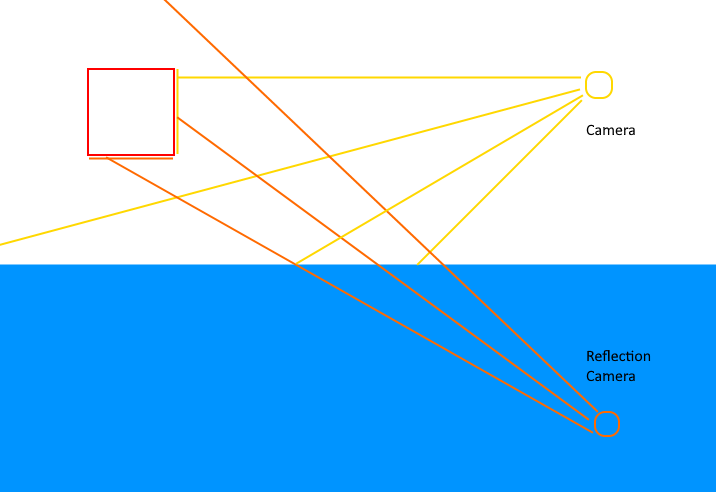
(The bottom of the square would need to be seen in the reflection however the regular camera cannot provide that information)
Also, I don't quite follow what you intended with the water not writing to the depth.
On that note, I would only have documentation, code cleanup, and making it look pretty:
- Clear colour set to the one in the original image above (I just think the light teal looks more appropriate).
- Make the sun colour warmer.
- AA? (I want your opinion on this)
- Scale terrain to make the proportions correct (and manually adjust the curve factor on the normals).
- Fix bugs:
- [x] Regenerate needed textures on resize
- [x] Minimizing crashes since width == height == 0, and therefore aspect ratio == NaN.
- Should I animate the camera?
Here's the latest build (at the time of writing):

OptimisticPeach
on 9 Jun 2020
I don't think it'd be possible to do the screen-raycasting and use a pass which was taken from the same angle, since it would lack information necessary to do a proper reflection:
Yes, it wouldn't have all the information. Computer graphics is all about rough approximations. Screen-space reflections are widely used in games.
Also, I don't quite follow what you intended with the water not writing to the depth.
The water doesn't need to be writing to the depth buffer because it's not an opaque occluder. Besides, you can't really do RODS if you are writing to the depth.
AA? (I want your opinion on this)
I don't think we need this right now, unless you are very inspired to do so. There is a separate msaa-line example fwiw.
Should I animate the camera?
Something needs to be animated. If your water is simulated, that's good, and we don't need to move the camera. Otherwise, let's move the camera around.
Here's the latest build (at the time of writing):
It looks absolutely terrific 🚀 , great work!
kvark
on 9 Jun 2020
Yes, it wouldn't have all the information. Computer graphics is all about rough approximations. Screen-space reflections are widely used in games.
I have a compromise:
- I render the terrain to the screen buffer, and store its depth to a texture.
- I render the reflection to a texture, and ignore the depth.
I don't need to render to two offscreen textures, and the water doesn't write to the depth buffer.
I don't think we need this right now, unless you are very inspired to do so. There is a separate msaa-line example fwiw.
Ok.
Something needs to be animated. If your water is simulated, that's good, and we don't need to move the camera. Otherwise, let's move the camera around.
The water is animated, however I'm using a noise function to distort the mesh, and not actually modelling physically accurate water.
Here's a gif of the water moving (I neglected to post this because gifs are usually low quality):
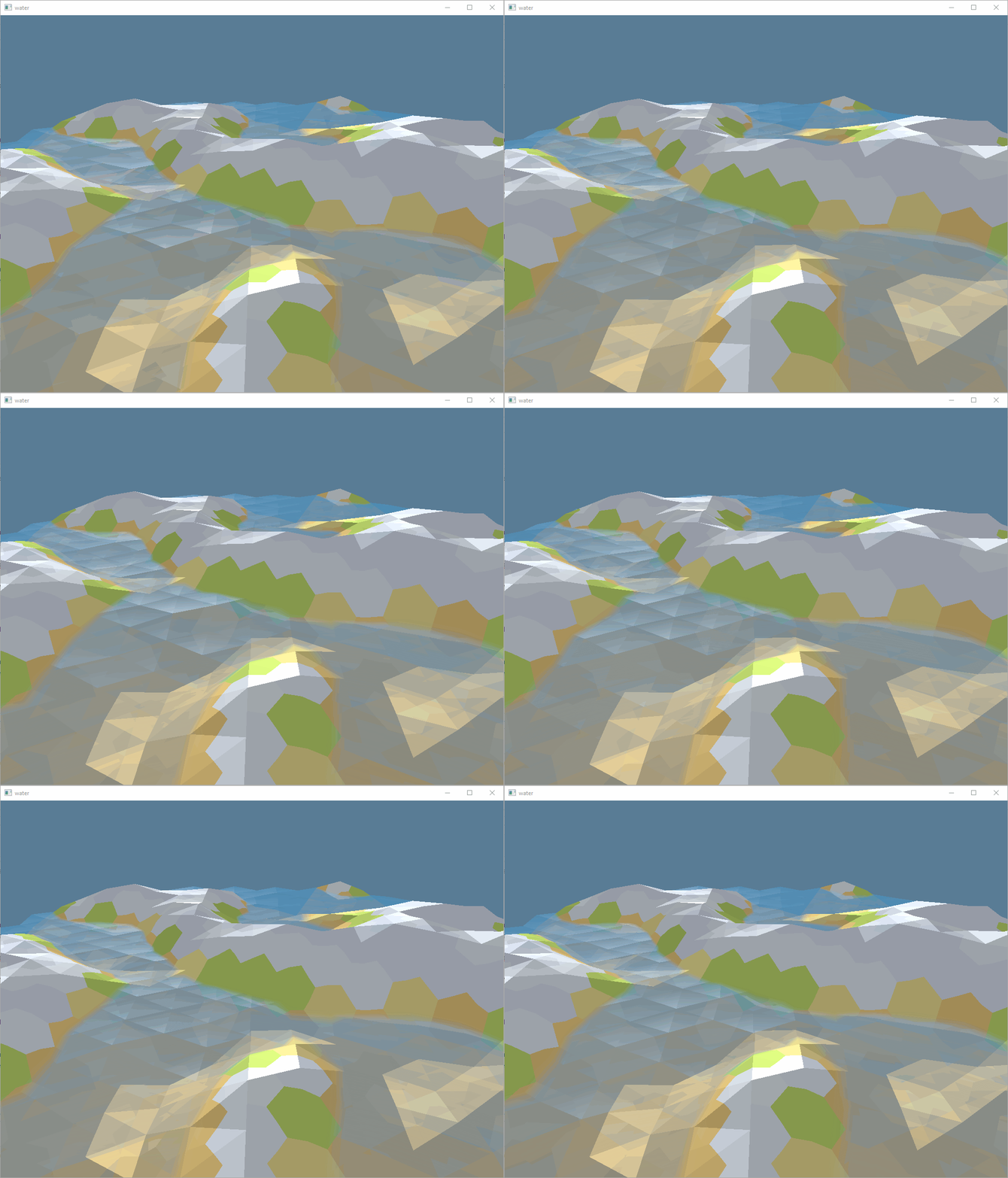
(I still need to tune time, curve factor, y-scale, etc., but the gist is there)
It looks absolutely terrific 🚀 , great work!
Thanks! I'm sorry for being slow however, I got stopped by a few bugs since I am new to wgpu. A thing that really stood out to me was a change w.r.t. the pipeline and shader types: if you load a buffer of [i16; 2]s into a vertex attribute, the values you read in the shader must be ivec2s. This differs from OpenGL ES which would automagically convert those. (Same with [i8; 4]).
Anyway, I'll get back to you in a day or so, after I'm happy with the code, documentation, and result.
OptimisticPeach
on 9 Jun 2020
Sounds like you are on the right path!
This differs from OpenGL ES which would automagically convert those.
Not really. GLES has glVertexAtrribIPoiner for integer attributes, which means they are visible ivec2 on the shader side.
If you need normalized values (that is, vec2 in range -1 to 1 for signed integers), you can get them in wgpu by using the Char2Norm attribute format.
kvark
on 9 Jun 2020
Related issues
 bvssvni
·
5Comments
bvssvni
·
5Comments
 m4b
·
5Comments
m4b
·
5Comments
 gzp-crey
·
3Comments
gzp-crey
·
3Comments
 branpk
·
3Comments
OptimisticPeach
·
3Comments
branpk
·
3Comments
OptimisticPeach
·
3Comments
Most helpful comment
Thanks for the guidance!
Thanks!
Alright, that's doable.
One thing I wanted to experiment with was using the screen buffer as a frame buffer itself, and reading from it. I'm unaware if this works (and if it does, if it's supported or efficient at all), to avoid the (albeit minimal) extra rendering from the refraction buffer.
Sorry if I don't completely follow: Water will still have a depth test to not overwrite terrain that's in front of it, however the water's own depth values will not be written to the depth buffer?
The depth of the main screen's terrain render, or the depth of the offscreen terrain render?
That's easy enough. It'd be a case of mapping the depth to the alpha value:
I'm not sure how to do this. Would you mind elaborating please?
My assumption of how it would work
We take the incident vector, the normal vector, and the ratio of indices of refraction, and use the
refractfunction. We then transform the refracted vector into ndc by using the projection matrix, and raycast until we hit the terrain beneath using the texture with the offscreen terrain render.This is probably doable, however I doubt how efficient it may be.
Alpha blending and RODS sure (However I'm not 100% clear on how the RODS would work), however I'm a bit iffy on the refraction/ray casting.
Also, you didn't mention a reflection render, so I assume you meant to keep that the same. I need to do the reflection render, since... how else would I do it (if I'm missing something please tell me!). I need to only render what's above water to not get stuff like this:
