Wezterm: add support for vertical and horizontal splits
Also allow me to bind keys similar to tmux so I can use ctrl-a, ctrl | to split.
 prabirshrestha
All 33 comments
I understand that "Split-Pane" functionality is something your tiling-window-manager or tools like tmux do best and should be used for. but... blah blah... Windows.
being windows-bound I cannot find any tool that provides split pane functionality for terminal applications. I know Windows-Terminal has rudimentary split pane functionality, and currently that is the only reason why I am not fully switching to wezterm.
Being able to split panes in wezterm-tabs would be a great usability enhancement for windows users. Even better would be a simple Rust (eg. cross-platform) program outside wezterm providing splitting functionality like tmux for console-programs.
 mborejdo
on 22 May 2020
mborejdo
on 22 May 2020
I've been gradually hacking on this feature in a local branch, and I've reached a point where I have basic functionality in terms of making horizontal or vertical splits. What remains is to make it usable enough to push to master, and for that I need some feedback; I personally haven't made using splits in either tmux or iterm2 part of my workflow, so I don't have a great sense of which functions to prioritize.
I think the minimum functionality required is:
- [x]
SplitVerticalandSplitHorizontalkey assignments - [x] Click in a pane to activate it
- [x] Key assignment to move to the pane that is Left, Right, Up, Down of the active pane, respectively
- [x] Key assignment to resize active pane by X cells in Left, Right, Up, Down direction
- [x] Drag mouse on a split to resize by mouse
Looking at tmux's man page, I can see that is has functions that assign layout modes, rotate panes and tile windows. While I'm not opposed to adding that functionality over time, I'm not sure which of those are essential split functions and which are really uber-power-user functions.
Another open question is what should the default key assignments be for some or all of these functions?
I think taking some inspiration from tmux may be appropriate (to take advantage of muscle memory), but tmux heavily uses a leader-key for its key bindings and that is quite awkward to implement in a native GUI, so I'm trying to resist it.
 wez
on 23 Sep 2020
wez
on 23 Sep 2020
hi Wez, looking really forward to try this feature. Another "split-feature" that comes to my mind:
- "Fullscreen" current active pane
Not having predefined layouts is OK, I guess. If split-pane is implemented as some subcommand, one could startup wezterm with some predefined panes. I like the way windows terminal does it. (thats the only reason I am currently using it, besides wezterm) (see https://docs.microsoft.com/en-us/windows/terminal/panes, https://docs.microsoft.com/en-us/windows/terminal/command-line-arguments)
mborejdo
on 23 Sep 2020
hi Wez, looking really forward to try this feature. Another "split-feature" that comes to my mind:
* "Fullscreen" current active pane
Can you describe the effect that "fullscreen" would have?
Tmux has main-horizontal and main-vertical layouts; is that the effect you want?
These images illustrate the layout, but I'd probably want to specify some parameters for the layout, such as eg: minimum number of rows for the main pane to ensure that it has a usable size.
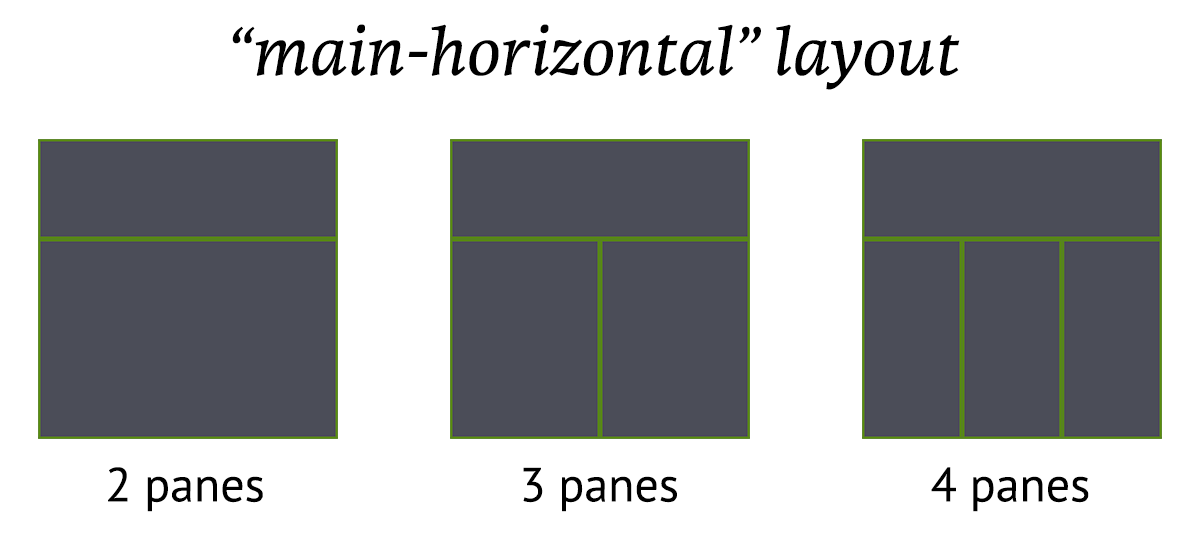
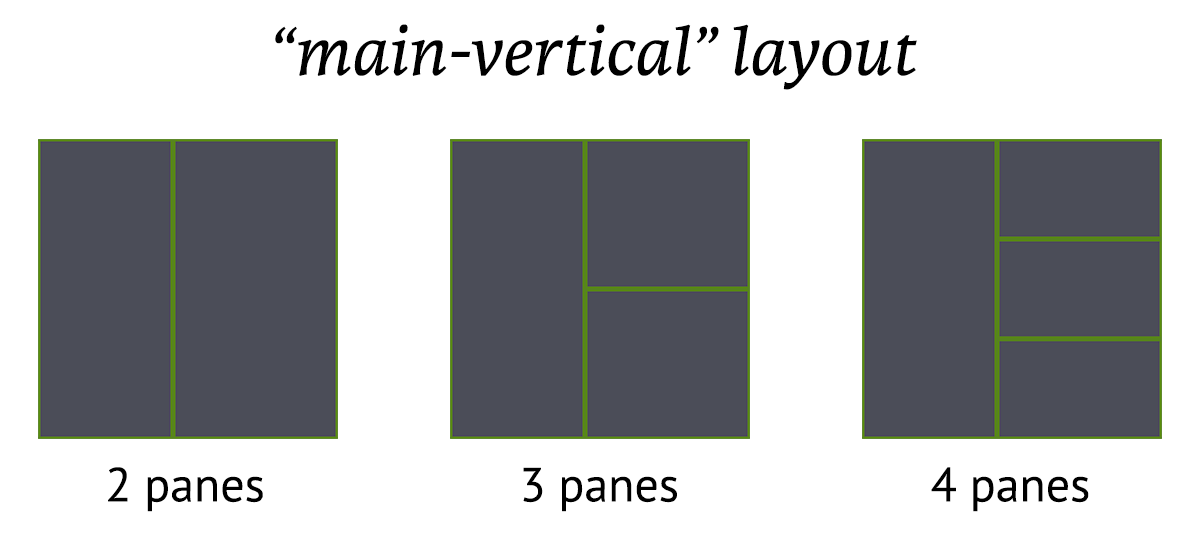
An important constraint of panes is that they are implemented by splitting things into two parts, so every pane must fit within the space available in its parent. If the fullscreen mode has the effect of hiding everything other than the active pane and making the pane fit the full size of the tab, then that makes for some UI complications because the other panes are no longer present, and their positioning requires a whole other set of calculations. Such a fullscreen pane looks/sounds very much like the existing tab primitive, so I'm leaning towards that as the recommended solution. I can see there being potential for moving panes from one containing tab to another, so another way to envision the "fullscreen" mode is to pop a pane into its own tab, then move it back when you're done. (Hand-waving over how tracking that movement and restoring it works for the moment).
Not having predefined layouts is OK, I guess.
I'm not saying that I won't build them, it's just that there are lots of possibilities and I want to prioritize building the more valuable features first, so I'm looking for feedback on which of these things are important!
If split-pane is implemented as some subcommand, one could startup wezterm with some predefined panes. I like the way windows terminal does it. (thats the only reason I am currently using it, besides wezterm) (see https://docs.microsoft.com/en-us/windows/terminal/panes, https://docs.microsoft.com/en-us/windows/terminal/command-line-arguments)
Thanks; those are helpful links!
wez
on 23 Sep 2020
"Fullscreen" is probably the wrong term here.
I mean "A way to toggle the currently active pane to fill the full width and height of the terminal window (temporarily) replacing all other panes".
So for example i want to start wezterm with the default shell and a split-pane -H command.
That way I would have a terminal window, with two panes. I'd need a way to "focus" either the first or second horizontal pane, to run another "split-pane -V command" splitting either the first or second pane in two vertical panes.
And so on. Having a more or less complex layout, I would run wezterm fullscreen (real monitor fullscreen here). I can easily navigate between the panes with keybindings (this is tricky i guess, considering the focus-order), probably swap panes and have the "fullpane-feature" to focus on a single pane.
mborejdo
on 23 Sep 2020
I've pushed the basic implementation of this to master.
CTRL|ALT|SHIFT %is assigned toSplitHorizontalCTRL|ALT|SHIFT "is assigned toSplitVerticalCTRL|ALT|SHIFT Left/Right/Up/Downwill adjust the size of the active pane in the specified direction (AdjustPaneSize)CTRL|SHIFT Left/Right/Up/Downwill switch the active pane to an adjacent pane in the specified direction. (ActivatePaneDirection). If multiple panes would match, the pane with the largest intersecting edge is selected.- Clicking in a pane sets it to the active pane
- Dragging the border of a pane resizes that edge
- Multiplexer sessions are not currently able to spawn or report panes
The key bindings are assignable if you prefer to assign them to something different, but I haven't written that up so you'll need to reverse engineer the lua config from the defaults in the code
Things I'm considering next in no particular order; feedback is appreciated to help me understand which of these have value to you:
- [x] "Zoom" state for a pane. A tab may have set the active pane to the zoomed state in which only that pane will be rendered, and it will occupy the full size of its containing tab. (This is roughly equivalent to the full screen functionality that @mborejdo described above)
- [ ] Ability to re-order panes (likely by swapping in a direction, or by some kind of rotation operation: tell me what you find useful!)
- [ ] Ability to set a layout for a tab. A layout will allow for something like eg: the
main-horizontallayout discussed above, where panes are re-adjusted to conform to the specified layout rather than the natural binary tree split that is the current behavior. - [x] key assignment to kill a pane (similar to
CloseCurrentTab, but apply to the active pane). You can simply CTRL-D most things on unix to achieve this today, but otherwise have to quit the program running in the pane to make it go away - [x] teach the multiplexer layer about panes
- [ ] config file syntax for defining sets of splits that can be used on startup
- [ ] CLI parameters for defining sets of splits on startup
wez
on 24 Sep 2020
Ok, goodbye Windows Terminal :+1: Really loving the panes.
I came across some problems. Should I open specific new issues or do you want to keep all split-related stuff here for now @wez ?
mborejdo
on 24 Sep 2020
I came across some problems. Should I open specific new issues or do you want to keep all split-related stuff here for now @wez ?
I don't mind; if an issue can be succinctly described in a comment here then that's fine with me. If it gets a bit involved we can spin it out into a separate issue.
wez
on 24 Sep 2020
This is great. The best news of the week 😃
For me here are the P0. All these should be possible by keyboard. Some of these are already possible. tmux window is equivalent to tab.
- split vertically
- split horizontally
- zoom in and zoom out. (it is being referred as full screen).
- move to another active pane on left/right/bottom/top.
# pane movements
bind h select-pane -L
bind j select-pane -D
bind k select-pane -U
bind l select-pane -R
- create new tab.
- switch to new tab.
- resize
# pane resizing
bind H resize-pane -L 5
bind J resize-pane -D 5
bind K resize-pane -U 5
bind L resize-pane -R 5

# pane resizing
bind -r H resize-pane -L 5
bind -r J resize-pane -D 5
bind -r K resize-pane -U 5
bind -r L resize-pane -R 5
- mouse support for selecting active pane and resizing.
set -g mouse on
P1:
- leader key support. I do want to continue to use tmux style
ctrl+a, ctrl + |. This is the most underrated feature for guis that have split support or tab. I want my tmux bindings. Need to be careful about this sincectrl+ain readline is used to go to the beginning of the line so have to instead pressctrl+a, ctrl+a.
# Change the prefix to Ctrl+a
unbind C-b
set -g prefix C-a
bind C-a send-prefix

# change the default delay to make it more responsive
set -sg escape-time 1
- when new pane is created it should automatically
cdinto the working directory of the working pane.
# Splitting panes
bind \\ split-window -h -c "#{pane_current_path}"
bind - split-window -v -c "#{pane_current_path}"
# window
bind c new-window -c "#{pane_current_path}"
P2:
- kill single pane (tmux askes for confirmation)
- kill all pane in tab.
P3:
- fast switch pane by number.

- fast switch tab by number. tmux defaults it to zero but lot of people like starting this with 1.

# start window index at 1
set -g base-index 1

# start pane index at 1
set -g pane-base-index 1
P4:
- list all tabs/window to allow faster switch. (also notice the border and color for active pane. tmux allows lot more config but I'm happy with default as long as it is a sane config)

- allow tab to be placed at the bottom. This allows all my status line such as tab/vim/tmux to be down which I barely look at.
My full tmux config can be seen at https://github.com/prabirshrestha/dotfiles/blob/master/.tmux.conf
P5;
- Allow to start panes by command line. Useful when building extensions such as https://github.com/tmuxinator/tmuxinator.
I personally never use the session feature of tmux and instead use windows (tabs) for multiple projects which are usually open since I barely restart my machine.
I use a dynamic window manager https://awesomewm.org/ on linux and https://github.com/prabirshrestha/dwm-win32 on windows. There is also similar but for terminals. https://www.brain-dump.org/projects/dvtm/ I personally haven't used it but something I have always wanted to try. For dwm-win32 I have been moving to lua so hopefully can fully customize auto layouts by lua. Once you go to dynamic tiling manager everything is unproductive.
I'm personally happy as long as I can get tmux style keybindings and splits and tabs and windows which means even if it is not built inside terminal app it is ok to have separate tmux.exe or dvtm.exe. The only problem I think this can have is due to windows terminal being very slow so having it as first class is still better choice. There is https://github.com/prompt-toolkit/pymux which partially works in windows but wasnt stable enough to replace.
prabirshrestha
on 24 Sep 2020
FWIW, some of the features above are already present:
- Show list of tabs is ALT-9 by default. ShowTabNavigator (However, this is intended to pop over the whole tab, but at the moment renders over the active pane instead by mistake--will fix this)
- Fast tab switch by number is ActivateTab
- Newly created splits use OSC 7 to specify the cwd automatically, just like tabs, but you can also specify all those details in the key assignment for the
SplitHorizontalandSplitVerticalactions. - The
AdjustPaneSizekey assignment accepts both a direction and a size. The size used in the default assignment is 1 but you can override it to be larger:{key="UpArrow", mods="SHIFT|CTRL|ALT", action=wezterm.action{AdjustPaneSize={"Up", 5}}},
wez
on 24 Sep 2020
Re: Leader key, I split that out into https://github.com/wez/wezterm/issues/274
wez
on 25 Sep 2020
Can you provide example of changing cwd with new splits and tabs?
For example in tmux i have bind c new-window -c "#{pane_current_path}" so when every i do ctrl+a, ctrl+c it opens in the current working directly. I see ability to set cwd but no example.
https://wezfurlong.org/wezterm/config/keys.html#spawncommandinnewwindow--spawncommandinnewtab
{ key = "c", mods = "LEADER", action=wezterm.action{SpawnTab="CurrentPaneDomain", cwd="#{pane_current_path}"}},
The default is to pick up the CWD set by OSC 7. You need a little bit of glue in your rc files; here's an excerpt from mine that causes both zsh and bash to emit an updated OSC 7 each time they print the prompt:
_dotfiles_urlencode() (
  # This is important to make sure string manipulation is handled
  # byte-by-byte.
  LC_ALL=C
  str="$1"
  while [ -n "$str" ]; do
    safe="${str%%[!a-zA-Z0-9/:_\.\-\!\'\(\)~]*}"
    printf "%s" "$safe"
    str="${str#"$safe"}"
    if [ -n "$str" ]; then
      printf "%%%02X" "'$str"
      str="${str#?}"
    fi
  done
)

# OSC 7 is used to specify the cwd in supporting terminals
_dotfiles_osc7 () {
  printf "\033]7;file://%s%s\033\\" "${HOSTNAME:-}" "$(_dotfiles_urlencode "${PWD}")"
}

# Run by zsh implicitly and by bash because we set PROMPT_COMMAND; is run
# before the prompt is printed.  We use it to reset the window title
function precmd()
{
  # _dotfiles_set_window_title "${USER}@${HOSTNAME%%.*}:${PWD/$HOME/~}"
  _dotfiles_osc7
}

# tell bash to run precmd before each prompt. zsh does this implicitly.
PROMPT_COMMAND='precmd'
On Windows in CMD I use this example from the wezterm docs to have the prompt emit the OSC 7 too:
http://wezfurlong.org/wezterm/shell-integration.html#osc-7-on-windows-with-cmdexe
There's presumably a way to make powershell do that too, but I've invested zero time in learning powershell so far.
With OSC 7 being emitted, your new tabs and panes will automatically pick up the cwd and you won't need to mention the cwd in your config.
wez
on 26 Sep 2020
I will give the bash and cmd a try. In tmux it works without any changes to my bashrc. would be interesting to see how it does though not sure how it would work for cmd. I myself don't use powershell so not worried about it.
I'm getting really close to porting my entire tmux config to be exactly the same in wezterm.
    leader = { key="a", mods="CTRL" },
    keys = {
        { key = "-", mods = "LEADER", action=wezterm.action{SplitVertical={domain="CurrentPaneDomain"}} },
        { key = "\\", mods = "LEADER", action=wezterm.action{SplitHorizontal={domain="CurrentPaneDomain"}} },
        { key = "z", mods = "LEADER", action="TogglePaneZoomState" },
        { key = "c", mods = "LEADER", action=wezterm.action{SpawnTab="CurrentPaneDomain"}},
        { key = "h", mods = "LEADER", action=wezterm.action{ActivatePaneDirection="Left"}},
        { key = "j", mods = "LEADER", action=wezterm.action{ActivatePaneDirection="Down"}},
        { key = "k", mods = "LEADER", action=wezterm.action{ActivatePaneDirection="Up"}},
        { key = "l", mods = "LEADER", action=wezterm.action{ActivatePaneDirection="Right"}},
        { key = "H", mods = "LEADER|SHIFT", action=wezterm.action{AdjustPaneSize={"Left", 5}}},
        { key = "J", mods = "LEADER|SHIFT", action=wezterm.action{AdjustPaneSize={"Down", 5}}},
        { key = "K", mods = "LEADER|SHIFT", action=wezterm.action{AdjustPaneSize={"Up", 5}}},
        { key = "L", mods = "LEADER|SHIFT", action=wezterm.action{AdjustPaneSize={"Right", 5}}},
        { key = "1", mods = "LEADER", action=wezterm.action{ActivateTab=0}},
        { key = "2", mods = "LEADER", action=wezterm.action{ActivateTab=1}},
        { key = "3", mods = "LEADER", action=wezterm.action{ActivateTab=2}},
        { key = "4", mods = "LEADER", action=wezterm.action{ActivateTab=3}},
        { key = "5", mods = "LEADER", action=wezterm.action{ActivateTab=4}},
        { key = "6", mods = "LEADER", action=wezterm.action{ActivateTab=5}},
        { key = "7", mods = "LEADER", action=wezterm.action{ActivateTab=6}},
        { key = "8", mods = "LEADER", action=wezterm.action{ActivateTab=7}},
        { key = "9", mods = "LEADER", action=wezterm.action{ActivateTab=8}},
        { key = "&", mods = "LEADER|SHIFT", action="CloseCurrentTab"},
    }
Few things I'm currently missing that are P0.
- closing pane/window
kill-pane. - prefix tab with number. I prefer to start tab
ctr+alt,1to activate tab 0 while some prefers to activate 1. So would need something likeset -g base-index 1. I use each tab for different projects so sometimes have 3-4 tabs open and rather than counting I need to see the tab number so I can fast switch to the tab.
Another thing I noticed is tmux config doesn't seem to requires me adding SHIFT and is smart enough but wezterm requires me to explicitly pass SHIFT. I don't worry about this but something that you might want to mention in the docs. You can also notice that for my adjust panes I had to use caps H along with SHIFT.
prabirshrestha
on 26 Sep 2020
Another thing I noticed is tmux config doesn't seem to requires me adding
SHIFTand is smart enough but wezterm requires me to explicitly passSHIFT. I don't worry about this but something that you might want to mention in the docs. You can also notice that for my adjust panes I had to use capsHalong withSHIFT.
Yeah, this has been on my todo list for a while. The termwiz layer knows how to normalize this away, but these key assignments happen in the gui layer which doesn't have this yet. I'll fix this up.
wez
on 26 Sep 2020
prefix tab with number. I prefer to start tab
ctr+alt,1to activate tab 0 while some prefers to activate 1. So would need something likeset -g base-index 1. I use each tab for different projects so sometimes have 3-4 tabs open and rather than counting I need to see the tab number so I can fast switch to the tab.
I'll add a couple of basic options to control this; enabling/disabling the tab index in the tab titles and whether it is zero- or one-based. I don't see the need for it to be an arbitrary base.
wez
on 26 Sep 2020
In tmux it works without any changes to my bashrc. would be interesting to see how it does though not sure how it would work for cmd.
I looked into this; tmux will try to use an OS specific way to extract the cwd from the process that it started in the pane. It will try to determine the process group leader and use its cwd, which means that it will likely work for child and grandchild processes that are in the foreground. This is not a portable approach and only works on a handful of operating systems, and I'm not sure that it is even possible on Windows.
That technique might be an interesting fallback to take in wezterm if OSC 7 wasn't set. OSC 7 has the advantage of being able to be specified for remote hosts; that is not a use-case with tmux, but connecting to remote multiplexers from a local wezterm GUI is an important feature for me.
wez
on 26 Sep 2020
What should the value of prompt be to set osc7? Sorry I'm totally new to this.
I don't mind changing by bashrc and prompt. What happens if I'm using clink to render custom prompt?
prabirshrestha
on 26 Sep 2020
What should the value of prompt be to set osc7? Sorry I'm totally new to this.
For Windows/CMD you mean?
The bare minimum is to include this text in your prompt env var: $E]7;file://localhost/$P$E\\.
There's an example of this in the docs:
https://wezfurlong.org/wezterm/shell-integration.html#osc-7-on-windows-with-cmdexe
What happens if I'm using clink to render custom prompt?
I use this with clink, but I don't use a custom prompt:
https://wezfurlong.org/wezterm/shell-integration.html#using-clink-on-windows-systems
I can't find any documentation for clink, let alone docs on how to do prompts :-/
The gist of it is that you need to arrange for the prompt to include the OSC 7 escape sequence
in it, likely at the start. I know the bash example I gave above does some fancy quoting,
but it's not generally required, so you just need to emit this:
ESC ] 7 ; file://localhost/$PWD ESC \\
where $PWD is however you would reference the current directory in clink's prompt stuff
and don't include the spaces; those are just there for clarity.
wez
on 26 Sep 2020
Should CloseActivePane be named CloseCurrentPane to align with CloseCurrentTab? Just found it bit weird when adding config.
prabirshrestha
on 26 Sep 2020
Seems like there is again off by one bug on windows.

repro steps:
- use busybox ls on windows on the single tab with one pane
- split vertically
- observer chars on near the separator.
couldn't repro on linux.
prabirshrestha
on 26 Sep 2020
Panes don't seem to resize automatically when wezterm size changes causing some panes to be hidden.
repro steps:
- open wezterm.
- maximize wezterm
- create a vertical split
- resize width of wezterm to be small. you will notice that the splits don't resize so pane might get completely hidden.
tmux seems capable of resizing. most likely each pane needs to get a scale factor and when wezterm resize also resize all panes to that particular scale.
prabirshrestha
on 27 Sep 2020
After pane resizing, I can't seem wezterm to work with a tiling manager. with dwm-win32 it always crashes. Most likely both dwm-win32 and wezterm is trying to resize the window.
let me know if there is a way to get logs. I don't see much info in event viewer.
Faulting application name: wezterm.exe, version: 1.0.0.0, time stamp: 0x5f70f041
Faulting module name: wezterm.exe, version: 1.0.0.0, time stamp: 0x5f70f041
Exception code: 0xc000001d
Fault offset: 0x000000000085b3ca
Faulting process id: 0x2678
Faulting application start time: 0x01d695d76a8562ca
Faulting application path: C:\Program Files\WezTerm\wezterm.exe
Faulting module path: C:\Program Files\WezTerm\wezterm.exe
Report Id: c59f8f93-6097-4c85-b874-9b5ca215ce74
Faulting package full name:
Faulting package-relative application ID:
Can you try setting RUST_BACKTRACE=1 in the environment before starting wezterm? Capturing its stderr should show any panicks caught by rust. Failing that, if it is a lower level crash then it may be worth attaching WinDbg (or your favorite debugger) to wezterm while it is healthy and see if that can capture the stack trace. I don't know how useful that will be in windbg without a pdb file, so it may be necessary to build a debug build locally to get a good quality stack trace if that is what is happening.
I wonder if what you're seeing might be related to #276
wez
on 29 Sep 2020
Seems like divide by zero. It is pointing to the follow line https://github.com/wez/wezterm/blob/c5efd94bb8e8b9fb5a44f21c7d4ee22e7c3244a7/src/mux/tab.rs#L479
276 could also be the same issue.
Was able to use the release build set backtrace on.
log
C:\WINDOWS\system32>thread 'main' panicked at 'attempt to divide by zero', src\mux\tab.rs:479:23
stack backtrace:
   0: <unknown>
   1: <unknown>
   2: <unknown>
   3: <unknown>
   4: <unknown>
   5: <unknown>
   6: <unknown>
   7: <unknown>
   8: <unknown>
   9: <unknown>
  10: <unknown>
  11: <unknown>
  12: <unknown>
  13: <unknown>
  14: <unknown>
  15: CallWindowProcW
  16: CallWindowProcW
  17: glPushClientAttrib
  18: CallWindowProcW
  19: DispatchMessageW
  20: SendMessageTimeoutW
  21: KiUserCallbackDispatcher
  22: NtUserMessageCall
  23: SendMessageW
  24: GetWindowTextW
  25: IsIconic
  26: Ordinal132
  27: Ordinal132
  28: GetWindowTextW
  29: <unknown>
  30: CallWindowProcW
  31: CallWindowProcW
  32: glPushClientAttrib
  33: CallWindowProcW
  34: DispatchMessageW
  35: LookupIconIdFromDirectoryEx
  36: KiUserCallbackDispatcher
  37: NtUserPeekMessage
  38: PeekMessageW
  39: PeekMessageW
  40: <unknown>
  41: <unknown>
  42: <unknown>
  43: <unknown>
  44: <unknown>
  45: <unknown>
  46: <unknown>
  47: BaseThreadInitThunk
  48: RtlUserThreadStart
note: Some details are omitted, run with `RUST_BACKTRACE=full` for a verbose backtrace.
 2020-09-28T23:22:01.956Z ERROR window::os::windows::window > caught Any
Another bug:
if you have 2 tabs but only one pane on both, closing current pane seems to crash wezterm.
2020-09-29T03:47:16.484Z ERROR wezterm::mux > tab 1 is dead
This is the config I'm using
{ key = "x", mods = "LEADER", action="CloseCurrentPane"},
latest master fixes both the bugs I reported. thanks for the quick fix.
prabirshrestha
on 29 Sep 2020
found another nit bug.
- Open wezterm
- create a vertical split
- move focus to left split
- zoom pane
- unzoom the pane
- | separator line is not visible. Need to resize the pane to see it again. most like another off by one issue.
if you zoom the right pane and unzoom it again it doesn't seem to have the issue.
prabirshrestha
on 30 Sep 2020
Another one (but otherwise loving the feature! <3)

Caused by:
- Opening vim (with -u NONE, so im reasonably certain it's not something on my end)
- vertical split
- each subsequent horizontal split seems to trick vim into thinking it's being shrunk (where at the end it's only updating 1 line)
A resize of the window fixes the problem
 DanCardin
on 30 Sep 2020
DanCardin
on 30 Sep 2020
@DanCardin thanks for reporting that! I can't reproduce it in master following these steps, with wezterm -n (to skip loading wezterm.lua) on either Linux or macOS.
Caused by:
* Opening vim (with or without -u NONE)
* vertical split
* each subsequent horizontal split seems to trick vim into thinking it's being shrunk (where at the end it's only updating 1 line)

I suspect that there might be something environmental contributing to the differences in what we see, but I'm not sure what!
wez
on 30 Sep 2020
another bug:
When using mux on widows exiting pane doesn't seem to close the pane. Only repros on windows.

I also seem to always get the following error on windows when starting new mux on windows and have to close wezterm and then start again and it will correctly connect.

prabirshrestha
on 3 Oct 2020
I also seem to always get the following error on windows when starting new mux on windows and have to close wezterm and then start again and it will correctly connect.
I believe this to be fixed in master as of 8d1af908bf434b1af6624af4b8df54079d317ece
Note that master has had some fairly significant changes to split the mux server into a separate binary.
If you're following https://wezfurlong.org/wezterm/multiplexing.html#connecting-into-windows-subsystem-for-linux then you'll need to change from this:
serve_command = ["wsl", "wezterm", "start", "--daemonize", "--front-end", "MuxServer"],
to this:
serve_command = {"wsl", "wezterm-mux-server", "--daemonize"}
I'll update the docs for this when I'm closing to making a release.
wez
on 6 Oct 2020
another bug:
When using mux on widows exiting pane doesn't seem to close the pane. Only repros on windows.
I couldn't trivially reproduce this on master, so it may also be fixed. If not, please file a new issue!
I'm going to close this one out as it is getting a bit long and that is making it harder for me to see what is outstanding!
wez
on 6 Oct 2020
Related issues
 tuananh
·
3Comments
tuananh
·
3Comments
 katef
·
10Comments
katef
·
10Comments
 p00f
·
5Comments
p00f
·
5Comments
 erf
·
7Comments
erf
·
7Comments
 sanga
·
10Comments
sanga
·
10Comments
Most helpful comment
I've pushed the basic implementation of this to master.
CTRL|ALT|SHIFT %is assigned toSplitHorizontalCTRL|ALT|SHIFT "is assigned toSplitVerticalCTRL|ALT|SHIFT Left/Right/Up/Downwill adjust the size of the active pane in the specified direction (AdjustPaneSize)CTRL|SHIFT Left/Right/Up/Downwill switch the active pane to an adjacent pane in the specified direction. (ActivatePaneDirection). If multiple panes would match, the pane with the largest intersecting edge is selected.The key bindings are assignable if you prefer to assign them to something different, but I haven't written that up so you'll need to reverse engineer the lua config from the defaults in the code
Things I'm considering next in no particular order; feedback is appreciated to help me understand which of these have value to you:
main-horizontallayout discussed above, where panes are re-adjusted to conform to the specified layout rather than the natural binary tree split that is the current behavior.CloseCurrentTab, but apply to the active pane). You can simply CTRL-D most things on unix to achieve this today, but otherwise have to quit the program running in the pane to make it go away