Wezterm: Scroll behaviour on resize to show content
Is your feature request related to a problem? Please describe.
When i list the files of a folder and drag the terminal window to make it smaller and then make it larger again, the content does not show untill i scroll the window.
In the default terminal emulator for macOS the content is 'locked' to the bottom of the window, so that it will show again when i make the window larger.
Describe the solution you'd like
I would like the same behavour as in the macOS Terminal app, where after i resize the window small, then large again, the content stay in the same position.
 erf
erf
All 6 comments
Amazing - you fixed it already!
Here is a couple of nitpicks.
If you start a new window and call
lsa couple of times so the history reaches the bottom of the window, then press CTRL-L to clear the screen and list som text again so the text reaches half the screen, and then try to resize the screen, the text immediately pops down to the bottom off the screen. In the Terminal app it seems the history position is cleared when you clear the window, so that the text stay the same position when you resize - although not sure if this is the prefered behaviour.Sometimes (seldom) when i resize the window very small and then large again, a few text artefacts pops up and linger at the bottom of the screen (see comment below for screenshots). I noticed the Terminal limits the window size to 5 rows and 20 columns, maybe that will fix it?
Maybe not related, but i notice some weird scaling / wobble effects on the text whilst resizing. Maybe related to https://github.com/glfw/glfw/issues/1251 or https://github.com/emoon/rust_minifb/issues/194 not sure if this is fixable, but could perhaps create a new issue for this?
Thank you for fixing these issues so quicly and for making this amazing terminal!
erf
on 29 Oct 2020
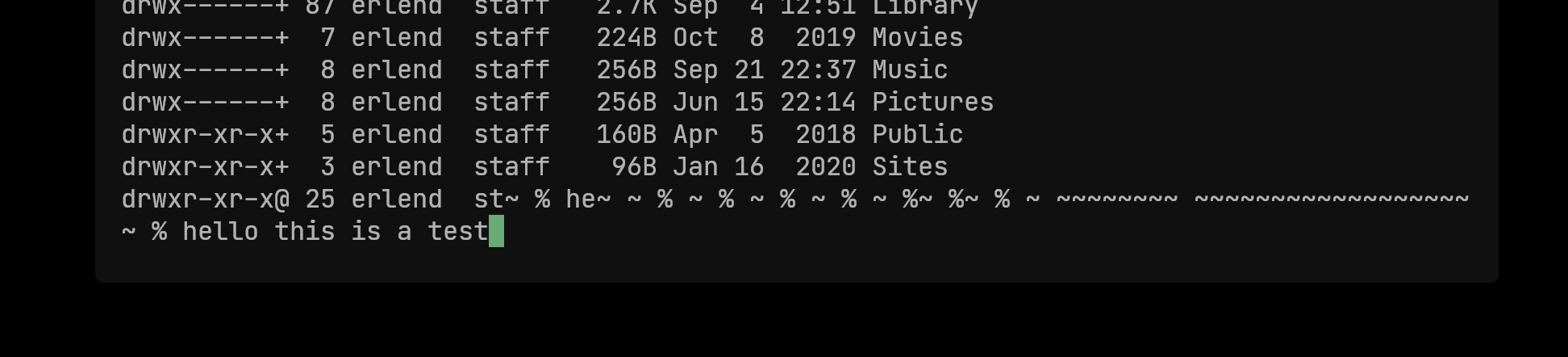
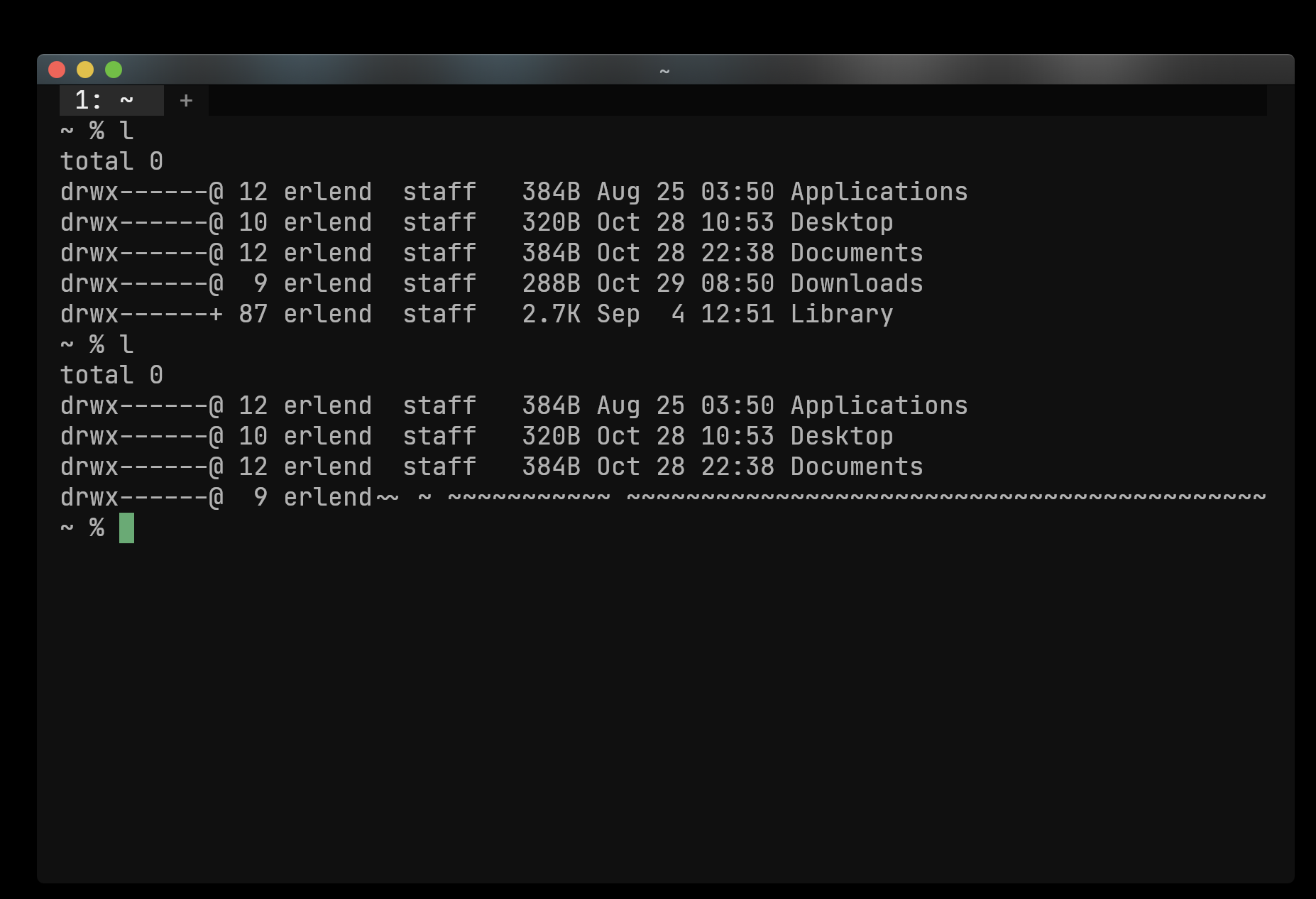
Here is a couple of image of what's happening if i do a lot of resizing, especially making the size very small. Notice the weird issue with the last line getting repeated.
erf
on 29 Oct 2020
1. If you start a new window and call `ls` a couple of times so the history reaches the bottom of the window, then press CTRL-L to clear the screen and list som text again so the text reaches half the screen, and then try to resize the screen, the text immediately pops down to the bottom off the screen. In the Terminal app it seems the history position is cleared when you clear the window, so that the text stay the same position when you resize - although not sure if this is the prefered behaviour.
Terminal.app has differently janky behavior here; what I see in this situation is that when sizing shorter, the cursor jumps to the bottom of the screen, leaving a huge gap and "corrupting" the screen contents as a result; post-resize the screen will need to be repainted by the application for it to really reflect what it was looking at.
While wezterm's current behavior may be a little visually jarring in this case, it feels more deterministic: if the window is made larger than the scrollback, then the whole scrollback will be visible in the new size and the contents of the screen are not damaged.
 wez
on 29 Oct 2020
wez
on 29 Oct 2020
Here is a couple of image of what's happening if i do a lot of resizing, especially making the size very small. Notice the weird issue with the last line getting repeated.
What's happening is that your shell is getting live resize events and repainting the window when it is really small.
Then, when you make the window wider, the line re-wrapping heuristic thinks that the ~ from your prompt is valid to attach to the preceding line because of the preceding line break in front of the prompt. If you do this at just the right speed your shell prompt will keep re-rendering ~ and then those will keep getting rewrapped in a similar way.
I'm not sure about "fixing" this. The suggestion of a minimum window size only helps if your prompt is super short.
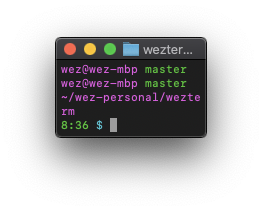
Here's an example from Terminal.app where it mangles my prompt from my local wezterm dir in a similar way, even with its min size constraint:
wez
on 29 Oct 2020
3. Maybe not related, but i notice some weird scaling / wobble effects on the text whilst resizing. Maybe related to glfw/glfw#1251 or emoon/rust_minifb#194 not sure if this is fixable, but could perhaps create a new issue for this?
That's unrelated to this (also: wezterm doesn't use either of those libraries so doesn't have the bugs that you linked to!)
The ANGLE EGL implementation which I'm using to get Metal based rendering rather than the Apple-deprecated OpenGL (CGL) rendering seems prone to the wobble on resize (ANGLE also does that on Windows). Setting prefer_egl=false switches back to CGL which is more solid in appearance. I do want to run down the cause of the wobble.
wez
on 29 Oct 2020
Yeah the wezterm behaviour makes sense.
Maybe disable line wrapping when the width is too small?
erf
on 29 Oct 2020
Related issues
 jsgf
·
3Comments
jsgf
·
3Comments
 diefans
·
5Comments
diefans
·
5Comments
 prabirshrestha
·
11Comments
prabirshrestha
·
11Comments
 hgkamath
·
7Comments
diefans
·
7Comments
hgkamath
·
7Comments
diefans
·
7Comments