Wekan: No horizontal scrollbar when multiple card list overflow screen size
Issue
Server Setup Information:
- Did you test in newest Wekan?: Yes
- Wekan version: 2.04
- Operating System: debian
- Deployment Method(snap/docker/sandstorm/mongodb bundle/source): snap
- Http frontend if any (Caddy, Nginx, Apache, see config examples from Wekan GitHub wiki first): ngnix
Problem description:
If you have a board with multiple card lists there is no horizontal scrollbar to the other lists (those not visible because do not fit in your screen). See screenshot:
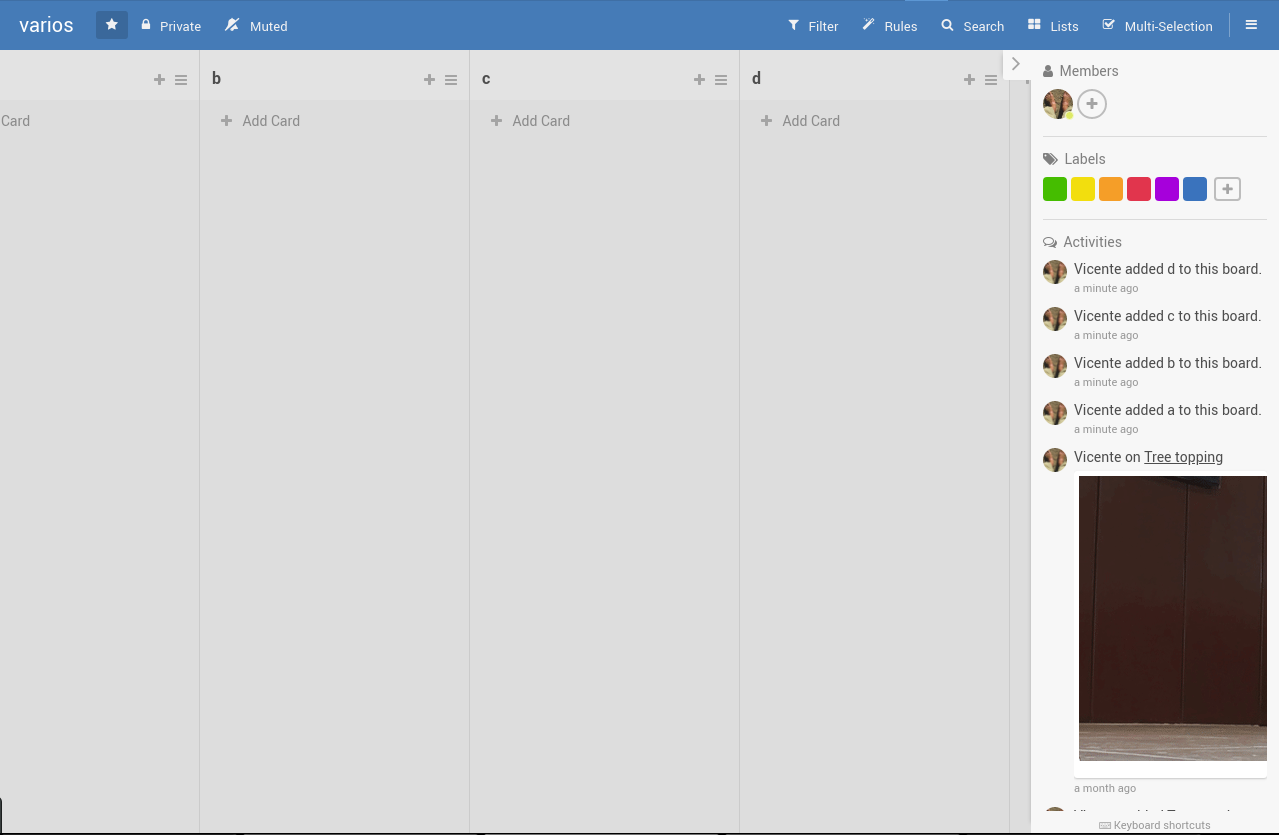
- Explain steps how to reproduce: Create a board with multiple card lists (that do not fit in your screen)
- In webbrowser, what does show Right Click / Inspect / Console ? Chrome shows more detailed info than Firefox.
Only and error because does not find wekan-manifest.json
Manifest: Line: 1, column: 1, Unexpected token.
23f2bf5……js_resource=true:77 XHR finished loading: GET "https://minca.comunes.org/sockjs/info?cb=3c69fuciz6".
23f2bf5……js_resource=true:77 XHR finished loading: GET "https://minca.comunes.org/sockjs/info?cb=od3ig35s83".
- If using Snap, what does show command
sudo snap logs wekan.wekan?
019-01-27T02:22:13Z wekan.wekan[9235]: LOGOUT_ON_MINUTES= (default value)
2019-01-27T02:22:13Z wekan.wekan[9235]: DEFAULT_AUTHENTICATION_METHOD= (default value)
2019-01-27T02:22:13Z wekan.wekan[9235]: MONGO_URL=mongodb:///var/snap/wekan/current/share/mongodb-27019.sock/wekan
2019-01-27T02:22:22Z wekan.wekan[9235]: Presence started serverId=XXXXXXXXX
2019-01-27T02:22:22Z wekan.wekan[9235]: Note: you are using a pure-JavaScript implementation of bcrypt.
2019-01-27T02:22:22Z wekan.wekan[9235]: While this implementation will work correctly, it is known to be
2019-01-27T02:22:22Z wekan.wekan[9235]: approximately three times slower than the native implementation.
2019-01-27T02:22:22Z wekan.wekan[9235]: In order to use the native implementation instead, run
2019-01-27T02:22:22Z wekan.wekan[9235]:   meteor npm install --save bcrypt
2019-01-27T02:22:22Z wekan.wekan[9235]: in the root directory of your application
 vjrj
vjrj
All 4 comments
@bentiss
Can you look at this?
 xet7
on 27 Jan 2019
xet7
on 27 Jan 2019
Also experiencing this issue (Ubuntu, on both Firefox and Chromium). Please note that not only the scrollbar is not visible, horizontal scrolling (using swipe gesture) does not work either. I can't get to any cards that don't fit on the screen.
 wyszo
on 27 Jan 2019
wyszo
on 27 Jan 2019
I found the reason.
Bugfix for Firefox rendering issue did hide scrollbar. After removing that, on Chromium/Chrome scrollbar works OK, but on Firefox cards are below of swimlane. Well, it's better to have them working on Chromium/Chrome than not at all.
I don't think it's good to go back to vertical swimlane, because changing it to horizontal swimlane did fix #2133
I will make new release with this partial fix.
xet7
on 27 Jan 2019
@xet7
Thanks for properly fixing the horizontal behavior!
 bentiss
on 28 Jan 2019
bentiss
on 28 Jan 2019
Related issues
 H4usi
·
5Comments
H4usi
·
5Comments
 jknaus
·
5Comments
jknaus
·
5Comments
 perchibald
·
4Comments
perchibald
·
4Comments
 mquandalle
·
4Comments
mquandalle
·
4Comments
 m0dch3n
·
5Comments
m0dch3n
·
5Comments
Most helpful comment
I found the reason.
Bugfix for Firefox rendering issue did hide scrollbar. After removing that, on Chromium/Chrome scrollbar works OK, but on Firefox cards are below of swimlane. Well, it's better to have them working on Chromium/Chrome than not at all.
I don't think it's good to go back to vertical swimlane, because changing it to horizontal swimlane did fix #2133
I will make new release with this partial fix.