Is it possible to have a board of boards? I would like to use it to track projects and thought that if I could have a board that contains lists like not started started testing and complete and withing each list I could have a card that linked to a project (another board).
 whittssg
All 6 comments
in other words that would be something like a parent/child attribute any board could have.
So if a board is a child, then you will point it to it's parent. inside of the parent board each 'child' just appears as a card which can be shifted through the board as usual, right?
I agree, that would be a super slick feature to have. Video editing software often has such a feature and they call it 'nesting'. I think it would be important to super easy get in and out of such a child board/card and easily jump back to the parent board
 vrms
on 30 Jan 2016
vrms
on 30 Jan 2016
@vrms Exactly :)
whittssg
on 31 Jan 2016
This is exactly what I have been thinking about! I would go one step further and make any card able to be promoted into a board. This would be a killer feature that is better than trello and could even be a better system than checklists.
 ScarabMonkey
on 1 Mar 2016
ScarabMonkey
on 1 Mar 2016
+1
I would love this functionality and / or a list of lists
 jonathan-chin
on 2 May 2016
jonathan-chin
on 2 May 2016
Hello, I started an implementation for this feature. It's still a work in progress, but here are some screenshots:
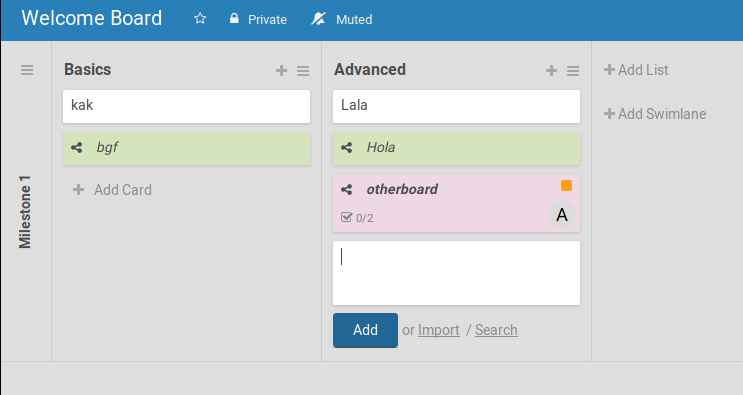
Here, next to the Add button, you can select Import (from dropdowns) or Search (an entire board).
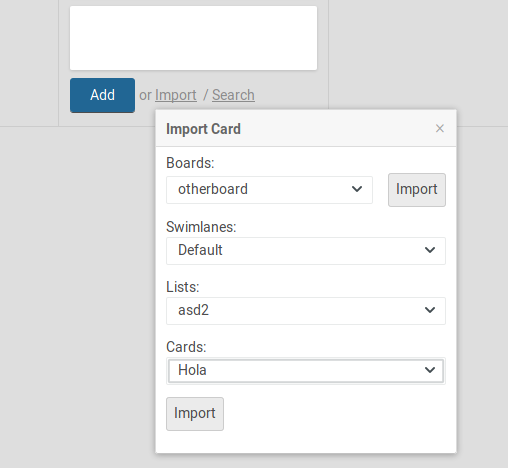
In the Import popup, you cad Import the selected board (next to the board name), or the selected card (at the bottom of the popup).
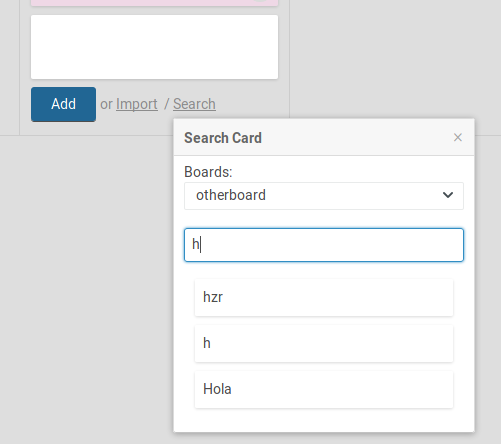
In the Search popup, you can click in the card to import and search with the text input (hitting enter).
I am working in displaying the imported card details, and in providing a 'link' button to the imported board _in the details view of the card that represents the board_.
What I find handful about the detailed view of a board, is that you could add checklists to that board (like partial implementations needed by root project).
Any comments are welcome!
 andresmanelli
on 20 Mar 2018
andresmanelli
on 20 Mar 2018
 xet7
on 8 Jun 2018
xet7
on 8 Jun 2018
Related issues
 perchibald
·
4Comments
perchibald
·
4Comments
 AaronChoi
·
3Comments
AaronChoi
·
3Comments
 timothyparez
·
3Comments
timothyparez
·
3Comments
 denisz1
·
3Comments
denisz1
·
3Comments
 jknaus
·
5Comments
jknaus
·
5Comments
Most helpful comment
Hello, I started an implementation for this feature. It's still a work in progress, but here are some screenshots:
Here, next to the
Addbutton, you can selectImport(from dropdowns) orSearch(an entire board).In the
Importpopup, you cadImportthe selected board (next to the board name), or the selected card (at the bottom of the popup).In the
Searchpopup, you canclickin the card to import andsearchwith the text input (hitting enter).I am working in displaying the imported card details, and in providing a 'link' button to the imported board _in the details view of the card that represents the board_.
What I find handful about the detailed view of a board, is that you could add checklists to that board (like partial implementations needed by root project).
Any comments are welcome!