
多谢楼主分享,技术无止境
 SiliconZou
All 201 comments
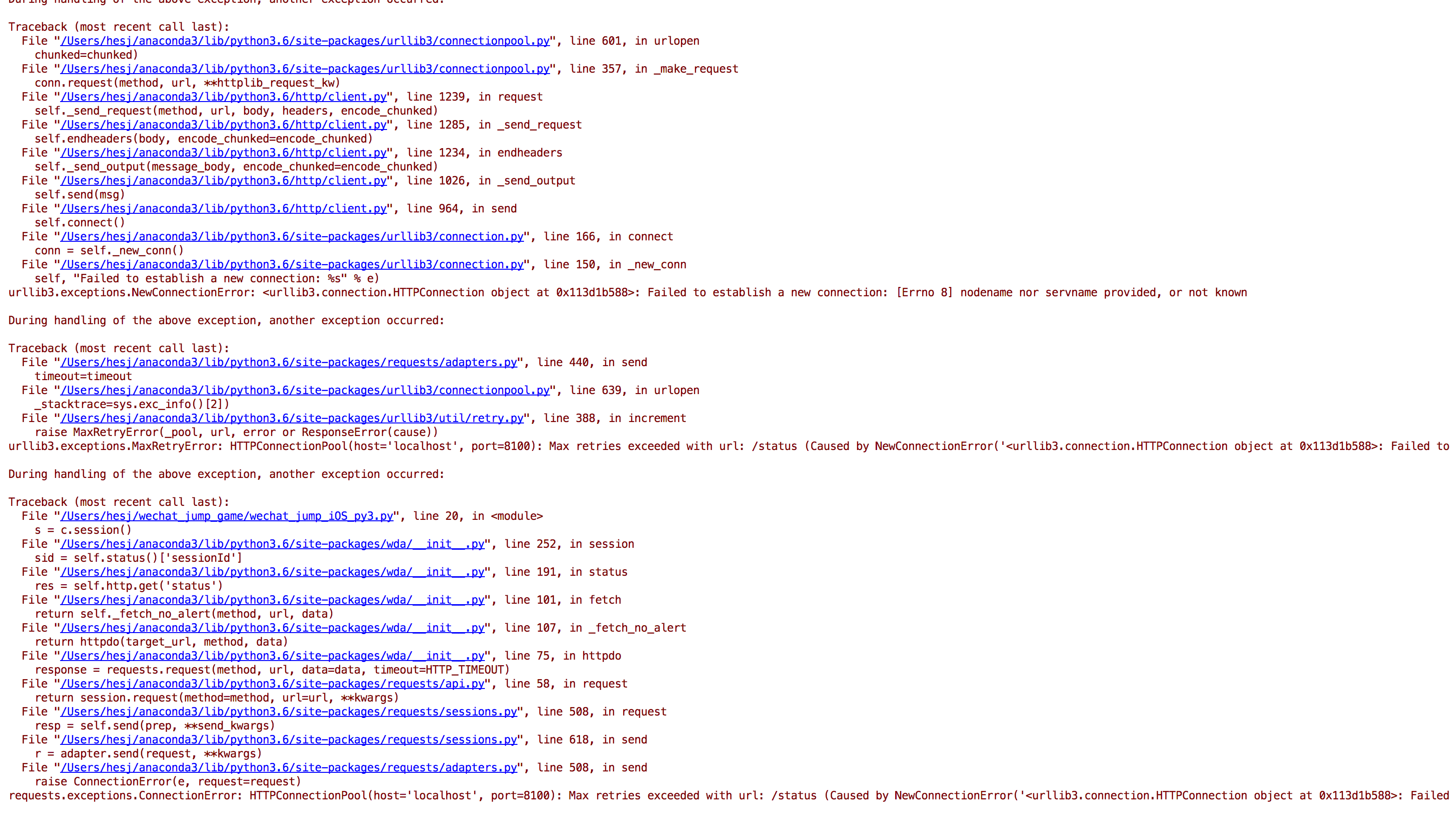
raise ConnectionError(e, request=request)
requests.exceptions.ConnectionError: HTTPConnectionPool(host='localhost', port=8100): Max retries exceeded with url: /status (Caused by NewConnectionError('
这个有遇到过吗
 MartinWong-H
on 30 Dec 2017
MartinWong-H
on 30 Dec 2017
大神 求一个 IOS 的简单教程 需要什么东西。 我是WIN 10系统。。。 需要什么软件 运行什么脚本呢? 感谢
 overthehump
on 30 Dec 2017
overthehump
on 30 Dec 2017
@xiao-Warning
配置WDA的最后:有些国产的iPhone机器通过手机的IP和端口还不能访问,此时需要将手机的端口转发到Mac上。
$ brew install libimobiledevice
$ iproxy 8100 8100
这时如果访问 http://localhost:8100/status 能显示一堆JSON数据,就说明WDA运行成功
然后再试试,应该就可以了
SiliconZou
on 30 Dec 2017
👌 谢谢 我试试看
MartinWong-H
on 30 Dec 2017
@overthehump iOS我也是按照楼主的步骤一步一步来的,我用的MacBook Pro,win10的话可以装Mac的虚拟机,不过比较麻烦
SiliconZou
on 30 Dec 2017
大神 我运行的时候 截的图有时候不太对 你有这种情况吗
 SIXSIXSIXX
on 30 Dec 2017
SIXSIXSIXX
on 30 Dec 2017
@SiliconZou @xiao-Warning
我也遇到这个错误了,在浏览器里面访问 http://localhost:8100/status 能显示一堆JSON数据,但是就是报异常

 GhostClock
on 30 Dec 2017
GhostClock
on 30 Dec 2017
@SIXSIXSIXX 我这边截图的时候会把Python的进程给杀掉,但是还可以再重新运行,没发现图不对
SiliconZou
on 30 Dec 2017
@GhostClock Traceback (most recent call last):
File "wechat_jump_iOS_py3.py", line 30, in
pull_screenshot()
File "wechat_jump_iOS_py3.py", line 19, in pull_screenshot
c.screenshot('1.png')
File "/Library/Frameworks/Python.framework/Versions/3.6/lib/python3.6/site-packages/wda/__init__.py", line 295, in screenshot
value = self.http.get('screenshot').value
File "/Library/Frameworks/Python.framework/Versions/3.6/lib/python3.6/site-packages/wda/__init__.py", line 101, in fetch
return self._fetch_no_alert(method, url, data)
File "/Library/Frameworks/Python.framework/Versions/3.6/lib/python3.6/site-packages/wda/__init__.py", line 107, in _fetch_no_alert
return httpdo(target_url, method, data)
File "/Library/Frameworks/Python.framework/Versions/3.6/lib/python3.6/site-packages/wda/__init__.py", line 83, in httpdo
raise WDAError(r.status, r.value)
wda.WDAError: WDAError(status=13, value=To screenshot a frame, it must have non-0 area.
(
0 CoreFoundation 0x00000001824c2dc8
1 libobjc.A.dylib 0x0000000181b27f80 objc_exception_throw + 56
2 CoreFoundation 0x00000001824c2c80
3 Foundation 0x0000000182e48154
4 XCTest 0x000000010008806c -[XCUIScreen _screenshotDataForQuality:rect:error:] + 192
5 XCTest 0x0000000100087f38 -[XCUIScreen screenshotDataForQuality:rect:error:] + 108
6 WebDriverAgentLib 0x0000000106b3f2dc -[XCUIDevice(FBHelpers) fb_screenshotWithError:] + 624
7 WebDriverAgentLib 0x0000000106b20dbc +[FBScreenshotCommands handleGetScreenshot:] + 132
8 WebDriverAgentLib 0x0000000106b2da10 -[FBRoute_TargetAction mountRequest:intoResponse:] + 208
9 WebDriverAgentLib 0x0000000106b2563c __37-[FBWebServer registerRouteHandlers:]_block_invoke + 496
10 RoutingHTTPServer 0x0000000106bde3cc -[RoutingHTTPServer handleRoute:withRequest:response:] + 144
11 RoutingHTTPServer 0x0000000106bdeb80 __72-[RoutingHTTPServer routeMethod:withPath:parameters:request:connection:]_block_invoke + 44
12 libdispatch.dylib 0x0000000181f0d47c
13 libdispatch.dylib 0x0000000181f1cae8
14 libdispatch.dylib 0x0000000181f0d47c
15 libdispatch.dylib 0x0000000181f12b84 _dispatch_main_queue_callback_4CF + 1844
16 CoreFoundation 0x0000000182478d50
17 CoreFoundation 0x0000000182476bb8
18 CoreFoundation 0x00000001823a0c50 CFRunLoopRunSpecific + 384
19 Foundation 0x0000000182db0cfc
20 WebDriverAgentLib 0x0000000106b24630 -[FBWebServer startServing] + 424
21 WebDriverAgentRunner 0x00000001006abbe4 -[UITestingUITests testRunner] + 132
22 CoreFoundation 0x00000001824c8a60
23 CoreFoundation 0x00000001823c0488
24 XCTest 0x0000000100072654 __24-[XCTestCase invokeTest]_block_invoke.275 + 48
25 XCTest 0x0000000100072404 __24-[XCTestCase invokeTest]_block_invoke + 680
26 XCTest 0x00000001000b89d8 -[XCUITestContext performInScope:] + 208
27 XCTest 0x000000010007214c -[XCTestCase invokeTest] + 136
28 XCTest 0x0000000100073224 __26-[XCTestCase performTest:]_block_invoke.382 + 48
29 XCTest 0x00000001000bda78 +[XCTContext runInContextForTestCase:block:] + 164
30 XCTest 0x0000000100072c20 -[XCTestCase performTest:] + 596
31 XCTest 0x000000010006ee14 __27-[XCTestSuite performTest:]_block_invoke + 288
32 XCTest 0x000000010006e83c -[XCTestSuite _performProtectedSectionForTest:testSection:] + 44
我访问localhost之后一执行python3 wechat_jump_iOS_py3.py就这样了
MartinWong-H
on 30 Dec 2017
@xiao-Warning 我访问localhost是错误没数据的,然后iproxy 8100 8100后 再打开http://localhost:8100/inspector就可以了
SiliconZou
on 30 Dec 2017

我这个打开是这样子,不过执行python3 wechat_jump_iOS_py3.py 还是跪了
MartinWong-H
on 30 Dec 2017
楼主,IOS可以自动跳吗?
 zikunfan
on 30 Dec 2017
zikunfan
on 30 Dec 2017
iphone 6s
time_coefficient = 0.00190
不会用GitHub发这里了
 sigai
on 30 Dec 2017
sigai
on 30 Dec 2017
卡在iproxy这一项了,
$iproxy 8100 8100
waiting for connection
accepted connection, fd = 4
waiting for connection
Number of available devices == 1
Requesting connecion to device handle == 40 (serial: 81d9164fb0991126168fc7b35d493205ae067ffb), port 8100
Error connecting to device!
启动之后
$ python3 wechat_jump_iOS_py3.py
retry to connect, error: HTTPConnectionPool(host='localhost', port=8100): Read timed out. (read timeout=60.0)
提示错误
 w0wbin
on 30 Dec 2017
w0wbin
on 30 Dec 2017
@LucasDvp 好像是不能,我是一步一步点着跳的😂 iPhone6的参数time_coefficient = 0.00200
SiliconZou
on 30 Dec 2017
@w0wbin 我刚开始也是一直waiting for connection,然后就打开http://localhost:8100/inspector这个网址,同时也要打开小游戏的界面,多刷新了几次等手机界面上的内容显示到网址后再次运行 wechat_jump_iOS_py3.py就可以了
SiliconZou
on 30 Dec 2017
pip install -t /Library/Frameworks/Python.framework/Versions/3.6/lib/python3.6/site-packages --pre facebook-wda

 hopesala
on 30 Dec 2017
hopesala
on 30 Dec 2017
到iproxy 8100 8100 打开浏览器这一步得到的是这个

w0wbin
on 30 Dec 2017
iPhone 7 Plus 系数
time_coefficient = 0.00120
 sxxhlx
on 30 Dec 2017
sxxhlx
on 30 Dec 2017
我运行出来的图怎么是这个

 siitao
on 30 Dec 2017
siitao
on 30 Dec 2017
@siitao 你这个应该是直接运行py文件之后的结果吧。其他都还没弄吧。
w0wbin
on 30 Dec 2017
@w0wbin 起来的弄了 localhost:8100的图也是这样的 是我哪一步没做对 还是漏了

siitao
on 30 Dec 2017
@xiao-Warning 我遇到的问题和你一模一样 请问你解决了吗
 cultivater
on 30 Dec 2017
cultivater
on 30 Dec 2017
@siitao 你这个是模拟器,不是手机的界面
cultivater
on 30 Dec 2017
@SiliconZou requests.exceptions.ConnectionError: ('Connection aborted.', RemoteDisconnected('Remote end closed connection without response',)) 这是是什么情况
 froyoe
on 30 Dec 2017
froyoe
on 30 Dec 2017
成功实现了。不过不能自动跳,哪个大神尽快出自动跳版本吧
 Qiuliuyang
on 30 Dec 2017
Qiuliuyang
on 30 Dec 2017
我也可以实现了,但是需要手动点击一下,每次不能跳到中心点,有误差,有时候也会跳不上去。这个应该怎么处理啊
 charlesYun
on 31 Dec 2017
charlesYun
on 31 Dec 2017
Android的auto脚本稍稍改下就可以在ios上自动跳了,不过参数一直不够完美,只能跳到几百,就不发出来了,等dalao撸个完美的。
 dd4rk
on 31 Dec 2017
dd4rk
on 31 Dec 2017
@SwiftieTerrence 求IOS自动跳的脚本
 zhangmyWZDY
on 31 Dec 2017
zhangmyWZDY
on 31 Dec 2017

我的运行除了不能自动跳都ok。跳不准的只能自己掌握以下技巧了吧
Qiuliuyang
on 31 Dec 2017
@Qiuliuyang 如何点击让他一步步跳,图片显示的分数是我在手机上点击的跳

zhangmyWZDY
on 31 Dec 2017
@zhangmyWZDY 在matplot里面上点一下起始坐标,再点一下终点坐标就行了。会自动跳
Qiuliuyang
on 31 Dec 2017
@Qiuliuyang thks , 有没有出现python界面显示不全,点完一个块,下一个块不在屏幕中显示,或者找不到下一个块的坐标点,请问如何解决?
zhangmyWZDY
on 31 Dec 2017
@zhangmyWZDY 是你手机连接不太好?我还没有这个问题,延迟倒是有,不过等一两秒就好了
Qiuliuyang
on 31 Dec 2017
@SiliconZou 楼主 怎么让他自动跳?wda应该在9.3.2d的系统运行有问题
MartinWong-H
on 31 Dec 2017
@SiliconZou 手动。。说错
MartinWong-H
on 31 Dec 2017


同一个界面,python应用程序显示如上图,手机上显示如下图,
设备iPhone6,运行的python3 wechat_jump_iOS_py3.py,time_coefficient = 0.00200,其他未做改动,
各路大神有看到的,求解。
zhangmyWZDY
on 31 Dec 2017
@cultivater 你指哪一个?
MartinWong-H
on 31 Dec 2017
@xiao-Warning 你遇到的那几个问题我都遇到过,尤其是最后的http://localhost:8100/inspector不显示手机的界面,你最后怎么解决的呢?
cultivater
on 31 Dec 2017
iPhone 7 plus跳一步之后界面刷新不完整,有大佬遇到过么,求解决方法。
 kinmoLun
on 31 Dec 2017
kinmoLun
on 31 Dec 2017
@loveJuly 7Plus time_coefficient = 0.00120
zikunfan
on 31 Dec 2017
@LucasDvp 这个系数我是这样设置的,就是跳了一步之后,新的小方块出现不完整。。。
kinmoLun
on 31 Dec 2017
@loveJuly 你@wangshub,看看需不需要改一下updatefig里面sleep时间
zikunfan
on 31 Dec 2017
@LucasDvp 这个时间是什么时间?
kinmoLun
on 31 Dec 2017
@loveJuly 刷新截图的间隔时间,要不你直接改成0.5试试好了
zikunfan
on 31 Dec 2017
@LucasDvp 我明白了,可以尝试一下
kinmoLun
on 31 Dec 2017
iphone 怎么保证每次都跳到中心点?
kinmoLun
on 31 Dec 2017
@loveJuly 棋子下方中间超出1mm为起点,终点就是几何体顶平面中心
zikunfan
on 31 Dec 2017
@LucasDvp 应该怎么修改iOS_py3的代码
kinmoLun
on 31 Dec 2017
@LucasDvp 把点击获取的坐标转换为对应几何体的中心?
kinmoLun
on 31 Dec 2017
@loveJuly 不用改代码,具体IOS我没有找到自动化方法,只能自己一个一个点
zikunfan
on 31 Dec 2017
@LucasDvp 我在想能不能把代码改改,点击第一次获取起点的中心点,点击第二次获取终点的中心点,distance就等于两个中心点的间距,这样无论怎么点,就都是跳到中心点了(保证每次都点到几何体的情况下)
kinmoLun
on 31 Dec 2017
@loveJuly,可是你几何体中心点在变化,这个原po使用OpenCV实现获取中心点的,你可以研究下如何在IOS里面调用wechat_jump_auto的代码
zikunfan
on 31 Dec 2017
@LucasDvp 找到一个可行的,#224(issue)
kinmoLun
on 31 Dec 2017
@loveJuly 棒,我试试
zikunfan
on 31 Dec 2017
@LucasDvp 有没有遇到过webdriveragent在iPhone 5s 下 test fail的情况
kinmoLun
on 31 Dec 2017
@loveJuly 没有我没有5s真机,你可以把error贴上来看看
zikunfan
on 31 Dec 2017
@LucasDvp 关键是xcode的控制台没有显示任何东西,command + U之后直接一个“test failed”的弹窗,就没了。
kinmoLun
on 31 Dec 2017
检查2个地方:
- 设置里面Device Setting有没有Trust你个人用户证书
- 证书有没有按照这个设置好
zikunfan
on 31 Dec 2017
在Mac下运行,好像需要把
ani = animation.FuncAnimation(fig, updatefig, interval=50, blit=True)
改为
ani = animation.FuncAnimation(fig, updatefig, interval=50, blit=False)
要不然,不会自动更新图像
 champkeh
on 31 Dec 2017
champkeh
on 31 Dec 2017
@LucasDvp 环境都没有问题,同样的环境下,6s和7p都可以成功test,唯独5s不行,我正在升级5s的系统,想知道是不是系统的问题,因为我用模拟器验证过是正常的。
kinmoLun
on 31 Dec 2017
@loveJuly,很有可能,你bundle setting里面选的IOS系统要跟你真机系统匹配
zikunfan
on 31 Dec 2017
可以自动化了。见:
https://github.com/wangshub/wechat_jump_game/pull/273/files
运行前提:
一个iOS设备、一台Mac电脑、一份Xcode
- 安装brew
- 安装WebDriverAgent,各种问题可以参考这个帖子
- 安装python3,即
brew install python3 - 安装本项目的各种依赖
pip3 install -r requirements.txt - 安装WebDriverAgent的Python库:
pip3 install facebook-wda - 安装
brew install libimobiledevice
接下来
- 手机用线连接mac,然后xcode通过真机运行WebDriverAgent(Product->test)
- 电脑运行
iproxy 8100 8100,在电脑浏览器访问http://localhost:8100/status看是否有输出。有则说明wda正常。 - 手机运行跳一跳程序
- 电脑运行
python3 wechat_jump_auto_iOS.py即可。
不断调整代码里的参数,使得可以自动完成。
 goodbest
on 31 Dec 2017
goodbest
on 31 Dec 2017
@kaizhetutuquliaomei 不排除是wda和iOS9的兼容问题啊。
不过我想也没必要为了这个就升级系统吧。
goodbest
on 31 Dec 2017
@goodbest good work~
zikunfan
on 31 Dec 2017
@kaizhetutuquliaomei 我刚刚用5s@iOS10试了一下,第一次也是截图崩。后来关了一些程序,重新就好了。估计是内存不足..(5s和6都是内存捉急)
goodbest
on 31 Dec 2017
@LucasDvp 已解决,有没有iPhone 5S的参数,分享一下。
kinmoLun
on 31 Dec 2017
@kaizhetutuquliaomei 我只能说inspector有时正常,有时不正常。
xcode里面经常报错ebDriverAgentRunner-Runner[249:8414] Enqueue Failure: Application local.pid.195 is not running
goodbest
on 31 Dec 2017
iPhoneSE的参数
time_coefficient = 0.00225
champkeh
on 31 Dec 2017
@champkeh config.json的配置呢?是用1920x1080的吗
kinmoLun
on 31 Dec 2017
@LucasDvp
自己的机器上测试可用的自动脚本 #271
 lstk520
on 31 Dec 2017
lstk520
on 31 Dec 2017
请问配置WDA bundle签名证书那些一定需要个人证书吗
 Abysman
on 31 Dec 2017
Abysman
on 31 Dec 2017
mac + iPhoneX完美运行
 Azleal
on 31 Dec 2017
Azleal
on 31 Dec 2017
@Azleal 请教一下WDA签名那部分是怎么完成的,我也是Mac和iPhone X
Abysman
on 31 Dec 2017
@Azleal 请教下,iPhone X 的参数如何配置
 LucisBaoshg
on 31 Dec 2017
LucisBaoshg
on 31 Dec 2017
@goodbest
你好,在运行wda的时候 弹出什么要access的钥匙串密钥,我不知道,然后我就点了拒绝,现在就跑不起来了。提示这个错误
CodeSign /Users/pengpn/Library/Developer/Xcode/DerivedData/WebDriverAgent-epqieiskmzjtbzfnpjbdjrvtlmrx/Build/Products/Debug-iphoneos/WebDriverAgentRunner-Runner.app/Frameworks/XCTAutomationSupport.framework
    cd /Users/pengpn/Downloads/WebDriverAgent
    export CODESIGN_ALLOCATE=/Applications/Xcode.app/Contents/Developer/Toolchains/XcodeDefault.xctoolchain/usr/bin/codesign_allocate
    export PATH="/Applications/Xcode.app/Contents/Developer/Platforms/iPhoneOS.platform/Developer/usr/bin:/Applications/Xcode.app/Contents/Developer/usr/bin:/usr/local/bin:/usr/bin:/bin:/usr/sbin:/sbin"

Signing Identity:     "iPhone Developer: [email protected] (5B98PT69ZW)"

    /usr/bin/codesign --force --sign 2C4AD029F196C7ECFC5FC0E94A9EDD5BA80C1DBA --deep --preserve-metadata=identifier,entitlements,flags --timestamp=none /Users/pengpn/Library/Developer/Xcode/DerivedData/WebDriverAgent-epqieiskmzjtbzfnpjbdjrvtlmrx/Build/Products/Debug-iphoneos/WebDriverAgentRunner-Runner.app/Frameworks/XCTAutomationSupport.framework

/Users/pengpn/Library/Developer/Xcode/DerivedData/WebDriverAgent-epqieiskmzjtbzfnpjbdjrvtlmrx/Build/Products/Debug-iphoneos/WebDriverAgentRunner-Runner.app/Frameworks/XCTAutomationSupport.framework: replacing existing signature
/Users/pengpn/Library/Developer/Xcode/DerivedData/WebDriverAgent-epqieiskmzjtbzfnpjbdjrvtlmrx/Build/Products/Debug-iphoneos/WebDriverAgentRunner-Runner.app/Frameworks/XCTAutomationSupport.framework: unknown error -1=ffffffffffffffff
Command /usr/bin/codesign failed with exit code 1
 pengpn
on 31 Dec 2017
pengpn
on 31 Dec 2017
@loveJuly
我没有用config.json,我是直接改的ios的那个文件

champkeh
on 31 Dec 2017
@SiliconZou 按照你说的方式安装了iproxy,问题依然存在。
ip:port/status 无数据
localhost:port/status 有数据
但是
localhost:port/inspector访问非常缓慢
而且执行py的时候提示
requests.exceptions.ConnectionError: HTTPConnectionPool 最大重试次数过多的问题
 zfdev
on 31 Dec 2017
zfdev
on 31 Dec 2017
折腾小半天终于OK了,刷了3288分
npm版本要更新最新
iphone端口不能直接http访问,brew install libimobiledevice,不是brew install imobiledevice
iphone7plus: time_coefficient = 0.00117
 BABALA258
on 31 Dec 2017
BABALA258
on 31 Dec 2017
@BABALA258 请问下WDA general那块签名怎么弄,用什么签名证书。。感谢
Abysman
on 31 Dec 2017
卡在 waiting for connection。捂脸
 MrFoxwho
on 31 Dec 2017
MrFoxwho
on 31 Dec 2017
@Abysman 我用的是apple开发者账号,到developer.apple.com去新建iOS Provisioning Profiles下载到xcode使用;
BABALA258
on 31 Dec 2017
@BABALA258 感谢。。不过这是不是收费的才能有证书
Abysman
on 31 Dec 2017
@BABALA258 不能直接http访问怎么办呢 我一直在waiting for connection
MrFoxwho
on 31 Dec 2017
@LucisBaoshg 参考一下 issues/4 , 另外wechat_jump_iOS_py3.py 中的参数已经是iPhone X的推荐参数了, 我没有调.
Azleal
on 31 Dec 2017
@zhangmyWZDY 你把 wechat_jump_iOS_py3.py 里面的 time.sleep(1) 改成合适的时间 我试了 1.5s 没问题
 teddingdev
on 31 Dec 2017
teddingdev
on 31 Dec 2017
有没有人和我一样中途把手机拔了的。。然后估计是iproxy映射的问题,就再也连不上了。。。
自己解决了。。用lsof -i tcp:port 将port换成被占用的端口(如:8100),然后找到进程的PID,使用kill命令:kill PID(进程的PID,如40989),杀死对应的进程。再重新用iproxy映射就可以了
 AlainOUYANG
on 31 Dec 2017
AlainOUYANG
on 31 Dec 2017
@pengpn 你好 请问你的那个Command /usr/bin/codesign failed with exit code 1问题解决了吗?
 iszw
on 1 Jan 2018
iszw
on 1 Jan 2018
@Azleal 对,我的问题其实是个人证书怎么来的,是一定要交钱申请才行是吗。谢谢~
Abysman
on 1 Jan 2018
一定要有mac电脑吗?
 Xuzan9396
on 1 Jan 2018
Xuzan9396
on 1 Jan 2018
iphone8 plus
time_coefficient = 0.00120
 liupeng826
on 1 Jan 2018
liupeng826
on 1 Jan 2018
6s
用auto的跑起来了,可以加上总分识别来完成指定总分的功能
 haima-zju
on 1 Jan 2018
haima-zju
on 1 Jan 2018
iPhone 6 + Mac
自动模式下 press_coefficient = 1.95 个人觉得比较合适
另外,time.sleep(random.uniform(2, 3)) 设置为2-3 这样更稳定同时还能够获得 唱片机 便利店等的加分
再次感谢作者们!
 XingyuZhou989
on 1 Jan 2018
XingyuZhou989
on 1 Jan 2018
@Abysman 不用的,改了WebDriverAgent的BundleID,用自己icloud账号就行,参考给出的https://testerhome.com/topics/7220这篇的“免费版的个人证书“这段
haima-zju
on 1 Jan 2018
@SiliconZou @goodbestpip3 install –pre facebook-wda
Invalid requirement: '–pre'
Traceback (most recent call last):
File "/usr/local/lib/python3.6/site-packages/pip/_vendor/packaging/requirements.py", line 92, in __init__
req = REQUIREMENT.parseString(requirement_string)
File "/usr/local/lib/python3.6/site-packages/pip/_vendor/pyparsing.py", line 1617, in parseString
raise exc
File "/usr/local/lib/python3.6/site-packages/pip/_vendor/pyparsing.py", line 1607, in parseString
loc, tokens = self._parse( instring, 0 )
File "/usr/local/lib/python3.6/site-packages/pip/_vendor/pyparsing.py", line 1379, in _parseNoCache
loc,tokens = self.parseImpl( instring, preloc, doActions )
File "/usr/local/lib/python3.6/site-packages/pip/_vendor/pyparsing.py", line 3376, in parseImpl
loc, exprtokens = e._parse( instring, loc, doActions )
File "/usr/local/lib/python3.6/site-packages/pip/_vendor/pyparsing.py", line 1379, in _parseNoCache
loc,tokens = self.parseImpl( instring, preloc, doActions )
File "/usr/local/lib/python3.6/site-packages/pip/_vendor/pyparsing.py", line 3698, in parseImpl
return self.expr._parse( instring, loc, doActions, callPreParse=False )
File "/usr/local/lib/python3.6/site-packages/pip/_vendor/pyparsing.py", line 1379, in _parseNoCache
loc,tokens = self.parseImpl( instring, preloc, doActions )
File "/usr/local/lib/python3.6/site-packages/pip/_vendor/pyparsing.py", line 3359, in parseImpl
loc, resultlist = self.exprs[0]._parse( instring, loc, doActions, callPreParse=False )
File "/usr/local/lib/python3.6/site-packages/pip/_vendor/pyparsing.py", line 1383, in _parseNoCache
loc,tokens = self.parseImpl( instring, preloc, doActions )
File "/usr/local/lib/python3.6/site-packages/pip/_vendor/pyparsing.py", line 2670, in parseImpl
raise ParseException(instring, loc, self.errmsg, self)
pip._vendor.pyparsing.ParseException: Expected W:(abcd...) (at char 0), (line:1, col:1)
During handling of the above exception, another exception occurred:
Traceback (most recent call last):
File "/usr/local/lib/python3.6/site-packages/pip/req/req_install.py", line 82, in __init__
req = Requirement(req)
File "/usr/local/lib/python3.6/site-packages/pip/_vendor/packaging/requirements.py", line 96, in __init__
requirement_string[e.loc:e.loc + 8]))
pip._vendor.packaging.requirements.InvalidRequirement: Invalid requirement, parse error at "'–pre'"
大佬 help!
 jhhuang96
on 1 Jan 2018
jhhuang96
on 1 Jan 2018
求教大佬
Product -> test 后显示

运行环境 Mac 10.13.2,Xcode 也是最新版本
手机系统 iPhone 8Plus 11.2.1
 dwyo
on 1 Jan 2018
dwyo
on 1 Jan 2018
@ding221 xcode应该是9.2
 blessu
on 1 Jan 2018
blessu
on 1 Jan 2018
iPhone 7 + mac
建议将 wechat_jump_auto_iOS.py 中的
if abs(pixel[0] - last_pixel[0]) + abs(pixel[1] - last_pixel[1]) + abs(pixel[2] - last_pixel[2]) > 10
改为
if abs(pixel[0] - last_pixel[0]) + abs(pixel[1] - last_pixel[1]) + abs(pixel[2] - last_pixel[2]) > 2
对于一些圆形带条纹board效果好,完成了500到1000以上的质变
此外
time.sleep(random.uniform(1, 1.1)) # 为了保证截图的时候应落稳了,多延迟一会儿
改成
time.sleep(random.uniform(1.4, 1.5)) # 为了保证截图的时候应落稳了,多延迟一会儿
这样可以吃到大多数的5/10/15/20。上面提到的2,3也是稳妥的选择。
感谢作者和大家,祝不删好友
blessu
on 1 Jan 2018
卡在waiting for connection,尝试了很多办法都没解决,有人遇到这个问题的嘛
 Yggdrasill-7C9
on 1 Jan 2018
Yggdrasill-7C9
on 1 Jan 2018
自动化可以是可以了,但是分不高,一般1300左右就会失败了。而且也不能保证买车跳跃都在中心。8p
charlesYun
on 1 Jan 2018
@XingyuZhou989 我同样是iphone6 为什么我自动 调你的时间 一个都跳不了
SIXSIXSIXX
on 1 Jan 2018
需要电脑?
 liuweiqiang0523
on 1 Jan 2018
liuweiqiang0523
on 1 Jan 2018
求iPhone SE参数~~~~
jhhuang96
on 1 Jan 2018
@SIXSIXSIXX
啊?你是按照作者要求 copy 对应型号的配置文件到./目录下吗?
XingyuZhou989
on 1 Jan 2018
个人证书 Xcode 直接帮你申请了,你同意使用钥匙串就可以了,6天有效期,跟着教程不用管证书的问题
发自我的 iPhone
在 2018年1月1日,上午9:00,Abysman <[email protected]notifications@github.com> 写道:
@Azlealhttps://github.com/azleal 对,我的问题其实是个人证书怎么来的,是一定要交钱申请才行是吗。谢谢~
—
You are receiving this because you commented.
Reply to this email directly, view it on GitHubhttps://github.com/wangshub/wechat_jump_game/issues/99#issuecomment-354631240, or mute the threadhttps://github.com/notifications/unsubscribe-auth/AcKZaD4nWWJL0oVeuZrKsNxWxFc19U-kks5tGC4ZgaJpZM4RPkJ7.
teddingdev
on 1 Jan 2018
你拔了手机, Xcode调试也断了,重新点 project—>test ,iproxy 8100 8100 重新转发就行
发自我的 iPhone
在 2018年1月1日,上午5:37,AlainOUYANG <[email protected]notifications@github.com> 写道:
有没有人和我一样中途把手机拔了的。。然后估计是iproxy映射的问题,就再也连不上了。。。
—
You are receiving this because you commented.
Reply to this email directly, view it on GitHubhttps://github.com/wangshub/wechat_jump_game/issues/99#issuecomment-354624806, or mute the threadhttps://github.com/notifications/unsubscribe-auth/AcKZaEzfBG9ZEH5K-g81RbcPgQWe5sBKks5tF_6pgaJpZM4RPkJ7.
teddingdev
on 1 Jan 2018
我昨天就奇怪,为什么要用随机数呢……我去掉了随机数 每次都是1.5s,不然每次截图都是在半空中也是醉了
发自我的 iPhone
在 2018年1月1日,下午12:23,blessu <[email protected]notifications@github.com> 写道:
iPhone 7 + mac
建议将 wechat_jump_auto_iOS.py 中的
if abs(pixel[0] - last_pixel[0]) + abs(pixel[1] - last_pixel[1]) + abs(pixel[2] - last_pixel[2]) > 10
改为
if abs(pixel[0] - last_pixel[0]) + abs(pixel[1] - last_pixel[1]) + abs(pixel[2] - last_pixel[2]) > 2
对于一些圆形带条纹board效果好,完成了500到1000以上的质变
此外
time.sleep(random.uniform(1, 1.1)) # 为了保证截图的时候应落稳了,多延迟一会儿
改成
time.sleep(random.uniform(1.4, 1.5)) # 为了保证截图的时候应落稳了,多延迟一会儿
这样可以吃到大多数的5/10/15/20。
—
You are receiving this because you commented.
Reply to this email directly, view it on GitHubhttps://github.com/wangshub/wechat_jump_game/issues/99#issuecomment-354636059, or mute the threadhttps://github.com/notifications/unsubscribe-auth/AcKZaJg6_h3awZ02_LuCwvf4UIadl-COks5tGF3ZgaJpZM4RPkJ7.
teddingdev
on 1 Jan 2018
谢谢大佬
8P 已经成功跑起来了,升级了xcode到 9.2,使用默认参数跑到了1100 了,目前还在跑
dwyo
on 1 Jan 2018
@Yggdrasill-7C9 有啊,我也卡在这儿了。iproxy 8100 8100,waiting for connection (forever!)有高手能帮忙解决么?localhost:8100/status完全正常,但是运行python却说Failed to establish a new connection: [Errno 61] Connection refused,原因是requests.exceptions.ConnectionError: HTTPConnectionPool(host='localhost', port=8100): Max retries exceeded with url: /status。
 rosenbloog
on 1 Jan 2018
rosenbloog
on 1 Jan 2018
@haima-zju a非常的悲伤,我的弹出个需要访问access的钥匙串,然后始终允许之后就再也不能签了。也是在sign下面改成自己的账号,bundle随便加了个后缀
Abysman
on 1 Jan 2018
@Abysman 不需要, 第一次打开xcode 那里有个add account, 添加你自己的appleid 就行了. 个人证书不需要花钱的.
Azleal
on 1 Jan 2018
@Azleal 确实是这么做的,Signing下面选自己的然后product bundle加了个后缀,但是之后build期间有个要访问钥匙串的什么access还要输入密码,然而并没有这个东西,始终允许后就一直fail了。。
Abysman
on 1 Jan 2018
@ding221 请问下,你的iproxy 8100 8100 运行之后的结果是什么。我的一直是waiting for connection。

 hesj
on 1 Jan 2018
hesj
on 1 Jan 2018
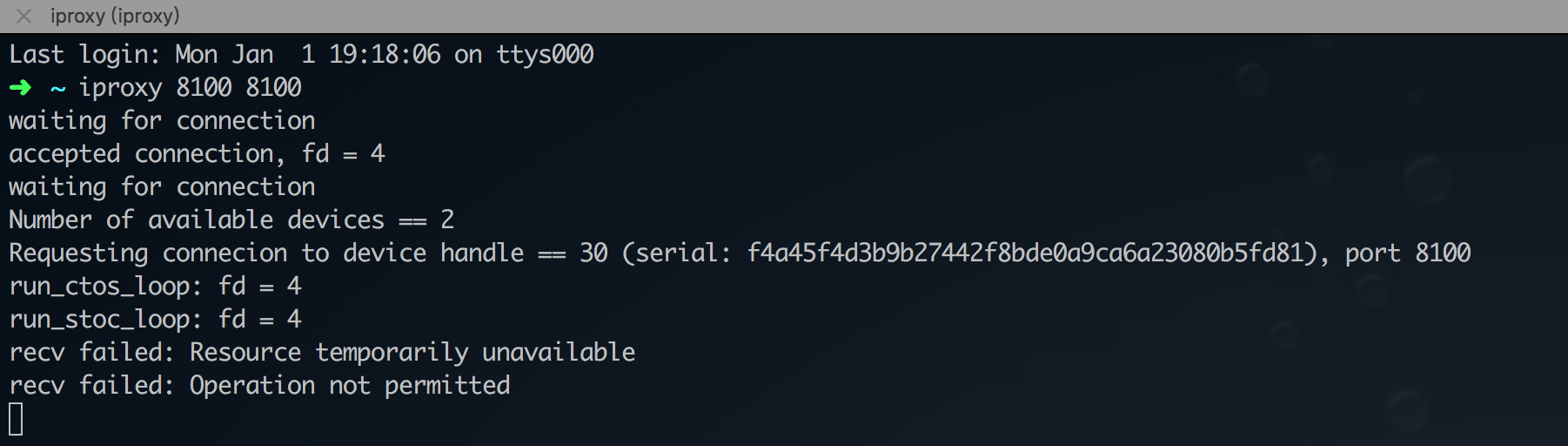
就是这个结果,终端窗口不能关,新开一个终端运行python脚本
发自我的 iPhone
在 2018年1月1日,下午6:06,hesj <[email protected]notifications@github.com> 写道:
@ding221https://github.com/ding221 请问下,你的iproxy 8100 8100 运行之后的结果是什么。我的一直是waiting for connection。
[image]https://user-images.githubusercontent.com/23515123/34466911-2afd19cc-ef1e-11e7-9d93-354abb660392.png
—
You are receiving this because you commented.
Reply to this email directly, view it on GitHubhttps://github.com/wangshub/wechat_jump_game/issues/99#issuecomment-354645900, or mute the threadhttps://github.com/notifications/unsubscribe-auth/AcKZaKa_xjAJ2Qy_-BfUgg-jd-ftr4mXks5tGK4ZgaJpZM4RPkJ7.
teddingdev
on 1 Jan 2018
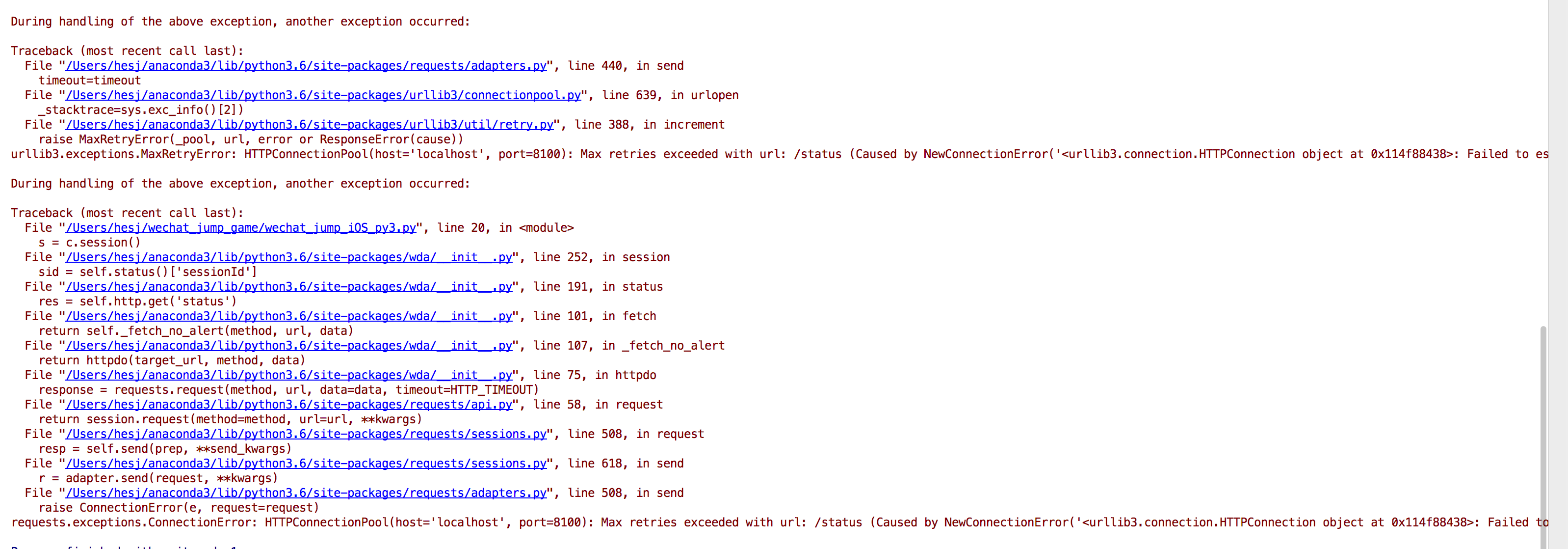
@uptian 我是这么做的,在我 pycharm 里面运行的,但是报错。原因是因为连接不上 8100 端口。
hesj
on 1 Jan 2018
@hesj 我是参考楼上 goodbest 这个哥们的
- 手机用线连接mac,然后xcode通过真机运行WebDriverAgent(Product->test)
- 电脑运行iproxy 8100 8100,在电脑浏览器访问 http://localhost:8100/status 看是否有输出。有则说明wda正常。
- 手机运行跳一跳程序
- 电脑运行python3 wechat_jump_auto_iOS.py即可。
- 不断调整代码里的参数,使得可以自动完成。
dwyo
on 1 Jan 2018
iproxy 做 端口转发 也不行吗
发自我的 iPhone
在 2018年1月1日,下午7:01,hesj <[email protected]notifications@github.com> 写道:
@uptianhttps://github.com/uptian 我是这么做的,在我 pycharm 里面运行的,但是报错。原因是因为连接不上 8100 端口。
[image]https://user-images.githubusercontent.com/23515123/34467231-2f146896-ef26-11e7-846b-547ad57ad345.png
—
You are receiving this because you were mentioned.
Reply to this email directly, view it on GitHubhttps://github.com/wangshub/wechat_jump_game/issues/99#issuecomment-354647711, or mute the threadhttps://github.com/notifications/unsubscribe-auth/AcKZaMQDrbyns74Q2E7OGZ6rNLJtigjrks5tGLsbgaJpZM4RPkJ7.
teddingdev
on 1 Jan 2018
@hesj @uptian
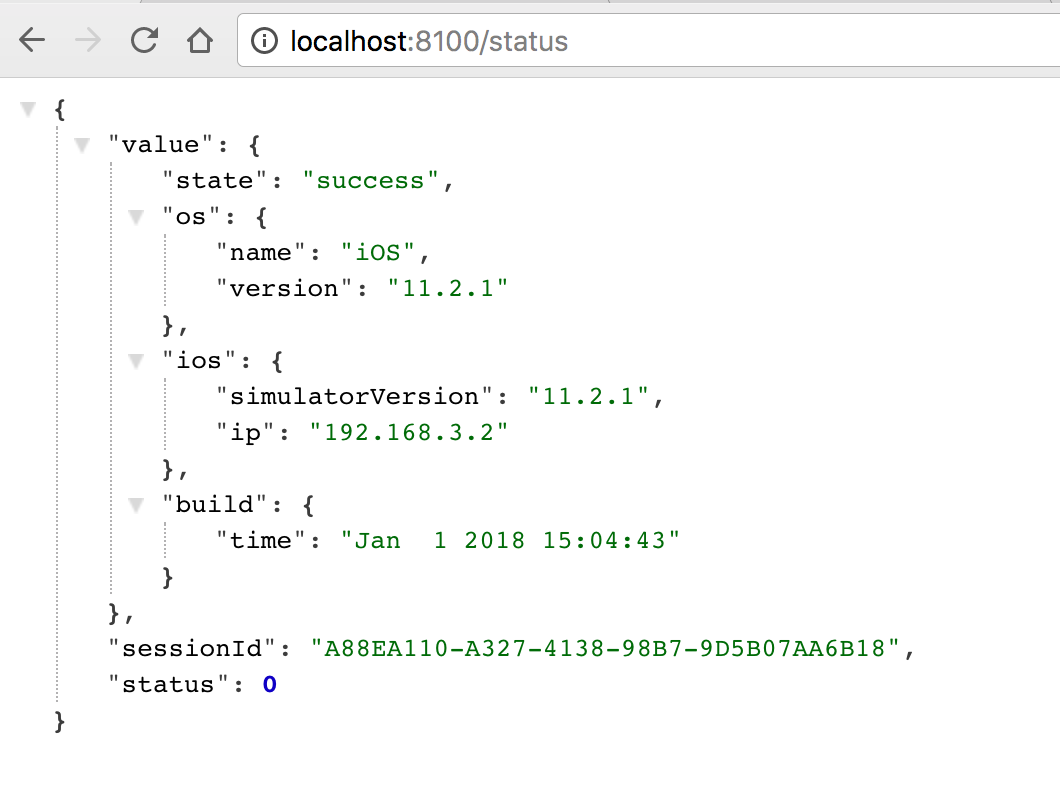
运行完 iproxy 8100 8100 后,浏览器访问 http://localhost:8100/status,出现类似下图
然后终端显示如下
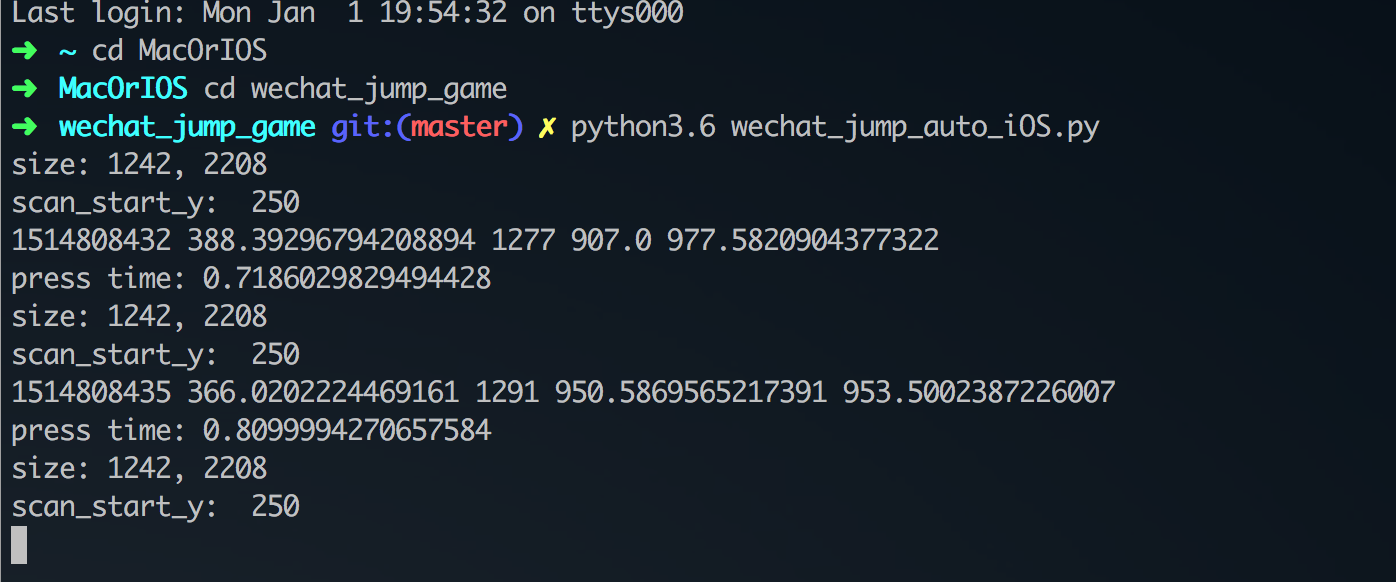
新开一个终端窗口,执行脚本就开始跑了
dwyo
on 1 Jan 2018
@ding221 @uptian 浏览器访问 http://localhost:8100/status,出现类似下图(不管有没有执行iproxy 8100 8100,都可以显示)
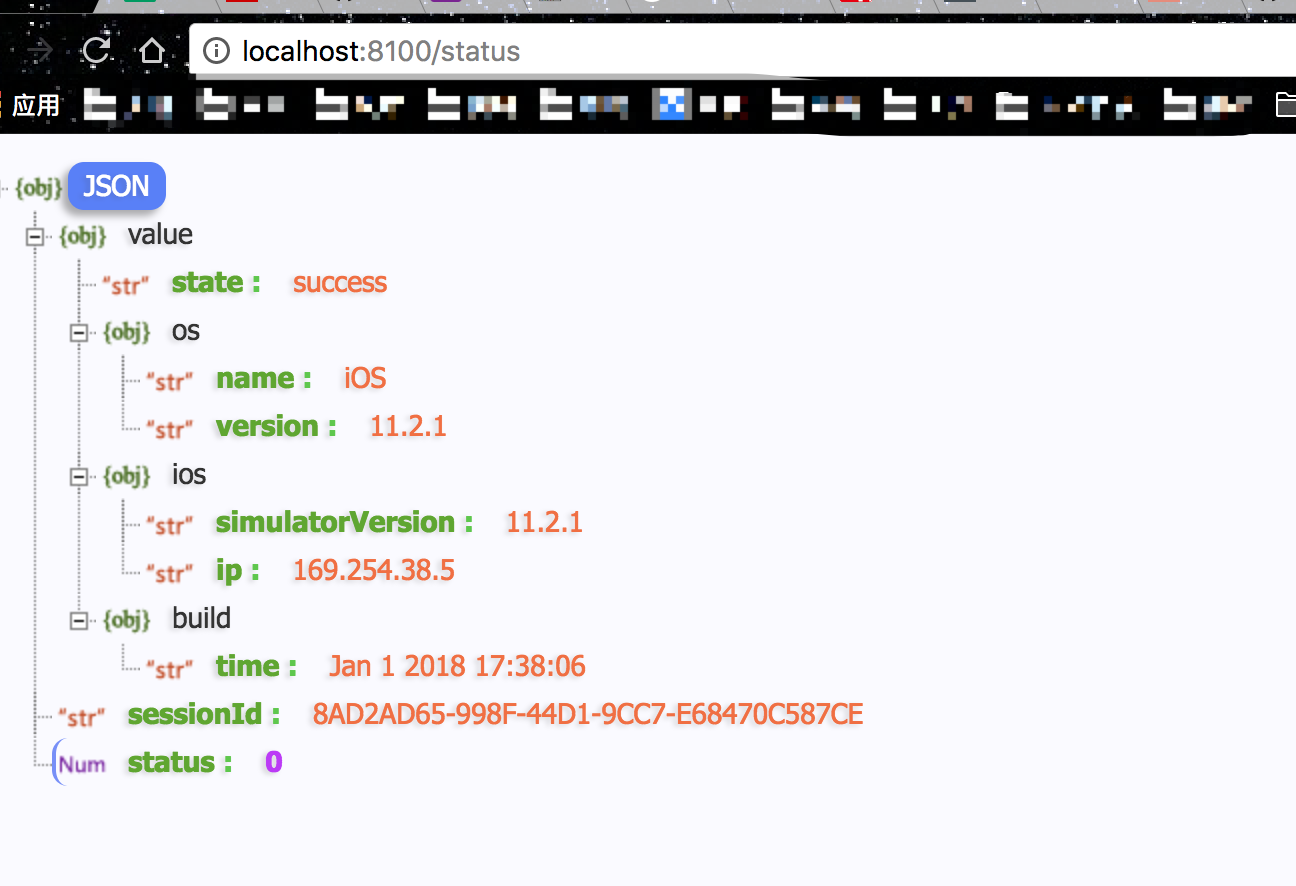
这是执行 iproxy 8100 8100 的情况,没有你后面的信息。
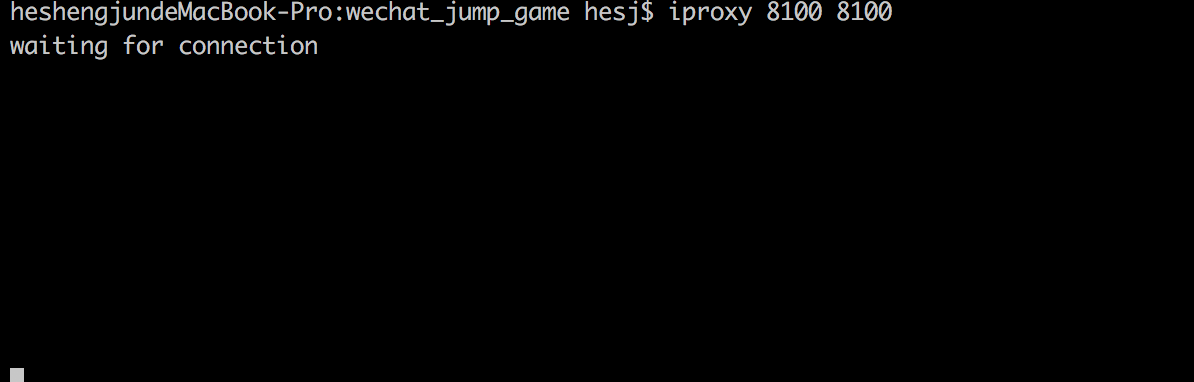
同时,我也检查了 8100 端口,并没有占用,且使用大招,重启过。
请问是不是和开发者证书有关系?
hesj
on 1 Jan 2018
@ding221 @uptian 我使用 iproxy 8100 8100 的后的截图,和你们不一样
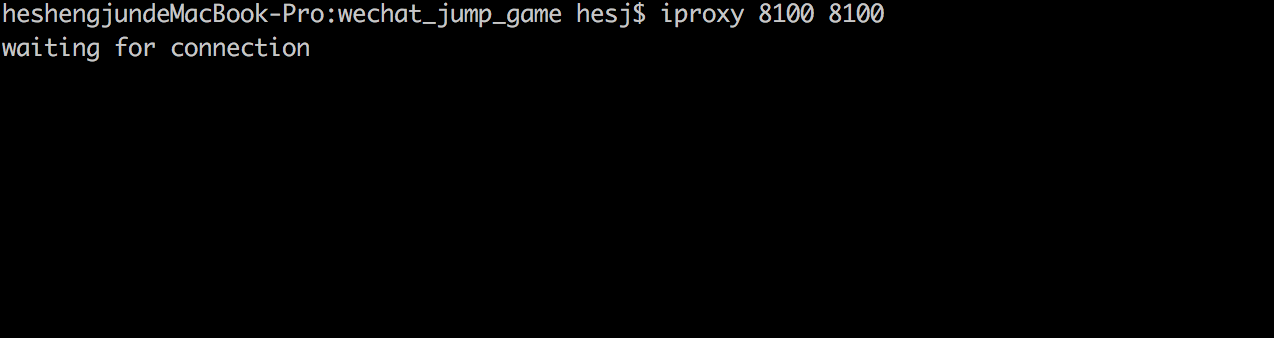
hesj
on 1 Jan 2018
@Abysman 是的, 哪个钥匙串是你电脑的钥匙串呀, 输入你mac的密码就行了
Azleal
on 1 Jan 2018
@Azleal 迷一般的就是我输了这个密码然后错误
Abysman
on 1 Jan 2018
@Azleal 十分感谢!最后还是弄好了
Abysman
on 1 Jan 2018
@Abysman 最后怎么弄好的?我遇到了和你同样的问题。
Code Signing Error: Failed to create provisioning profile. The app ID "com.facebook.WebDriverAgentRunner" cannot be registered to your development team. Change your bundle identifier to a unique string to try again.
Code Signing Error: No profiles for 'com.facebook.WebDriverAgentRunner' were found:  Xcode couldn't find any iOS App Development provisioning profiles matching 'com.facebook.WebDriverAgentRunner'.
Code Signing Error: Code signing is required for product type 'UI Testing Bundle' in SDK 'iOS 11.2'
 leegang
on 1 Jan 2018
leegang
on 1 Jan 2018
@leegang 我是Lib签了,Runner没签。中途不知道怎么把这个弄掉了。以及如果弹出了那个要访问钥匙串的请求基本就妥了
Abysman
on 1 Jan 2018
@Abysman 谢谢
leegang
on 1 Jan 2018
求问各位,$ brew install libimobiledevice
$ iproxy 8100 8100
这时如果访问 http://localhost:8100/status 能显示一堆JSON数据,就说明WDA运行成功,这个一直不能实现
终端一直链接出错怎么办呀
 BUAAtao
on 1 Jan 2018
BUAAtao
on 1 Jan 2018
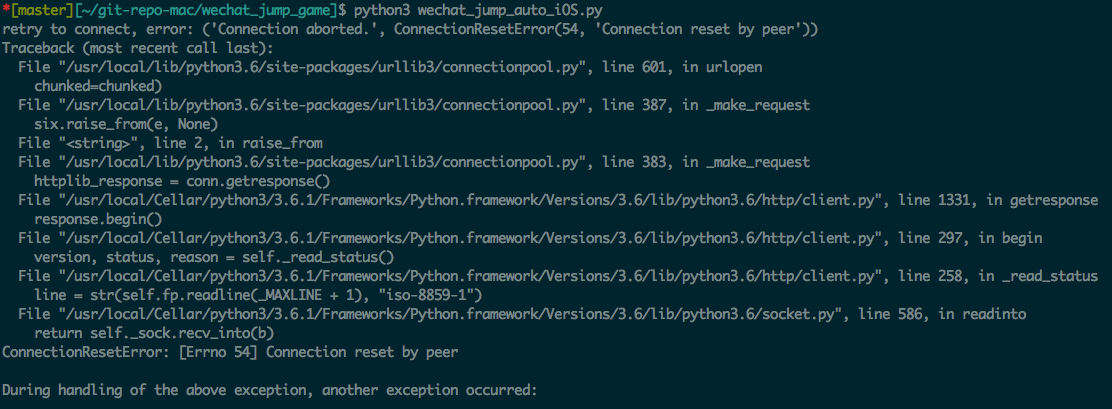
@ding221
请问为什么脚本每次运行一段时间(通常10秒内), 连接就断了. 访问 http://localhost:8100/status 也会失败?
 pastaTree
on 1 Jan 2018
pastaTree
on 1 Jan 2018
iproxy命令提示错误:
Requesting connecion to device handle == 2 (serial: 9b03e5e....a52d69681b3ae), port 8100
Error connecting to device!
python3 运行提示错误:
File "/Library/Frameworks/Python.framework/Versions/3.5/lib/python3.5/site-packages/wda/__init__.py", line 107, in _fetch_no_alert
return httpdo(target_url, method, data)
File "/Library/Frameworks/Python.framework/Versions/3.5/lib/python3.5/site-packages/wda/__init__.py", line 75, in httpdo
response = requests.request(method, url, data=data, timeout=HTTP_TIMEOUT)
File "/Library/Frameworks/Python.framework/Versions/3.5/lib/python3.5/site-packages/requests/api.py", line 58, in request
return session.request(method=method, url=url, *kwargs)
File "/Library/Frameworks/Python.framework/Versions/3.5/lib/python3.5/site-packages/requests/sessions.py", line 508, in request
resp = self.send(prep, *send_kwargs)
File "/Library/Frameworks/Python.framework/Versions/3.5/lib/python3.5/site-packages/requests/sessions.py", line 618, in send
r = adapter.send(request, **kwargs)
File "/Library/Frameworks/Python.framework/Versions/3.5/lib/python3.5/site-packages/requests/adapters.py", line 490, in send
raise ConnectionError(err, request=request)
requests.exceptions.ConnectionError: ('Connection aborted.', RemoteDisconnected('Remote end closed connection without response',))
 keqinyang
on 1 Jan 2018
keqinyang
on 1 Jan 2018
访问status 页面能显示一堆JSON数据,电脑上也能看到真机的界面,但就是 新开一个窗口运行py却出现import wda,ModuleNotFoundError,No module named 'wda'这个错,明明什么都装好了啊,wda也没什么问题,什么原因??
 ghost
on 1 Jan 2018
ghost
on 1 Jan 2018
大神能告诉我这是啥问题么,弄了好久好久了
/Users/yuanyi/Desktop/WebDriverAgent-master/wechat_jump_iOS_py3.py: line 1: import: command not found
/Users/yuanyi/Desktop/WebDriverAgent-master/wechat_jump_iOS_py3.py: line 2: import: command not found
/Users/yuanyi/Desktop/WebDriverAgent-master/wechat_jump_iOS_py3.py: line 3: import: command not found
/Users/yuanyi/Desktop/WebDriverAgent-master/wechat_jump_iOS_py3.py: line 4: import: command not found
from: can't read /var/mail/PIL
/Users/yuanyi/Desktop/WebDriverAgent-master/wechat_jump_iOS_py3.py: line 6: import: command not found
/Users/yuanyi/Desktop/WebDriverAgent-master/wechat_jump_iOS_py3.py: line 7: import: command not found
/Users/yuanyi/Desktop/WebDriverAgent-master/wechat_jump_iOS_py3.py: line 8: import: command not found
/Users/yuanyi/Desktop/WebDriverAgent-master/wechat_jump_iOS_py3.py: line 16: time_coefficient: command not found
/Users/yuanyi/Desktop/WebDriverAgent-master/wechat_jump_iOS_py3.py: line 19: syntax error near unexpected token ('
/Users/yuanyi/Desktop/WebDriverAgent-master/wechat_jump_iOS_py3.py: line 19:c = wda.Client()'
 yy1039795372
on 1 Jan 2018
yy1039795372
on 1 Jan 2018
python3安装了吗
2018-01-02 3:03 GMT+08:00 yy1039795372 notifications@github.com:
大神能告诉我这是啥问题么,弄了好久好久了
/Users/yuanyi/Desktop/WebDriverAgent-master/wechat_jump_iOS_py3.py: line
1: import: command not found
/Users/yuanyi/Desktop/WebDriverAgent-master/wechat_jump_iOS_py3.py: line
2: import: command not found
/Users/yuanyi/Desktop/WebDriverAgent-master/wechat_jump_iOS_py3.py: line
3: import: command not found
/Users/yuanyi/Desktop/WebDriverAgent-master/wechat_jump_iOS_py3.py: line
4: import: command not found
from: can't read /var/mail/PIL
/Users/yuanyi/Desktop/WebDriverAgent-master/wechat_jump_iOS_py3.py: line
6: import: command not found
/Users/yuanyi/Desktop/WebDriverAgent-master/wechat_jump_iOS_py3.py: line
7: import: command not found
/Users/yuanyi/Desktop/WebDriverAgent-master/wechat_jump_iOS_py3.py: line
8: import: command not found
/Users/yuanyi/Desktop/WebDriverAgent-master/wechat_jump_iOS_py3.py: line
16: time_coefficient: command not found
/Users/yuanyi/Desktop/WebDriverAgent-master/wechat_jump_iOS_py3.py: line
19: syntax error near unexpected token (' /Users/yuanyi/Desktop/
WebDriverAgent-master/wechat_jump_iOS_py3.py: line 19:c = wda.Client()'—
You are receiving this because you were mentioned.
Reply to this email directly, view it on GitHub
https://github.com/wangshub/wechat_jump_game/issues/99#issuecomment-354669881,
or mute the thread
https://github.com/notifications/unsubscribe-auth/AFOq2dU6jGuhV8paiWqyBsHdHuxbJz-Bks5tGSwOgaJpZM4RPkJ7
.
haima-zju
on 2 Jan 2018
需要电脑MAC电脑,我觉得我还不如借用一下别人的安卓机登陆去刷比较容易点。。
 Lanme
on 2 Jan 2018
Lanme
on 2 Jan 2018
iPhone记得把assistive touch关掉(小圆点)不然横向纵向都计算有问题
 MonkeyS914
on 2 Jan 2018
MonkeyS914
on 2 Jan 2018
@Yggdrasill-7C9 @MrFoxwho waiting for connect 解决了吗
 unix2dos
on 2 Jan 2018
unix2dos
on 2 Jan 2018
@edionwong 检查一下是不是安装了openatx/facebook-wda 除了WDA以外还要装这个
 paradises
on 2 Jan 2018
paradises
on 2 Jan 2018
请问iPhone6和win7/10,该怎么设置啊,
 mirrormy
on 2 Jan 2018
mirrormy
on 2 Jan 2018
关于上面👆提到的各种connect refuse 或者 timeout等等的问题,昨天折磨我半个晚上。现给出我的方案。
下载WebDriverAgent后,使用Xcode配置证书,修改ID等之后。不运行test。
使用自动化脚本运行,_并保持不退出_。也就是下面这段
解锁keychain,以便可以正常的签名应用,
PASSWORD="replace-with-your-password"
security unlock-keychain -p $PASSWORD ~/Library/Keychains/login.keychain
获取设备的UDID
UDID=$(idevice_id -l | head -n1)
运行测试
xcodebuild -project WebDriverAgent.xcodeproj -scheme WebDriverAgentRunner -destination "id=$UDID" test
执行过程有点慢,但是能看到很详细的日志。
如果上面脚本执行成功,再执行iproxy 8100 8100.
如果失败的话,可能没有添加对账户的信任。
添加信任再次执行,如果还失败,_重启手机_。再次运行,对我来说就成功了。
每次运行脚本前,运行上面的脚本并保持不退出。
同时,还是要运行iproxy 8100 8100。
我是iPhone 6 + Mac,昨天反复的connect失败,今天各种time out。
亲测可行。
 vrcoder
on 2 Jan 2018
vrcoder
on 2 Jan 2018
@vrcoder xcodebuild -project WebDriverAgent.xcodeproj -scheme WebDriverAgentRunner -destination "id=$UDID" test 执行完还是连不上
unix2dos
on 2 Jan 2018
我现在的情况是localhost:8100是能正常工作的,但是运行python会报错:
python3 ./wechat_jump_auto_iOS.py
Traceback (most recent call last):
  File "./wechat_jump_auto_iOS.py", line 53, in <module>
    s = c.session()
  File "/usr/local/lib/python3.6/site-packages/wda/__init__.py", line 252, in session
    sid = self.status()['sessionId']
  File "/usr/local/lib/python3.6/site-packages/wda/__init__.py", line 191, in status
    res = self.http.get('status')
  File "/usr/local/lib/python3.6/site-packages/wda/__init__.py", line 101, in fetch
    return self._fetch_no_alert(method, url, data)
  File "/usr/local/lib/python3.6/site-packages/wda/__init__.py", line 107, in _fetch_no_alert
    return httpdo(target_url, method, data)
  File "/usr/local/lib/python3.6/site-packages/wda/__init__.py", line 77, in httpdo
    retjson = response.json()
  File "/usr/local/lib/python3.6/site-packages/requests/models.py", line 892, in json
    return complexjson.loads(self.text, **kwargs)
  File "/usr/local/Cellar/python3/3.6.1/Frameworks/Python.framework/Versions/3.6/lib/python3.6/json/__init__.py", line 354, in loads
    return _default_decoder.decode(s)
  File "/usr/local/Cellar/python3/3.6.1/Frameworks/Python.framework/Versions/3.6/lib/python3.6/json/decoder.py", line 339, in decode
    obj, end = self.raw_decode(s, idx=_w(s, 0).end())
  File "/usr/local/Cellar/python3/3.6.1/Frameworks/Python.framework/Versions/3.6/lib/python3.6/json/decoder.py", line 357, in raw_decode
    raise JSONDecodeError("Expecting value", s, err.value) from None
json.decoder.JSONDecodeError: Expecting value: line 1 column 1 (char 0)
 chy9002
on 2 Jan 2018
chy9002
on 2 Jan 2018
自动运行wechat_jump_auto_iOS.py时,iPhone 6的参数press_coefficient = 1.995.运行时关掉assistive touch小圆点,不然会影响截图后判断方块纵横的方向 @MonkeyS914
SiliconZou
on 2 Jan 2018
关于iproxy 8100 8100后出现waiting for connection的情况,此时打开 http://localhost:8100/inspector 刷新一下然后等手机界面显示在浏览器上,等完全显示后,再去运行wechat_jump_auto_iOS.py文件@hesj @unix2dos @MrFoxwho @Yggdrasill-7C9
SiliconZou
on 2 Jan 2018
@youaremywind你运行wechat_jump_auto_iOS.py前,要用xcode通过真机运行WebDriverAgent(Product->test)
SiliconZou
on 2 Jan 2018
运行了还是闪退了 然后运行py还是 No module named 'wda' @SiliconZou
 youaremywind
on 2 Jan 2018
youaremywind
on 2 Jan 2018
运行后闪退是正常的,然后就不用管了,No module named 'wda'应该是你没运行那个脚本./Scripts/bootstrap.sh@youaremywind
SiliconZou
on 2 Jan 2018
退出那个虚拟环境就好了
youaremywind
on 2 Jan 2018
@vrcoder 你好,按照你的步骤操作好之后,最后一步显示的不是手机界面,而是一个错误。这是什么问题呢
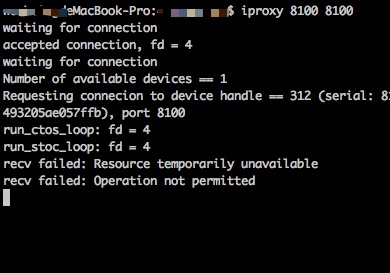
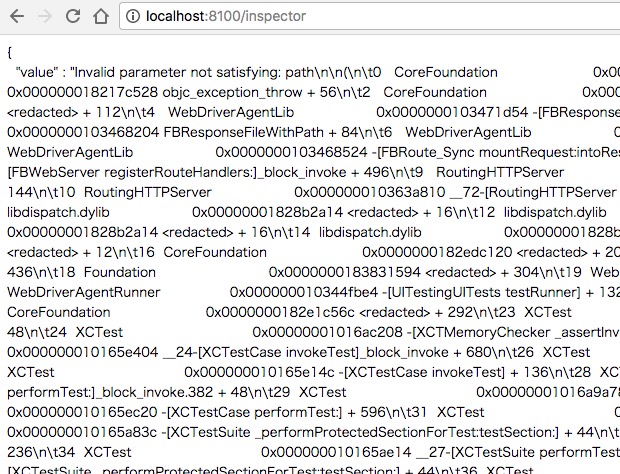
w0wbin
on 2 Jan 2018
我从/status看到信息了,也可以通过/inspector看到手机界面,就是在运行
python3 wechat_jump_iOS_py3.py时
遇到wda.WDAError: WDAError(status=10, value=Application is not running, possibly crashed)的错误。
 Chen-xy
on 2 Jan 2018
Chen-xy
on 2 Jan 2018
Traceback (most recent call last):
File "wechat_jump_iOS_py3.py", line 34, in
pull_screenshot()
File "wechat_jump_iOS_py3.py", line 23, in pull_screenshot
c.screenshot('autojump.png')
File "/Users/kuayuewyh/anaconda3/envs/wechat_env/lib/python3.6/site-packages/wda/__init__.py", line 295, in screenshot
value = self.http.get('screenshot').value
File "/Users/kuayuewyh/anaconda3/envs/wechat_env/lib/python3.6/site-packages/wda/__init__.py", line 101, in fetch
return self._fetch_no_alert(method, url, data)
File "/Users/kuayuewyh/anaconda3/envs/wechat_env/lib/python3.6/site-packages/wda/__init__.py", line 107, in _fetch_no_alert
return httpdo(target_url, method, data)
File "/Users/kuayuewyh/anaconda3/envs/wechat_env/lib/python3.6/site-packages/wda/__init__.py", line 83, in httpdo
raise WDAError(r.status, r.value)
wda.WDAError: WDAError(status=13, value=To screenshot a frame, it must have non-0 area.
(
0 CoreFoundation 0x00000001859861d8
1 libobjc.A.dylib 0x00000001843c055c objc_exception_throw + 56
2 CoreFoundation 0x0000000185986094
3 Foundation 0x000000018641379c
4 XCTest 0x00000001001d006c -[XCUIScreen _screenshotDataForQuality:rect:error:] + 192
5 XCTest 0x00000001001cff38 -[XCUIScreen screenshotDataForQuality:rect:error:] + 108
6 WebDriverAgentLib 0x0000000101daf2e8 -[XCUIDevice(FBHelpers) fb_screenshotWithError:] + 624
7 WebDriverAgentLib 0x0000000101d90dc8 +[FBScreenshotCommands handleGetScreenshot:] + 132
8 WebDriverAgentLib 0x0000000101d9da1c -[FBRoute_TargetAction mountRequest:intoResponse:] + 208
9 WebDriverAgentLib 0x0000000101d95648 __37-[FBWebServer registerRouteHandlers:]_block_invoke + 496
10 RoutingHTTPServer 0x0000000101e4e3cc -[RoutingHTTPServer handleRoute:withRequest:response:] + 144
11 RoutingHTTPServer 0x0000000101e4eb80 __72-[RoutingHTTPServer routeMethod:withPath:parameters:request:connection:]_block_invoke + 44
12 libdispatch.dylib 0x00000001848111c0
13 libdispatch.dylib 0x00000001848220c4
14 libdispatch.dylib 0x00000001848111c0
15 libdispatch.dylib 0x0000000184815d6c _dispatch_main_queue_callback_4CF + 1000
16 CoreFoundation 0x0000000185933f2c
17 CoreFoundation 0x0000000185931b18
18 CoreFoundation 0x0000000185860048 CFRunLoopRunSpecific + 444
19 Foundation 0x0000000186371a8c
20 WebDriverAgentLib 0x0000000101d9463c -[FBWebServer startServing] + 424
21 WebDriverAgentRunner 0x0000000101d83be4 -[UITestingUITests testRunner] + 132
22 CoreFoundation 0x000000018598c160
23 CoreFoundation 0x000000018587fc3c
24 XCTest 0x00000001001ba654 __24-[XCTestCase invokeTest]_block_invoke.275 + 48
25 XCTest 0x00000001001ba404 __24-[XCTestCase invokeTest]_block_invoke + 680
26 XCTest 0x00000001002009d8 -[XCUITestContext performInScope:] + 208
27 XCTest 0x00000001001ba14c -[XCTestCase invokeTest] + 136
28 XCTest 0x00000001001bb224 __26-[XCTestCase performTest:]_block_invoke.382 + 48
29 XCTest 0x0000000100205a78 +[XCTContext runInContextForTestCase:block:] + 164
30 XCTest 0x00000001001bac20 -[XCTestCase performTest:] + 596
31 XCTest 0x00000001001b6e14 __27-[XCTestSuite performTest:]_block_invoke + 288
32 XCTest 0x00000001001b683c -[XCTestSuite _performProtectedSectionForTest:testSection:] + 44
33 XCTest 0x00000001001b6a4c -[XCTestSuite performTest:] + 236
34 XCTest 0x00000001001b6e14 __27-[XCTestSuite performTest:]_block_invoke + 288
35 XCTest 0x00000001001b683c -[XCTestSuite _performProtectedSectionForTest:testSection:] + 44
36 XCTest 0x00000001001b6a4c -[XCTestSuite performTest:] + 236
37 XCTest 0x00000001001b6e14 __27-[XCTestSuite performTest:]_block_invoke + 288
38 XCTest 0x00000001001b683c -[XCTestSuite _performProtectedSectionForTest:testSection:] + 44
39 XCTest 0x00000001001b6a4c -[XCTestSuite performTest:] + 236
40 XCTest 0x000000010020f484 __44-[XCTTestRunSession runTestsAndReturnError:]_block_invoke + 44
41 XCTest 0x00000001001c9994 -[XCTestObservationCenter _observeTestExecutionForBlock:] + 420
42 XCTest 0x000000010020f300 -[XCTTestRunSession runTestsAndReturnError:] + 292
43 XCTest 0x00000001001a63d4 -[XCTestDriver runTestsAndReturnError:] + 312
44 XCTest 0x0000000100204c20 _XCTestMain + 620
45 CoreFoundation 0x0000000185934160
46 CoreFoundation 0x000000018593395c
47 CoreFoundation 0x00000001859317b0
48 CoreFoundation 0x0000000185860048 CFRunLoopRunSpecific + 444
49 GraphicsServices 0x00000001872e6198 GSEventRunModal + 180
50 UIKit 0x000000018b84c2fc
51 UIKit 0x000000018b847034 UIApplicationMain + 208
52 WebDriverAgentRunner-Runner 0x000000010007c444 WebDriverAgentRunner-Runner + 33860
53 libdyld.dylib 0x00000001848445b8
)) @xiao-Warning 请问你这个问题是怎么解决的
 XGNoCopy
on 2 Jan 2018
XGNoCopy
on 2 Jan 2018
请问这个wda真机到底怎么安装呀。我安装了个,手机桌面也有个空白图标了,就是运行test报test failed。。。
 AgentZh0u
on 2 Jan 2018
AgentZh0u
on 2 Jan 2018
我的设备是 Mac,目前Mac+iPhone和Mac+Android 都成功了,大家可以参考下这篇文章:http://kuiblog.com/archives/402/
 kuiblog
on 2 Jan 2018
kuiblog
on 2 Jan 2018
一跑test就报
Showing Recent Issues
Test target WebDriverAgentRunner encountered an error (Unable to connect to test manager on dea7f15355143360b27695823d9ed9253f6ef72c If you believe this error represents a bug, please attach the log file at /var/folders/b2/y_bl8gd178n272m9f_26t0tw0000gn/T/com.apple.dt.XCTest/IDETestRunSession-DCA9E66E-9EC5-42E7-92B5-990F671D47E3/WebDriverAgentRunner-A4848D51-4E91-4B01-B905-7B621147C472/Session-WebDriverAgentRunner-2018-01-02_201230-9aPvCo.log)
AgentZh0u
on 2 Jan 2018
我是Mac+i7,本来一开始还能跑到700多分,然后在运行一次程序,第一个也跳不了了,求大神指点
 wqw123
on 2 Jan 2018
wqw123
on 2 Jan 2018
魅族NOTE2 可以打开,重启ADB说明ADB没问题,无法找到设备,一直显示List of devices attached,使用adb kill-server和adb start-server无效,USB模式和开发者选项都已经打开,可能手机驱动不支持。
 XuanlongQ
on 2 Jan 2018
XuanlongQ
on 2 Jan 2018
大神求5s参数
 Kryssss
on 2 Jan 2018
Kryssss
on 2 Jan 2018
@xiao-Warning 更新IOS 11解决该问题,原操作系统为IOS9.3.1
 woowooh
on 2 Jan 2018
woowooh
on 2 Jan 2018
@cultivater 升级IOS11.2后该问题得以解决,原操作系统为IOS9.3.1
woowooh
on 2 Jan 2018
@Kryssss 已有SE配置,5s应该差不多,
 ZYSzys
on 2 Jan 2018
Kryssss
on 2 Jan 2018
ZYSzys
on 2 Jan 2018
Kryssss
on 2 Jan 2018
一切配置正常,浏览器也可以访问 /status正常打印json,也完成了"pip install --pre facebook-wda
"的安装,但是最后一步python运行的时候 import wda是
Traceback (most recent call last):
  File "wechat_jump_iOS_py3.py", line 1, in <module>
    import wda
ModuleNotFoundError: No module named 'wda'
,请问大佬是否是因为conda环境的原因,尝试了pip install wda也不行
感谢
 surpassing
on 2 Jan 2018
surpassing
on 2 Jan 2018
@Kryssss 没办法,数据集太少,模型训练得不够好,等dalao优化算法。。。
300之后你可以用手动(wechat_jump_iOS_py3.py)再往上刷
ZYSzys
on 2 Jan 2018
多谢 @ZYSzys
Kryssss
on 2 Jan 2018
retry to connect, error: HTTPConnectionPool(host='localhost', port=8100): Read timed out. (read timeout=60.0) 的兄弟,可以检查下DNS设置.
 wxlpp
on 2 Jan 2018
wxlpp
on 2 Jan 2018
我的问题已经解决,应该是hosts的问题导致python无法通过localhost访问到wda,改成用127.0.0.1就好了
chy9002
on 3 Jan 2018
@surpassing 可以试试执行pip3 install --pre facebook-wda
 taylorwrynn
on 3 Jan 2018
taylorwrynn
on 3 Jan 2018
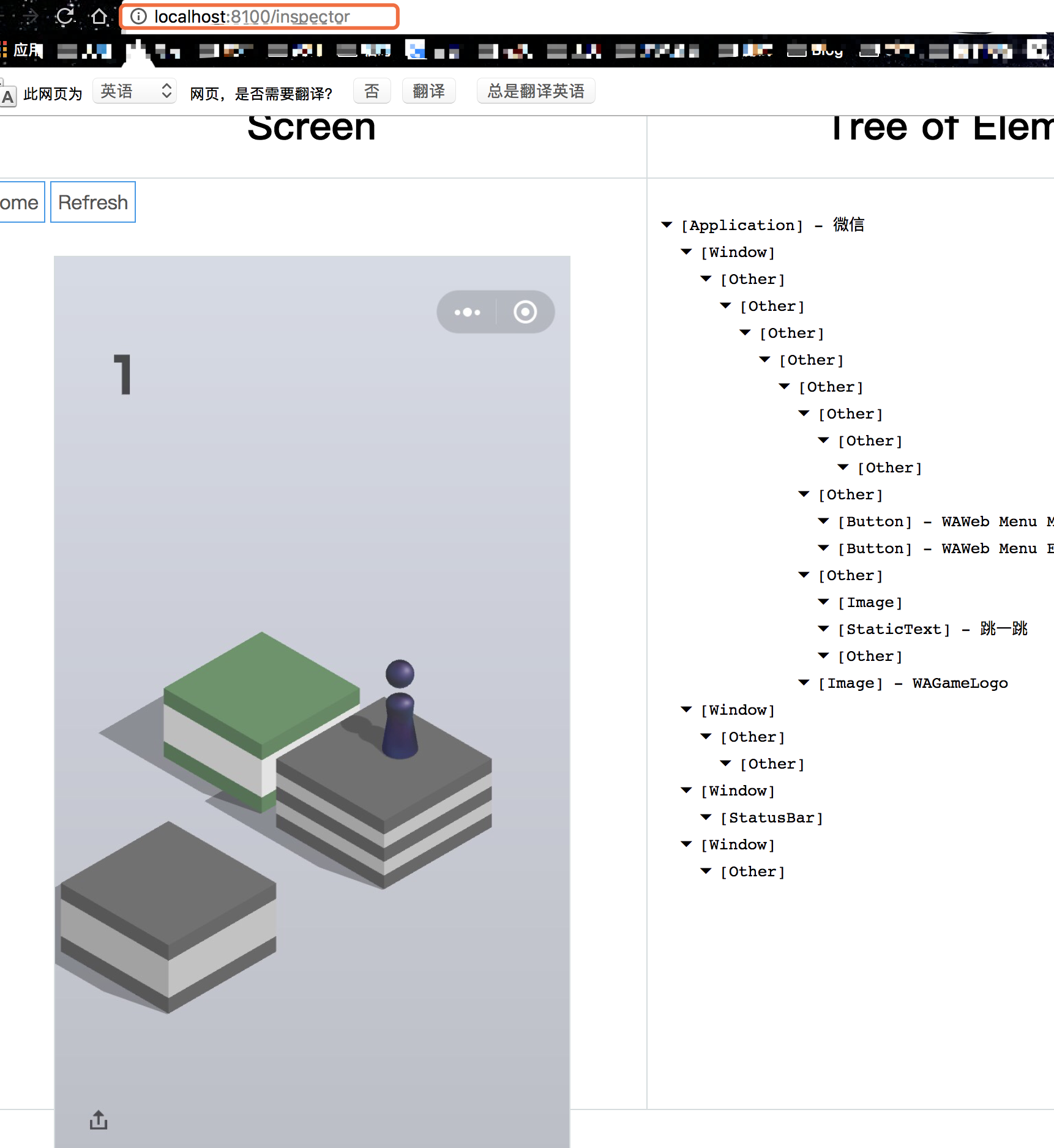
我的浏览器可以访问本地的 8100,端口。也可以显示手机画面。如图
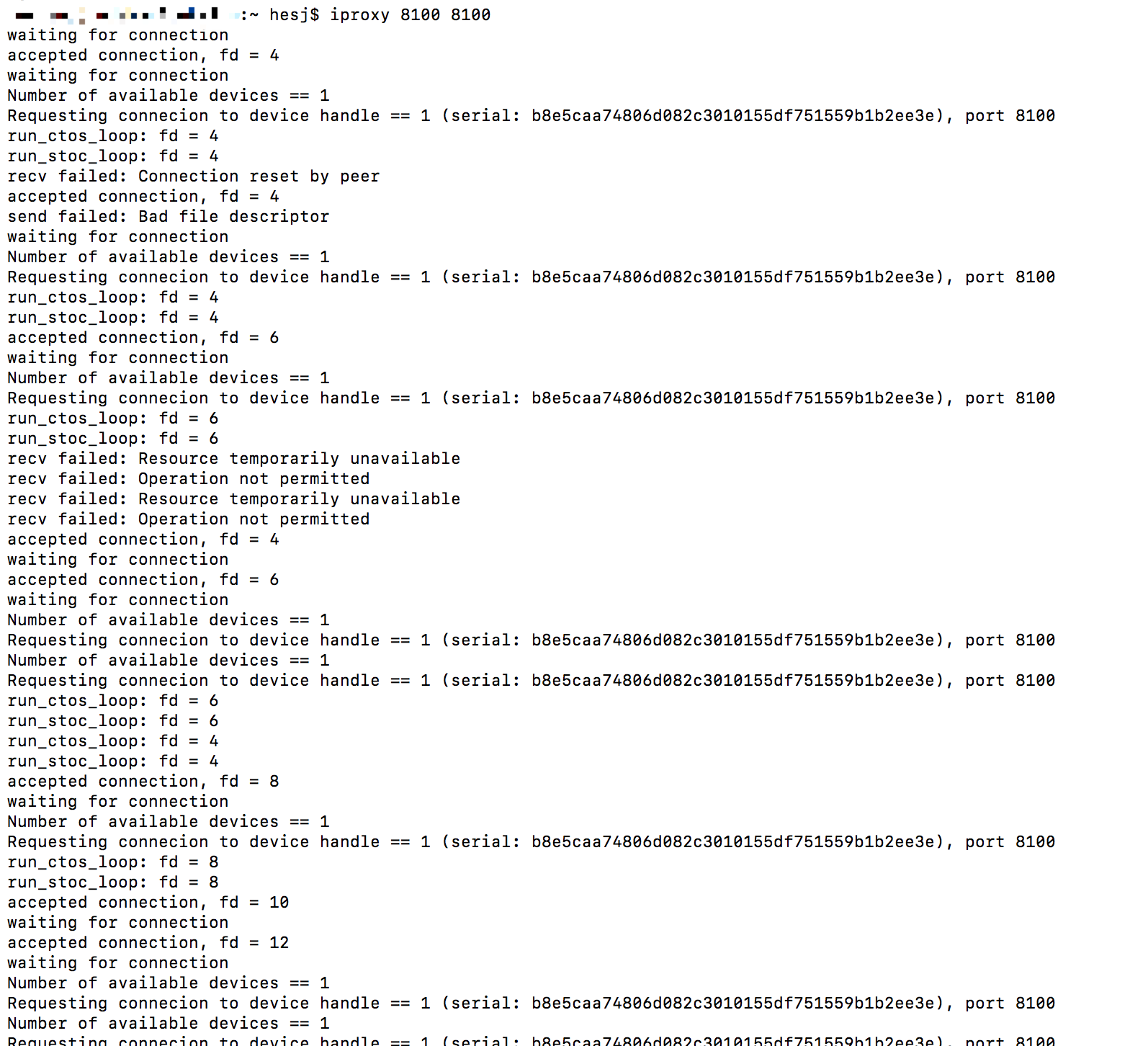
我的控制台,也显示了数据信息,如图:
但是我的 IOS 手动版本的脚本运行不了,报错提示应该是连接不到localhost 的 8100,端口,很纳闷,因为浏览器可以访问到。错误如图:
hesj
on 3 Jan 2018
@unix2dos 你说的这情况才开始我也这样,重启手机就好了
vrcoder
on 3 Jan 2018
@w0wbin 这个问题没有遇见过。不过看起来connect问题是没有了
vrcoder
on 3 Jan 2018
分数提交不上去……你的能提交吗
发自我的 iPhone
在 2018年1月2日,下午8:42,kuiblog <[email protected]notifications@github.com> 写道:
我的设备是 Mac,目前Mac+iPhone和Mac+Android 都成功了,大家可以参考下这篇文章:http://kuiblog.com/archives/402/
—
You are receiving this because you were mentioned.
Reply to this email directly, view it on GitHubhttps://github.com/wangshub/wechat_jump_game/issues/99#issuecomment-354758883, or mute the threadhttps://github.com/notifications/unsubscribe-auth/AcKZaPhfShBd66Cz7DQ3-2nsdfJRaMoMks5tGiREgaJpZM4RPkJ7.
teddingdev
on 3 Jan 2018
@hesj 我和你同样的问题,是python里面没法用localhost连接到127.0.0.1导致的,我还不知道为什么,不过我把代码里面的
-   c = wda.Client()
+   c = wda.Client('http://127.0.0.1:8100')
就可以了
chy9002
on 3 Jan 2018
@uptian 被反作弊了:https://github.com/wangshub/wechat_jump_game/pull/771
 truebit
on 3 Jan 2018
truebit
on 3 Jan 2018
import wda,ModuleNotFoundError,No module named 'wda'
遇到这个问题,可以尝试把pip install改成pip3 install
如:
pip3 install --pre facebook-wda
pip3 install -r requirements.txt
我就是这样成功运行了 python3 wechat_jump_iOS_py3.py
 GrandHahn
on 3 Jan 2018
GrandHahn
on 3 Jan 2018
@2649073896 pip默认安装2.7里面 如果你py2和3都安装了 pip3安装在3下面
 Ace--Qi
on 3 Jan 2018
Ace--Qi
on 3 Jan 2018
@xiao-Warning
代码里面加微信的boundID
s = c.session('com.tencent.xin')
def pull_screenshot():
time.sleep(10)
c.screenshot('1.png')
截图前休眠10秒
然后启动脚本手动点进游戏
 2882889
on 3 Jan 2018
2882889
on 3 Jan 2018
@taylorwrynn 我搞定了感谢! 还是conda环境切错了,系统默认的不是我用pip install的那个,最后conda env list看了下,source activate另一个就好了。 感谢:)
surpassing
on 3 Jan 2018
请问依赖文件到底是装在哪里?
也就是说 这个 pip3 install -r requirements.txt 应该在哪里执行?
 paveldbest
on 3 Jan 2018
paveldbest
on 3 Jan 2018
@paveldbest 得把这个项目下载下来,然后cd进去执行
 xiaoxm
on 4 Jan 2018
xiaoxm
on 4 Jan 2018
很好奇你们怎么那么高分的,我无论怎么调整都不超过800分
 mkblbj
on 4 Jan 2018
mkblbj
on 4 Jan 2018
(wechat_env) SugarMan:wechat_jump_game-master SugarMan$ python3 wechat_jump_auto_iOS.py
Traceback (most recent call last):
File "wechat_jump_auto_iOS.py", line 31, in
config = json.load(f)
File "/Users/Super/anaconda3/envs/wechat_env/lib/python3.6/json/init.py", line 299, in load
parse_constant=parse_constant, object_pairs_hook=object_pairs_hook, **kw)
File "/Users/Super/anaconda3/envs/wechat_env/lib/python3.6/json/init.py", line 354, in loads
return _default_decoder.decode(s)
File "/Users/Super/anaconda3/envs/wechat_env/lib/python3.6/json/decoder.py", line 339, in decode
obj, end = self.raw_decode(s, idx=_w(s, 0).end())
File "/Users/Super/anaconda3/envs/wechat_env/lib/python3.6/json/decoder.py", line 357, in raw_decode
raise JSONDecodeError("Expecting value", s, err.value) from None
json.decoder.JSONDecodeError: Expecting value: line 7 column 1 (char 6)
我这个在http://127.0.0.1:8100/inspector可以点击 但是运行不了脚本
 ImmerTry
on 4 Jan 2018
ImmerTry
on 4 Jan 2018
好不容易可以自动跳了,结果试了n多次 最多不超过50。。。。。。
 zfx5130
on 4 Jan 2018
zfx5130
on 4 Jan 2018
2018-01-05 10:56:49.202543 WebDriverAgentRunner-Runner[1569:496858] Enqueue Failure: Application local.pid.1446 is not running /Users/dingzb/Documents/XcodeSpace/WebDriverAgent/WebDriverAgentRunner/UITestingUITests.m 37 1
2018-01-05 10:56:49.205447 WebDriverAgentRunner-Runner[1569:496858] * Assertion failure in -[XCUIScreen _screenshotDataForQuality:rect:error:], /Library/Caches/com.apple.xbs/Sources/XCTest_iOS/XCTest-13764/Sources/UITesting/XCUIScreen.m:230
 addingzb
on 5 Jan 2018
addingzb
on 5 Jan 2018
2018-01-05 10:56:49.202543 WebDriverAgentRunner-Runner[1569:496858] Enqueue Failure: Application local.pid.1446 is not running /Users/dingzb/Documents/XcodeSpace/WebDriverAgent/WebDriverAgentRunner/UITestingUITests.m 37 1
2018-01-05 10:56:49.205447 WebDriverAgentRunner-Runner[1569:496858] * Assertion failure in -[XCUIScreen _screenshotDataForQuality:rect:error:], /Library/Caches/com.apple.xbs/Sources/XCTest_iOS/XCTest-13764/Sources/UITesting/XCUIScreen.m:230
导致python 截屏失败了。。。。。。怎么回事。
addingzb
on 5 Jan 2018
@xiao-Warning python3 wechat_jump_iOS_py3.py python3 wechat_jump_auto_iOS.py Python工程里这俩改下代码,c = wda.Client('http://127.0.0.1:8200') 换个端口。 IOS工程里找到8100 也相应的改下端口。
 ZxLeo
on 5 Jan 2018
ZxLeo
on 5 Jan 2018
windows+ios,请问怎么办。。。借了别人安卓跑成功了,现在自己iphone6sp不知所措
 pengyou200902
on 5 Jan 2018
pengyou200902
on 5 Jan 2018
我都成功了。。但是连30都跳不过。。233333
 AlexisWu-01
on 5 Jan 2018
AlexisWu-01
on 5 Jan 2018
我前面一切正常。截图什么都有 最后运行PYTHON的时候 出现 requests.exceptions.ConnectionError: HTTPConnectionPool(host='localhost', port=8100): Max retries exceeded with url: /status (Caused by NewConnectionError('
 bojunwu
on 6 Jan 2018
bojunwu
on 6 Jan 2018
@hesj 我和你同样的问题,是python里面没法用localhost连接到127.0.0.1导致的,我还不知道为什么,不过我把代码里面的
- c = wda.Client()
- c = wda.Client('http://127.0.0.1:8100')
就可以了
成功的解决了我的问题
bojunwu
on 6 Jan 2018
@SiliconZou 我无论怎么刷新,都还是连接不上
 dandan0503
on 7 Jan 2018
dandan0503
on 7 Jan 2018
iproxy命令运行不了是怎么回事啊 有没有人出现过
$ brew install libimobiledevice
Warning: libimobiledevice 1.2.0_2 is already installed
$ iproxy 8100 8100
-bash: iproxy: command not found
 stayRealLang
on 7 Jan 2018
stayRealLang
on 7 Jan 2018
@stayRealLang $ brew install usbmuxd 加上这个
 YAANNZ
on 8 Jan 2018
YAANNZ
on 8 Jan 2018
@YAANNZ 可以了!多谢大佬
stayRealLang
on 8 Jan 2018
大佬你好,我是 iOS + Mac 的,在安装 WDA 的时候按照 https://testerhome.com/topics/7220 这个帖子来配置,运行初始化脚本和配置证书都能成功,结果编译的时候出错了,好像是缺少 XCUIScreen 这个文件?想请问下这个情况应该如何解决?
Mac 系统:10.12.5
Xcode 版本:8.3.3
iOS 版本:10.3.2(build time 的时候报错了,所以我觉得应该不是手机版本的问题)
错误代码:
~/WebDriverAgent/PrivateHeaders/XCTest/XCUIScreen.h:7:12: Cannot find interface declaration for 'XCUIScreen'; did you mean 'UIScreen'?
~/WebDriverAgent/WebDriverAgentLib/Categories/XCUIElement+FBUtilities.m:147:3: Unknown type name 'XCUIScreen'; did you mean 'UIScreen'?
~/WebDriverAgent/WebDriverAgentLib/Categories/XCUIElement+FBUtilities.m:147:29: Use of undeclared identifier 'XCUIScreen'
~/WebDriverAgent/WebDriverAgentLib/Categories/XCUIElement+FBUtilities.m:147:43: Missing '[' at start of message send expression
~/WebDriverAgent-master/WebDriverAgentLib/Categories/XCUIDevice+FBHelpers.m:67:3: Unknown type name 'XCUIScreen'; did you mean 'UIScreen'?
~/WebDriverAgent-master/WebDriverAgentLib/Categories/XCUIDevice+FBHelpers.m:67:29: Use of undeclared identifier 'XCUIScreen'
~/WebDriverAgent-master/WebDriverAgentLib/Categories/XCUIDevice+FBHelpers.m:67:43: Missing '[' at start of message send expression
~/WebDriverAgent-master/WebDriverAgentLib/Categories/XCUIElement+FBUtilities.m:147:41: Expected expression
~/WebDriverAgent-master/WebDriverAgentLib/Categories/XCUIElement+FBUtilities.m:147:68: Expected ']'
~/WebDriverAgent-master/WebDriverAgentLib/Categories/XCUIDevice+FBHelpers.m:67:41: Expected expression
~/WebDriverAgent-master/WebDriverAgentLib/Categories/XCUIDevice+FBHelpers.m:67:68: Expected ']'


我没有对代码做任何修改,clone 下来配置完 build 就直接报错了。因为不是做 iOS 开发的,我对代码一点不熟,希望大佬能够帮忙纠正一下错误,谢谢!
 brilliantGuo
on 8 Jan 2018
brilliantGuo
on 8 Jan 2018
raise ConnectionError(e, request=request)
requests.exceptions.ConnectionError: HTTPConnectionPool(host='localhost', port=8100): Max retries exceeded with url: /status (Caused by NewConnectionError('
出现这个问题是因为连接的是localhost这个地址,你可以直接更改脚本,把地址设置成wda获取的地址,例如这样
c = wda.Client("http://169.xxx.xxx.205:8100")
 roMummy
on 9 Jan 2018
roMummy
on 9 Jan 2018
@xiao-Warning
roMummy
on 9 Jan 2018
http://...:8100/inspector 截图和其他的都是空白是什么原因,
http://...:8100/status 这个地址里面的json数据正常
 HelloZS
on 11 Jan 2018
HelloZS
on 11 Jan 2018
@HelloZS 我和你的情况一样,不知道怎么解决 - _ -
 zeliu
on 11 Jan 2018
zeliu
on 11 Jan 2018
@zeliu 这个问题不影响玩跳一跳
HelloZS
on 11 Jan 2018
@Shoufu 网上说更新到Xcode9+ 你试试,我和你一样的问题。现在又在更新os中。。。
 alsosweet
on 16 Jan 2018
alsosweet
on 16 Jan 2018
搞定了,感谢分享。
 memorylikun
on 25 Jan 2018
memorylikun
on 25 Jan 2018
我这个打开是这样子,不过执行python3 wechat_jump_iOS_py3.py 还是跪了
解决了吗?
 binzi56
on 10 Oct 2020
binzi56
on 10 Oct 2020
Related issues
 NullYing
·
4Comments
NullYing
·
4Comments
 Uni-lovenix
·
3Comments
Uni-lovenix
·
3Comments
 yuanjingsong
·
3Comments
yuanjingsong
·
3Comments
 wgp183555257
·
6Comments
wgp183555257
·
6Comments
 Weilet
·
5Comments
Weilet
·
5Comments
Most helpful comment
raise ConnectionError(e, request=request): Failed to establish a new connection: [Errno 61] Connection refused',))
requests.exceptions.ConnectionError: HTTPConnectionPool(host='localhost', port=8100): Max retries exceeded with url: /status (Caused by NewConnectionError('
这个有遇到过吗