现在只能做到一直跳下去(参数设置的合理的情况下),每次正中心是最终的目标。
常用调试思路:
- 直线的时候每次都跳的近那么调大 press_coefficient,反之调小
=======
- 更新最新的代码
- 按下面的方式填写
模板如下
机型:
分辨率(具体到宽高):
电脑系统:
问题描述:
(另外请尽量附一张 screenshot_backups 目录下的 _d.png 结尾画了线的图)
 binderclip
All 166 comments
机型:一加3T
分辨率:1920x1080
中间有三个偏移了 不过第四个就又跳准了
已经顺利三千分
 c588
on 30 Dec 2017
c588
on 30 Dec 2017
@cjy825 我的就是用一加 3T 调试写的,应该啥都不用改
binderclip
on 30 Dec 2017
@binderclip 那可能就是单纯的人品不好吧 T T
c588
on 30 Dec 2017
机型:三星S6edge
分辨率:2560x1440

 dugu0808
on 30 Dec 2017
dugu0808
on 30 Dec 2017
机型:小米MIX2
分辨率:1080x2160
电脑系统:WIN10
问题描述:方向都不正确


 qisq777
on 30 Dec 2017
qisq777
on 30 Dec 2017
机型:华为5S
分辨率:720*1280
参数 2.0
 meicuihui
on 30 Dec 2017
meicuihui
on 30 Dec 2017
机型:荣耀V9
分辨率:2560x1440
根据这个参数到66分挂掉了:
under_game_score_y = 390
press_coefficient = 1.04
piece_base_height_1_2 = 26
piece_body_width = 110

 supernb123
on 30 Dec 2017
supernb123
on 30 Dec 2017
红米note4 总是个位数

 liurentian
on 30 Dec 2017
liurentian
on 30 Dec 2017
机型:小米4c
分辨率:1920 x 1080
press_coefficient = 1.47 其他不变
平均下来 都是各位数, 最高也只跳到了30多

 qiantao94
on 30 Dec 2017
qiantao94
on 30 Dec 2017
有一张图吧,因为每次产生的图替换了上一张图。
 kunphp
on 30 Dec 2017
kunphp
on 30 Dec 2017
@binderclip 好像是下次跳的时候,图片经常更新不过来,还是用的上次的图片去跳。 基本两三次就GG
liurentian
on 30 Dec 2017
@kunphp 在screamshot_backups里有每一次的截图
c588
on 30 Dec 2017
@bestTao 小米note2,也是1920x1080,昨天晚上参数1.47,跳到918分。今天更新代码后发现这个参数不行了,需要从新调。
 mg459046365
on 30 Dec 2017
mg459046365
on 30 Dec 2017
@bestTao 1.47这个参数是我基于昨天晚上的代码调节出来的参数,不过今天到目前为止还没调出比较合理的参数
mg459046365
on 30 Dec 2017
@liurentian adb 命令有问题?
binderclip
on 30 Dec 2017
@binderclip adb没有问题,刚才我可能理解错了
liurentian
on 30 Dec 2017
@cjy825 嗯,cp 换成copy就可以了
kunphp
on 30 Dec 2017
@bestTao 直线的时候每次都跳的近那么调大 press_coefficient,反之调小
binderclip
on 30 Dec 2017
机型:小米5s
分辨率:1920 x 1080
没修改参数的话只能俩位数
修改参数:
piece_base_height_1_2 = 25
piece_body_width = 80
现在跳一千多,给机油们参考下
 lw1992
on 30 Dec 2017
lw1992
on 30 Dec 2017
红米note4 本来1.393几下就完,调了 1.404 参数,现在300还在持续跳
liurentian
on 30 Dec 2017
binderclip
on 30 Dec 2017
@lw1992 我一会试一下你的参数,我现在最多也就900多
mg459046365
on 30 Dec 2017
@binderclip 再怎么调高这个参数 还是会掉下去 很多时候并不能跳到黑线的位置
看下面俩图


qiantao94
on 30 Dec 2017
@bestTao 再往大一点调还不行?
binderclip
on 30 Dec 2017
小米 MIX 能用的参数
under_game_score_y = 619 # 截图中刚好低于分数显示区域的 Y 坐标,300 是 1920x1080 的值,2K 屏、全面屏请根据实际情况修改
press_coefficient = 1.492 # 长按的时间系数,请自己根据实际情况调节
swipe_x1, swipe_y1, swipe_x2, swipe_y2 = 320, 410, 320, 410 # 模拟按压的起始点坐标,需要自动重复游戏请设置成“再来一局”的坐标
piece_base_height_1_2 = 20 # 二分之一的棋子底座高度,可能要调节
piece_body_width = 70 # 棋子的宽度,比截图中量到的稍微大一点比较安全,可能要调节
sample_board_x1, sample_board_y1, sample_board_x2, sample_board_y2 = 824, 371, 959, 448
仅供参考
 wudapeng268
on 30 Dec 2017
wudapeng268
on 30 Dec 2017
一加5T
1080*2160
win7
第一步都跑不起来
 zhuangsen
on 30 Dec 2017
zhuangsen
on 30 Dec 2017

18.5:9的屏幕,分辨率1440*2960
press_coefficient = 0.68
这么长的线也能跳过去,真是神奇,横向的时候就不好使了,在第一个横向的原地跳了一下,然后就掉下去了,待我降到1080p再试试!
 F5F5
on 30 Dec 2017
F5F5
on 30 Dec 2017

到这一步就死了。
荣耀8
1080 1920
 tonyzzp
on 30 Dec 2017
tonyzzp
on 30 Dec 2017
@lw1992 你的25和80不就是自带的吗,老铁
 Mebigger
on 30 Dec 2017
Mebigger
on 30 Dec 2017
@lw1992 我的也是小米5s,默认参数就是25 80,默认参数最多也就两位数,修改时间系数press_coefficient=1.45后最多跳了238
 likantour
on 30 Dec 2017
likantour
on 30 Dec 2017
魅蓝note6基本是10分左右,参数未改
1920*1080
经常性出现方向判断错误这种情况。
_试了N多次,方向错误一般发生在白块,或者方块向左跳

 ZhaoGuojing
on 30 Dec 2017
ZhaoGuojing
on 30 Dec 2017
三星 S7 Edge 测试了下 2K
参数:
under_game_score_y = 385
press_coefficient = 0.68
piece_base_height_1_2 = 25
piece_body_width = 110
右跳时,两者距离长,计算无问题,两者距离短,就会跳过,
左跳时,两者距离短,计算无问题,两者距离长,计算的距离很短,就会跳不到
2464 KB/s (95303 bytes in 0.037s)
(1514635057, 1167, 1523, 1436, 1369)
309.962901006
adb shell input swipe 320 410 320 410 204
309是打印出来的distance

 SunMingjun
on 30 Dec 2017
SunMingjun
on 30 Dec 2017
红米Note4X,一步都跳不起来。
 mingregister
on 30 Dec 2017
mingregister
on 30 Dec 2017
程序运行不了
 CODEHLK
on 30 Dec 2017
CODEHLK
on 30 Dec 2017
ImportError: No module named PIL
这个报错
CODEHLK
on 30 Dec 2017
能正常截图上传png图片
CODEHLK
on 30 Dec 2017
依赖安装那一步怎么做。
pip install -r requirements.txt
这一步不清楚,可以具体说说吗
CODEHLK
on 30 Dec 2017
机型:华为P9
色差识别问题
几千分之后有时背景色和棋盘色差太小
导致错误
其他一切正常
 nashiluoyuji
on 30 Dec 2017
nashiluoyuji
on 30 Dec 2017
小米max2 1080 *1920 under_game_score_y = 360
press_coefficient = 1.50
piece_base_height_1_2 = 25 # 二分之一的棋子底座高度,可能要调节
piece_body_width = 80 # 棋子的宽度,比截图中量到的稍微大一点比较安全,可能要调节
只能跳到200左右
 laolinmao
on 30 Dec 2017
laolinmao
on 30 Dec 2017
三星S8
向前面跳没问题,每次向左边跳不过去
 liaobei
on 30 Dec 2017
liaobei
on 30 Dec 2017
机型:Samsung Galaxy S8 Plus
分辨率(具体到宽高):2960 x 1440
电脑系统:MacOS 10.13.3
问题描述:可能连一步都跳不起来。。


 SoraJin424
on 30 Dec 2017
SoraJin424
on 30 Dec 2017
机型:小米NOTE3
分辨率(具体到宽高):1920x1080像素
电脑系统:WIN10
问题描述:
最多跳到20分

 ehguidu
on 30 Dec 2017
ehguidu
on 30 Dec 2017
mix2 0分0.0
 WersonLu
on 30 Dec 2017
WersonLu
on 30 Dec 2017
Traceback (most recent call last):
File "C:/Users/ls/Desktop/wechat_jump_auto.py", line 161, in
main()
File "C:/Users/ls/Desktop/wechat_jump_auto.py", line 148, in main
im = Image.open("./1.png")
File "C:\Users\lsAppData\Roaming\Python\Python36\site-packages\PIL\Image.py", line 2530, in open
fp = builtins.open(filename, "rb")
FileNotFoundError: [Errno 2] No such file or directory: './1.png'
 axuhongbo
on 30 Dec 2017
axuhongbo
on 30 Dec 2017
请问这是什么错误啊,我要自己创建文件夹吗
axuhongbo
on 30 Dec 2017
@SunMingjun 我也是三星S7edge 按照你调教的参数设置 10分以内,请问一下你的屏幕分辨率设置的是多少呢。
 ipengyo
on 30 Dec 2017
ipengyo
on 30 Dec 2017
@ipengyo 2K
SunMingjun
on 30 Dec 2017
@liaobei 一样的问题 我调了好一会了 现在怎么样了
 michelle6147
on 30 Dec 2017
michelle6147
on 30 Dec 2017
有悬浮球之类功能的切记要关掉,不关掉跳的不准
 kongcz
on 30 Dec 2017
kongcz
on 30 Dec 2017
Traceback (most recent call last):
File "C:\Users\U\Desktop\wechat_jump_game-master\wechat_jump_auto.py", line 169, in
main()
File "C:\Users\U\Desktop\wechat_jump_game-master\wechat_jump_auto.py", line 156, in main
im = Image.open("./1.png")
File "C:\Python27\lib\site-packages\PIL\Image.py", line 2530, in open
fp = builtins.open(filename, "rb")
IOError: [Errno 2] No such file or directory: './1.png'
我也是,这咋整?
 kaige2012
on 30 Dec 2017
kaige2012
on 30 Dec 2017
IOError: [Errno 2] No such file or directory: './1.png'的确认下adb是否正常
命令行输入adb devices能否找到设备,如果提示dll文件问题的把adb全都拷到python工程目录下再试试
kongcz
on 30 Dec 2017
把两个dll和adb拷到wechat_jump_game-master文件夹下就可以了,搞了半天没搞懂。。。
kaige2012
on 30 Dec 2017
机型:小米6
分辨率(具体到宽高):1920×1080
电脑系统:Mac
问题描述:跳了两个超准的之后方向不对了

 zhu-ting
on 30 Dec 2017
zhu-ting
on 30 Dec 2017
小米MIX2的 请将 "under_game_score_y" 从300 改为 540, 可以跑分了, 原理是默认 1080 * 1920 的值 default 300, 小米MIX2的屏幕是 1080 * 2160 , 所以 under_game_score_y = 300 + (2160 - 1920) = 540 , 其他宽 为 1080 高不一样的手机也可以根据这样修改 @qisq777 @WersonLu
调试参数
{
"under_game_score_y": 540,
"press_coefficient": 1.400, (感觉还需要往上调点)
"piece_base_height_1_2": 20,
"piece_body_width": 70
}
 kioyong
on 30 Dec 2017
kioyong
on 30 Dec 2017
方向不对或者是误差巨大的看一下是不是开了侧边栏
 hcder
on 30 Dec 2017
hcder
on 30 Dec 2017
在我的小米6上(1920x1080),mac下运行程序,将press_coefficient设为1.45即可正常运行,分数1000+
 Raindr0p
on 30 Dec 2017
Raindr0p
on 30 Dec 2017
机型:锤子M1l
分辨率:2560x1440
根据这个参数没挂过,就是不知道程序不稳定,还是我连接不稳定,刷一会儿脚本就会报错,但是游戏不会中断,重新执行脚本就可以继续了。
under_game_score_y = 390
press_coefficient = 1.04
piece_base_height_1_2 = 26
piece_body_width = 110
 pangerl
on 30 Dec 2017
pangerl
on 30 Dec 2017
@kioyong 小米MIX2屏幕分辨率大了,不是都大在上边 了,怎么能直接加呢?根据我我实际测量
调试参数
{
"under_game_score_y": 409,
"press_coefficient": 1.400, (感觉还需要往上调点)
"piece_base_height_1_2": 35,
"piece_body_width": 80
}
sample_board_x1, sample_board_y1, sample_board_x2, sample_board_y2 = 336.5, 1302, 789, 1041
3000+无压力
 kiang70
on 30 Dec 2017
kiang70
on 30 Dec 2017
piece_base_height_1_2 = 25
piece_body_width = 80
1.414 1920*1080
完美
 jimapple
on 30 Dec 2017
jimapple
on 30 Dec 2017
坚果pro2 2160x1080 采用以下配置,至少可刷到1000+
{
    "under_game_score_y": 300,
    "press_coefficient": 1.393,
    "piece_base_height_1_2": 20,
    "piece_body_width": 70
}
 xwsg
on 30 Dec 2017
xwsg
on 30 Dec 2017
小米5x
1920*1080
win10
最高200多
"press_coefficient": 1.494,
"piece_base_height_1_2": 30,
"piece_body_width": 80。
感觉是死在魔方识别错误。

 strongwong
on 30 Dec 2017
strongwong
on 30 Dec 2017
三星 S8 Plus 分辨率2960*1440
到现在没试出来一个有用的参数
求一个可以用的参数
michelle6147
on 31 Dec 2017
press_time = math.pow(distance,0.85) * press_coefficient 改为 press_time = distance* press_coefficient 正常运行 1加3t 配置{
"under_game_score_y": 300,
"press_coefficient": 1.392,
"piece_base_height_1_2": 25,
"piece_body_width": 80
}
 francisxie
on 31 Dec 2017
francisxie
on 31 Dec 2017
我是小白,可以帮我看下这是什么错误吗,谢谢
Load config file from ./config/2560x1440/config.json
Traceback (most recent call last):
File "D:python\wechat_jump_game-master\wechat_jump_auto.py", line 62, in
is_debug = config['debug']
KeyError: 'debug'
 asksajd
on 31 Dec 2017
asksajd
on 31 Dec 2017
is_debug
=1
francisxie
on 31 Dec 2017
机型:小米5s
分辨率(具体到宽高):1920*1080
电脑系统:win7
问题描述:

 zy654781296
on 31 Dec 2017
zy654781296
on 31 Dec 2017
机型:小米5s
分辨率(具体到宽高):1920*1080
电脑系统:win7
问题描述: 第一步直接跳飞了,参数改小的话,又没法继续

zy654781296
on 31 Dec 2017
MI4的参数怎么设置
 Vampire112
on 31 Dec 2017
Vampire112
on 31 Dec 2017
机型:小米6
分辨率(具体到宽高):1920*1080
电脑系统:ubuntu 16.4
问题描述: 只能跳几十分

 simonzhoup
on 31 Dec 2017
simonzhoup
on 31 Dec 2017
机型:小米6
分辨率:1920 x 1080
电脑系统:windows 10
修改参数:总感觉参数没啥影响,最小调到0.68,最大调过10,20,甚至999感觉区别都不是很大
还有发现一个问题就是, 离得近的方块经常跳不准(不管参数多大都会跳的近一些),离得远的方块经常就会跳到中心

 zhouCode
on 31 Dec 2017
zhouCode
on 31 Dec 2017
机型:小米6
分辨率(具体到宽高):1920*1080
电脑系统:win10
问题描述: 只能跳二三百分,离得近的经常跳偏


 cold-snap
on 31 Dec 2017
cold-snap
on 31 Dec 2017
手机S7 EDGE
Screen: Physical size: 1440x2560
Density: Physical density: 640
Override density: 560
DeviceType: SM-G9350
电脑系统:deepin 15.5
问题:一直都是0个,跳不准。
 zengmiaokun
on 31 Dec 2017
zengmiaokun
on 31 Dec 2017
=====
Screen: Physical size: 1440x2960
Override size: 1080x2220
Density: Physical density: 560
Override density: 420
DeviceType: SM-G9550
不好用,都是0个
 elton
on 31 Dec 2017
elton
on 31 Dec 2017
机型:红米note3
分辨率:1920x1080
电脑系统:win10 1709
问题描述:
Screen: Physical size: 1080x1920
Density: Physical density: 480
DeviceType: Redmi Note 3
List of devices attached
75aa12a6 device
Traceback (most recent call last):
File "wechat_jump_auto.py", line 234, in
main()
File "wechat_jump_auto.py", line 221, in main
im = Image.open('./autojump.png')
File "C:\Users\ShinelonAppData\Local\Programs\Python\Python35\lib\site-packages\PIL\Image.py", line 2572, in open
% (filename if filename else fp))
OSError: cannot identify image file './autojump.png'
 8oAssamo8
on 31 Dec 2017
8oAssamo8
on 31 Dec 2017
这个怎么玩的,有朋友教一下吗。QQ19502438
 hongyunfei
on 31 Dec 2017
hongyunfei
on 31 Dec 2017
机型:一加5T
分辨率(具体到宽高):
Screen: Physical size: 1080x2160
Density: Physical density: 420
问题描述:
一般跳到第三个开始偏移,不超过20分

追加:
将 "press_coefficient" 改为 1.393 完美
 MostarChow
on 31 Dec 2017
MostarChow
on 31 Dec 2017
Screen: Physical size: 1440x2560
Density: Physical density: 640
DeviceType: SM-G9250
OS: darwin
Python: 2.7.10 (default, Jul 15 2017, 17:16:57)
[GCC 4.2.1 Compatible Apple LLVM 9.0.0 (clang-900.0.31)]
List of devices attached
04157df4aa4fb93a device
Traceback (most recent call last):
File "wechat_jump_auto.py", line 236, in
main()
File "wechat_jump_auto.py", line 223, in main
im = Image.open('./autojump.png')
File "/Library/Python/2.7/site-packages/PIL/Image.py", line 2572, in open
% (filename if filename else fp))
IOError: cannot identify image file './autojump.png'
 vactowb
on 31 Dec 2017
vactowb
on 31 Dec 2017
Screen:
Density:
DeviceType:
OS: win32
Python: 3.5.3 (v3.5.3:1880cb95a742, Jan 16 2017, 16:02:32) [MSC v.1900 64 bit (AMD64)]
List of devices attached
error: device not found
Traceback (most recent call last):
File "auto.py", line 236, in
main()
File "auto.py", line 223, in main
im = Image.open('./autojump.png')
File "C:\UsersacerAppData\Local\Programs\Python\Python35\lib\site-packages\PIL\Image.py", line 2572, in open
% (filename if filename else fp))
OSError: cannot identify image file './autojump.png'
 ghost
on 1 Jan 2018
ghost
on 1 Jan 2018

 Likunone
on 1 Jan 2018
Likunone
on 1 Jan 2018
机型:iPhone 7
分辨率(具体到宽高):--
电脑系统:mac
问题描述:
建议将 wechat_jump_auto_iOS.py 中的
if abs(pixel[0] - last_pixel[0]) + abs(pixel[1] - last_pixel[1]) + abs(pixel[2] - last_pixel[2]) > 10
改为
if abs(pixel[0] - last_pixel[0]) + abs(pixel[1] - last_pixel[1]) + abs(pixel[2] - last_pixel[2]) > 2
对于一些圆形带条纹board效果好,完成了500到1000以上的质变
此外
time.sleep(random.uniform(1, 1.1)) # 为了保证截图的时候应落稳了,多延迟一会儿
改成
time.sleep(random.uniform(1.4, 1.5)) # 为了保证截图的时候应落稳了,多延迟一会儿
这样可以吃到大多数的5/10/15/20。
 blessu
on 1 Jan 2018
blessu
on 1 Jan 2018
小米6 win10 1920 1080
更新脚本后直接跳偏了,大约到20左右


cold-snap
on 1 Jan 2018
@cold-snap 关闭悬浮球
 dmego
on 1 Jan 2018
dmego
on 1 Jan 2018
修改参数再运行程序参数依然使用上一个配置的参数

 dadatom
on 1 Jan 2018
dadatom
on 1 Jan 2018
Screen: Physical size: 1080x1920
Density: Physical density: 480
DeviceType: MI 6
OS: win32
Python: 3.6.4 (v3.6.4:d48eceb, Dec 19 2017, 06:54:40) [MSC v.1900 64 bit (AMD64)]
每次识别图像很准,都能识别到正中心,但是跳的时候尤其距离近的方块,总是跳的近一些,基本每次都在200-250左右
zhouCode
on 1 Jan 2018
Screen: Physical size: 1440x2960
Density: Physical density: 560
DeviceType: SM-G9550
OS: win32
Python: 3.6.4 (v3.6.4:d48eceb, Dec 19 2017, 06:54:40) [MSC v.1900 64 bit (AMD64)]
三星S8+求一个能用的参数……跳的太远了……
 catduck2010
on 1 Jan 2018
catduck2010
on 1 Jan 2018
Screen: Physical size: 1080x1920
Density: Physical density: 460
Override density: 480
DeviceType: MI 5
OS: linux
Python: 3.5.4rc1 (default, Jul 25 2017, 08:53:34)
[GCC 6.4.0 20170704]
List of devices attached
c90a4bc9 device
采用方式1获取截图
Traceback (most recent call last):
File "wechat_jump_auto.py", line 380, in
main()
File "wechat_jump_auto.py", line 369, in main
piece_x, piece_y, board_x, board_y = find_piece_and_board(im)
File "wechat_jump_auto.py", line 203, in find_piece_and_board
im_pixel=im.load()
File "/usr/lib/python3/dist-packages/PIL/ImageFile.py", line 212, in load
s = read(self.decodermaxblock)
File "/usr/lib/python3/dist-packages/PIL/PngImagePlugin.py", line 591, in load_read
cid, pos, length = self.png.read()
File "/usr/lib/python3/dist-packages/PIL/PngImagePlugin.py", line 116, in read
raise SyntaxError("broken PNG file (chunk %s)" % repr(cid))
SyntaxError: broken PNG file (chunk b'AT\x8co')
//真心看不懂啊.....大神帮帮忙
dadatom
on 1 Jan 2018
一定要注意关掉悬浮球才可生效
 wizholy
on 1 Jan 2018
wizholy
on 1 Jan 2018
Screen: Physical size: 1080x1920
Density: Physical density: 480
DeviceType: PLK-TL01H
OS: win32
Python: 3.6.3 |Anaconda, Inc.| (default, Oct 15 2017, 03:27:45) [MSC v.1900 64 bit (AMD64)]
List of devices attached
A2JDU16705001835 device
Traceback (most recent call last):
File "wechat_jump_auto.py", line 356, in
main()
File "wechat_jump_auto.py", line 343, in main
im = Image.open('./autojump.png')
File "C:\ProgramDataAnaconda3\lib\site-packages\PIL\Image.py", line 2519, in open
% (filename if filename else fp))
OSError: cannot identify image file './autojump.png'
//What's the problem?
 QiLey
on 1 Jan 2018
QiLey
on 1 Jan 2018
{
"under_game_score_y": 340,
"press_coefficient": 2.27,
"piece_base_height_1_2": 25,
"piece_body_width": 80,
"swipe" : {
"x1": 500,
"y1": 1600,
"x2": 500,
"y2": 1603
}
}
360 N4 360OS3 改了好久的参数。。。终于能比较稳了。。【但是很奇怪。。。明明是1920*1080.。。
 yk133
on 1 Jan 2018
yk133
on 1 Jan 2018
HTC M8
1920*1080
win7

连续两次都是跳这个点的时候,跳过了一点点掉下去了
 Gaturae
on 1 Jan 2018
Gaturae
on 1 Jan 2018
谢谢,我关掉试试
发送自 Windows 10 版邮件应用
发件人: Dmego
发送时间: 2018年1月1日 14:44
收件人: wangshub/wechat_jump_game
抄送: Dali Yang; Mention
主题: Re: [wangshub/wechat_jump_game] 参数不行的发这里 (#62)
@cold-snap 关闭悬浮球
—
You are receiving this because you were mentioned.
Reply to this email directly, view it on GitHub, or mute the thread.
cold-snap
on 1 Jan 2018
Screen: Physical size: 1440x2880
Density: Physical density: 640
DeviceType: HTC 2Q4D200
OS: win32
Python: 2.7 (r27:82525, Jul 4 2010, 07:43:08) [MSC v.1500 64 bit (AMD64)]

参数:
{
"under_game_score_y": 300,
"press_coefficient": 1.04,
"piece_base_height_1_2": 28,
"piece_body_width": 110,
"swipe" : {
"x1": 320,
"y1": 410,
"x2": 320,
"y2": 410
}
}
 lsli0116
on 1 Jan 2018
lsli0116
on 1 Jan 2018
红米5
分辨率1440*720这个参数咋设置???
 xuegaomian
on 1 Jan 2018
xuegaomian
on 1 Jan 2018
机型:小米 note4x
分辨率(具体到宽高):1920X1080
电脑系统:win10
问题描述:不稳定一会跳100多一会200-400就失败了
这是现在的参数,还算跳的稳点,最多400多,不然只能100多:
{
"under_game_score_y": 300,
"press_coefficient": 1.492,
"piece_base_height_1_2": 20,
"piece_body_width": 70,
"swipe" : {
"x1": 500,
"y1": 1600,
"x2": 500,
"y2": 1602
}
}

 LDDPanda
on 1 Jan 2018
LDDPanda
on 1 Jan 2018
Screen: Physical size: 1440x2560
Density: Physical density: 640
DeviceType: VKY-AL00
OS: win32
Python: 3.6.4 (v3.6.4:d48eceb, Dec 19 2017, 06:54:40) [MSC v.1900 64 bit (AMD64)
]
采用方式2获取截图
scan_start_y: 903
Traceback (most recent call last):
File "wechat_jump_auto.py", line 288, in
main()
File "wechat_jump_auto.py", line 277, in main
piece_x, piece_y, board_x, board_y = find_piece_and_board(im)
File "wechat_jump_auto.py", line 202, in find_piece_and_board
for j in range(board_x_start, board_x_end):
TypeError: 'float' object cannot be interpreted as an integer
 ATrueFans
on 1 Jan 2018
ATrueFans
on 1 Jan 2018
{
"under_game_score_y": 300,
"press_coefficient": 1.45,
"piece_base_height_1_2": 20,
"piece_body_width": 70,
"swipe" : {
"x1": 500,
"y1": 1600,
"x2": 500,
"y2": 1602
}
}
小米6 参数如上 能自动跳,但是200多分就会掉下去 希望哪位大神能给个好一点的参数
 bujueshi
on 2 Jan 2018
bujueshi
on 2 Jan 2018
机型:小米6
分辨率:1920 x 1080
电脑系统:windows 10
修改参数:"press_coefficient": 1.44,
700多的时候,方向出了点问题

 cloudflyz
on 2 Jan 2018
cloudflyz
on 2 Jan 2018
Python 2.7.14 (v2.7.14:84471935ed, Sep 16 2017, 20:25:58) [MSC v.1500 64 bit (AMD64)] on win32
Type "copyright", "credits" or "license()" for more information.
= RESTART: C:\Users\XUE\Desktop\wechat_jump_game-master\wechat_jump_auto.py =
Load default config
如果你的脚本无法工作,上报issue时请copy如下信息:
**
Screen: Physical size: 720x1440
Density: Physical density: 320
DeviceType: Redmi 5
OS: win32
Python: 2.7.14 (v2.7.14:84471935ed, Sep 16 2017, 20:25:58) [MSC v.1500 64 bit (AMD64)]
采用方式2获取截图
('scan_start_y: ', 530)
(1514871850, 252, 804, 525, 646)
adb shell input swipe 360 1188 360 1188 734
xuegaomian
on 2 Jan 2018
C:\Users\today\Desktop\game-master>python wechat_jump_auto.py
Load config file from C:\Users\today\Desktop\game-master/config/1920x1080/config.json
Traceback (most recent call last):
File "wechat_jump_auto.py", line 248, in
main()
File "wechat_jump_auto.py", line 225, in main
op = yes_or_no('请确保手机打开了 ADB 并连接了电脑,然后打开跳一跳游戏再用本程序,确定开始?')
File "wechat_jump_auto.py", line 209, in yes_or_no
i = raw_input(prompt)
NameError: name 'raw_input' is not defined
 today010up
on 2 Jan 2018
today010up
on 2 Jan 2018
华为荣耀9 1920x1080的
参数如下:
{
    "under_game_score_y": 300,
    "press_coefficient": 1.393,
    "piece_base_height_1_2": 20,
    "piece_body_width": 70,
    "swipe": {
        "x1": 500,
        "y1": 1600,
        "x2": 500,
        "y2": 1602
    }
}

一直跳到了3000多分,不敢刷太高就停下来了
 luoxy123
on 2 Jan 2018
luoxy123
on 2 Jan 2018
大神求5s参数
 Kryssss
on 2 Jan 2018
Kryssss
on 2 Jan 2018
机型:小米MIX
分辨率:2040x1080
电脑系统:MacOS
问题描述:最多没超过100分

 KAYAII
on 3 Jan 2018
KAYAII
on 3 Jan 2018
机型:vivox20
分辨率:2160x1080
电脑系统:mac os
配置参数如下:
{
    "under_game_score_y": 420,
    "press_coefficient": 1.372,
    "piece_base_height_1_2": 25,
    "piece_body_width": 85
    "swipe":{
        "x1": 320,
        "y1": 1210,
        "x2": 720,
        "y2": 910
     }

}
分数刷到3000+不是问题:

 Moosphan
on 3 Jan 2018
Moosphan
on 3 Jan 2018
跳到600多就停了,不给记录啊
 763139102
on 3 Jan 2018
763139102
on 3 Jan 2018
现在刷高了都没有记录
luoxy123
on 3 Jan 2018
机型:中国移动M821
分辨率(具体到宽高):720x1280
电脑系统:macOS 10.13.2
问题描述:screenshot_backups目录没找到啊,是手机目录还是电脑目录啊?
运行起来,跳第一步就挂了,我是把720x1280目录下的config文件复制到项目根目录下了,请问配置里的参数都是什么含义
(另外请尽量附一张 screenshot_backups 目录下的 _d.png 结尾画了线的图)
 icoo000
on 3 Jan 2018
icoo000
on 3 Jan 2018
机型:iPhone7
分辨率(具体到宽高):750x1334
电脑系统:macOS 10.13.2
问题描述:调整洗数后,第一步可以跳对,第二步就大力往前飞了。我print了distance,发现distance的值变得很大。
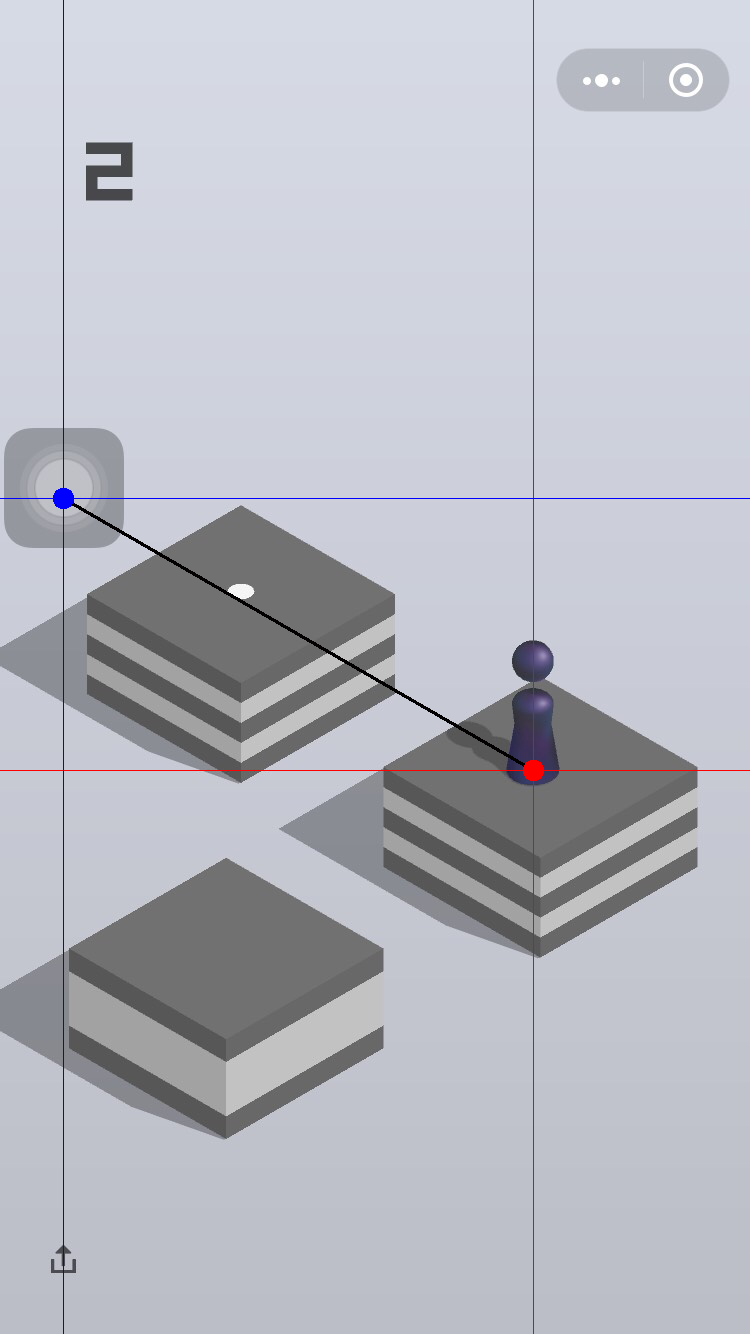
我把辅助按钮关闭掉,看看行不行。估计是这个原因
 danplin
on 3 Jan 2018
danplin
on 3 Jan 2018
小米note顶配 分辨率2560%1440
100分左右必死 求正确参数 2k屏
win7旗舰32位
 huhuno1
on 3 Jan 2018
huhuno1
on 3 Jan 2018
运行python脚本出现这个问题
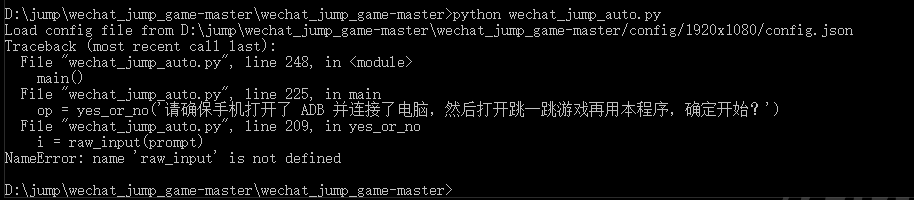 要怎么解决,手机机型为htc one m8
 silongyi
on 3 Jan 2018
silongyi
on 3 Jan 2018
三星s7edge
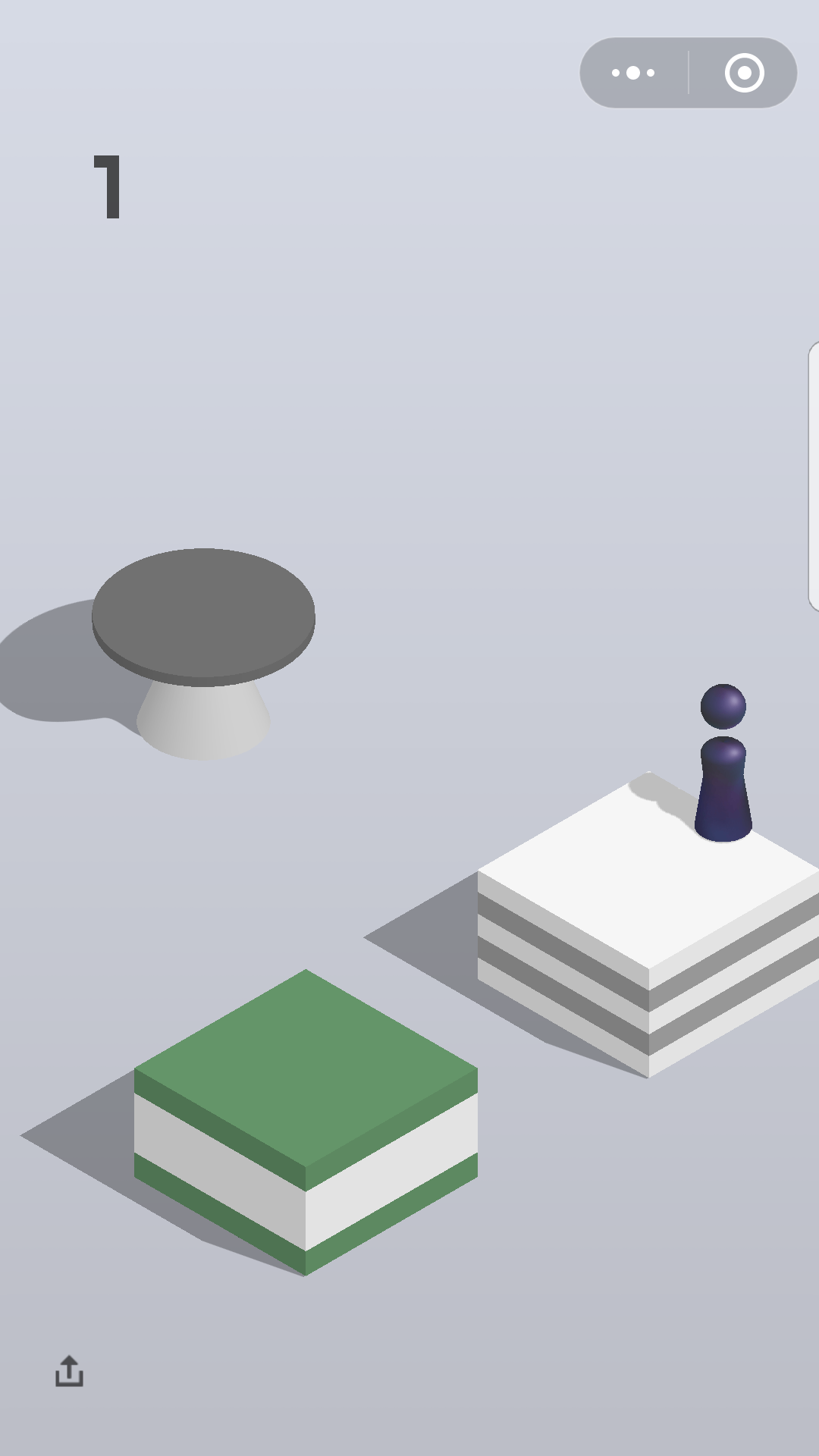
右跳太远 左跳太近 怎么改
 xxfxxf
on 3 Jan 2018
xxfxxf
on 3 Jan 2018
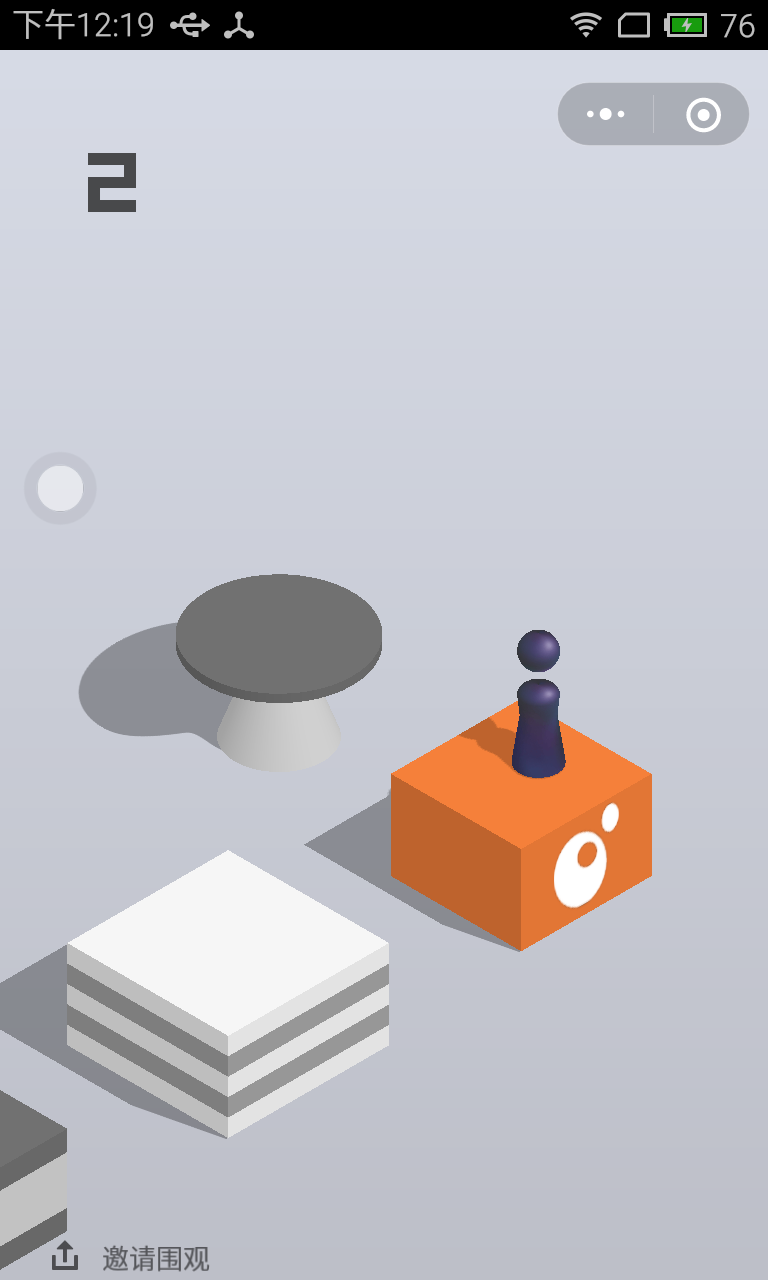
魅族 M1
1280x768 分辨率、
WIn10 x64
因为只有1280x720的配置,还是期待可以加入768的配置的...
ghost
on 3 Jan 2018
楼主快更新config啊
huhuno1
on 3 Jan 2018
机型:魅族 PRO6 PLUS
分辨率(具体到宽高):2560x1440
电脑系统:win7
问题描述:每次第一跳就超过距离掉下去了
 mozhuwanjieDEV
on 3 Jan 2018
mozhuwanjieDEV
on 3 Jan 2018
机型:魅族MX4 PRO
分辨率:2560x1536(非常规2000+)
电脑系统:win 10
测试了好久,调整default.json参数 好多次都不行,最后调整press_time成功,具体如下
default.json:
{
"under_game_score_y": 410,
"press_coefficient": 1.005,
"piece_base_height_1_2": 28,
"piece_body_width": 110,
"swipe": {
"x1": 320,
"y1": 410,
"x2": 320,
"y2": 410
}
}
调整wechat_jump_auto.py中的press time 在后面加了个0.96的系数(具体自己可以再调整),虽然没有每次都中心,但中心成功率已经很高了,跑到555分就关掉了,太高了。。。,别人要怀疑了
def jump(distance):
'''
跳跃一定的距离
'''
press_time = distance * press_coefficient*0.96
press_time = max(press_time, 200) # 设置 200ms 是最小的按压时间
press_time = int(press_time)
cmd = 'adb shell input swipe {x1} {y1} {x2} {y2} {duration}'.format(
x1=swipe_x1,
y1=swipe_y1,
x2=swipe_x2,
y2=swipe_y2,
duration=press_time
)
print(cmd)
os.system(cmd)
return press_time
 zevollovez
on 3 Jan 2018
zevollovez
on 3 Jan 2018
求荣耀v9
 wanwujiedao
on 3 Jan 2018
wanwujiedao
on 3 Jan 2018
机型:华为P9,EVA-AL00
分辨率: 1080x1920
电脑系统:win10
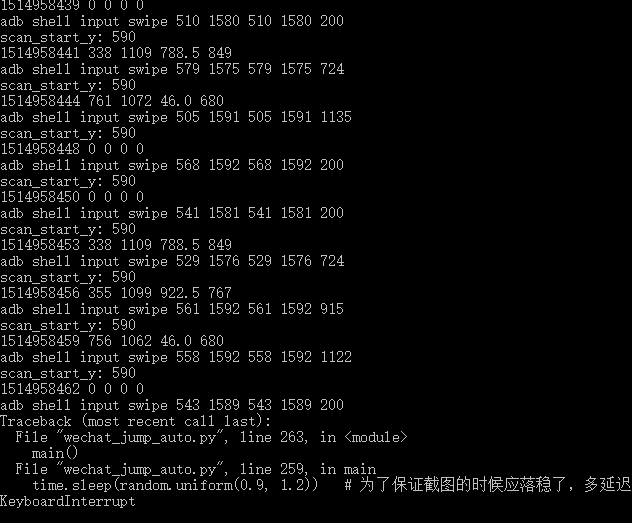
测试了好久,每次往右边跳的时候还是很顺利的,一旦改变方向,要往左边的方块跳,就像傻子一样坐好久,之后跳到屏幕外面去了。。。。不知道怎么改参数才能分清楚方向(⊙o⊙)…
没找到划线的截图,只能找到cmd下跳跃失败时的数据,请看下
 OneLittleChild
on 3 Jan 2018
OneLittleChild
on 3 Jan 2018
oppo的
Screen: Physical size: 480x854
Density: Physical density: 240
DeviceType: A31t
OS: win32
电脑:win10
跳一下就掉下去了。
 5412487
on 3 Jan 2018
5412487
on 3 Jan 2018
贴一个魅族pro6plus能用的参数,具体能刷多少没试过,怕装逼装过头。
关闭悬浮球,反正我是关了玩的。
{
"under_game_score_y": 390,
"press_coefficient": 1,
"piece_base_height_1_2": 26,
"piece_body_width":110
}
我是刷到一千了。。。。
 owenjun
on 3 Jan 2018
owenjun
on 3 Jan 2018
三星S8+的参数,目前为止最高到了500多,勉强能用哈
{
"under_game_score_y": 740,
"press_coefficient": 1.05,
"piece_base_height_1_2": 140,
"piece_body_width": 140,
"swipe": {
"x1": 320,
"y1": 410,
"x2": 320,
"y2": 410
}
}
 michaellee123
on 3 Jan 2018
michaellee123
on 3 Jan 2018
小米mix2的童鞋们
84行最小按压时间200改为100,
91行按压时间duration=press_time改为duration=press_time+40
几乎全都跳到中心点,特别赞,不过不要刷太过了差不多就停了哈~
 chenshuipeng
on 3 Jan 2018
chenshuipeng
on 3 Jan 2018
跪求魅蓝A5
 dlsyaim
on 3 Jan 2018
dlsyaim
on 3 Jan 2018
跪求iPhone6 Plus
 chaozhangpower
on 3 Jan 2018
chaozhangpower
on 3 Jan 2018
机型:小米 5s Plus
分辨率(具体到宽高):1080x1920
电脑系统:deepin 15.5(linux)
问题描述:
只能跳到100-150(换了不同的config.json)
Python: 3.5.4 |Anaconda custom (64-bit)| (default, Nov 20 2017, 18:44:38)
[GCC 7.2.0]
 StephenLU0422
on 3 Jan 2018
StephenLU0422
on 3 Jan 2018
楼上小米5sp 的,同款手机 同款系统,我改了下参数 ,300 1.47 25 80【抱歉爪机。。。】
yk133
on 3 Jan 2018
跪求华为A6的参数
 AllureLo
on 3 Jan 2018
AllureLo
on 3 Jan 2018
@yk133,小米5sp现在
只能240左右
{
"under_game_score_y": 300,
"press_coefficient": 1.47,
"piece_base_height_1_2": 25,
"piece_body_width": 80,
"swipe": {
"x1": 500,
"y1": 1600,
"x2": 500,
"y2": 1602
}
}
StephenLU0422
on 3 Jan 2018
@StephenLU0422
{
"under_game_score_y": 300,
"press_coefficient": 1.47,
"piece_base_height_1_2": 25,
"piece_body_width": 80,
"swipe" : {
"x1": 500,
"y1": 1600,
"x2": 500,
"y2": 1603
}
}
600+
可能运气不太好??
yk133
on 3 Jan 2018
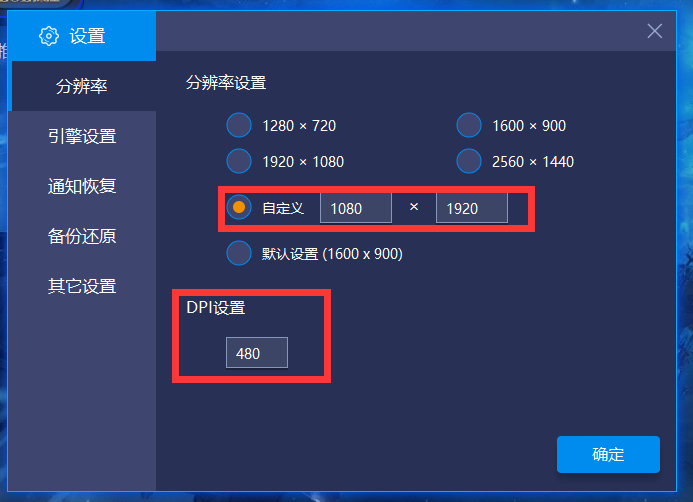
用Bluestacks模拟器,可以不受硬件限制,经测试:分辨率1080*1092,DIP设成480,可行(跑到1400手动关了,极限值未测试)!!
 Moowei
on 3 Jan 2018
Moowei
on 3 Jan 2018
机型:一加5
1920x1080
under_game_score_y = 300
press_coefficient = 1.392
piece_base_height_1_2 = 20
piece_body_width = 70
最高1300左右,求更好的参数
 Zuriel429
on 3 Jan 2018
Zuriel429
on 3 Jan 2018
华为荣耀v9
参数都不太好用,用的2560x1440的第一个都跳不过去
 liulongrong
on 4 Jan 2018
liulongrong
on 4 Jan 2018
机型:nubi az11
分辨率(具体到宽高):1920*1080
问题描述:像右上跳且两个棋盘太近会蓄力一跳导致跳过头
scan_start_y: 640
1515042489 0 0 0 0
adb shell input swipe 586 1588 586 1588 200
scan_start_y: 590
1515042492 0 0 0 0
adb shell input swipe 523 1576 523 1576 200
 sd2333
on 4 Jan 2018
sd2333
on 4 Jan 2018
一加2
1920x1080
under_game_score_y = 300
press_coefficient = 1.392
piece_base_height_1_2 = 20
piece_body_width = 70
上面默认参数,一千六。
1.392改成了1.393,一千八。
1.393改成了1.394,一千六。
 lunix01
on 4 Jan 2018
lunix01
on 4 Jan 2018
红米note4x 改为1.48 已经900+了
 kookley
on 4 Jan 2018
kookley
on 4 Jan 2018
机型:小米mix2
分辨率(具体到宽高):2160x1080像素
电脑系统:win10
问题描述:上50后每次都在边缘,跳的有点近
"under_game_score_y": 619,
"press_coefficient": 1.492,
"piece_base_height_1_2": 20,
"piece_body_width": 70,
"swipe" : {
"x1": 824,
"y1": 371,
"x2": 959,
"y2": 448
}
 Tyler-zct
on 4 Jan 2018
Tyler-zct
on 4 Jan 2018
s7直屏版,物理分辨率2560x1440,为了平时用省电设置成了1920x1080,每次最多跳到第二块,就挂了。设置回2560x1440则正常
 yacojam
on 4 Jan 2018
yacojam
on 4 Jan 2018
荣耀9,pc是win7,一步都跳不起,有知情人士了解情况吗?
 zzdgit
on 5 Jan 2018
zzdgit
on 5 Jan 2018
@zzdgit 我是V9,情况和你一样,不知道有什么好用的参数
 yangk
on 5 Jan 2018
yangk
on 5 Jan 2018
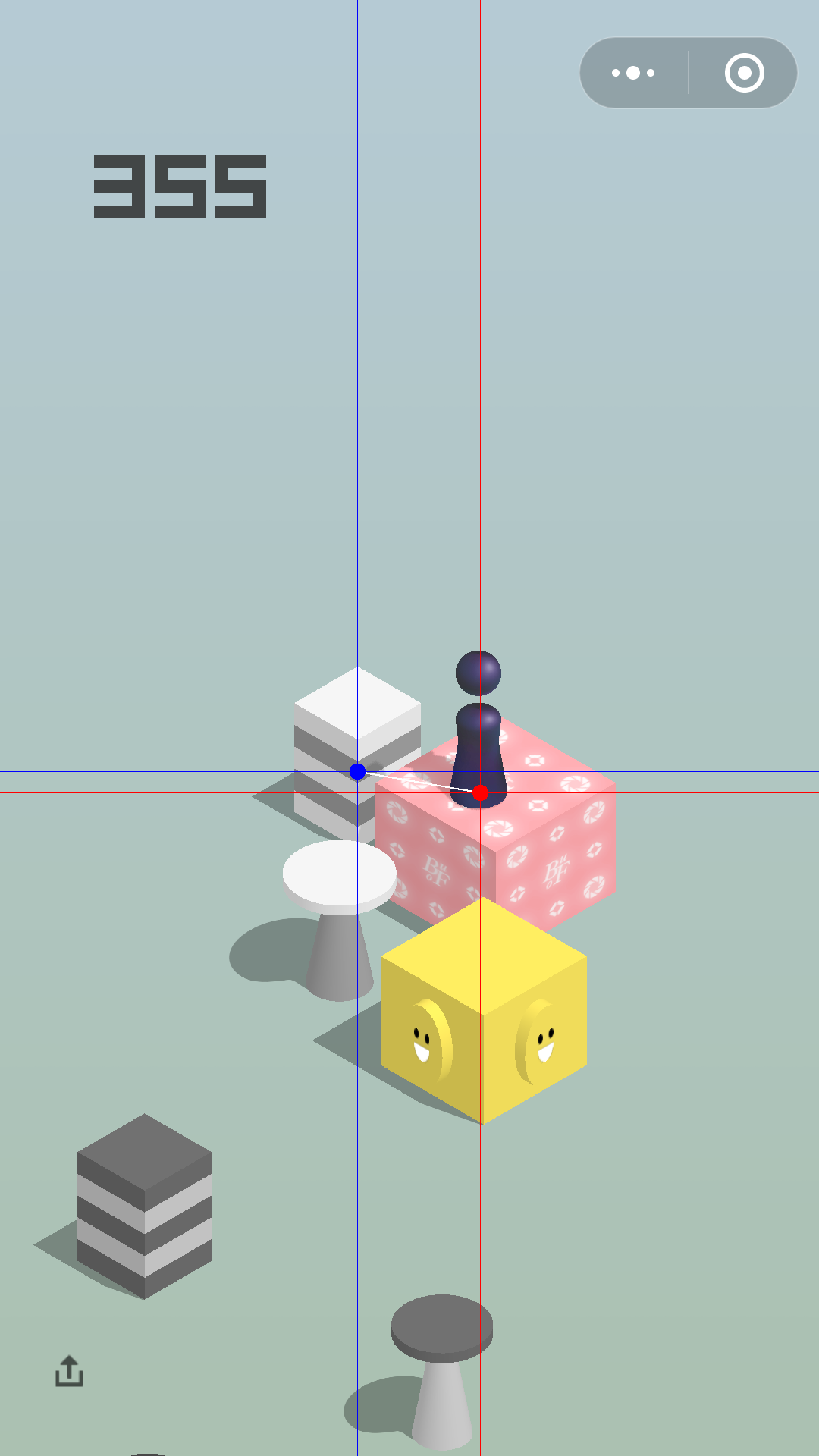
机型:MI 6
分辨率(具体到宽高):1920 * 1080
电脑系统:OSX 10.13.2
问题描述: 识别错误
 Whiothes
on 5 Jan 2018
Whiothes
on 5 Jan 2018
@yangk 是不是要开启什么模拟点击模式,我在手机上楞是没找到
zzdgit
on 5 Jan 2018
机型:小米6
分辨率:1920 x 1080
电脑系统:windows 7
"press_coefficient": 1.425,
别的默认,还有米6可能进的是默认的1080的json,所以注意下
目前到了700多,不想太高,手动停了。
可以把延时改长一点,这样就更大概率吃到奖励墩
 wangvvv
on 5 Jan 2018
wangvvv
on 5 Jan 2018
机型:iPhone 6S
分辨率:1334X750
系统:OSx 10.13.2

 AlexisWu-01
on 5 Jan 2018
AlexisWu-01
on 5 Jan 2018
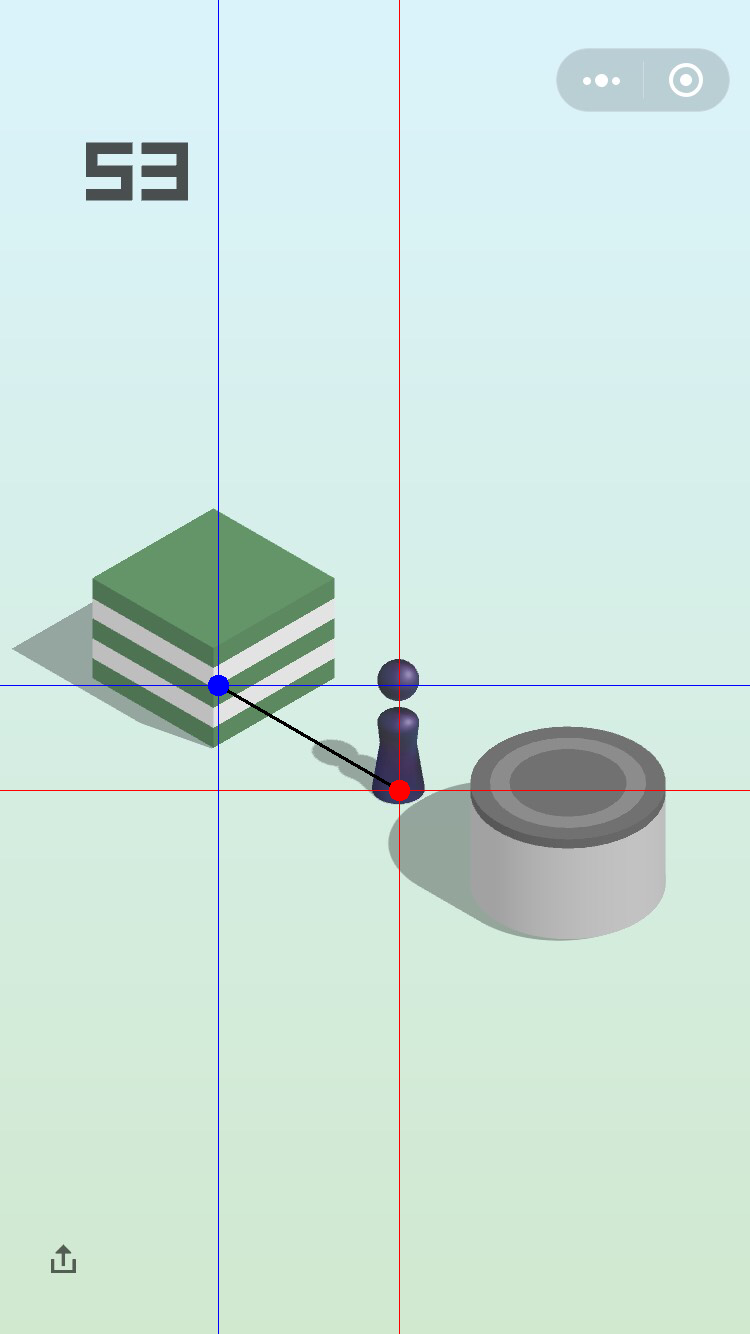
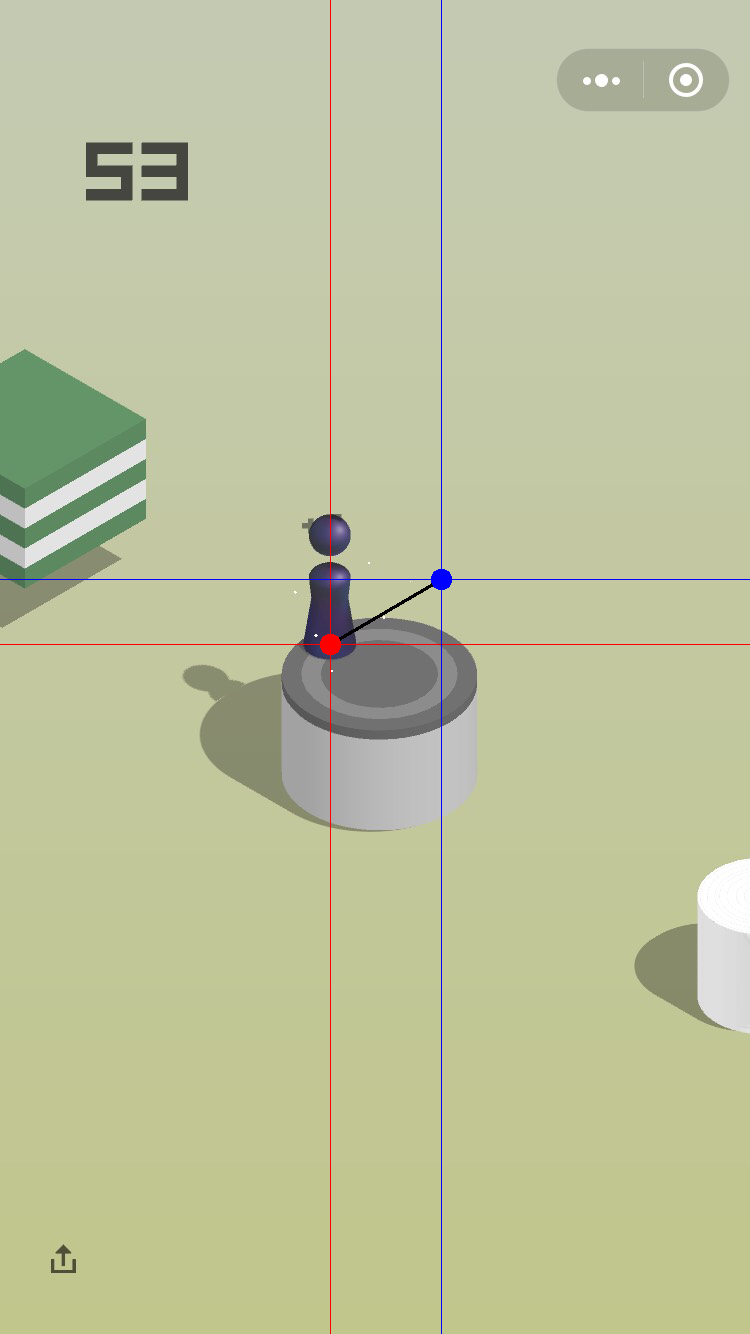
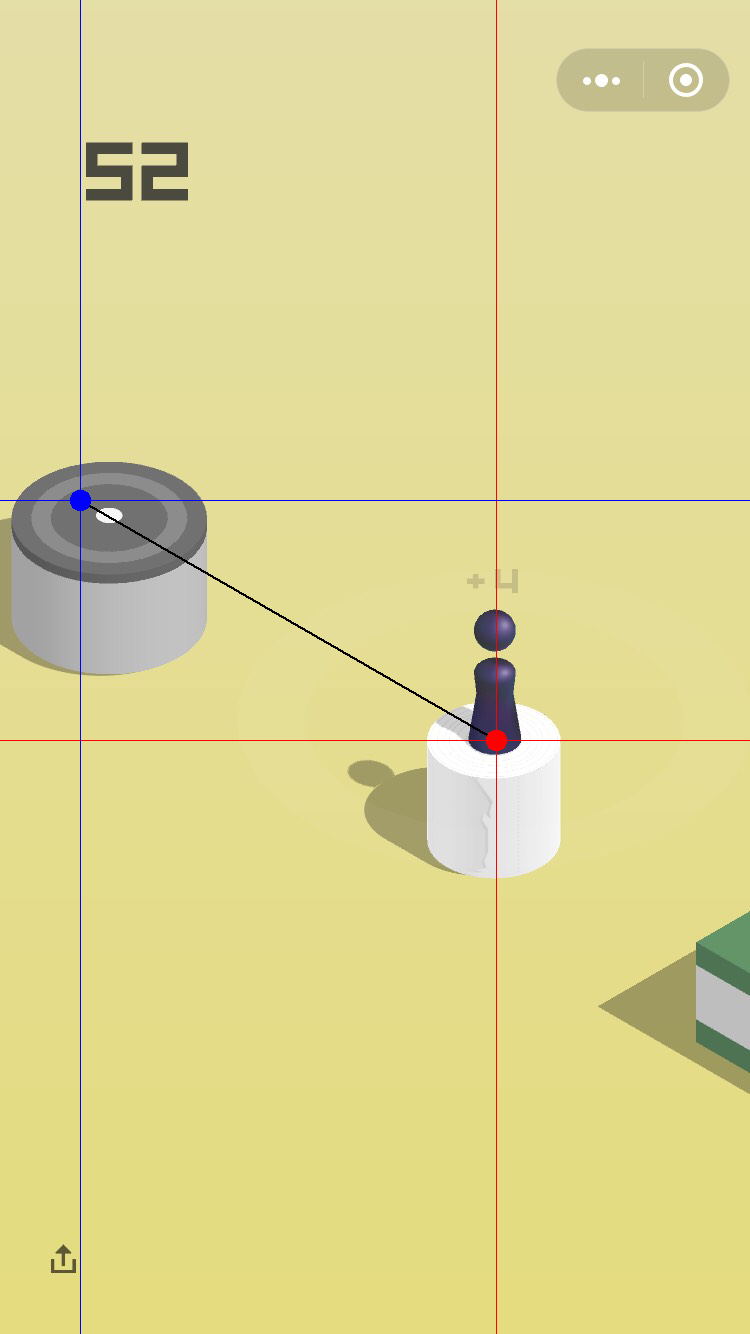
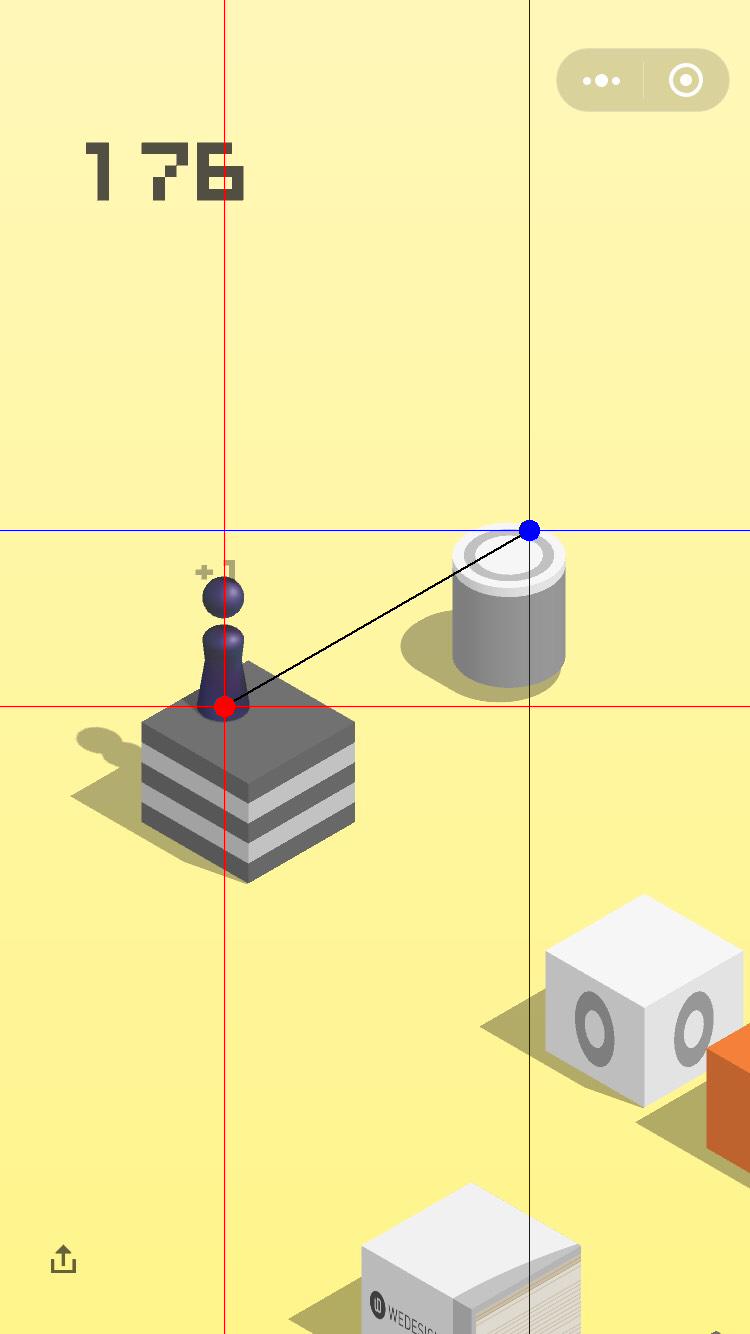
report几个定错位的
iphone 6s ios10.3.3+mac OS 10.13.2
AlexisWu-01
on 5 Jan 2018
STOP_jump MacOS
没有 .unix

 HanMs
on 6 Jan 2018
HanMs
on 6 Jan 2018
机型:vivo Y18L
分辨率:720x1280
电脑系统:win10
问题描述:报错 Error: Invalid arguments for command: swipe
python wechat_jump_auto.py
Load config file from F:CYG\wechat_jump\wechat_jump_game-master/config/1280x720/config.json
请确保手机打开了 ADB 并连接了电脑,然后打开跳一跳并【开始游戏】后再用本程序,确定开始? y/n [y]: y
程序版本号:1.1.1
Screen: Physical size: 720x1280
Density: Physical density: 320
Device: msm8226
Phone OS: 4.3
Host OS: win32
Python: 3.6.3 (v3.6.3:2c5fed8, Oct 3 2017, 17:26:49) [MSC v.1900 32 bit (Intel)]
采用方式 1 获取截图
scan_start_y: 476
1515244349 225 739 525.5 566
adb shell input swipe 336 1053 336 1053 727
Error: Invalid arguments for command: swipe
usage: input ...
input text
input keyevent
input [touchscreen|touchpad|touchnavigation] tap
input [touchscreen|touchpad|touchnavigation] swipe
input trackball press
input trackball roll
scan_start_y: 476
(另外请尽量附一张 screenshot_backups 目录下的 _d.png 结尾画了线的图)----没有发现这个目录
 ccchen2016
on 6 Jan 2018
ccchen2016
on 6 Jan 2018
win8
小米6
代入给的config的参数直接会飞
得分没有超过个位数
 v754424340
on 7 Jan 2018
v754424340
on 7 Jan 2018
机型:Kingsun(杂牌机,充话费送的那种)
分辨率:480×854
电脑系统:Windows 10 专业版Version 1709
问题描述:由于不可知的原因电脑无法用idel编辑py文件,无法自己调试,所以请求帮忙做一份480×854的参数(这个分辨率太低了...)
Screen: Physical size: 480x854
Density: Physical density: 240
Device: msm8909
Phone OS: 4.4.4
Host OS: win32
Python: 3.6.4 (v3.6.4:d48eceb, Dec 19 2017, 06:54:40) [MSC v.1900 64 bit (AMD64)]
采用方式 1 获取截图
scan_start_y: 284
1515346568 150 482 350.0 378
adb shell input swipe 263 698 263 698 313
scan_start_y: 284
1515346571 0 0 0 0
adb shell input swipe 204 709 204 709 200
scan_start_y: 284
1515346574 150 482 350.0 378
adb shell input swipe 218 695 218 695 313
scan_start_y: 284
1515346577 0 0 0 0
adb shell input swipe 248 707 248 707 200
scan_start_y: 284
1515346591 150 482 350.0 378
adb shell input swipe 256 713 256 713 313
scan_start_y: 284
1515346594 250 493 149.0 494
adb shell input swipe 232 694 232 694 200
scan_start_y: 284
1515346597 150 482 350.0 378
adb shell input swipe 221 707 221 707 313
从一开始起跳就会掉,现有的参数都与它差得很远。。。
 QeeZone
on 7 Jan 2018
QeeZone
on 7 Jan 2018
@QeeZone请使用nightly版本,那个不需要分辨率配置,可以试试
 MrLevo520
on 7 Jan 2018
MrLevo520
on 7 Jan 2018
2160*1080 honor v10
 goldencicada
on 8 Jan 2018
goldencicada
on 8 Jan 2018
2560*1536
"under_game_score_y": 285,
"press_coefficient": 0.95,
"piece_base_height_1_2": 28,
"piece_body_width": 110,
"swipe": {
"x1": 320,
"y1": 410,
"x2": 320,
"y2": 410
}
可以到1000+
 hxs2660
on 8 Jan 2018
hxs2660
on 8 Jan 2018
小米note顶配:
{
"under_game_score_y": 410,
"press_coefficient": 1.086,
"piece_base_height_1_2": 26,
"piece_body_width": 110,
"swipe": {
"x1": 320,
"y1": 410,
"x2": 320,
"y2": 410
}
}
水平跳挺准的,但是往上跳的时候就会蓄力到最大,直接跳到屏幕边。。。。。。。。
 LingJingYing
on 9 Jan 2018
LingJingYing
on 9 Jan 2018
向上跳挺好的,但是向左跳,会直接跳飞到屏幕边上,这个是用最近更新的一版代码所发现的情况。请问该如何解决?
 MrMarsZhu
on 9 Jan 2018
MrMarsZhu
on 9 Jan 2018
蓝叠bluestack模拟器 720*1080
{
"under_game_score_y": 369,
"press_coefficient": 2.003,
"piece_base_height_1_2": 13,
"piece_body_width": 45,
"swipe": {
"x1": 374,
"y1": 1060,
"x2": 374,
"y2": 1060
}
}
曾经能到800多,但今天无意中实验发现200都难上,是不是小程序内部参数改了……
 SuX97
on 10 Jan 2018
SuX97
on 10 Jan 2018
小米note标配最多跳100分左右,无法跳出更高的分数
小米note标配参数:
5.7英寸
1920X1080像素
386ppi
 jinweizhiyuan
on 10 Jan 2018
jinweizhiyuan
on 10 Jan 2018
小米mix2最多最多跳100分左右,无法跳出更高的分数.无法突破200
,是时间的乘数有问题吗
 Eacaen
on 11 Jan 2018
Eacaen
on 11 Jan 2018
大神们,来个iPhone 6 Plus
 threshi
on 12 Jan 2018
threshi
on 12 Jan 2018
iPhone6 Plus

threshi
on 12 Jan 2018
默认是根据机型自动加载配置的吗,请问下如何修改使用哪个配置?
 chris-zh
on 12 Jan 2018
chris-zh
on 12 Jan 2018
小米6用的是1920*1080里的数据
 grj521yxy
on 19 Jan 2018
grj521yxy
on 19 Jan 2018
为什么现在跳完的分数提交不上去了
 15291834071
on 21 Jan 2018
15291834071
on 21 Jan 2018
,
 jcmsmm
on 9 Feb 2018
jcmsmm
on 9 Feb 2018
红米5plus
分辨率:2160x1080
电脑系统:win7 32位
请问参数设置多少
 xuzhijvn
on 12 Feb 2018
xuzhijvn
on 12 Feb 2018
@qq783175223
红米5plus
分辨率:2160x1080
DPI: 440
wechat_jump_auto 1.1.4 版本试用这个,不行就自己调整
"press_coefficient": 1.045
因为 #841 改了算法,一行代码不见了, 需要PR #1208
 JasonKhew96
on 23 Feb 2018
JasonKhew96
on 23 Feb 2018
Huawei P9
1080*1920
"press_coefficient": 1.02
5000 + 手动停止,但是分数被自动质疑,上不了榜。
 enzhou-y
on 24 Feb 2018
enzhou-y
on 24 Feb 2018
红米note4x
 aLLLiyyy
on 26 Feb 2018
aLLLiyyy
on 26 Feb 2018
@aLLLiyyy 分辨率?
 leon332157
on 27 Feb 2018
leon332157
on 27 Feb 2018
机型:魅蓝S6
分辨率(具体到宽高):1440*720
电脑系统:Win7
问题描述:能跳270左右
 HoshinoSuzumi
on 21 Apr 2018
HoshinoSuzumi
on 21 Apr 2018
Related issues
 Uni-lovenix
·
3Comments
Uni-lovenix
·
3Comments
 Testlyy
·
7Comments
Testlyy
·
7Comments
 henryluki
·
5Comments
henryluki
·
5Comments
 ameizi
·
6Comments
ameizi
·
6Comments
 UniqHu
·
3Comments
UniqHu
·
3Comments
Most helpful comment
小米 MIX 能用的参数
under_game_score_y = 619 # 截图中刚好低于分数显示区域的 Y 坐标,300 是 1920x1080 的值,2K 屏、全面屏请根据实际情况修改
press_coefficient = 1.492 # 长按的时间系数,请自己根据实际情况调节
swipe_x1, swipe_y1, swipe_x2, swipe_y2 = 320, 410, 320, 410 # 模拟按压的起始点坐标,需要自动重复游戏请设置成“再来一局”的坐标
piece_base_height_1_2 = 20 # 二分之一的棋子底座高度,可能要调节
piece_body_width = 70 # 棋子的宽度,比截图中量到的稍微大一点比较安全,可能要调节
sample_board_x1, sample_board_y1, sample_board_x2, sample_board_y2 = 824, 371, 959, 448
仅供参考