Webxr: Basic WebXR test fails in Chrome Android.
Hi, just trying out WebXR API. I just did this basic test using if(navigator.xr). Works fine in Windows Chrome. doesDnot work in android chrome. I am sure I am missing something here or i am doing it the wrong way. I am new to this. Thanks in advance
if(navigator.xr){
    Bsup.innerHTML = "Your Browser supports WebXR!";
    chkVR.disabled=false;
    chkAR.disabled=false;

}else{
    Bsup.innerHTML = "Your Browser does not support WebXR!"
    chkVR.disabled=true;
    chkAR.disabled=true;
    status.innerHTML = "Please try with a WebXR supported Browser.";

}
 naseemshah
All 7 comments
I'm sorry, this is not the bug tracker for Chrome, this is the bug tracker for the WebXR specification.
 Manishearth
on 19 Jul 2020
Manishearth
on 19 Jul 2020
It's likely that your android chrome is out of date somehow.
Manishearth
on 19 Jul 2020
I have the latest chrome version 83. WebXR examples works perfectly fine in the same chrome! Even Google Sodar AR application works in my phone. I don't know why this doesn't work.
naseemshah
on 19 Jul 2020
is it possible i am doing the check the wrong way?
naseemshah
on 19 Jul 2020
That check should work, but only if your origin is secure. (HTTPS or localhost) I suspect you may be testing with localhost on Windows and then deploying to a non-HTTPS server to test with Android?
 toji
on 25 Jul 2020
toji
on 25 Jul 2020
Yes, exactly! That's what I did. I ran my a local server on my pc and connected via wifi to check in my android! Again this is Development server not production server.
Thank you for that, will try that out!
And this is the only way to check? is there any different way that I don't know of?
naseemshah
on 26 Jul 2020
@toji thanks man! It totally worked! I pushed to gh-pages and it worked.
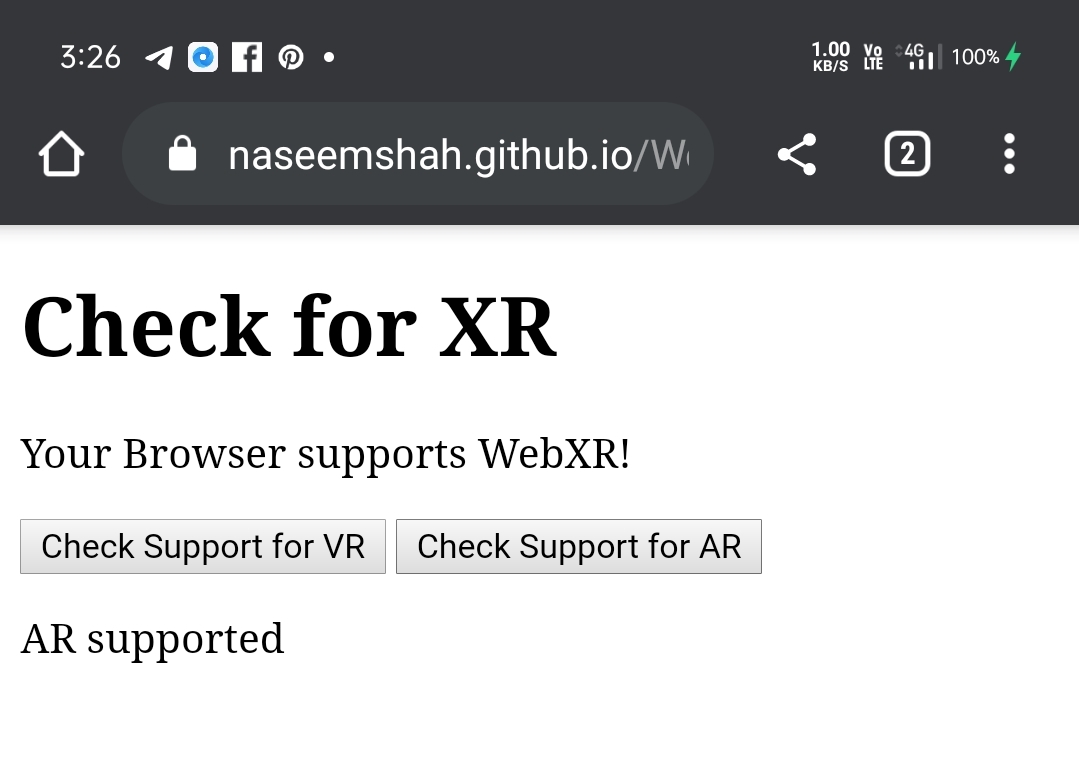
Thanks alot! 😄
naseemshah
on 26 Jul 2020
Related issues
toji
·
6Comments
 hajop
·
4Comments
hajop
·
4Comments
 MortimerGoro
·
10Comments
MortimerGoro
·
10Comments
 ranbuch
·
10Comments
ranbuch
·
10Comments
 klausw
·
11Comments
klausw
·
11Comments