Webtorrent: Comparing bandwidth usage with webseed streaming and direct http streaming
Hello,
I am currently thinking of using webtorrent to stream videos on my website and save some bandwidth.
My videos are stored in an object storage service (like S3 or google storage). You probably know that with this kind of service I am paying bandwidth usage per GB sent/uploaded.
So why not using my object storage public URL as a webseed in order to save money ? It works great, but actually I think I will spend more money by using webtorrent.
If I stream the video directly from the public HTTP URL, video data are sent just "as fast as necessary" to keep the video stream fluid. Even if I have a very fast internet speed and I watch only 10% of the videos, there will be only 15%-20% of the videos bytes sent by the storage service.
With webtorrent, the whole video is downloaded at my full internet speed. So more bytes are sent by storage service, and the final invoice will be much higher.
Of course this scenario is true only if there is no other peers available than the webseed URL.
What do you think about this ? Is there anything I can do about it ?
 daeschlerdavid
All 13 comments
You can definitely save bandwidth by using WebTorrent (if you do it correctly) by only using webseeds when needed
You can add/remove webSeeds manually but there is no logic for auto disable/enable
torrent.removePeer(url)
torrent.addWebSeed(peerId)
It's possible to get how many users there is available from the tracker, how many you are connected to and how fast you are downloading...
 jimmywarting
on 17 Jan 2019
jimmywarting
on 17 Jan 2019
I think the problem is that the File portion of WebTorrent doesn't do anything special when downloading media files.
It doesn't look like it downloads just the parts that are getting rendered, but I might be missing something.
It uses the render-media module that invokes createReadStream() on the file for prioritizing which chunks to download.
By default, all files get downloaded in a WebTorrent so you'd need to unselect them all and then rely on createReadStream() to prioritize the chunks. Not sure if that'd be enough either.
 RangerMauve
on 17 Jan 2019
RangerMauve
on 17 Jan 2019
ideally you should also download pieces in random order and only do sequential download when stream buffer is low... but there's one small issue i have with that: #1558
Maybe webSeeds could kick in when there are critical pieces needed (critical pieces will be flagged when createReadStream is unable to read the pieces that are not available)
jimmywarting
on 17 Jan 2019
It would be really interesting to create a simple demo that uses a combination of webseeds and (when the amount of peers is to low) simply downloading the file directly using HTTP(S).
Even better would be if this downloaded file would then start seeding on WebRTC to decrease the likelihood of the next user needing to do the same.
Has anyone made something like this, or would there be an interest in this kind of demo?
 andreekeberg
on 4 Mar 2019
andreekeberg
on 4 Mar 2019
@andreekeberg https://hackernoon.com/how-to-create-a-swarm-cdn-for-free-with-webtorrent-bfa09d193f71
 DiegoRBaquero
on 4 Mar 2019
DiegoRBaquero
on 4 Mar 2019
@andreekeberg https://hackernoon.com/how-to-create-a-swarm-cdn-for-free-with-webtorrent-bfa09d193f71
Not sure if I'm missing something, correct me if I'm wrong but doesn't this example always use a webseed? What I meant was the following quote by @AoEmaster:
If I stream the video directly from the public HTTP URL, video data are sent just "as fast as necessary" to keep the video stream fluid. Even if I have a very fast internet speed and I watch only 10% of the videos, there will be only 15%-20% of the videos bytes sent by the storage service.
And the reply by @jimmywarting mentioning only using webseeds in some cases.
I would however be very interested in seeing some more research into how much more bandwidth a webtorrent download (with a single webseed and no peers) uses compared to a traditional HTTP download!
andreekeberg
on 4 Mar 2019
@AoEmaster I liked your Idea, I think if there was an option to limit the maximum speed of torrent to something like video bitrate or a bit higher, we can be sure the bandwidth usage will not be higher than normal http streaming.
 WatchSoMuch
on 26 Mar 2019
WatchSoMuch
on 26 Mar 2019
This issue has been automatically marked as stale because it has not had recent activity. It will be closed if no further activity occurs.
![stale[bot] picture](https://avatars3.githubusercontent.com/in/1724?v=4&s=40) stale[bot]
on 24 Jun 2019
stale[bot]
on 24 Jun 2019
Here I have a very interesting statistics from my server for you, I am not writing the site name so it wouldn't be a problem, though its not difficult to guess

Some notes about this screenshot.
- This data is for last 2 months sorted on most watched movies and tv series grouped by movie
- The WSDL,DL,UL numbers are in Gigabytes and driven from the torrent statistics which webtorrent reports
- The WSDL is WebSeed Downloaded, DL:Non Web Seed Downloaded,UL is uploaded
- Most watched qualities for TV Series is SD and for Movies, SD and HD
- WebSeed is dynamically added and removed based on torrent seeds/peers and buffering,etc
- Torrents for top movies have seeds/peers externally from outside of site visitors
It shows how webtorrent is helping website traffic up to %75 for top watching movies and doesn't have effect on less popular movies.
WatchSoMuch
on 1 Mar 2020
@WatchSoMuch Interesting stats Would be easier to understand as a graph to be honnest.
@feross
I just started using Webtorrent and it has cut my bandwidth bills in half! I implemented it on my servers and the stats you see are as caches have expired and web pages are running the webtorrent code.
The content being hosting and loaded in my analytics data is purely MP4, Webm, OGG, FLV, MOV etc video files NOTHING ELSE......YET :D
Here are my Stats and Analytics on Bandwidth consumption and shows how much bandwidth Webtorrent is saving me each month now.
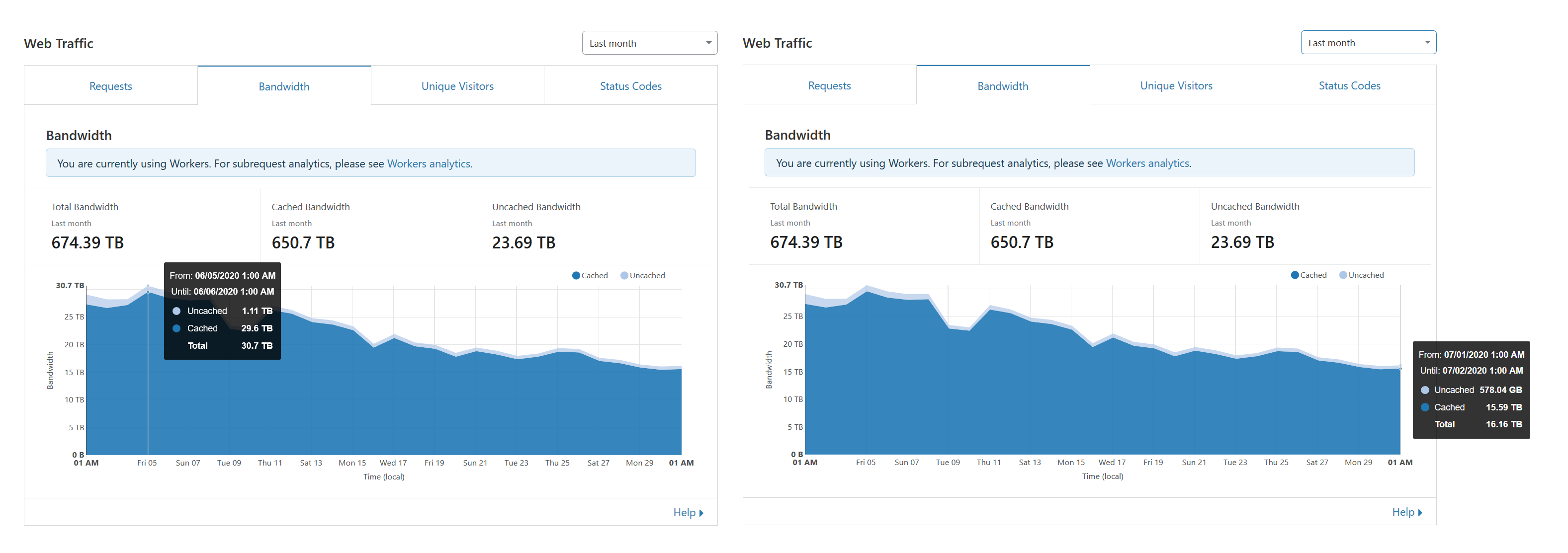
Daily my bandwidth consumption would be about 30TB each day, So every month my bandwidth consumption was around 800-900TB almost a petabyte of bandwidth it was costing me a fortune! :( So I started using Webtorrent a month ago for the first time to see how i can cut down on my bills.
Now so far since using it my daily bandwidth consumption is at 15-16TB a day thats HALF of what it used to be and it is still dropping and i notice video latency has improved dramaticly because users watching the same video send it to me so it loads faster. My servers are also feeling the relief because my IOPS I/O usage on the hard drives has gone down so much so they can load the files better improving site speeds as a hole.
If i push image files like jpegs and gifs ico png svg etc i recon i could save allot more be good if webtorrent would let me load in CSS style sheets , JS Javascript and such with it too it.
In a months time i will share more analytics graph data to see if it platos or stabilizes at this figure of 15tb or if it drops of even more. I want it to drop more but its a waiting game.
I hope more people are having a good experience like me and can share some more data for us all to look at and compare!
 C0nw0nk
on 2 Jul 2020
C0nw0nk
on 2 Jul 2020
@C0nw0nk be careful with the cloudflare in case you have enabled it, you can not use cloudflare cache for streaming or large content, you have to turn the icon off, this happened to me and they removed my site for using it when the bandwidth went too high.
WatchSoMuch
on 3 Jul 2020
@WatchSoMuch
@C0nw0nk be careful with the cloudflare in case you have enabled it, you can not use cloudflare cache for streaming or large content, you have to turn the icon off, this happened to me and they removed my site for using it when the bandwidth went too high.
You can just put your videos on a subdomain like media.site.com and not put that through cloudflares proxy to bypass them. Regardless i have a buisness and enterprise level plan with them. Only for the bandwidth but if things keep going the way they do i will be ending my enterprise plan and removing my subdomain that serves all my media files from their proxy so they can't charge.
But webtorrent has prooven itself to be a P2P Swarm CDN that can take this kind of traffic :D and save me a fortune https://hackernoon.com/how-to-create-a-swarm-cdn-for-free-with-webtorrent-bfa09d193f71
https://hacks.mozilla.org/2018/08/dweb-building-a-resilient-web-with-webtorrent/
C0nw0nk
on 3 Jul 2020
So here is another little update.
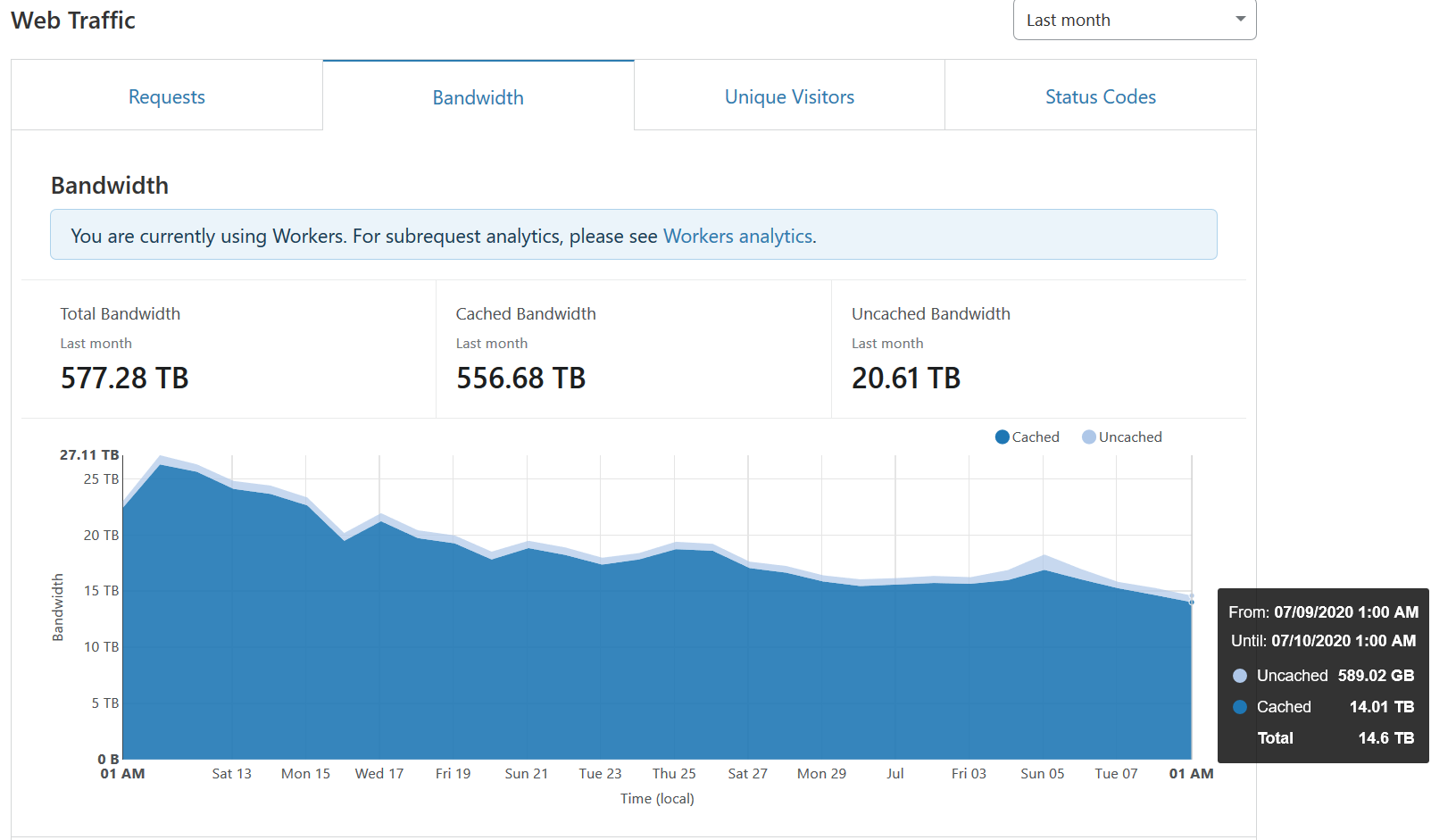
Bandwidth is officially at <=50% of what it used to be.
Another interesting thing that might of pushed it that little bit lower was the fact that libtorrent added support for webtorrent.
As @feross even said here https://feross.org/libtorrent-webtorrent/
The list of torrent p2p apps using the libtorrent library is here.
https://www.libtorrent.org/projects.html
I think their update might of helped push it over the edge if only µTorrent would do the same all the major torrent client software this shows how much of a impact it has.
C0nw0nk
on 10 Jul 2020
Related issues
jimmywarting
·
7Comments
 lacker
·
6Comments
lacker
·
6Comments
 marcu87
·
5Comments
marcu87
·
5Comments
 kevinsimper
·
4Comments
kevinsimper
·
4Comments
 norzak
·
6Comments
norzak
·
6Comments
Most helpful comment
@WatchSoMuch Interesting stats Would be easier to understand as a graph to be honnest.
@feross
I just started using Webtorrent and it has cut my bandwidth bills in half! I implemented it on my servers and the stats you see are as caches have expired and web pages are running the webtorrent code.
The content being hosting and loaded in my analytics data is purely MP4, Webm, OGG, FLV, MOV etc video files NOTHING ELSE......YET :D
Here are my Stats and Analytics on Bandwidth consumption and shows how much bandwidth Webtorrent is saving me each month now.
Daily my bandwidth consumption would be about 30TB each day, So every month my bandwidth consumption was around 800-900TB almost a petabyte of bandwidth it was costing me a fortune! :( So I started using Webtorrent a month ago for the first time to see how i can cut down on my bills.
Now so far since using it my daily bandwidth consumption is at 15-16TB a day thats HALF of what it used to be and it is still dropping and i notice video latency has improved dramaticly because users watching the same video send it to me so it loads faster. My servers are also feeling the relief because my IOPS I/O usage on the hard drives has gone down so much so they can load the files better improving site speeds as a hole.
If i push image files like jpegs and gifs ico png svg etc i recon i could save allot more be good if webtorrent would let me load in CSS style sheets , JS Javascript and such with it too it.
In a months time i will share more analytics graph data to see if it platos or stabilizes at this figure of 15tb or if it drops of even more. I want it to drop more but its a waiting game.
I hope more people are having a good experience like me and can share some more data for us all to look at and compare!