Website: [WIP] Kubecon 2017 Doc Sprints
Kubernetes Doc Sprint Guide
Where: Kubecon 2017, Austin, TX, USA
When: Tuesday, 5 Dec 2017, 1-5pm CST
Room | Sprint subject | Description
---------|----------|-----
Room 1 | User journeys | Improve content that supports better user journeys (experienced K8s users)
Room 2 | Glossary | Add glossary terms (novice K8s users)
Facilitators
Name | GitHub username | Role
---|---|---
Zach Corleissen | @zacharysarah | Lead
Andrew Chen | @chenopis | Facilitator: glossary
Steve Perry | @steveperry-53 | Facilitator: user journeys
Radhika Puthiyetath | @radhikapc | Facilitator
Jennifer Rondeau | @Bradamant3 | Reviews, facilitator
Nick Chase | @nickchase | Reviews
Introduction
Thanks for helping out with Kubernetes documentation!
Kubernetes is a system for managing containerized application across a series of nodes. It allows applications to be easily deployed and scaled across varied infrastructure components. For more information on Kubernetes, read “An Introduction to Kubernetes” or this quick comic case study, “How many coders does it take to screw in a lightbulb?”.
Doc sprint prerequisites
You don’t need to have any background on Kubernetes as a product. However, you do need to have:
- A basic understanding of Markdown
- An account on Github
Signed the CNCF CLA
If this is the first time you’re submitting a pull request to Kubernetes.io, you’ll need to sign The Cloud Native Computing Foundation's Content License Agreement (CLA). To sign the agreement, you’ll need to register your email with the Linux Foundation. The email you register must match the email address for your GitHub account.
Joined the Kubernetes documentation channel on Slack
We'll be communicating about sprint progress in Slack, including signaling when PRs are ready for review.
You should also take some time and familiarize yourself with:
Kubernetes Doc Locations
All of Kubernetes documentation is located on kubernetes.io/docs, and the GitHub repository for documentation is located at https://github.com/kubernetes/website.
Kubernetes Docs Structure
The documentation is generally divided into four main sections: Concepts, Tasks, Tutorial, and Reference. Here are some guidelines to help differentiate them so you know where to put new topics:
Section | Description | Example | Directory
-- | -- | -- | --
Concepts | Help the user gain deeper understanding of your product ("What is X?", "How does X Work?"). | labels and selectors | /docs/concepts/
Tasks | Show a user how to accomplish a specific task, and optionally, different interfaces for doing that task. ("How to do X"). | define environment variables | /docs/tasks/
Tutorials | Walk a user through a real-world, industry-specific, or end-to-end development scenario that uses your product. ("How to do Y in the context of ABC"). | running Zookeeper | /docs/tutorials/
Reference | Give the user the tools they need to use the product's interface(s). | kubectl overview | /docs/reference/
Kubernetes documentation templates. Documentation templates can help speed up PRs that add new pages. You can clone these template files:
The Kubernetes style guide
If you create a new document, you must create an entry in one of the table of contents. Otherwise, the PR will trigger a Travis CI error.
If you need help or have questions about any of these prerequisites, one of the sprint organizers can help.
Doc sprint goals
This goals of this doc sprint are:
- Improve specific areas of Kubernetes developer documentation
- Introduce contributors to the Kubernetes docs contribution process
- Close as many doc issues as possible
Work for the sprint is detailed in a GitHub project: https://github.com/kubernetes/website/projects/8
Doc sprint process
Select an issue from the GitHub project for this doc sprint.
Improve or add content.
Submit a pull request for review.
You can ask questions or send notifications in Slack during any part of the sprint.
Select a document to work on and open it in Github
Select an issue from the GitHub sprint project.
Move the issue to the In Progress column and assign it to yourself.
Read through the issue to make sure you understand what's required.
Edit the document
Open the relevant page(s) and click the pencil icon ("Edit this file") in the upper right corner.
The file opens in the GitHub editor.
Make any necessary changes.
Use the Kubernetes style guide for guidance.
Review your changes.
You can preview your changes at any point by selecting the "Preview changes” pane in the upper left corner of the editor.
Submit a pull request for review
Once you’re ready for your doc to be reviewed, you’ll need to create a new branch and open a Pull Request:
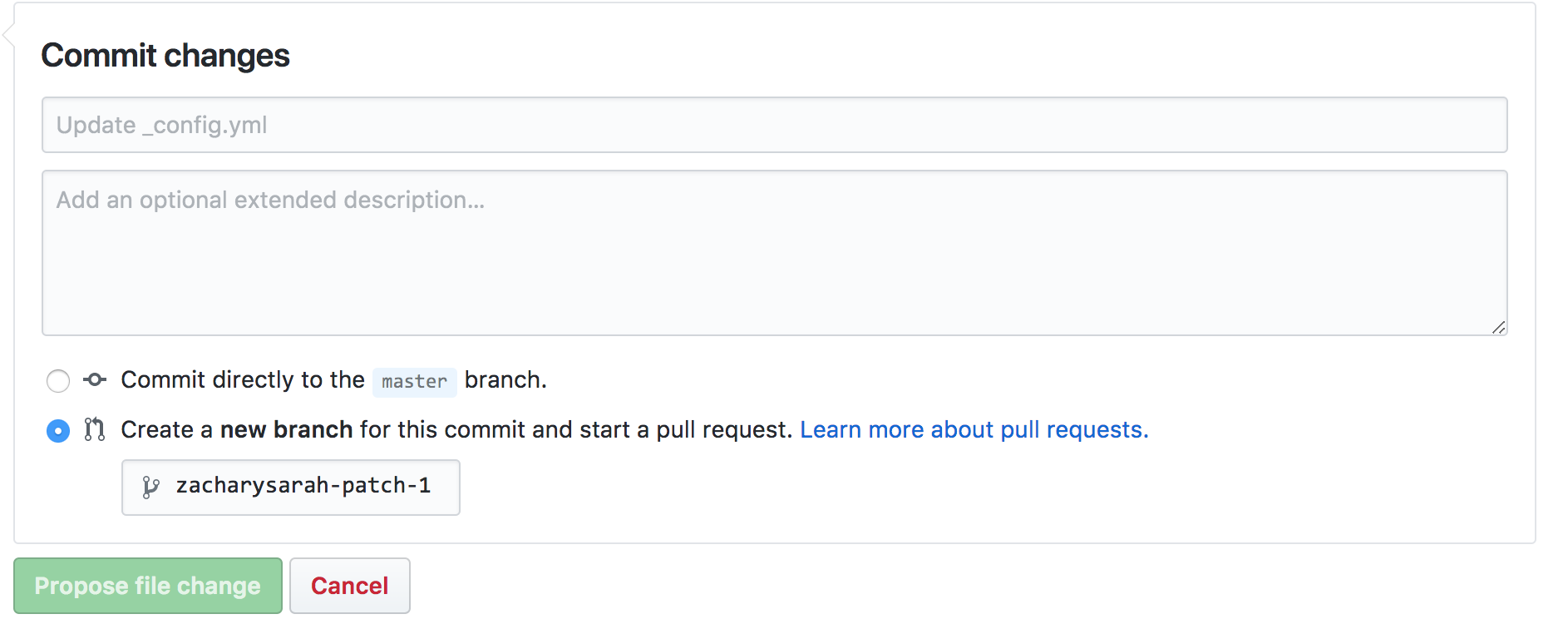
Enter "KubeCon 2017" in the description, along with a short description of the proposed change.
Verify that you’re submitting against
base: master, then click “Create pull request”.Note: After opening the PR, un-check and re-check the box to allow edits from maintainers. (It's a workaround for broken GitHub functionality.)
Send a message to the #sig-docs channel on Slack that your PR is ready for review:
KubeCon 2017 PR ready for review: <URL>
Prizes!
It isn’t a doc sprint if there isn’t swag. ✨ 🎉 ✨
- All participants get their choice of one item of swag from the Kubernetes store.
Continuing to contribute
If you’re interested in continuing to improve Kubernetes documentation:
Join the Kubernetes SIG Docs Google group
Attend the next Kubernetes docs community meeting (Tuesdays @ 10:30am, PST)
 zacharysarah
All 8 comments
Looks great! Might be useful to add something about how/where to ask questions while they're working (as 4th item under either "Select a Document" or "Edit a Document" perhaps) -- they can ask facilitators, or post in the Slack channel -- IOW, encourage discussion/communication while they're working, not just when they're done with a PR.
 Bradamant3
on 1 Dec 2017
Bradamant3
on 1 Dec 2017
@Bradamant3 I added a note under "Doc sprint process":
You can ask questions or send notifications in Slack during any part of the sprint.
zacharysarah
on 1 Dec 2017
@zacharysarah I would also add in a bit about the overall structure of the site:
Section | Description | Example | Directory
-- | -- | -- | --
Concepts | Help the user gain deeper understanding of your product ("What is X?", "How does X Work?"). | labels and selectors | /docs/concepts/
Tasks | Show a user how to accomplish a specific task, and optionally, different interfaces for doing that task. ("How to do X"). | defining environment variables | /docs/tasks/
Tutorials | Walk a user through a real-world, industry-specific, or end-to-end development scenario that uses your product. ("How to do Y in the context of ABC"). | running Zookeeper | /docs/tutorials/
Reference | Give the user the tools they need to use the product's interface(s). | kubectl overview | /docs/reference/
 chenopis
on 1 Dec 2017
chenopis
on 1 Dec 2017
@zacharysarah And here are the doc templates that they can clone for the Concept, Tasks, and Tutorial sections:
chenopis
on 1 Dec 2017
@zacharysarah If they are creating a new doc, then they must also add it to one of the ToC YAML files, see: https://kubernetes.io/docs/home/contribute/write-new-topic/#creating-an-entry-in-the-table-of-contents
chenopis
on 1 Dec 2017
My comments have been added to the issue description.
chenopis
on 1 Dec 2017
@zacharysarah Can we close this?
 steveperry-53
on 6 Jan 2018
steveperry-53
on 6 Jan 2018
@steveperry-53 Absolutely.
zacharysarah
on 8 Jan 2018
Related issues
 gochist
·
3Comments
gochist
·
3Comments
 Karunamon
·
3Comments
Karunamon
·
3Comments
 ahmetb
·
4Comments
ahmetb
·
4Comments
 adityamandhare
·
3Comments
adityamandhare
·
3Comments
 rgo
·
4Comments
rgo
·
4Comments