Webrender: Inset box shadow with non-round blur radius plus non-round scale transform renders unevenly
This YAML test case:
---
root:
  items:
        - type: stacking-context
          bounds: [0, 0, 1000, 1000]
          transform: scale(0.77)
          items:
            - type: box-shadow
              bounds: [ 200, 50, 100, 100 ]
              color: black
              clip-mode: inset
              blur-radius: 3.75
              border-radius: [ 0, 0, 0, 0 ]
It renders with its right hand side darker thank it's left hand side:
https://pearce.org.nz/wr-box-shadow.png
I suspect it's got something to do with the non-round blur radius and non-round scale transform.
This is causing Gecko's boxshadow-large-border-radius.html reftest to fail with WebRender enabled.
 cpearce
All 9 comments
This is needed to unblock https://bugzilla.mozilla.org/show_bug.cgi?id=1475827
 staktrace
on 25 Dec 2018
staktrace
on 25 Dec 2018
This particular test case appears to not render symmetrically because we render a square solid brush with an almost-but-not-quite square mask. for me the mask ends up being 77x78 rather than 77x77. Interestingly we pass 77x77 most of the way until raster_rect_to_device_pixels is called in get_raster_rects at which point a rectangle is rounded out.
The asymmetry happens with non-integer origins of the input rectangle. For example TypedRect(77.0×77.0 at (154.0,38.5)) gets rounded out to TypedRect(77.0×78.0 at (154.0,38.0)).
The party is happening around here.
If I first floor() the origin of the rectangle in raster_rect_to_device_pixels, the test case looks good.
I think that it makes sense to first align the origin of the rectangle with the intermediate target's pixel grid and then round the size out so that the position and sizes are snapped independently rather than the position affecting the size, but I don't know whether there is a better place to do this.
@gw3583 thoughts?
 nical
on 15 Jan 2019
nical
on 15 Jan 2019
Patch up at https://phabricator.services.mozilla.com/D16537
I think snapping the rectangle this way is what we do in other places to avoid jibble-jabbling. It'd make sense to add this to euclid.
nical
on 15 Jan 2019
My previous patch isn't quite correct on its own.
Here is a brain dump of what I understand from the way this works:
The test case renders an inset shadow mask into an intermediate target and renders a solid brush with this mask.
The primitive has a transform applied to it which results in it's transformed position having a fractional offset.
To render the shadow mask we try to figure out what the final rect of the brush will be by applying the transform on the CPU. we then round out the transformed bounds to obtain a conservative rect. When the bounds are rounded out we end up with a mask size of 77x78 instead of 77x77 because of the fractional part of the position on the y axis. The UV rect we generate for the mask matches the conservative rect.
When we render the solid brush, the transform is applied in the shader after pixel snapping, and the sizing plays out differently. The brush ends up with a size of 77x77 pixels on the screen. Note that as opposed to what I was implying in an earlier comment, pixel snapping in the brush shader snaps the corners of the rect independently and not first the origin and then the size. It looks like we only do the latter for text.
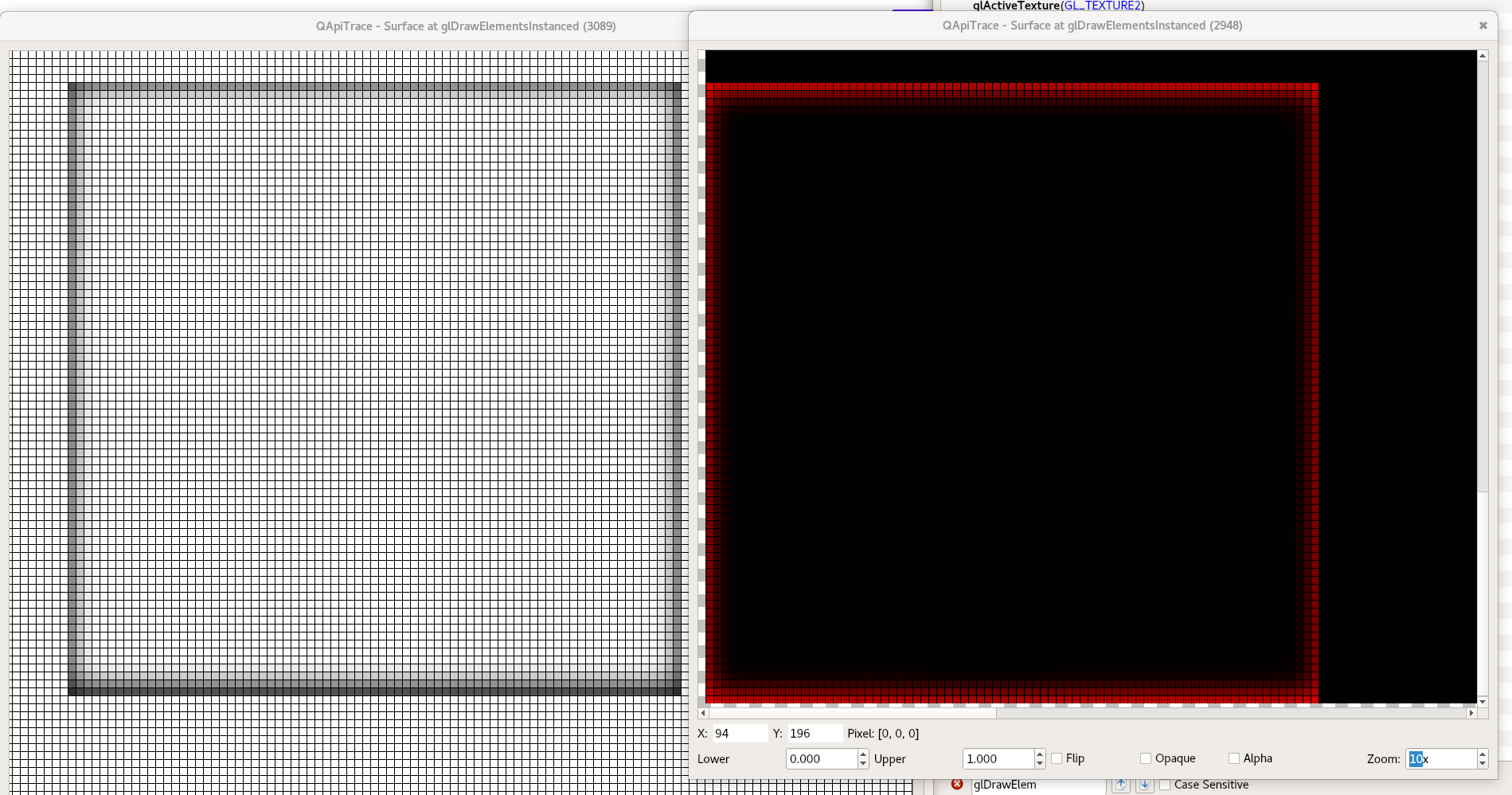
In the shader, we sample from the mask using texelFetch (so no interpolation to paper over the mask size being 1 px taller than the solid brush, but I am not sure that would fix the issue).
My impression is that for this to work without having a side darker than the other, we need (1) the sizes of the mask and the solid brush to match exactly, or (2) figure out a way for the error to play out the same way on each side (the asymmetry is what makes this so noticeable). However if we have (2) without (1), then we'd still have the top and bottom darker or lighter than the left and right sides which might be maybe more forgivable but still noticeable.
Side note, qapitrace is nice when you need to count pixels (more so than renderdoc).
nical
on 16 Jan 2019
Unedited notes from recent discussion with Glenn:
The rounding out of the mask render task bounds should, in theory, not affect the uv rect of the render task, unless we go through the "simple" UvRectKind. We checked that indeed if we go through the UvRectKind::Quad path, the the uvs are built from the picture rect with some rounding (but not rounding-out) applied.
Glenn also found that the first ClipRegion that we render before applying the blur goes through the simple UvRectKind::Rect path, so we lose the fractional offset of the primitive there and is most likely a bug. Fixing it might not address the whole issue but the latter is likely blocked on getting the correct uv rect here. cf uv_rect_kind in render_task.rs
One of my misconceptions was that we snap in the vertex shader before applying the transform, and that is not true. we do multiply the snapped position by a uTransform matrix but that matrix is in fact the orthographic projection, and not the css transform (oops!).
About snapping the corners of the rects (A) rather than the position and then the size (B) (the latter avoids jibble-jabbling issues with fractional scrolling). We only do (B) for text but do (A) for the rest. We've been doing (A) for a long time and past attempts at changing the snapping methods led to wptests breakage but we don't know why.
Right now this isn't a big issue in gecko because Gecko rounds scroll offsets. So we should only have jibble-jabbling when scrolling an axis-aligned scaling transform is applied which is rare.
nical
on 17 Jan 2019
More notes, mostly to myself. It looks like we need to add an uv_rect_kind to ClipRegionTask which would have to be generated in RenderTask::new_rounded_rect_mask or new_mask in render_task.rs. Most of the info we need to to compute the uvs (transforms etc) shouldn't be too far up the call stack (the picture_state and a bit of rect juggling will probably do?).
nical
on 17 Jan 2019
My head hurts.
So here goes another totally wrong assumption I was making about box shadows: I thought we were trying to figure out the bounds of the transformed brush to decide the size of the clip region and its blur, but that's not actually the case: the clip region and the blur appear to always be rasterized at their size in layout space without the transform.
In this test case the layout coordinates of the primitive don't have any fractional offset (the fractional offset of the brush is introduced by the transform). So always using UvRectKind::Rect with clip regions, if it is a bug, doesn't appear affect this test case.
The clip mask, though, is rasterized according to the transformed size.
So what I (think I) know at this point:
- we render a larger mask than the brush that will read (off by 1 pixel in y)
- the geometry of the rendered mask match the (rounded out) size of the render task
- the rendered mask appears to uniformly spread its source (the blurred rect) across the (too large) geometry
I don't yet understand all of the details of what's going on in the shader so I'm not sure whether:
- we are providing incorrect dimensions in the geometry of the clip mask shader and it should match the brush.
- we are meant to provide a quad that is larger but the shader is intended to account for that by sampling intelligently somehow.
- we don't really try to account for fractional offsets when rendering the mask.
The issue could be in the information we generate on the CPU to render the mask, or in some difference between the mask and brush shaders in how vertices are positioned, maybe.
nical
on 18 Jan 2019
I expanded your test case to include the following scales:
---
root:
  items:
    - type: stacking-context
      transform: scale(0.3)
      items:
        - type: box-shadow
          bounds: [ 50, 50, 100, 100 ]
          color: black
          blur-radius: 1
          clip-mode: inset
    - type: stacking-context
      transform: scale(0.4)
      items:
        - type: box-shadow
          bounds: [ 50, 150, 100, 100 ]
          color: black
          blur-radius: 1
          clip-mode: inset
    - type: stacking-context
      transform: scale(0.5)
      items:
        - type: box-shadow
          bounds: [ 50, 250, 100, 100 ]
          color: black
          blur-radius: 1
          clip-mode: inset
    - type: stacking-context
      transform: scale(0.6)
      items:
        - type: box-shadow
          bounds: [ 50, 350, 100, 100 ]
          color: black
          blur-radius: 1
          clip-mode: inset
    - type: stacking-context
      transform: scale(0.7)
      items:
        - type: box-shadow
          bounds: [ 50, 450, 100, 100 ]
          color: black
          blur-radius: 1
          clip-mode: inset
    - type: stacking-context
      transform: scale(0.73)
      items:
        - type: box-shadow
          bounds: [ 50, 550, 100, 100 ]
          color: black
          blur-radius: 1
          clip-mode: inset
    - type: stacking-context
      transform: scale(0.75)
      items:
        - type: box-shadow
          bounds: [ 50, 650, 100, 100 ]
          color: black
          blur-radius: 1
          clip-mode: inset
    - type: stacking-context
      transform: scale(0.77)
      items:
        - type: box-shadow
          bounds: [ 50, 750, 100, 100 ]
          color: black
          blur-radius: 1
          clip-mode: inset
    - type: stacking-context
      transform: scale(0.8)
      items:
        - type: box-shadow
          bounds: [ 50, 850, 100, 100 ]
          color: black
          blur-radius: 1
          clip-mode: inset
    - type: stacking-context
      items:
        - type: box-shadow
          bounds: [ 50, 950, 100, 100 ]
          color: black
          blur-radius: 1
          clip-mode: inset
I have a prototype set of changes which gives us output for this test case of:

From a quick visual inspection, I think these look correct and symmetrical at all scales. Now to try and tidy up all these hacks into something reasonable, and see if these changes hold in general.
 gw3583
on 29 Jan 2019
gw3583
on 1 Feb 2019
gw3583
on 29 Jan 2019
gw3583
on 1 Feb 2019
Related issues
 mstange
·
3Comments
staktrace
·
4Comments
mstange
·
3Comments
staktrace
·
4Comments
 Darkspirit
·
4Comments
mstange
·
4Comments
Darkspirit
·
4Comments
mstange
·
4Comments
 jrmuizel
·
5Comments
jrmuizel
·
5Comments