Webpacker: How to optimize loading entrypoints/packs
Question
How do I load javascript packs in the most optimized way?
Context
My current setup is that I include javascript packs only for the views that require a lot of client-side interactions (i.e. need to make use of React/other JS frameworks). Refer to the following example assuming that showing a post will need heavy client-side logic:
controllers/posts_controller.rb
def show
  @post = Post.find(params[:id])
end
views/posts/show.html.erb
```html.erb
<%= content_tag :div,
id: "posts-show",
data: {
post: @post,
}.to_json do %>
<%= stylesheet_pack_tag 'PostsShow' %>
<%= javascript_pack_tag 'PostsShow', 'data-turbolinks-track': 'reload' %>
**javascript/packs/PostsShow.js**

```js
function PostsShow(props) {
  const { post: { title } } = props
  return (
    <div>Post: { title }</div>
  )
}

const renderComponent = (elementID, Component) => {
  const node = document.getElementById(elementID);
  if (node) {
    const data = JSON.parse(node.getAttribute("data"));
    ReactDOM.render(<Component {...data} />, node);
  }
};

renderComponent('posts-show', PostsShow);
This setup works quite well in most cases but the initial loading time bothers me. Is it in general too excessive to have a separate entrypoint for each action (e.g. posts#show, posts#index)?
 woniesong92
All 5 comments
I'd separate your pakcage for all that page, instead of per single action.
That way you'd have a posts package which includes all actions.
 obedparla
on 14 May 2020
obedparla
on 14 May 2020
@rossta would you care to provide any insights here?
woniesong92
on 17 May 2020
@woniesong92 Thanks for asking. The question of how to best optimize your bundling strategy deserves a lot of attention. I'm planning to write more about this subject in the near future. What follows are some highlights.
Assumptions
It sounds like you've already decided to split up your main bundle into smaller ones, so you're at the next step which is "What's the best way to split it up?"
Before you can answer that question, we need to establish a few assumptions I'll have to make without knowing your application.
I'll assume, from what you've described, that you are building a "multi-page application": server-side routing and a separate HTML views with some client-side rendering.
This is different from a single-page application in which all the routing and rendering is performed on the client side. The reason for the distinction is that bundling advice may differ depending on the context.
Measurement
Since you're talking about optimizing through multiple packs, I'll also assume you're interested in performance, i.e., sending only the code your users need improve the user experience.
Any discussion of performance optimization should include some data analysis. I'd recommend having a baseline of frontend user metrics, which you may be able to get with a monitoring tool like New Relic or even Google Analytics. There's also Lighthouse which can give you some solid recommendations and estimate user metric scores over an emulated throttled network connection. You'll want to be able to back your choices with data rather than blind guessing or copy & paste.
Visualization
I would also (right away) install the webpack-bundle-analyzer. (I used this tool to compare the bundle sizes in development and production in your question about antd). If I were you, I'd want to know what's going on in each of these packs you're using. As you saw in the other thread, you'd want to run this tool against your production build.
(If you're not already using the "split chunks" optimization, this next part is very important.)
Pay close attention to what you see in the bundle analysis. When you start using multiple packs, you might be surprised what you see, namely, that you are bundling some of the same modules, like React in your case, _in every pack_. Why? Because you haven't instructed webpack to share modules across your bundles, i.e., webpack doesn't assume by default you have a multi-page application.
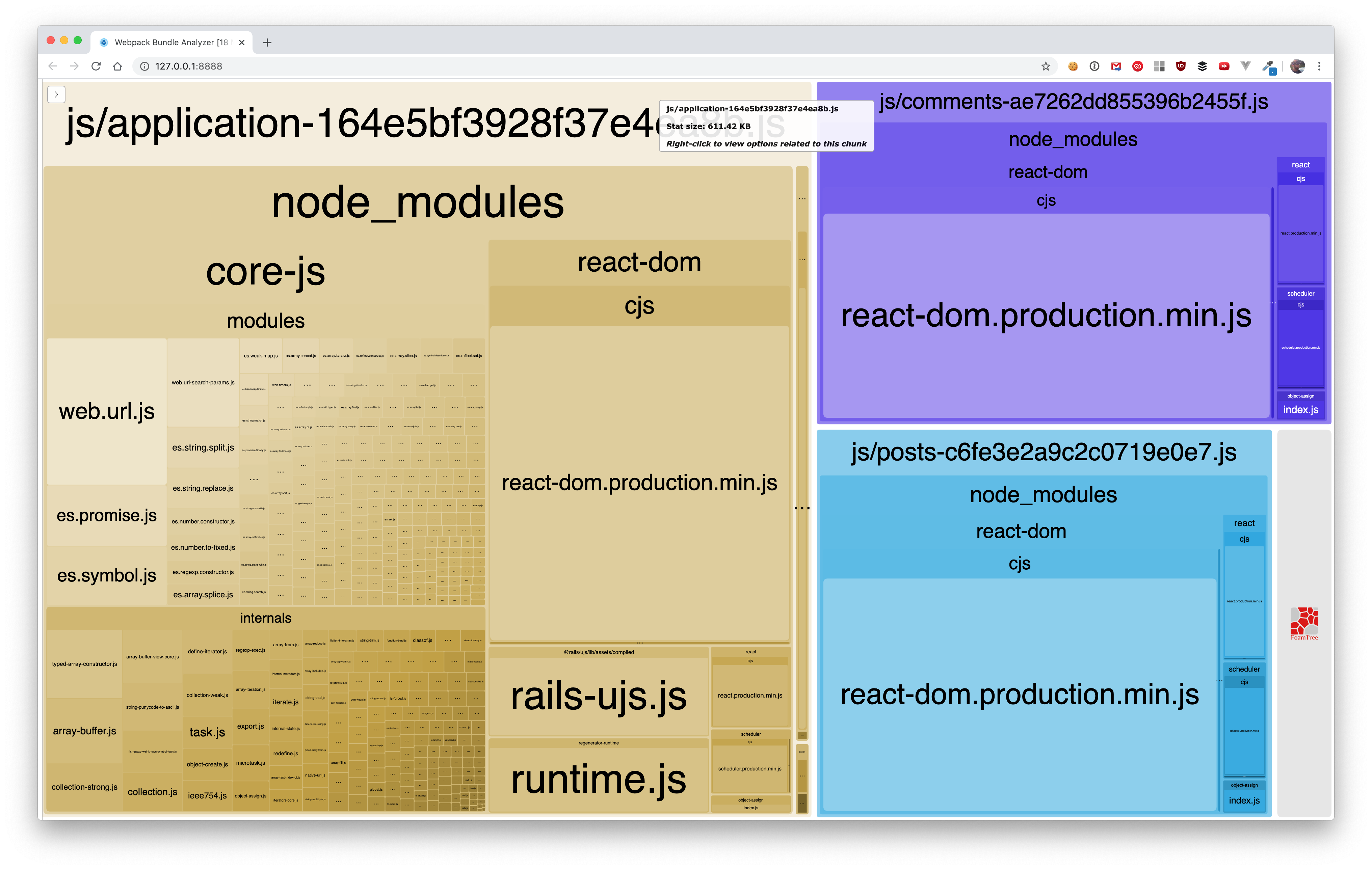
Look closely at the example above, which was generated from a demo app with three separate packs that render React components, and you can see react-dom in all three bundles. This is, at best, a bad UX, since you're forcing the user to download the same module(s) on different pages in different bundles, and at worst, a source of confounding bugs, especially when using multiple packs on a single page.
Split Chunks
Let's assume you've got your head wrapped around the problem... how do you solve it? For a multi-page application, webpack recommends the splitChunks optimization.
I won't go into too much detail about this API, which provides a number of options to play with, but it's easy enough to enable it through the Webpacker config:
environment.splitChunks()
The result might looks something like this:
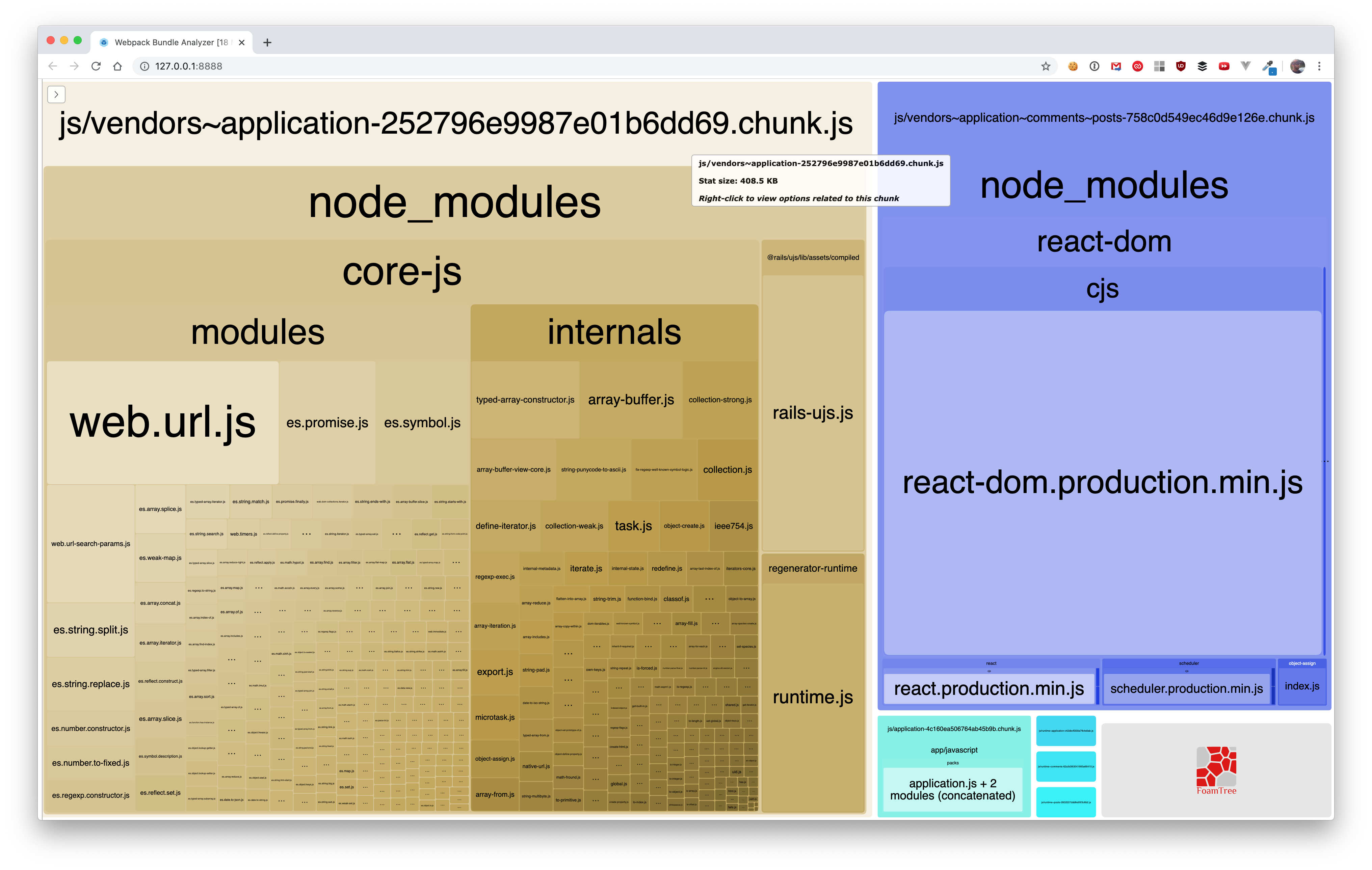
Notice it created _more bundles_ without the duplication. To correctly render a given page, there are some "vendor" packs and some shared bundles that webpack spits out to go with your explicit entry points. This is why the splitChunks optimization requires separate view helpers for rendering the javascript and stylesheet tags, e.g. https://github.com/rails/webpacker/blob/22ab02b7c84e917f985ecc76f5916d144f43bfbf/lib/webpacker/helper.rb#L102-L104
Webpack does the splitting in away so that the modules can be shared across bundles. Your application will now render _more_ bundles at a reduced cost across multiple pages (and even more so in a single page if your CDN provider has HTTP/2 enabled).
What now?
From here, you now have the tools to figure out the answer to your own question: How do I load JavaScript packs in the most optimized way? I won't be able to tell you how fine-grained your packs should be. There's a tradeoff to how much splitting you can do before you see diminishing returns. You'll have to see what works best for your application.
Hope that's helpful.
 rossta
on 19 May 2020
rossta
on 19 May 2020
I'm planning to write more about this subject in the near future. What follows are some highlights.
Wow, great highlights @rossta !
 Blake-LeBlanc
on 2 Jun 2020
Blake-LeBlanc
on 2 Jun 2020
@woniesong92 Would you like to close this issue?
rossta
on 28 Aug 2020
Related issues
 pioz
·
3Comments
pioz
·
3Comments
 itay-grudev
·
3Comments
itay-grudev
·
3Comments
 iChip
·
3Comments
iChip
·
3Comments
 ilrock
·
3Comments
ilrock
·
3Comments
 towry
·
3Comments
towry
·
3Comments
Most helpful comment
@woniesong92 Thanks for asking. The question of how to best optimize your bundling strategy deserves a lot of attention. I'm planning to write more about this subject in the near future. What follows are some highlights.
Assumptions
It sounds like you've already decided to split up your main bundle into smaller ones, so you're at the next step which is "What's the best way to split it up?"
Before you can answer that question, we need to establish a few assumptions I'll have to make without knowing your application.
I'll assume, from what you've described, that you are building a "multi-page application": server-side routing and a separate HTML views with some client-side rendering.
This is different from a single-page application in which all the routing and rendering is performed on the client side. The reason for the distinction is that bundling advice may differ depending on the context.
Measurement
Since you're talking about optimizing through multiple packs, I'll also assume you're interested in performance, i.e., sending only the code your users need improve the user experience.
Any discussion of performance optimization should include some data analysis. I'd recommend having a baseline of frontend user metrics, which you may be able to get with a monitoring tool like New Relic or even Google Analytics. There's also Lighthouse which can give you some solid recommendations and estimate user metric scores over an emulated throttled network connection. You'll want to be able to back your choices with data rather than blind guessing or copy & paste.
Visualization
I would also (right away) install the webpack-bundle-analyzer. (I used this tool to compare the bundle sizes in development and production in your question about
antd). If I were you, I'd want to know what's going on in each of these packs you're using. As you saw in the other thread, you'd want to run this tool against your production build.(If you're not already using the "split chunks" optimization, this next part is very important.)
Pay close attention to what you see in the bundle analysis. When you start using multiple packs, you might be surprised what you see, namely, that you are bundling some of the same modules, like React in your case, _in every pack_. Why? Because you haven't instructed webpack to share modules across your bundles, i.e., webpack doesn't assume by default you have a multi-page application.
Look closely at the example above, which was generated from a demo app with three separate packs that render React components, and you can see react-dom in all three bundles. This is, at best, a bad UX, since you're forcing the user to download the same module(s) on different pages in different bundles, and at worst, a source of confounding bugs, especially when using multiple packs on a single page.
Split Chunks
Let's assume you've got your head wrapped around the problem... how do you solve it? For a multi-page application, webpack recommends the splitChunks optimization.
I won't go into too much detail about this API, which provides a number of options to play with, but it's easy enough to enable it through the Webpacker config:
The result might looks something like this:

Notice it created _more bundles_ without the duplication. To correctly render a given page, there are some "vendor" packs and some shared bundles that webpack spits out to go with your explicit entry points. This is why the splitChunks optimization requires separate view helpers for rendering the javascript and stylesheet tags, e.g. https://github.com/rails/webpacker/blob/22ab02b7c84e917f985ecc76f5916d144f43bfbf/lib/webpacker/helper.rb#L102-L104
Webpack does the splitting in away so that the modules can be shared across bundles. Your application will now render _more_ bundles at a reduced cost across multiple pages (and even more so in a single page if your CDN provider has HTTP/2 enabled).
What now?
From here, you now have the tools to figure out the answer to your own question: How do I load JavaScript packs in the most optimized way? I won't be able to tell you how fine-grained your packs should be. There's a tradeoff to how much splitting you can do before you see diminishing returns. You'll have to see what works best for your application.
Hope that's helpful.