Webpacker: Webpacker + Vue compiled failed
I tried to create a new Rails app using Webpacker and Vue.
Info:
- Rails 5.2.3
- Ruby 2.5.5p157 x64
- OS: Windows Server 2016
Here what I have done:
rails new myapp --webpack=vue -d mysql
While installing package with yarn I have peer dependency warnings:
warning " > [email protected]" has unmet peer dependency "css-loader@*".
warning " > [email protected]" has unmet peer dependency "webpack@^4.1.0 || ^5.0.0-0".
After that my package.json file looks like this:
{
  "name": "myapp",
  "private": true,
  "dependencies": {
    "@rails/webpacker": "^4.0.7",
    "vue": "^2.6.10",
    "vue-loader": "^15.7.0",
    "vue-template-compiler": "^2.6.10"
  }
}
When I use command rails webpacker:compile it works perfectly and compile :
Compiling…
Compiled all packs in D:/myapp/public/packs
So far so good but when I try to add peer dependency in package.json things go wrong:
yarn add webpack@^4.35.2
yarn add css-loader
Here, peer dependencies warnings are gone.
Now package.json looks like this:
{
  "name": "myapp",
  "private": true,
  "dependencies": {
    "@rails/webpacker": "^4.0.7",
    "css-loader": "^3.0.0",
    "vue": "^2.6.10",
    "vue-loader": "^15.7.0",
    "vue-template-compiler": "^2.6.10",
    "webpack": "4.35.2"
  }
}
And when I try to run the rails webpacker:compile it leave me with this (blank) error :
Compiling…
Compilation failed:
if I use the command ruby .\bin\webpack-dev-server I got the following error (It's normal I don't have webpack-dev-server in dev dependency of package.json. Is it normal that this package is not added by default?)
yarn run v1.16.0
error Command "webpack-dev-server" not found.
info Visit https://yarnpkg.com/en/docs/cli/run for documentation about this command.
So I add webpack-dev-server to package.json:
yarn add webpack-dev-server --dev
So now I can run the ruby .\bin\webpack-dev-server and I got this following error:
ERROR in ./app/javascript/app.vue?vue&type=style&index=0&id=6fb8108a&scoped=true&lang=css& (./node_modules/css-loader/dist/cjs.js??ref--3-1!./node_modules/vue-loader/lib/loaders/stylePostLoader.js!./node_modules/postcss-loader/src??ref--3-2!./node_modules/vue-loader/lib??vue-loader-options!./app/javascript/app.vue?vue&type=style&index=0&id=6fb8108a&scoped=true&lang=css&)
Module build failed (from ./node_modules/css-loader/dist/cjs.js):
ValidationError: CSS Loader Invalid Options

options should NOT have additional properties

    at validateOptions (D:\myapp\node_modules\schema-utils\src\validateOptions.js:32:11)
    at Object.loader (D:\myapp\node_modules\css-loader\dist\index.js:34:28)
i 「wdm」: Failed to compile.
Is it bad to add peer dependencies to my project?
 Jaroost
All 13 comments
Are your files still stock? If not: in order to help debug, could you please post as much as you can of:
./package.json./babel.config.js./config/webpack/environment.js./config/webpacker.yml./app/javascript/packs/application.js- the full error message (even the parts you wouldn’t think is relevant)
—to a single https://gist.github.com. Please tag me via @jakeNiemiec in a comment and I’ll try to troubleshoot any problems directly in the gist.
 jakeNiemiec
on 3 Jul 2019
jakeNiemiec
on 3 Jul 2019
@jakeNiemiec All files are stock except package.json. Here the gist with all files and error messages
Jaroost
on 4 Jul 2019
Is it normal that this package is not added by default? nope, not normal.
What's your output for rails webpacker:info?
Update:
My webpacker + Vuejs setup is working. Here's my output on MacOS tho. I got a feeling you need the binstubs update.
Ruby: ruby 2.6.3p62 (2019-04-16 revision 67580) [x86_64-darwin18]
Rails: 5.2.3
Webpacker: 4.0.7
Node: v12.4.0
Yarn: 1.17.0
@rails/webpacker:
app@ /Users/ytbryan/Desktop/app
└── @rails/[email protected]
Is bin/webpack present?: true
Is bin/webpack-dev-server present?: true
Is bin/yarn present?: true
 ytbryan
on 4 Jul 2019
ytbryan
on 4 Jul 2019
@ytbryan
D:\myapp>rails webpacker:info
Ruby: ruby 2.5.5p157 (2019-03-15 revision 67260) [x64-mingw32]
Rails: 5.2.3
Webpacker: 4.0.7
Node: v12.5.0
Yarn: 1.16.0
@rails/webpacker:
myapp@ D:\myapp
`-- @rails/[email protected]
Is bin/webpack present?: true
Is bin/webpack-dev-server present?: true
Is bin/yarn present?: true
D:\myapp>
I'm facing the same issue as @Jaroost since I tried to solve the dependencies warning from yarn.
 zedtux
on 5 Jul 2019
zedtux
on 5 Jul 2019
As mentioned in this comment, the localIdentName option was removed in favor modules.localIdentName option, and looking in this repo I found that the old way is being still used.
Update 1
Looking at the node_modules/css-loader/dist/options.json file confirmed the option position change.
Update 2
I changed my config/webpack/environment.js file like so :
const { environment } = require('@rails/webpacker')
const MomentLocalesPlugin = require('moment-locales-webpack-plugin')
/*
** Plugins
*/
environment.plugins.prepend('MomentLocalesPlugin', new MomentLocalesPlugin({
localesToKeep: ['es-us']
}))
const cssLoader = environment.loaders.get('css')
var loaderLength = cssLoader.use.length
for (var i = 0; i < loaderLength; i++) {
var loader = cssLoader.use[i]
if (loader.loader === 'css-loader') {
// Copy localIdentName into modules
loader.options.modules = {
localIdentName: loader.options.localIdentName
}
// Delete localIdentName
delete loader.options.localIdentName
}
}
module.exports = environment
Before this change, I had the following errors :
webpack_1 | ERROR in ./node_modules/typeface-grand-hotel/index.css (./node_modules/css-loader/dist/cjs.js??ref--6-1!./node_modules/postcss-loader/src??ref--6-2!./node_modules/typeface-grand-hotel/index.css)
webpack_1 | Module build failed (from ./node_modules/css-loader/dist/cjs.js):
webpack_1 | ValidationError: CSS Loader Invalid Options
webpack_1 |
webpack_1 | options should NOT have additional properties
webpack_1 |
webpack_1 | at validateOptions (/application/node_modules/schema-utils/src/validateOptions.js:32:11)
webpack_1 | at Object.loader (/application/node_modules/css-loader/dist/index.js:34:28)
webpack_1 |
webpack_1 | ERROR in ./app/javascript/src/stylesheets/application.scss (./node_modules/css-loader/dist/cjs.js??ref--7-1!./node_modules/postcss-loader/src??ref--7-2!./node_modules/sass-loader/lib/loader.js??ref--7-3!./app/javascript/src/stylesheets/application.scss)
webpack_1 | Module build failed (from ./node_modules/css-loader/dist/cjs.js):
webpack_1 | ValidationError: CSS Loader Invalid Options
webpack_1 |
webpack_1 | options should NOT have additional properties
webpack_1 |
webpack_1 | at validateOptions (/application/node_modules/schema-utils/src/validateOptions.js:32:11)
webpack_1 | at Object.loader (/application/node_modules/css-loader/dist/index.js:34:28)
With this change I have this :
webpack_1 | ERROR in ./app/javascript/src/stylesheets/application.scss (./node_modules/css-loader/dist/cjs.js??ref--7-1!./node_modules/postcss-loader/src??ref--7-2!./node_modules/sass-loader/lib/loader.js??ref--7-3!./app/javascript/src/stylesheets/application.scss)
webpack_1 | Module build failed (from ./node_modules/css-loader/dist/cjs.js):
webpack_1 | ValidationError: CSS Loader Invalid Options
webpack_1 |
webpack_1 | options should NOT have additional properties
webpack_1 |
webpack_1 | at validateOptions (/application/node_modules/schema-utils/src/validateOptions.js:32:11)
webpack_1 | at Object.loader (/application/node_modules/css-loader/dist/index.js:34:28)
So there is an error less. The remaining one is in my project but I can't figure out what's going wrong for now.
Update 3
Of course I had to do the same for the sass loader so here is my final code that solve this issue :
const { environment } = require('@rails/webpacker')
const MomentLocalesPlugin = require('moment-locales-webpack-plugin')
/*
** Plugins
*/
environment.plugins.prepend('MomentLocalesPlugin', new MomentLocalesPlugin({
localesToKeep: ['es-us']
}))
/*
** CSS loader fixing issue, See https://github.com/rails/webpacker/issues/2162
*/
const cssLoader = environment.loaders.get('css')
var cssLoaderLength = cssLoader.use.length
for (var i = 0; i < cssLoaderLength; i++) {
var loader = cssLoader.use[i]
if (loader.loader === 'css-loader') {
// Copy localIdentName into modules
loader.options.modules = {
localIdentName: loader.options.localIdentName
}
// Delete localIdentName
delete loader.options.localIdentName
}
}
const sassLoader = environment.loaders.get('sass')
var sassLoaderLength = sassLoader.use.length
for (var j = 0; j < sassLoaderLength; j++) {
var loader = sassLoader.use[j]
if (loader.loader === 'css-loader') {
// Copy localIdentName into modules
loader.options.modules = {
localIdentName: loader.options.localIdentName
}
// Delete localIdentName
delete loader.options.localIdentName
}
}
module.exports = environment
options should NOT have additional properties
@zedtux, I have seen this popping up as a problem. Any idea what causes this?
@Jaroost Node: v12.5.0
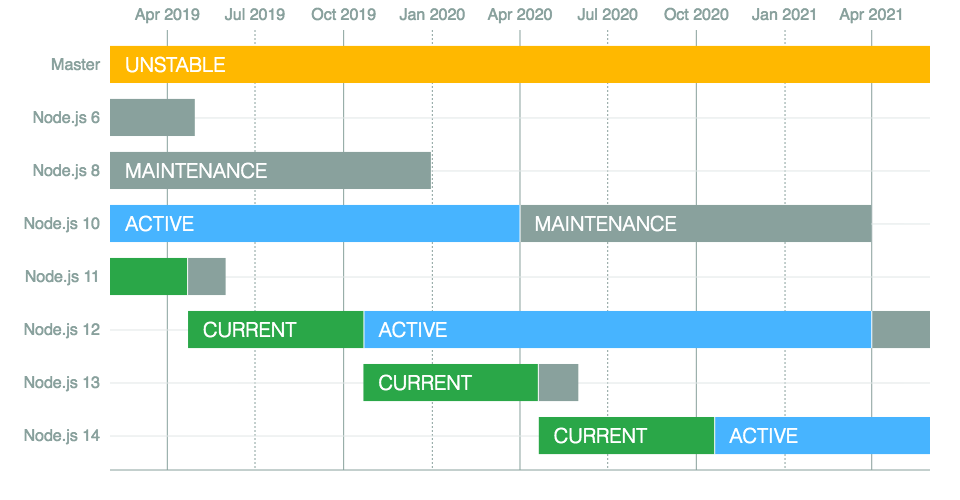
I would not use the "prerelease" version of node (current), I would instead use the "active version". I have seen problems with node@12 & node-sass.
jakeNiemiec
on 5 Jul 2019
I have seen this popping up as a problem. Any idea what causes this?
@jakeNiemiec the v3 of css-loader has some breaking changes including the move of the localIdentName option, so that the node_modules/css-loader/dist/options.json files doesn't validate the passing options to css-loader.
zedtux
on 5 Jul 2019
@jakeNiemiec I have node 12.5.0, I tried node 10.16.0 with the same issue
the @zedtux solution works I updated the gist with the new environment.js (environment-fix.js)
Update 1
I have now very strange behavior, in app.vue when I use class style this style is ignored:
<template>
<div>
<p class="test" >{{ message }}</p>
</div>
</template>
<script>
export default {
data: function () {
return {
message: "Hello Vue!"
}
}
}
</script>
<!--with or without scoped, class style doesn't work-->
<style>
/*works*/
p {
font-size: 2em;
text-align: center;
color: red
}
/*doesn't work*/
/*.test{
font-size: 2em;
text-align: center;
color: yellow
}*/
</style>
I don't know if this issue is related to webpacker.
Jaroost
on 8 Jul 2019
I had to revert all my packages updates as bootstrap wasn't loading like before (I had only the reset css style, and some classes from bootswatch, but all the buttons, list and so on styling wasn't loading).
zedtux
on 8 Jul 2019
I have node 12.5.0, I tried node 10.16.0 with the same issue
12 will give you issues unrelated webpacker. It all depends on if the tools you use are updated for 12.x.x, examples:
- https://github.com/webpack/webpack/issues/9064#issuecomment-486722132
- https://github.com/vuejs/vue-cli/pull/4109
- https://github.com/vuejs/vue-cli/issues/3883
- https://github.com/webpack/webpack/issues/9070
Here is how we are consuming webpack 4:
//scss
@import '~bootstrap/scss/bootstrap';
//js
import Popper from 'popper.js/dist/esm/popper';
//MAKE SURE window.$ exists before this point, import jQuery how you normally would
window.Popper = Popper;
require('bootstrap');
Apart from that, I cannot be of much help with the vue stuff.
jakeNiemiec
on 8 Jul 2019
Ok I finally get this running by updating environment.js according to the documentation like so:
const { environment } = require('@rails/webpacker')
const { VueLoaderPlugin } = require('vue-loader')
const vue = require('./loaders/vue')

environment.plugins.prepend('VueLoaderPlugin', new VueLoaderPlugin())
environment.loaders.prepend('vue', vue)

/*
** CSS loader fixing issue, See https://github.com/rails/webpacker/issues/2162
*/
const cssLoader = environment.loaders.get('css')
cssLoader.use=[{'loader':'vue-style-loader'}, {'loader': 'css-loader'}];

module.exports = environment
default configuration is missing vue-style-loader in the css loaders
Jaroost
on 9 Jul 2019
Can this issue be closed ?
 guillaumebriday
on 24 Aug 2020
guillaumebriday
on 24 Aug 2020
Related issues
 pioz
·
3Comments
pioz
·
3Comments
 vtno
·
3Comments
vtno
·
3Comments
 ijdickinson
·
3Comments
ijdickinson
·
3Comments
 eriknygren
·
3Comments
eriknygren
·
3Comments
 iChip
·
3Comments
iChip
·
3Comments
Most helpful comment
Ok I finally get this running by updating
environment.jsaccording to the documentation like so:default configuration is missing
vue-style-loaderin the css loaders