Webpacker: Images Not Working as Documentation States:
Image Pack Tag Not Working
// package.json
{
  "name": "mfcs",
  "private": true,
  "dependencies": {
    "@rails/webpacker": "^4.0.7",
    "babel-plugin-module-resolver": "^3.2.0",
    "normalize.css": "^8.0.1",
    "postcss-focus": "^4.0.0"
  },
  "devDependencies": {
    "webpack-dev-server": "^3.7.2"
  }
}
- I was following this documentation in getting webpacker working with Rails.
- The
<%= image_pack_tag 'mfcs.png' %>is not allowing my image to show. - Directory structure as I see it should be

- manifest.json

Debugging Attempts
- Tried to use this open issue to solve the problem. Neither of these in the
application.jsfile fix the issue.
const importAll = (r) => r.keys().map(r)
importAll(require.context('../images', false, /\.(png|jpe?g|svg)$/));
const images = require.context('../images', true)
const imagePath = (name) => images(name, true)


md5-a4127eac207ad08924e1a2f2c715080d


version: '3'
services:
  db:
    container_name: db
    restart: always
    image: postgres:10
    ports:
      - "5432:5432"
    environment:
      - POSTGRES_PASSWORD=docker
    volumes:
      - ./postgresdata/db:/data/db

  elasticsearch:
    image: elasticsearch:6.6.0
    container_name: elasticsearch
    restart: always
    volumes:
      - ./search_data:/usr/share/elasticsearch/data
    ports:
      - 9200:9200
      - 9300:9300

  webpacker:
    build: .
    environment:
      - NODE_ENV=development
      - RAILS_ENV=development
      - WEBPACKER_DEV_SERVER_HOST=0.0.0.0
    command: ./bin/webpack-dev-server
    volumes:
      - .:/home/mfcs
    ports:
      - '3035:3035'

  mfcs:
    build:
      context: ./
      dockerfile: Dockerfile
    tty: true
    stdin_open: true
    container_name: mfcs
    command: bundle exec rails s -p 3000 -b '0.0.0.0'
    environment:
      - SECRET_KEY_BASE=test
      - DATABASE_PASSWORD=docker
      - ELASTICSEARCH_URL=http://elasticsearch:9200
      - TERM=xterm
      # - SELENIUM_REMOTE_HOST=selenium
      # - RAILS_ENV=production # replace with your current environment development or production
    volumes:
      - ./:/home/mfcs
    ports:
      - "3000:3000"
      - "3001:3001"
    links:
      - elasticsearch
      - db
Everything else is default from the install of webpacker.
Solution ?
I was able to get it to show an image by using
<%= image_pack_tag 'media/packs/images/mfcs.png' %>, but this doesn't seem like it is correct. However it does work.
 ddavisgraphics
All 8 comments
I'm not sure what the reference was... I read through the threads of conversation and am still confused.
ddavisgraphics
on 24 Jun 2019
I know this doesn't help to resolve the actual problem being discussed here, but I think I found a slightly more appealing solution temporarily that I thought I'd share in case others wanted to use it. I was able to keep the desired asset files in the parent directory under app/webpacker/ (e.g., app/webpacker/images). I then created a pack manifest entry file in app/webpacker/packs that I named to reflect the asset type (e.g., app/webpacker/packs/images.js or app/webpacker/packs/fonts.js). Inside that file I used the sample code from the primary application.js:
// app/wepbacker/packs/images.js
// Uncomment to copy all static images under ../images to the output folder and reference
// them with the image_pack_tag helper in views (e.g <%= image_pack_tag 'rails.png' %>)
// or the `imagePath` JavaScript helper below.

// import all image files in a folder:
require.context('../images', true)

const images = require.context('../images', true)
const imagePath = (name) => images(name, true)
I'm not sure if the JS helpers work yet, but I am able to access images in my Rails views by adding the following to my application view:
<%= javascript_pack_tag 'images', 'data-turbolinks-track': 'reload' %>
and then using the following in my views:
<%= image_pack_tag('media/images/<img_filename>.jpg %>`
Hopefully this works for others as a clean temporary fix. It should help to at least avoid having the extra packs portion of the path to remove down the line.
 stevenhaddox
on 5 Sep 2019
stevenhaddox
on 5 Sep 2019
I can confirm that this is an issue in a newly created rails 6 app. I uncommented the following lines that come with a freshly created app:
// Uncomment to copy all static images under ../images to the output folder and reference
// them with the image_pack_tag helper in views (e.g <%= image_pack_tag 'rails.png' %>)
// or the `imagePath` JavaScript helper below.

const images = require.context('../images', true)
const imagePath = (name) => images(name, true)
Added an app/javascript/images folder, but when I try to access <%= image_pack_tag "landing/coming-soon.jpg" %> to use the image at this location app/javascript/images/landing/coming-soon.jpg, I get the following exception:
ActionView::Template::Error (Webpacker can't find landing/coming-soon.jpg in /Users/amit/dawn/code/dawn/public/packs/manifest.json. Possible causes:
1. You want to set webpacker.yml value of compile to true for your environment
   unless you are using the `webpack -w` or the webpack-dev-server.
2. webpack has not yet re-run to reflect updates.
3. You have misconfigured Webpacker's config/webpacker.yml file.
4. Your webpack configuration is not creating a manifest.
Your manifest contains:
{
  "application.js": "/packs/js/application-9b8d3ff5f59a10b19a10.js",
  "application.js.map": "/packs/js/application-9b8d3ff5f59a10b19a10.js.map",
  "application/index.js": "/packs/js/application/index-fc1672c94d4e52b14928.js",
  "application/index.js.map": "/packs/js/application/index-fc1672c94d4e52b14928.js.map",
  "entrypoints": {
    "application": {
      "js": [
        "/packs/js/application-9b8d3ff5f59a10b19a10.js"
      ],
      "js.map": [
        "/packs/js/application-9b8d3ff5f59a10b19a10.js.map"
      ]
    },
    "application/index": {
      "js": [
        "/packs/js/application/index-fc1672c94d4e52b14928.js"
      ],
      "js.map": [
        "/packs/js/application/index-fc1672c94d4e52b14928.js.map"
      ]
    }
  }
}
The image seems to be missing in logs of bin/webpack-dev-server. I was trying to switch from using the asset pipeline (for static assets) to using webpacker for everything, but the experience is far from smooth. I have spent hours trying to figure this out with no success.
 amitsaxena
on 14 Oct 2019
amitsaxena
on 14 Oct 2019
I uncommented the following lines that come with a freshly created app
//cc @guilleiguaran from https://github.com/rails/webpacker/pull/1976
 jakeNiemiec
on 14 Oct 2019
jakeNiemiec
on 14 Oct 2019
I am having the same problem in a newly created Rails 6 application:
Rails 6.0.2.1
ruby 2.6.5p114 (2019-10-01 revision 67812) [x86_64-darwin18]
yarn 1.16.0
webpacker (gem) 4.2.2 but tried also with 4.2.0 and 4.2.1
app/frontend/packs/application.js

// This file is automatically compiled by Webpack, along with any other files
// present in this directory. You're encouraged to place your actual application logic in
// a relevant structure within app/javascript and only use these pack files to reference
// that code so it'll be compiled.
require("@rails/ujs").start()
require("turbolinks").start()
require("@rails/activestorage").start()

const images = require.context('../images', true)
const imagePath = (name) => images(name, true)
Input folder structure:
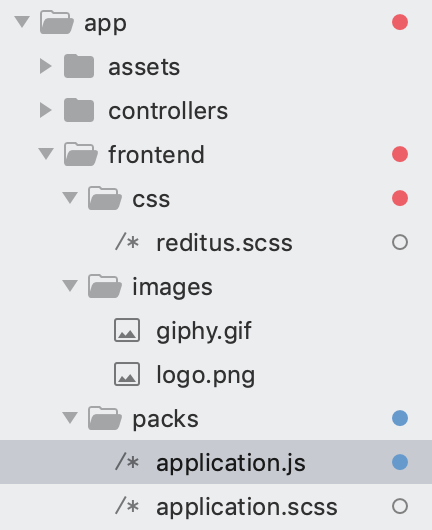
Output folder structure:
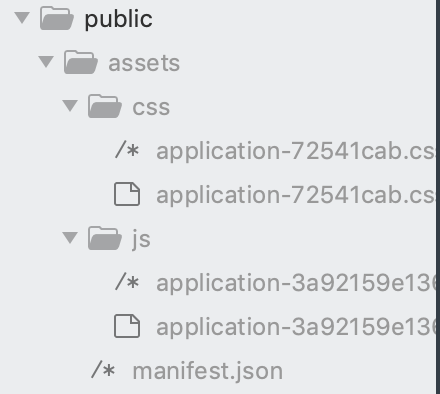
app/config/webpacker.yml

default: &default
  source_path: app/frontend
  source_entry_path: packs
  public_root_path: public
  public_output_path: assets
  cache_path: tmp/cache/webpacker
  check_yarn_integrity: false
  webpack_compile_output: true

  resolved_paths: []
  cache_manifest: false
  extract_css: true

  static_assets_extensions:
    - .jpg
    - .jpeg
    - .png
    - .gif
    - .tiff
    - .ico
    - .svg
    - .eot
    - .otf
    - .ttf
    - .woff
    - .woff2

  extensions:
    - .mjs
    - .js
    - .sass
    - .scss
    - .css
    - .module.sass
    - .module.scss
    - .module.css
    - .png
    - .svg
    - .gif
    - .jpeg
    - .jpg

development:
  <<: *default
  compile: true
  check_yarn_integrity: false

  dev_server:
    https: false
    host: localhost
    port: 3035
    public: localhost:3035
    hmr: false
    # Inline should be set to true if using HMR
    inline: true
    overlay: true
    compress: true
    disable_host_check: true
    use_local_ip: false
    quiet: false
    pretty: false
    headers:
      'Access-Control-Allow-Origin': '*'
    watch_options:
      ignored: '**/node_modules/**'

test:
  <<: *default
  compile: true
  public_output_path: packs-test

production:
  <<: *default
  compile: false
  cache_manifest: true
Calling this: <%= image_pack_tag("giphy.gif") %> raises this:
Webpacker can't find giphy.gif in /app/public/assets/manifest.json. Possible causes:
1. You want to set webpacker.yml value of compile to true for your environment
   unless you are using the `webpack -w` or the webpack-dev-server.
2. webpack has not yet re-run to reflect updates.
3. You have misconfigured Webpacker's config/webpacker.yml file.
4. Your webpack configuration is not creating a manifest.
Your manifest contains:
{
  "application.css": "/assets/css/application-72541cab.css",
  "application.css.map": "/assets/css/application-72541cab.css.map",
  "application.js": "/assets/js/application-3a92159e136ddff1298e.js",
  "application.js.map": "/assets/js/application-3a92159e136ddff1298e.js.map",
  "entrypoints": {
    "application": {
      "css": [
        "/assets/css/application-72541cab.css"
      ],
      "js": [
        "/assets/js/application-3a92159e136ddff1298e.js"
      ],
      "css.map": [
        "/assets/css/application-72541cab.css.map"
      ],
      "js.map": [
        "/assets/js/application-3a92159e136ddff1298e.js.map"
      ]
    }
  }
}
{
  "name": "webpacker_test",
  "private": true,
  "dependencies": {
    "@rails/activestorage": "^6.0.0",
    "@rails/ujs": "^6.0.0",
    "@rails/webpacker": "4.2.2",
    "turbolinks": "^5.2.0"
  },
  "version": "0.1.0",
  "devDependencies": {
    "webpack-dev-server": "^3.10.1"
  }
}
 kmossco
on 21 Dec 2019
kmossco
on 21 Dec 2019
I have the same problem here. I using the @stevenhaddox solution for now.
 diogocaetano
on 30 Mar 2020
diogocaetano
on 30 Mar 2020
The instructions in docs/assets.md seem to be working for me, so far. It has been one year since this issue was opened, so maybe this has been fixed?
To fix my specific mistake, I had to use e.g. asset_pack_path('media/images/x.jpg') instead of e.g. asset_pack_path('images/x.jpg'). The use of the media/ prefix is documented in docs/assets.md, but not in the main readme (under usage) so that could be fixed still.
 jaredbeck
on 20 Jul 2020
jaredbeck
on 20 Jul 2020
If this helps, the documentation instructions works only if you DON'T have an application.css/scss file along with application.js at /packs.
So, this works:

// packs/application.js

import '../stylesheets/application.scss'
require.context('../images', true)
It emits both application.css at packs/css and all the images at packs/media/images.
This doesn't work:

// packs/application.js

require.context('../images', true)
This also works:

// packs/application.js

// not requiring images here
// packs/images.js

require.context('../images', true)
 arielj
on 16 Dec 2020
arielj
on 16 Dec 2020
Related issues
 inopinatus
·
3Comments
inopinatus
·
3Comments
 amandapouget
·
3Comments
amandapouget
·
3Comments
 itay-grudev
·
3Comments
itay-grudev
·
3Comments
 ytbryan
·
3Comments
ytbryan
·
3Comments
 towry
·
3Comments
towry
·
3Comments
Most helpful comment
I know this doesn't help to resolve the actual problem being discussed here, but I think I found a slightly more appealing solution temporarily that I thought I'd share in case others wanted to use it. I was able to keep the desired asset files in the parent directory under
app/webpacker/(e.g.,app/webpacker/images). I then created a pack manifest entry file inapp/webpacker/packsthat I named to reflect the asset type (e.g.,app/webpacker/packs/images.jsorapp/webpacker/packs/fonts.js). Inside that file I used the sample code from the primaryapplication.js:I'm not sure if the JS helpers work yet, but I am able to access images in my Rails views by adding the following to my application view:
<%= javascript_pack_tag 'images', 'data-turbolinks-track': 'reload' %>and then using the following in my views:
<%= image_pack_tag('media/images/<img_filename>.jpg%>`Hopefully this works for others as a clean temporary fix. It should help to at least avoid having the extra
packsportion of the path to remove down the line.