Webpacker: Inconsistent file name / hash with extract css
Rails 5.2.2
webpacker 4.0.2
extract_css is set to true
The app is deployed in heroku, and on every release the filename/hash of the css changes, even if there are no changes to the css. I verified this by comparing the md5 of the css between releases and it is identical, however the filename/hash of the generated css file changes.
environment.js
const { environment } = require('@rails/webpacker')

const vue =  require('./loaders/vue')
const vueResolver = require("./resolve/vue")

environment.loaders.append('vue', vue);
environment.config.merge(vueResolver);

module.exports = environment
postcss.config.js
var tailwindcss = require("tailwindcss");

module.exports = {
  plugins: [
    tailwindcss("./app/javascript/src/tailwind.js"),
    require('postcss-import'),
    require('postcss-flexbugs-fixes'),
    require('postcss-preset-env')({
      autoprefixer: {
        flexbox: 'no-2009'
      },
      stage: 3
    })
  ]
}
Edit: running RAILS_ENV=production rails assets:precompile on my local machine produces the same asset hash/filename every time (clearing out all packs and tmp/cache in between), but on heroku the asset hash/filename is different on each deploy, but downloading the css from heroku and comparing via md5 indicates they are identical, even though the filenames are different. The javascript assets have the same filenames between releases.
 agrieser
All 11 comments
For anyone else who ends up here: the issue was with intermediate sourcemaps that contained build path information being included as part of the hash, and thus filename. The reason this didn't show up on my local machine is that the build paths were the same every time, but in heroku the buildpaths include a randomly named tmp directory. Which means the hash of the content will be different for each deploy. In the final step, when the css was written into it's own file, the sourcemap info was removed so the files were identical, however the hashes still included that information and thus the filenames were different.
I tried using the option environment.config.merge({ devtool: 'none' }) to disable sourcemaps, but this only disables sourcemaps at the final step. Intermediate sourcemaps are still built (and looking at the code they are hard coded: https://github.com/rails/webpacker/blob/1e9e2d04de100a3d5beb085ccaad061440265dc7/package/utils/get_style_rule.js#L13)
The workaround was to iterate through all the style loaders and merge into their configs:
config/webpacker/environment.js:
const merge = require('webpack-merge')
const sassLoader = environment.loaders.get('sass')
const cssLoader = environment.loaders.get('css')
sassLoader.use.map(function(loader) {
loader.options = merge(loader.options, { sourceMap: false });
});
cssLoader.use.map(function(loader) {
loader.options = merge(loader.options, { sourceMap: false });
});
This now produces consistent output in heroku. If I have time I'll go through the loaders individually and see if I can narrow down which is causing the problems.
If I'm understanding this correctly, this seems like an important bug because it will impact anyone who deploys to an environment with randomized tmp paths (heroku as an example).
agrieser
on 13 Mar 2019
Narrowed this down to just css-loader
config/webpack/environment.js:
const sassLoader = environment.loaders.get("sass");
const cssLoader = environment.loaders.get("css");

sassLoader.use.map(function(loader) {
  if (loader.loader === "css-loader") {
    loader.options = merge(loader.options, { sourceMap: false });
  }
});

cssLoader.use.map(function(loader) {
  if (loader.loader === "css-loader") {
    loader.options = merge(loader.options, { sourceMap: false });
  }
});
You might want to explore https://webpack.js.org/configuration/output/#outputfilename to generate hashes based on chunk content.
Also, you can customize those source map paths with https://webpack.js.org/configuration/output/#outputdevtoolmodulefilenametemplate
This is how I fixed a similar problem:
output: {
  //...
  devtoolModuleFilenameTemplate: (info) =>
    'file://' + path.resolve(info.absoluteResourcePath).replace(/\\/g, '/')
  //...
You can modify this to genericize the path based on the enviornment. Hope this helps.
 jakeNiemiec
on 13 Mar 2019
jakeNiemiec
on 13 Mar 2019
Thank you @agrieser for finding this! I've spent way too many hours trying to figure out why the css hashes were always different on Heroku when no changes have been made.
If I'm understanding this correctly, this seems like an important bug because it will impact anyone who deploys to an environment with randomized tmp paths (heroku as an example).
I agree that this is an important bug. It means that every end user will have to download a new css file after every single deploy to Heroku. Any news on this getting patched or your pull request merged?
 scotteknight
on 10 Jul 2019
scotteknight
on 10 Jul 2019
@scotteknight Any news on this getting patched or your pull request merged?
Like I said above, you can genericize your sourcemap paths so that they are based on relative paths instead of randomized Heroku tmp paths. This would be the hassle-free option since the source map paths can be arbitrarily defined.
If you wanted to troubleshoot webpacker I would start here:
Do you use RAILS_RELATIVE_URL_ROOT? Would you mind posting your current config files to a gist?
jakeNiemiec
on 10 Jul 2019
@jakeNiemiec thanks for the suggestions. However I'm a webpack noob, I'm not really sure how to implement what you suggest. I recently moved all of our js and css from sprockets over to webpacker. The current setup is the standard webpacker generated files. I created a gist here.
You can see what I added to the environment.js based on the suggestion above and it seems to be working. Not currently using RAILS_RELATIVE_URL_ROOT or a webpack config file other than webpacker.yml
Any help is appreciated or if I'd be happy to contribute any way I can. Thanks!
scotteknight
on 11 Jul 2019
BTW, I was having the same issue with the bundled .js hash in production. Upgrading webpacker gem and npm package from 4.0.2 to 4.0.7 solved it for js but not for css.
scotteknight
on 11 Jul 2019
I'm facing the same issue only with CSS files. The content of the files is exactly the same
 goranovs
on 11 Jul 2019
goranovs
on 11 Jul 2019
@scotteknight Apoligies for the delay, you can set it in your environment.js file with:
// somewhere in middle
environment.config.output.devtoolModuleFilenameTemplate = 'webpack://[namespace]/[resource-path]?[loaders]'
DON'T just copy/paste that, you need to look at the available options and configure a solution that works for you: https://webpack.js.org/configuration/output/#outputdevtoolmodulefilenametemplate. You can also set this at build-time by passing a function.
How will you know if it's working?
I personally use the "Sources" tab in chrome.
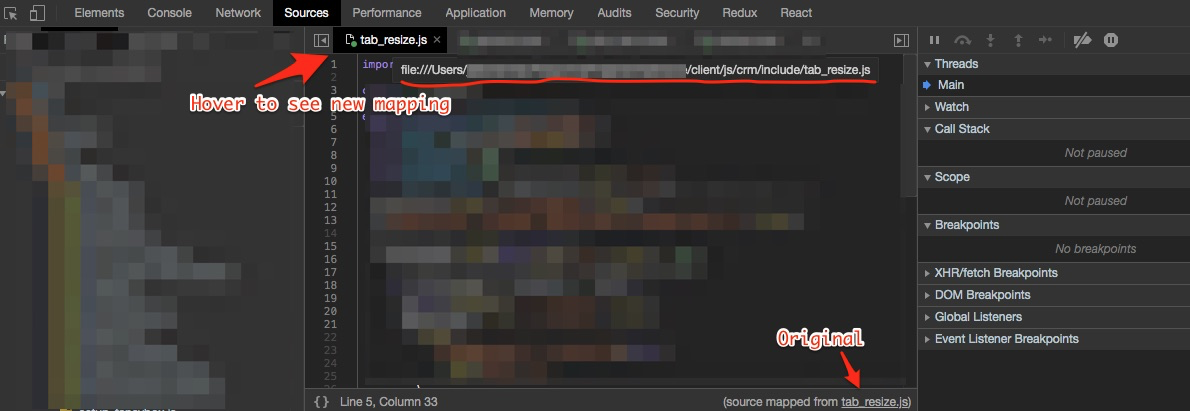
I don't have access to Heroku to troubleshoot. If you find something that works, can you post it here?
jakeNiemiec
on 15 Jul 2019
Probably a note to self. I am still experiencing different hashes when I set extract_css to be true. After debugging, I realise it is my own fault.
It is due to this particular snippet:
@keyframes noise-anim {
  $steps: 20;
  @for $i from 0 through $steps {
    #{percentage($i*(1/$steps))} {
      clip: rect(random(100)+px,9999px,random(100)+px,0);
    }
  }
}
Very much due to the random function.
Working on rails 6.0.0, webpacker 4.0.7 here
I did not implement the sourceMap options that @agrieser mentioned.
Things compiled as expected, at least under Elastic Beanstalk deployment with multiple instances
 Vic-L
on 4 Nov 2019
Vic-L
on 4 Nov 2019
For those still getting this issue in 2020 with the newer version of webpack-merge, require webpack-merge as follows:
const { environment } = require('@rails/webpacker');
...
const { merge } = require('webpack-merge');
 arvinwiyono
on 7 Jul 2020
arvinwiyono
on 7 Jul 2020
Related issues
 eriknygren
·
3Comments
eriknygren
·
3Comments
 swrobel
·
3Comments
swrobel
·
3Comments
 amandapouget
·
3Comments
amandapouget
·
3Comments
 christianrojas
·
3Comments
christianrojas
·
3Comments
 ilrock
·
3Comments
ilrock
·
3Comments
Most helpful comment
Narrowed this down to just
css-loaderconfig/webpack/environment.js: