Webpacker: Compiling takes ~50s in development
Any change (small or big) takes 50 seconds to compile.
My development environment -
- Running
rails sandbin/webpack-dev-serverin separate terminals. - I kept getting out of heap/memory when compiling, so I added this for the webpack dev server
export NODE_OPTIONS="--max-old-space-size=3048" - Using
gem 'webpacker', '4.0.0.rc.7'and"@rails/webpacker": "4.0.0-rc.7"and"webpack-dev-server": "3.1.14" - Node version
11.10.0 Visual Studio Code - Version 1.31.1 (1.31.1)- This is on
macOS Mojave
Rails version: 5.2.2
Ruby version: 2.6.1
 kapso
kapso
All 21 comments
You could try preventing all of nodeModules from being compiled. It may not work for your build, but it will save you time if it does.
 jakeNiemiec
on 18 Feb 2019
jakeNiemiec
on 18 Feb 2019
I'd recommend taking a look at #1907 and make sure you're not accidentally creating a circular dependency, e.g. A imports B which imports C which imports A.
 connorshea
on 18 Feb 2019
connorshea
on 18 Feb 2019
@connorshea
Found a plugin (https://www.npmjs.com/package/circular-dependency-plugin) to detect circular dependency, but the plugin did not report anything back or error out.
// webpack/development.js
const environment = require('./environment')

const CircularDependencyPlugin = require('circular-dependency-plugin')
module.exports = {
  entry: './app/javascript/packs',
  plugins: [
    new CircularDependencyPlugin({
      // exclude detection of files based on a RegExp
      exclude: /a\.js|node_modules/,
      // add errors to webpack instead of warnings
      failOnError: true,
      // set the current working directory for displaying module paths
      cwd: process.cwd(),
    })
  ]
}

module.exports = environment.toWebpackConfig()
@kapso if you’re on Linux (or Mac and install it via Homebrew) can you show us what tree outputs in the app/javascript directory?
connorshea
on 18 Feb 2019
@connorshea here you go - https://gist.github.com/kapso/e01566b44a4b20843e68bf97d227bb
kapso
on 18 Feb 2019
@kapso I talk in this issue about how you can --profile to uncover where the bottleneck is: https://github.com/rails/webpacker/issues/1824
jakeNiemiec
on 18 Feb 2019
If you are using sass, you may be re-compling the entire sass tree on every change. We removed most of our sass stuff and went from 15s dev builds to 1s.
 ro-savage
on 19 Feb 2019
ro-savage
on 19 Feb 2019
Found the issue, it was indeed CSS issue. Thanks @ro-savage
Thanks all for chiming in as well. So I have brought the compile time down from 60s to 8s. I am a Rails developer, new to React/Webpacker, and I am curious if this is normal for compile time to be 8s long?
kapso
on 19 Feb 2019
First compile will take a while. But a well written webpack config in a well written (but large) app should have re-compile times of under 2s.
Using webpacker might make it slower (I haven't looked into it), as my one webpacker appp is about 1.5-2s rebuilds. While most of my straight JS webpack builds are about 500ms.
ro-savage
on 19 Feb 2019
Are there any best practice blogs for Webpacker to speed up the compile time?
kapso
on 19 Feb 2019
You didn't respond to my other messages, but I want to link you to a good tool if you want to squeeze the maximum out of your build: https://github.com/webpack/analyse
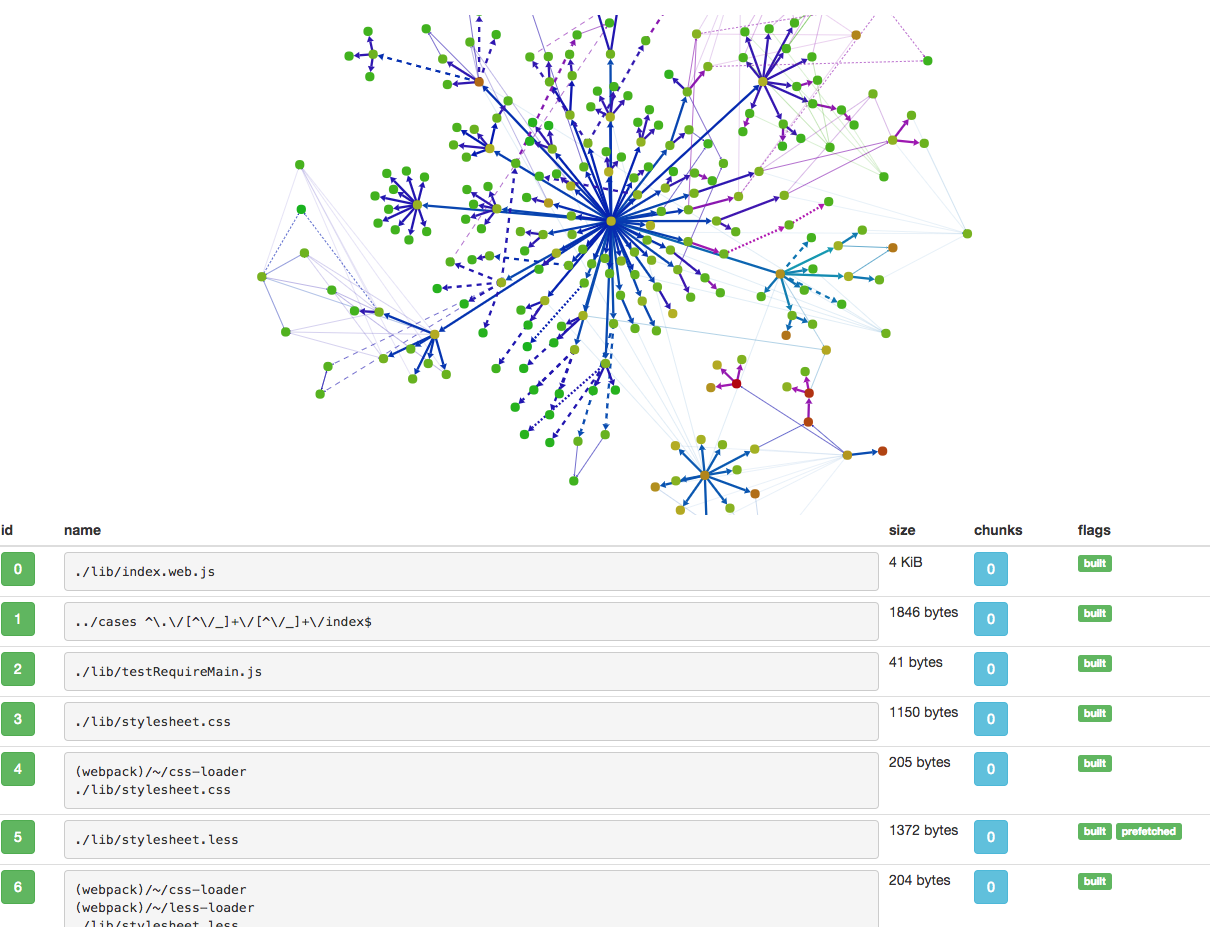
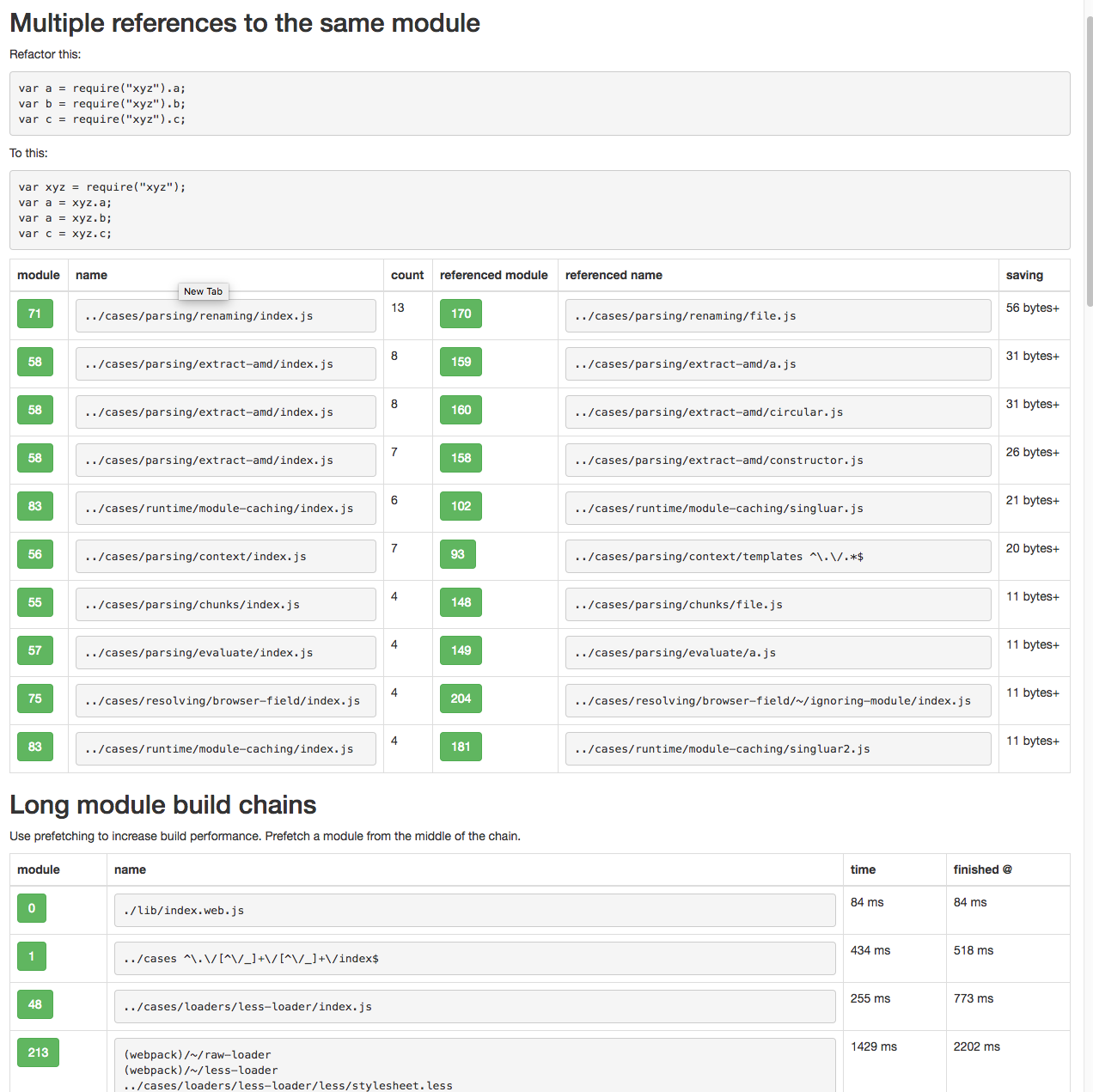
It will take a bit to set up but works well. There is also: https://github.com/webpack-contrib/webpack-bundle-analyzer

jakeNiemiec
on 19 Feb 2019
@jakeNiemiec sorry :) went on a different tangent to resolve the issue, but I appreciate your comments. Thanks for sharing this tool, will look into it. I would ideally like to bring the (non-1st time) compile time down to ~2s.
- Re: preventing
node_modulesfrom compiling again, mywebpacker.ymlhas the following. So I am guessing they wont get picked by compiler for every change?
development:
  dev_server:
    watch_options:
      ignored: /node_modules/
- Here's the output of profiling https://gist.github.com/kapso/53755feaa946293e858895dac430774e does it show anything in particular that I should be addressing?
kapso
on 19 Feb 2019
Here's the output of profiling
You gotta use profile and json like: ./bin/webpack --profile --json > stats.json then upload here: http://webpack.github.io/analyse/
Re: preventing
node_modulesfrom compiling again, mywebpacker.ymlhas the following. So I am guessing they wont get picked by compiler for every change?
Webpacker does not consider your config, you need to delete an internal loader with environment.loaders.delete('nodeModules') found in this guide.
Edit: Our build compiles over 1000+ modules, dev build takes 45 seconds, prod build takes about 2 mins. Enjoy that quick build while your app is still small, stylesheets are the most time-intensive part for us.
jakeNiemiec
on 19 Feb 2019
@jakeNiemiec adding environment.loaders.delete('nodeModules') to webpack/development.js did not have any noticeable impact.
Will post results from the analyse tool as well, hopefully can help others.
Also thanks for sharing your experience, is this particular app that you talk about a Rails/Webpacker/React app, or just straight JS webpack build?
kapso
on 19 Feb 2019
Also thanks for sharing your experience, is this particular app that you talk about a Rails/Webpacker/React app, or just straight JS webpack build?
No problem, we use Rails, a lighter, custom version of webpacker, and react. See comment to get an idea of how our app rolls: https://github.com/rails/webpacker/issues/1903#issuecomment-464896525
jakeNiemiec
on 19 Feb 2019
@kapso one thing to note, if you're doing this, make sure you don't have your whole project folder in your packs directory else it will create a js entry for each file in that directory. That's the issue I was having until i found the entry in the docs
 arkhamRejek
on 20 Feb 2019
arkhamRejek
on 20 Feb 2019
@arkhamRejek not sure if I understand but this is the folder structure. We have 2 separate React apps, scoped in separate folders. Replace ** with a folder structure typical for a react app. So - common, components, layout, container, stores, domain folders etc.
/packs/firstApp/**/*.jsx/packs/secondApp/**/*.jsx
Is this something that will slow down compilation?
kapso
on 20 Feb 2019
Yes this will slow down things a lot. You should not have anything in packs/, except your entrypoints (ie the files you load using <script>.
Put all other files the parent folder.
What is happening here is that Webpack is using every file as an entrypoint, compiling each one (and its dependencies).
 renchap
on 20 Feb 2019
renchap
on 20 Feb 2019
I agree with Renaud, the structure should be:
app/javascript/src/firstApp/**/*.jsxapp/javascript/src/secondApp/**/*.jsx
Like the readme says:
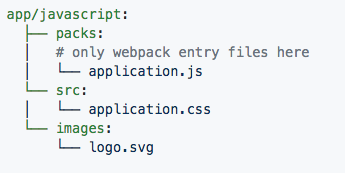
I would create a app/javascript/packs/firstApp.index.js file that has something like
//...
import { FirstApp } from './../src/FirstApp'; // or 'app/javascript/src/FirstApp'
//...
ReactDOM.render(<FirstApp/>, document.getElementById('first-app'));
With this, your build won't do extra work. Hope this helps.
jakeNiemiec
on 20 Feb 2019
Yea fixing the folder structure shaved off the last 4/5 seconds, and now compile time is ~1s.
Amazing, thank you so much everyone 🙏
kapso
on 21 Feb 2019
In my case, I have to set check_yarn_integrity to be false in development mode.
 hiveer
on 23 Mar 2020
hiveer
on 23 Mar 2020
Related issues
 ilrock
·
3Comments
ilrock
·
3Comments
 pioz
·
3Comments
pioz
·
3Comments
 ijdickinson
·
3Comments
ijdickinson
·
3Comments
 vtno
·
3Comments
vtno
·
3Comments
 naps62
·
3Comments
naps62
·
3Comments
Most helpful comment
Yea fixing the folder structure shaved off the last 4/5 seconds, and now compile time is ~1s.
Amazing, thank you so much everyone 🙏