Webpacker: [ts] Property `context` does not exist on type 'NodeRequire'
Hi there!
Thanks for all your hard work on webpacker, it's excellent! I'm having a bit of an issue using typescript and stimulus on Rails 5.1 and webpacker 3.2.2.
I installed webpacker, typescript and stimulus using the following:
bundle exec rails webpacker:install
bin/rails webpacker:install:typescript
bin/rails webpacker:install:stimulus
Create a file called application.ts:
import { Application } from "stimulus"
import { definitionsFromContext } from "stimulus/webpack-helpers"

const application = Application.start()
const context = require.context("controllers", true, /.ts$/)
application.load(definitionsFromContext(context))
I get a compiler error at
const context = require.context("controllers", true, /.ts$/) // [ts] Property 'context' does not exist on type 'NodeRequire'.
My tsconfig.json:
{
  "compilerOptions": {
    "declaration": false,
    "emitDecoratorMetadata": true,
    "experimentalDecorators": true,
    "lib": ["es6", "dom"],
    "module": "es6",
    "moduleResolution": "node",
    "sourceMap": true,
    "target": "es5",
    "types": [
      "webpack",
      "webpack-env"
    ]
  },
  "exclude": [
    "**/*.spec.ts",
    "node_modules",
    "vendor",
    "public"
  ],
  "compileOnSave": false
}
My package.json
{
  "name": "canopy",
  "private": true,
  "dependencies": {
    "@rails/webpacker": "^3.2.2",
    "stimulus": "^1.0.1",
    "ts-loader": "^3.5.0",
    "typescript": "^2.7.2"
  },
  "version": "1.0.0",
  "repository": "[email protected]:sunnyrjuneja/canopy.git",
  "author": "Sunny Juneja <[email protected]>",
  "devDependencies": {
    "@types/webpack": "^3.8.8",
    "@types/webpack-env": "^1.13.5",
    "webpack-dev-server": "^2.11.1"
  }
}
My understanding is the types: [...] in tsconfig would solve this problem. It's why reaching out here.
 sunnyrjuneja
All 13 comments
Issue I'm referring to: https://github.com/DefinitelyTyped/DefinitelyTyped/issues/6170
sunnyrjuneja
on 16 Feb 2018
I've created a repo to reproduce the problem. https://github.com/sunnyrjuneja/webpacker-ts-issue
sunnyrjuneja
on 23 Feb 2018
I reread the issue and was able to solve my problem.
- I removed stimulusjs and made sure typescript was working.
- I removed all types, node_modules and yarn.lock. I believe my problem was that I had node types at one point.
- I re-installed types/webpack-env (and no other types).
- I reset VS Studio Code.
- It worked! :tada:
sunnyrjuneja
on 4 Mar 2018
I think reinstalling types/webpack-env is enough or installing it if missing.
Command: npm i -D @types/webpack-env
 Legends
on 16 Mar 2018
Legends
on 16 Mar 2018
@Legends I tried reinstalling a few times and it didn't do it. I'm not sure what the issue was :(.
sunnyrjuneja
on 16 Mar 2018
Yes, sometimes it's really weird...
Legends
on 16 Mar 2018
an easy but ugly workaround:
require['context']
 yoyoys
on 21 Jul 2018
yoyoys
on 21 Jul 2018
As said by @Legends installing webpack typings extends the require with the context method so it works:
npm i -D @types/webpack-env
 havsar
on 22 Dec 2018
havsar
on 22 Dec 2018
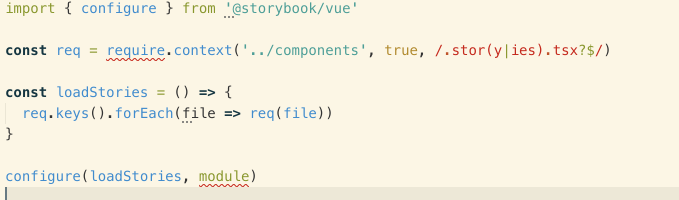
When I installed @types/webpack-env I started getting:
Cannot find name 'require'. Do you need to install type definitions for node? Try `npm i @types/node`.
 moltar
on 16 Apr 2019
moltar
on 16 Apr 2019
I think reinstalling
types/webpack-envis enough or installing it if missing.
@Legends could you please update your comment by adding @ in front of types.
Warning: Permanently added the RSA host key for IP address '140.82.118.3' to the list of known hosts.
Nothing serious, but I just copy-pasted without care, and maybe someone else would do the same :)
 mehmetnyarar
on 12 May 2019
mehmetnyarar
on 12 May 2019
npm i -D @types/webpack-env and then restart
 ghost
on 13 Dec 2019
ghost
on 13 Dec 2019
Is there any more information on the cause of this? I'm experiencing this issue exactly as @moltar did Cannot find name 'require'. and installing or reinstalling @types/webpack-env (and restarting) does not solve the problem
 travisp
on 17 Jan 2020
travisp
on 17 Jan 2020
- npm i -D @types/webpack-env
{
"compilerOptions": {
"types": [
"node",
"webpack-env"
]
}
}
 guanwanxiao
on 9 Apr 2020
guanwanxiao
on 9 Apr 2020
Related issues
 ijdickinson
·
3Comments
ijdickinson
·
3Comments
 pioz
·
3Comments
pioz
·
3Comments
 suhomozgy-andrey
·
3Comments
suhomozgy-andrey
·
3Comments
 ankitrg
·
3Comments
ankitrg
·
3Comments
 towry
·
3Comments
towry
·
3Comments
Most helpful comment
I think reinstalling
types/webpack-envis enough or installing it if missing.Command:
npm i -D @types/webpack-env