It looks like Webpacker 3 adds a lot of npm dependencies to my application. We don't use CoffeeScript or ERB in our JS, and right now are still using the asset pipeline for CSS compilation. In previous versions I could just modify the configuration to remove all this stuff, but it looks like now there's no option but to install them due to the fact that they're hard dependencies of the @rails/webpacker package. It would be nice if there was a way to configure which plugins are and are not used. Am I missing something?
 mockdeep
All 20 comments
@mockdeep Ahh yes for now until we figure out a way to relax them :). Are they can causing any issues? I am assuming, generally we don't like dependencies 😄 Please, feel free leave any ideas though 👍
 gauravtiwari
on 1 Sep 2017
gauravtiwari
on 1 Sep 2017
@gauravtiwari Yeah, it's mostly just clutter. No issues I've run into, in fact the upgrade went pretty smoothly (though I felt it was a bit too aggressive in adding dependencies to my package.json). Unfortunately, I haven't seen a great way to conditionally require stuff in node-style package management. I guess that's why they end up publishing 18 different packages for different configurations. Maybe it would make sense to allow importing different config settings somewhere, like config/webpack/environment.js:
const environment = {
css: require('@rails/webpacker/css');
js: require('@rails/webpacker/js');
};
module.exports = environment;
I know it doesn't match the way your Environment class works, but rough idea. Maybe doing something like that you could not have hard dependencies and could rely on the user to add them.
mockdeep
on 1 Sep 2017
Yeah, I'm in the same boat. I was manually removing the CoffeeScript dependencies before and now I am stuck with them. No issues, but like mentioned above, it's just clutter.
Also, I assume I am free to remove the @rails/webpacker dependencies that were previously added to my package.json, since they are installed as dependencies of @rails/webpacker? If so, after removing all the @rails/webpacker dependencies from my package.json, I am left with three dependencies that webpacker previously depended on:
autoprefixerprecsswebpack-merge
Is it true these were previously dependencies and are no longer?
 codebycliff
on 6 Sep 2017
codebycliff
on 6 Sep 2017
why builded simple hello_react have 2.1MB ? i have confused.
i change "@rails/webpacker" and "babel-preset-react" to "devDependencies"
no ideal
 Jesse-Fan
on 7 Sep 2017
Jesse-Fan
on 7 Sep 2017
@Jesse-Fan Depends on your build environment, please see this comment: https://github.com/rails/webpacker/issues/754#issuecomment-327422725
Usually in development mode webpack adds deps for hot/live reloading. All those are just webpack dependencies, they are not used inside the actual bundle so moving them to "devDependencies" or removing won't help.
gauravtiwari
on 7 Sep 2017
@gauravtiwari but i have turn HRM off in config/webpack/webpack.yaml and i run rails webpacker:compile the bundle size is also 2MB+
i try to use rails assets:precompile . It's cannot solve my problem D(
Jesse-Fan
on 7 Sep 2017
@Jesse-Fan Have you tried NODE_ENV=production bundle exec rails webpacker:compiler or NODE_ENV=production assets:precompile
gauravtiwari
on 7 Sep 2017
@gauravtiwari
bingo!!
NODE_ENV=production rails webpacker:compile
it does work
and hello_react is 140kb+
thx
Jesse-Fan
on 7 Sep 2017
If you have several react components you can reduce the bundle size by using common chunk plugin, that will extract vendor deps into a single file, which can be included in layout and probably cached using Turbolinks.
// config/webpack/environment.js
const webpack = require('webpack')
const { environment } = require('@rails/webpacker')
environment.plugins.set('CommonChunk',
new webpack.optimize.CommonsChunkPlugin({
name: 'vendor',
minChunks: (module) =>
module.context && module.context.indexOf("node_modules") !== -1
})
)
// extract webpack manifest code
environment.plugins.set('CommonChunk2',
new webpack.optimize.CommonsChunkPlugin({
name: 'manifest',
minChunks: Infinity
})
)
module.exports = environment

gauravtiwari
on 7 Sep 2017
@gauravtiwari
but i also have a trouble ..D(

Jesse-Fan
on 8 Sep 2017
@Jesse-Fan What version of yarn are you using? Please upgrade and then reinstall node_modules i.e. delete node_modules folder and run yarn install again
gauravtiwari
on 8 Sep 2017
@gauravtiwari Awesome!!!!
I got it !!thank you very much
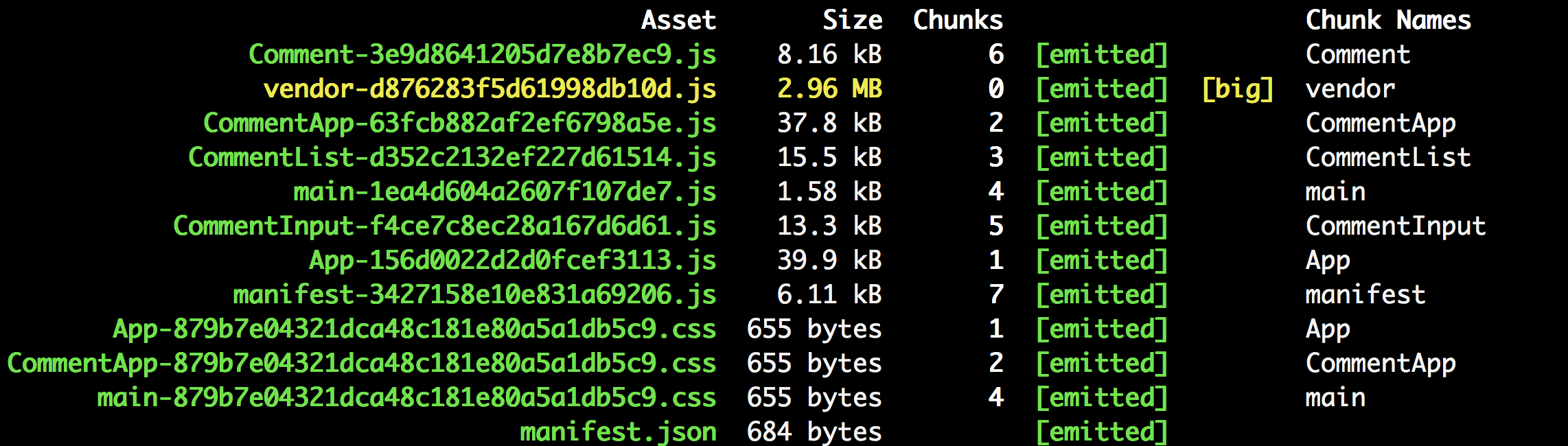
but sometimes i have a trouble with fonts images or jQuery ,Do you have some detail course?
Jesse-Fan
on 8 Sep 2017
but sometimes i have a trouble with fonts images or jQuery ,Do you have some detail course?
Could you please describe the problem?
gauravtiwari
on 8 Sep 2017
@gauravtiwari
Can i use turbolink technology like this?

and i have found vendor is also so big,althought app reduce size and i need to link too many script tag . i think causing a large number of http requests .
Jesse-Fan
on 8 Sep 2017
@Jesse-Fan Are you using sprockets i.e. rails asset pipeline as well?
gauravtiwari
on 8 Sep 2017
@gauravtiwari
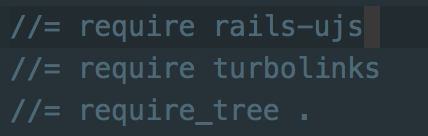
all my script need to use javascript_include_tag ?or app/assets/javascript/application.js ? i am so fresh kid so that i don't know how to do you say.....

Jesse-Fan
on 9 Sep 2017
We are dropping coffeescript in #870, first step but hopefully we will figure out a way to drop others too 👍
gauravtiwari
on 29 Sep 2017
Bump here!
As Babel 7 is coming, I am testing it in my app. The packages moved to a @babel/package naming, and I have all the needed ones in my package.json:
    "@babel/core": "7.0.0-beta.32",
    "@babel/plugin-proposal-class-properties": "7.0.0-beta.32",
    "@babel/plugin-proposal-object-rest-spread": "7.0.0-beta.32",
    "@babel/plugin-syntax-dynamic-import": "7.0.0-beta.32",
    "@babel/polyfill": "7.0.0-beta.32",
    "@babel/preset-env": "7.0.0-beta.32",
    "@babel/preset-react": "7.0.0-beta.32",
I think I prefer to have the application package.json specify the dependancies (with a default one generated on Webpacker's initialisation) rather than Webpacker depending on all those packages directly.
 renchap
on 29 Nov 2017
renchap
on 29 Nov 2017
Agreed. Let's make some of the dependencies optional. Optional dependencies are well suited for this use case.
 mareksuscak
on 5 Dec 2017
mareksuscak
on 5 Dec 2017
Dropped erb and coffeescript - now available through separate installer. Will make a release later.
gauravtiwari
on 15 Dec 2017
Related issues
 iChip
·
3Comments
iChip
·
3Comments
 eriknygren
·
3Comments
eriknygren
·
3Comments
 pioz
·
3Comments
pioz
·
3Comments
 ytbryan
·
3Comments
ytbryan
·
3Comments
 amandapouget
·
3Comments
amandapouget
·
3Comments
Most helpful comment
Bump here!
As Babel 7 is coming, I am testing it in my app. The packages moved to a
@babel/packagenaming, and I have all the needed ones in mypackage.json:I think I prefer to have the application
package.jsonspecify the dependancies (with a default one generated on Webpacker's initialisation) rather than Webpacker depending on all those packages directly.