Webpacker: heroku: error Command "webpack" not found.
Hello,
I spent the day migrating an old rails 4 app with the gem react_rails to a new rails 5.1 app with webpacker.
Everything works perfectly well, except when I try to deploy the app on heroku.

 tchret
All 38 comments
@tchret Hey, did you move dependencies under devDependencies inside package.json?
 gauravtiwari
on 18 Jun 2017
gauravtiwari
on 18 Jun 2017
@gauravtiwari: Hi, thanks for your answer.
I just did and I've always the same error when Webpacker start the compilation:
yarn run v0.22.0
error Command "webpack" not found.
@tchret Sorry, I should have been more clear. Basically all dependencies needs to live under dependencies key except webpack-dev-server. Also when deloying to heroku is it running yarn install? Could you please share full log please (atleast the relevant parts)?
gauravtiwari
on 18 Jun 2017
@gauravtiwari Ok got it! I think it's good on this side (see gist)
there is no yarn install during the deployment
tchret
on 18 Jun 2017
@tchret Ahh there we go - Are you using any heroku buildpacks?
gauravtiwari
on 18 Jun 2017
@gauravtiwari No, nothing. Am i supposed to?
tchret
on 18 Jun 2017
@tchret No, I was just checking if that's overriding the default one. The default ruby buildpacks now takes care of this with webpacker gem. BTW, could you please add these two buildpacks and try deploying again -
heroku buildpacks:add --index 1 heroku/nodejs
heroku buildpacks:add --index 2 heroku/ruby
@gauravtiwari: haaaa the nodejs one was missing :)
I guess it was because the production setup was an old one (created under rails 4)
Thank you so much man 🙏🏼
tchret
on 18 Jun 2017
@tchret Great 👍 no worries, glad it's working
gauravtiwari
on 18 Jun 2017
gauravtiwari
on 18 Jun 2017
@tchret Hey, seems like I found the main issue - Do you a yarn binstub inside bin folder?
gauravtiwari
on 20 Jun 2017
Seems like the yarn install task is invoked but there is no yarn binstub present since you were using Rails 4 earlier. Please regenerate them - bundle install --binstubs
gauravtiwari
on 20 Jun 2017
@tchret The above command won't work, try this:
bundle config --delete bin
# Will create yarn binstub
rails app:update:bin
git add bin
Running heroku buildpacks:add --index 1 heroku/nodejs fixed the error Command "webpack" not found for me.
 tjshipe
on 29 Sep 2017
tjshipe
on 29 Sep 2017
Running
heroku buildpacks:add --index 1 heroku/nodejsfixed the errorCommand "webpack" not foundfor me.
Where did you run that command - from your local terminal, or in heroku?
 tonydehnke
on 17 Jul 2019
tonydehnke
on 17 Jul 2019
I just encountered this problem with a fresh vanilla rails app on a fresh vanilla heroku app.
on first push i got this:
remote:  !     Warning: Multiple default buildpacks reported the ability to handle this app. The first buildpack in the list below will be used.
remote:             Detected buildpacks: Ruby,Node.js
remote:             See https://devcenter.heroku.com/articles/buildpacks#buildpack-detect-order
and then at the end…
remote:        Compiling…
remote:        Compilation failed:
remote:        error Command "webpack" not found.
remote:
remote:
remote:  !
remote:  !     Precompiling assets failed.
remote:  !
remote:  !     Push rejected, failed to compile Ruby app.
remote:
remote:  !     Push failed
setting the two buildpacks as described here fixed it.
 jjb
on 6 Oct 2019
jjb
on 6 Oct 2019
Hello 👋 I maintain the Ruby buildpack. The ruby buildpack provides both node and yarn, though you can specify a specific version if you desire by also using the nodejs buildpack.
One thing to watch out for here with this specific error is that the webpack command is provided by your application, usually at bin/webpack. Make sure it is good, you might need to re-generate binstubs:
$ bundle exec rake app:update:bin
 schneems
on 8 Oct 2019
schneems
on 8 Oct 2019
n.b. if using brightbox ruby with ruby-switch, bundle exec rake app:update:bin will result in binstubs having #!/usr/bin/env ruby2.6. So, you'll need to go in and fix these manually.
also, unrelated to this card, bundle exec rake app:update:bin will remove the spring harness
-begin
-  load File.expand_path('../spring', __FILE__)
-rescue LoadError => e
-  raise unless e.message.include?('spring')
-end
The contents of bin/rails for a rails new foo generate this for me:
#!/usr/bin/env ruby
APP_PATH = File.expand_path('../config/application', __dir__)
require_relative '../config/boot'
require 'rails/commands'
I think spring no longer hooks into the binstubs but rather is somewhere else now.
schneems
on 8 Oct 2019
here's what rails new --database=postgresql rails-app creates for me with rails 6.0.0
#!/usr/bin/env ruby2.6
begin
  load File.expand_path('../spring', __FILE__)
rescue LoadError => e
  raise unless e.message.include?('spring')
end
APP_PATH = File.expand_path('../config/application', __dir__)
require_relative '../config/boot'
require 'rails/commands'
Weird I don't get that with the same command. I'm using chruby to manage my rubies. Using Ruby 2.6.5.
$ rails -v
Rails 6.0.0
$ which rails
/Users/rschneeman/.gem/ruby/2.6.5/bin/rails
⛄ 2.6.5 🚀  /tmp
$ cat $(which rails)
#!/usr/bin/env ruby
#
# This file was generated by RubyGems.
#
# The application 'railties' is installed as part of a gem, and
# this file is here to facilitate running it.
#

require 'rubygems'

version = ">= 0.a"

str = ARGV.first
if str
  str = str.b[/\A_(.*)_\z/, 1]
  if str and Gem::Version.correct?(str)
    version = str
    ARGV.shift
  end
end

if Gem.respond_to?(:activate_bin_path)
load Gem.activate_bin_path('railties', 'rails', version)
else
gem "railties", version
load Gem.bin_path("railties", "rails", version)
end
I'm getting this same error. I was using the ruby and nodejs buildpack, but based on @schneems feedback I removed nodejs. Neither way can seem to find webpack (with nodejs buildpack or without).
bin folder

Tail of failure log
I see this warning Pattern ["webpack@latest"] is trying to unpack in the same destination "/app/.cache/yarn/v4/npm-webpack-4.41.0-db6a254bde671769f7c14e90a1a55e73602fc70b/node_modules/webpack" as pattern ["webpack@^4.32.2"]. This could result in non-deterministic behavior, skipping., not sure if it's relevant.

package.json
{
  "name": "name",
  "private": true,
  "dependencies": {
    "@rails/actioncable": "^6.0.0-alpha",
    "@rails/activestorage": "^6.0.0-alpha",
    "@rails/ujs": "^6.0.0-alpha",
    "@rails/webpacker": "^4.0.7",
    "bootstrap": "4.3.1",
    "datatables.net": "^1.10.20",
    "datatables.net-bs4": "^1.10.20",
    "datatables.net-dt": "^1.10.20",
    "datatables.net-responsive": "^2.2.3",
    "datatables.net-responsive-bs4": "^2.2.3",
    "jquery": "^3.4.1",
    "popper.js": "^1.15.0",
    "turbolinks": "^5.2.0"
  },
  "version": "0.1.0",
  "devDependencies": {
    "webpack": "latest",
    "webpack-dev-server": "^3.8.0"
  }
}
I've tried regenerated bins using bundle exec rake app:update:bin and bundle install --binstubs
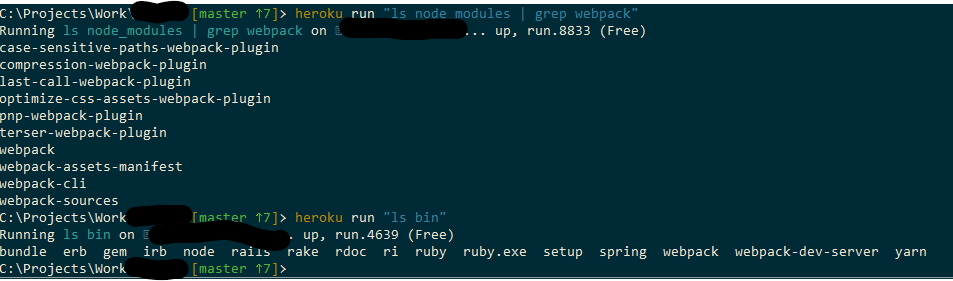
Ruby: 2.6.5
Rails: 6.0.0
Sass-rails: 5
Webpacker: 4.0
 jackjwilliams
on 10 Oct 2019
jackjwilliams
on 10 Oct 2019
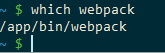
What's the contents of your bin/webpack i.e. cat bin/webpack. Is the file executable?
$ heroku run bash
~$ which webpack
# you should see something here if not, that's a problem
Oddly enough:
jackjwilliams
on 10 Oct 2019
@schneems
Weird I don't get that with the same command
here's my Vagrantfile if you want to reproduce https://gist.github.com/jjb/2b459814cd4d1bb0dbbfbaea0bbf0139
jjb
on 13 Oct 2019
I can confirm that with all the binstubs correct, a fresh app detects/behaves correctly, and there is no need for 2 buildpacks.
jjb
on 13 Oct 2019
I can confirm that with all the binstubs correct, a fresh app detects/behaves correctly, and there is no need for 2 buildpacks.
Fresh app here, rails 6
remote:        warning " > [email protected]" has unmet peer dependency "webpack@^4.0.0".
remote:        warning "webpack-dev-server > [email protected]" has unmet peer dependency "webpack@^4.0.0".
remote:        [4/4] Building fresh packages...
remote:        Done in 6.24s.
remote:        I, [2019-10-19T09:47:33.933166 #1433]  INFO -- : Writing /tmp/build_c8f93413ee92157305a4adb188699583/public/assets/application-e3b0c44298fc1c149afbf4c8996fb92427ae41e4649b934ca495991b7852b855.css
remote:        I, [2019-10-19T09:47:33.933937 #1433]  INFO -- : Writing /tmp/build_c8f93413ee92157305a4adb188699583/public/assets/application-e3b0c44298fc1c149afbf4c8996fb92427ae41e4649b934ca495991b7852b855.css.gz
remote:        Compiling…
remote:        Compilation failed:
remote:        error Command "webpack" not found.
 rmagnum2002
on 19 Oct 2019
rmagnum2002
on 19 Oct 2019
Fresh app, Rails 6.0.3.2, nodejs and ruby buildpacks added.
remote: -----> Detecting rake tasks
remote: -----> Preparing app for Rails asset pipeline
remote:        Running: rake assets:precompile
remote:        yarn install v1.22.4
remote:        [1/4] Resolving packages...
remote:        [2/4] Fetching packages...
remote:        info [email protected]: The platform "linux" is incompatible with this module.
remote:        info "[email protected]" is an optional dependency and failed compatibility check. Excluding it from installation.
remote:        [3/4] Linking dependencies...
remote:        warning " > [email protected]" has unmet peer dependency "webpack@^4.0.0 || ^5.0.0".
remote:        warning "webpack-dev-server > [email protected]" has unmet peer dependency "webpack@^4.0.0".
remote:        [4/4] Building fresh packages...
remote:        Done in 9.97s.
remote:        yarn install v1.22.4
remote:        [1/4] Resolving packages...
remote:        [2/4] Fetching packages...
remote:        info [email protected]: The platform "linux" is incompatible with this module.
remote:        info "[email protected]" is an optional dependency and failed compatibility check. Excluding it from installation.
remote:        [3/4] Linking dependencies...
remote:        warning " > [email protected]" has unmet peer dependency "webpack@^4.0.0 || ^5.0.0".
remote:        warning "webpack-dev-server > [email protected]" has unmet peer dependency "webpack@^4.0.0".
remote:        [4/4] Building fresh packages...
remote:        Done in 1.92s.
remote:        I, [2020-08-23T12:50:25.100975 #2893]  INFO -- : Writing /tmp/build_803e76d4/public/assets/manifest-b4bf6e57a53c2bdb55b8998cc94cd00883793c1c37c5e5aea3ef6749b4f6d92b.js
remote:        I, [2020-08-23T12:50:25.101306 #2893]  INFO -- : Writing /tmp/build_803e76d4/public/assets/manifest-b4bf6e57a53c2bdb55b8998cc94cd00883793c1c37c5e5aea3ef6749b4f6d92b.js.gz
remote:        I, [2020-08-23T12:50:25.101943 #2893]  INFO -- : Writing /tmp/build_803e76d4/public/assets/application-04024382391bb910584145d8113cf35ef376b55d125bb4516cebeb14ce788597.css
remote:        I, [2020-08-23T12:50:25.102573 #2893]  INFO -- : Writing /tmp/build_803e76d4/public/assets/application-04024382391bb910584145d8113cf35ef376b55d125bb4516cebeb14ce788597.css.gz
remote:        Compiling...
remote:        Compilation failed:
remote:        yarn run v1.22.4
remote:        info Visit https://yarnpkg.com/en/docs/cli/run for documentation about this command.
remote:
remote:
remote:        error Command "webpack" not found.
remote:
remote:
remote:  !
remote:  !     Precompiling assets failed.
remote:  !
remote:  !     Push rejected, failed to compile Ruby app.
remote:
remote:  !     Push failed
Adding webpack to the devDependencies solves one warning:
warning " > [email protected]" has unmet peer dependency "webpack@^4.0.0 || ^5.0.0".
but doesn't solve the error, can't get it working on Heroku:
remote: -----> Detecting rake tasks
remote: -----> Preparing app for Rails asset pipeline
remote:        Running: rake assets:precompile
remote:        yarn install v1.22.4
remote:        [1/4] Resolving packages...
remote:        [2/4] Fetching packages...
remote:        info [email protected]: The platform "linux" is incompatible with this module.
remote:        info "[email protected]" is an optional dependency and failed compatibility check. Excluding it from installation.
remote:        info [email protected]: The platform "linux" is incompatible with this module.
remote:        info "[email protected]" is an optional dependency and failed compatibility check. Excluding it from installation.
remote:        [3/4] Linking dependencies...
remote:        [4/4] Building fresh packages...
remote:        Done in 13.02s.
remote:        yarn install v1.22.4
remote:        [1/4] Resolving packages...
remote:        [2/4] Fetching packages...
remote:        info [email protected]: The platform "linux" is incompatible with this module.
remote:        info "[email protected]" is an optional dependency and failed compatibility check. Excluding it from installation.
remote:        info [email protected]: The platform "linux" is incompatible with this module.
remote:        info "[email protected]" is an optional dependency and failed compatibility check. Excluding it from installation.
remote:        [3/4] Linking dependencies...
remote:        [4/4] Building fresh packages...
remote:        Done in 2.77s.
remote:        I, [2020-08-23T13:02:02.364069 #3032]  INFO -- : Writing /tmp/build_db36f30d/public/assets/manifest-b4bf6e57a53c2bdb55b8998cc94cd00883793c1c37c5e5aea3ef6749b4f6d92b.js
remote:        I, [2020-08-23T13:02:02.364388 #3032]  INFO -- : Writing /tmp/build_db36f30d/public/assets/manifest-b4bf6e57a53c2bdb55b8998cc94cd00883793c1c37c5e5aea3ef6749b4f6d92b.js.gz
remote:        I, [2020-08-23T13:02:02.364727 #3032]  INFO -- : Writing /tmp/build_db36f30d/public/assets/application-04024382391bb910584145d8113cf35ef376b55d125bb4516cebeb14ce788597.css
remote:        I, [2020-08-23T13:02:02.364914 #3032]  INFO -- : Writing /tmp/build_db36f30d/public/assets/application-04024382391bb910584145d8113cf35ef376b55d125bb4516cebeb14ce788597.css.gz
remote:        Compiling...
remote:        Compilation failed:
remote:        yarn run v1.22.4
remote:        info Visit https://yarnpkg.com/en/docs/cli/run for documentation about this command.
remote:
remote:
remote:        error Command "webpack" not found.
remote:
remote:
remote:  !
remote:  !     Precompiling assets failed.
remote:  !
remote:  !     Push rejected, failed to compile Ruby app.
 fabiolnm
on 23 Aug 2020
fabiolnm
on 23 Aug 2020
Also getting this error on a fresh rails app. Doesn't matter if rails/webpacker is a dependency or devDependency, I get the same error regardless
 anark
on 3 Sep 2020
anark
on 3 Sep 2020
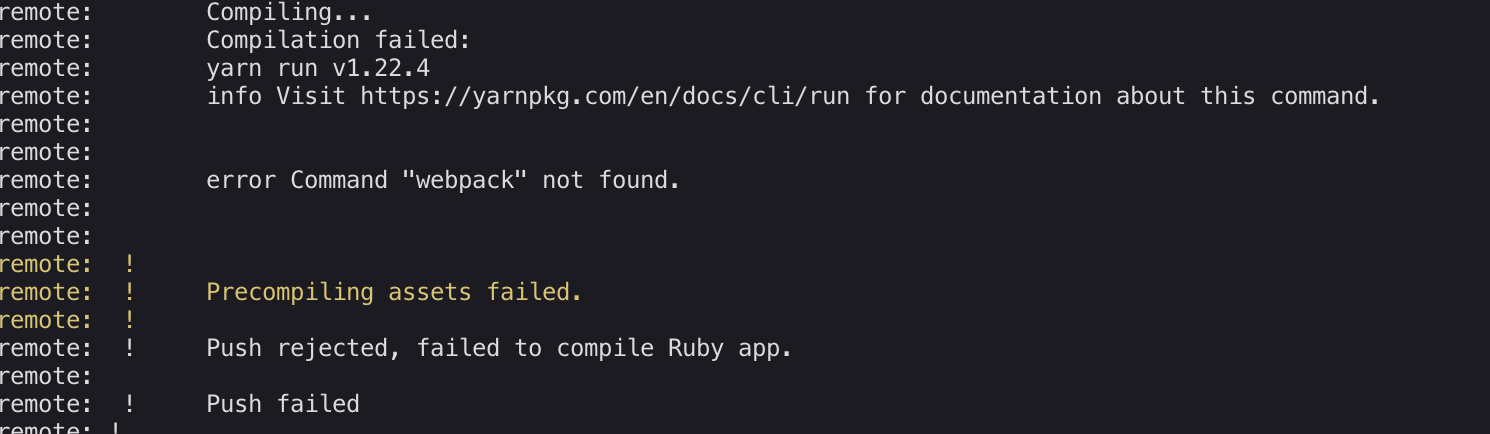
Has anyone figured out how to solve this error? I am getting the same error and have tried everything but it does not go away.
 balalnaeem
on 16 Sep 2020
balalnaeem
on 16 Sep 2020
@balalnaeem did you figure out this error? I've got the exact same error. I have just encountered this issues and am not sure how to fix it.
 deucemac
on 28 Oct 2020
deucemac
on 28 Oct 2020
In your app, what's the first line of bin/rails? does it point to an oddly named ruby only relevant to your dev environment? if so, change it to just be #!/usr/bin/env ruby
jjb
on 28 Oct 2020
The first line is #!/usr/bin/env ruby
deucemac
on 28 Oct 2020
Any update on this issue? I haven't been able to deploy to heroku for months because of this.
 jakehockey10
on 30 Nov 2020
jakehockey10
on 30 Nov 2020
Nope.
balalnaeem
on 30 Nov 2020
I added this line to ~/.railsrc
To stop generating the webpacker directories for new projects.
fabiolnm
on 30 Nov 2020
I think must be because Heroku does not have webpack in its virtual environment !
- From my observation: From my local machine:
which webpackdoes not return anything, which signals thatwebpackis not in the env path. So typingwebpackin the app folder results in the error:
~/myfirstapp$ webpack
Command 'webpack' not found, but can be installed with:
sudo apt install webpack
- Pushing to heroku is showing the similar error:
Command 'webpack' not found. So I think must be that the heroku virtual machine does not have webpack in its env path.

 HungDo1291
on 14 Dec 2020
HungDo1291
on 14 Dec 2020
@schneems : I tried heroku run bash and which webpack and do not see anything . How do I set path on heroku?
HungDo1291
on 14 Dec 2020
Related issues
 eriknygren
·
3Comments
eriknygren
·
3Comments
 johan-smits
·
3Comments
johan-smits
·
3Comments
 christianrojas
·
3Comments
christianrojas
·
3Comments
 Eearslya
·
3Comments
Eearslya
·
3Comments
 suhomlineugene
·
3Comments
suhomlineugene
·
3Comments
Most helpful comment
@tchret No, I was just checking if that's overriding the default one. The default ruby buildpacks now takes care of this with webpacker gem. BTW, could you please add these two buildpacks and try deploying again -