After running bundle update (and noticing that I went from 1.0 to 1.1), relaunching my server (locally), I have this error:
Can't find application.js in /my_app/public/packs/manifest.json. Is webpack still compiling?
When specifying 1.0 in my gemfile, it works fine. When moving back to 1.1, error comes back.
I have a basic setup, similar to what you advise in the readme.
Happy to invite one of the maintainer to our private repo.
 MatthiasRMS
All 41 comments
@MatthiasRMS You would need to re-run bundle exec rails webpacker:install and bundle exec rails webpacker:install:{react, angular, vue} if you have added these too.
 gauravtiwari
on 10 Apr 2017
gauravtiwari
on 10 Apr 2017
I also met this error:
Can't find application.js in /my_app/public/packs/manifest.json. Is webpack still compiling?
ubuntu 16.04
rails: 5.0.2
the main step that I take:
Gemfile:
gem 'webpacker', github: 'rails/webpacker'

bundle install
rails webpacker:install && rails webpacker:install:vue
when I add <%= javascript_pack_tag 'application' %>, it went this error.
Besides, I already install yarn, which version is 0.22, however, when I run rails webpacker:install && rails webpacker:install:vue, it comes with some messages:
Yarn executable was not detected in the system.
Download Yarn at https://yarnpkg.com/en/docs/install
 BoleLee
on 12 Apr 2017
BoleLee
on 12 Apr 2017
@BoleLee Is yarn available in the path? Can you verify please if yarn --version runs okay?
gauravtiwari
on 12 Apr 2017
New to Yarn and such, but I noticed the latest 0.22 of Yarn uses the yarn bin name which is installed and in my path. But I noticed the ./bin/yarn stub wants to call yarnpkg seen here: https://github.com/rails/webpacker/blob/master/lib/install/bin/yarn.tt#L5
I have no such binary called yarnpkg. Did things change?
 metaskills
on 13 Apr 2017
metaskills
on 13 Apr 2017
I've the same problem.
I've checked the prerequisites and are all ok. Any idea ? (it's a new app, so it's not an upgrade)
 inchr
on 17 Apr 2017
inchr
on 17 Apr 2017
@gauravtiwari it says:
yarn --version
0.21.3
inchr
on 17 Apr 2017
yarnpkg and yarn refer to the same thing.
Update: ok, not exactly the same, but yarn ships with yarnpkg. See https://github.com/yarnpkg/yarn/tree/master/bin cc @metaskills
If you have already have yarn installed, I would check if your webpack-dev-server port is free. At development.server.yml, try to change it from the default 8080 to something else.
 ytbryan
on 17 Apr 2017
ytbryan
on 17 Apr 2017
Is yarnpkg installed for everyone? It was certainly not installed for me.
metaskills
on 17 Apr 2017
@metaskills How did you install yarn - homebrew or npm? https://yarnpkg.com/lang/en/docs/install/ I have installed with homebrew and both binaries are available.
gauravtiwari
on 17 Apr 2017
How did you install yarn - homebrew or npm
Neither.... MacPorts.
metaskills
on 17 Apr 2017
Hmm, then I guess it's something to do with MacPorts 😄
gauravtiwari
on 17 Apr 2017
Honestly tho... what is the primary binary name? Is one an alias for the other? Are they different?
metaskills
on 17 Apr 2017
I used homebrew...btw now seems to be ok after I've started again the webpack server in development.
inchr
on 18 Apr 2017
anyway, Gaurav changed yarnpkg to yarn in this PR https://github.com/rails/webpacker/pull/264/files#diff-d4fa2613404db474328053641eaae683
ytbryan
on 18 Apr 2017
Closing since this doesn't feel like an issue anymore 👍 Feel free to reopen
gauravtiwari
on 20 Apr 2017
FYI for others coming across this - I had these errors deploying to Ubuntu 16.04.
I had installed Yarn via npm and yarn --version gave me 0.15.3.
So I installed Yarn from source, which resulted in Yarn version 0.23.4 being installed, which worked with Webpacker.
 jarvisjohnson
on 8 May 2017
jarvisjohnson
on 8 May 2017
We should check the yarn version too during install.
gauravtiwari
on 8 May 2017
Agreed - an 'outdated Yarn' message would be helpful in that situation
jarvisjohnson
on 8 May 2017
@BoleLee have you resolved your issue? I have the same error message and can't find out what to do.
 sergeyvdovareize
on 6 Nov 2017
sergeyvdovareize
on 6 Nov 2017
@sergeyvdovareize Are you compiling webpack assets using ./bin/webpack or ./bin/webpack-dev-server? What version of webpacker are you using? Could you please paste your config/webpacker.yml?
gauravtiwari
on 7 Nov 2017
@gauravtiwari
I didn't change anything there.
# Note: You must restart bin/webpack-dev-server for changes to take effect

default: &default
  source_path: app/javascript
  source_entry_path: packs
  public_output_path: packs
  cache_path: tmp/cache/webpacker

  # Additional paths webpack should lookup modules
  # ['app/assets', 'engine/foo/app/assets']
  resolved_paths: []

  # Reload manifest.json on all requests so we reload latest compiled packs
  cache_manifest: false

  extensions:
    - .coffee
    - .erb
    - .js
    - .jsx
    - .ts
    - .vue
    - .sass
    - .scss
    - .css
    - .png
    - .svg
    - .gif
    - .jpeg
    - .jpg

development:
  <<: *default
  compile: true

  # Reference: https://webpack.js.org/configuration/dev-server/
  dev_server:
    https: false
    host: localhost
    port: 3035
    public: localhost:3035
    hmr: false
    # Inline should be set to true if using HMR
    inline: true
    overlay: true
    disable_host_check: true
    use_local_ip: false

test:
  <<: *default
  compile: true

  # Compile test packs to a separate directory
  public_output_path: packs-test

production:
  <<: *default

  # Production depends on precompilation of packs prior to booting for performance.
  compile: false

  # Cache manifest.json for performance
  cache_manifest: true
Here is my folders architecture

When i run ./bin/webpack it says
No such file or directory - .../node_modules/.bin/webpack (Errno::ENOENT)
I though i had to look for webpack.rb inside the project bin folder
sergeyvdovareize
on 7 Nov 2017
Ahh I see, please run yarn install first
gauravtiwari
on 7 Nov 2017
@gauravtiwari
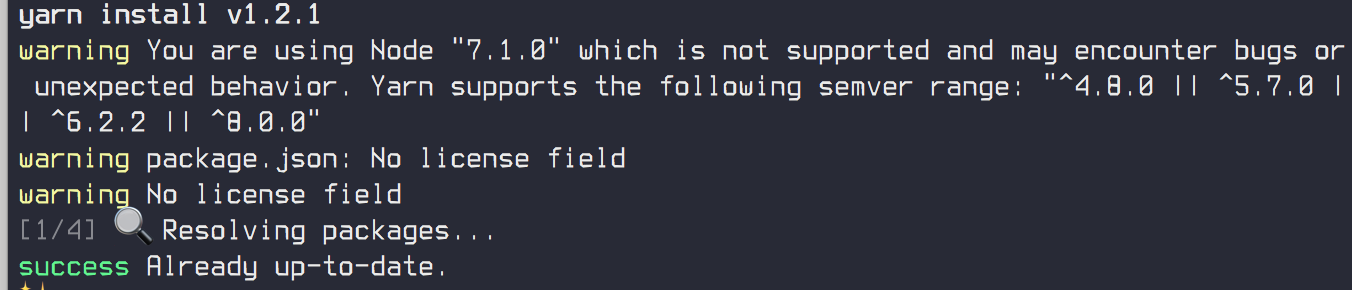
Nothing changed
sergeyvdovareize
on 7 Nov 2017
Remove node_modules and then run yarn install
rm -rf node_modules
gauravtiwari
on 7 Nov 2017
Still nothing
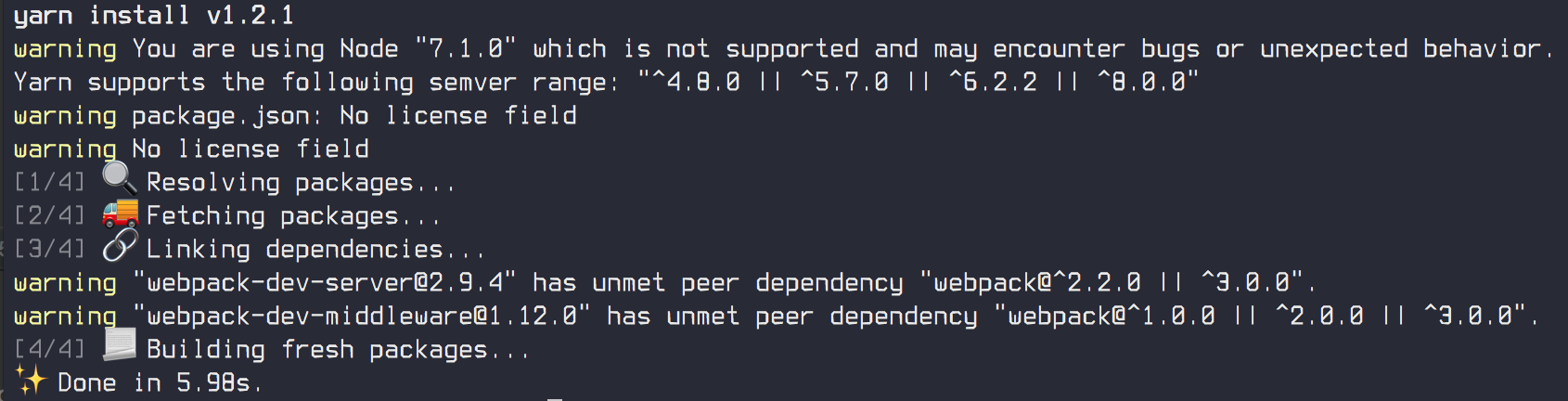
sergeyvdovareize
on 7 Nov 2017
@gauravtiwari I was following these instructions - https://github.com/reactjs/react-rails
sergeyvdovareize
on 7 Nov 2017
Now run, ./bin/webpack please. Still doesn't work?
gauravtiwari
on 7 Nov 2017
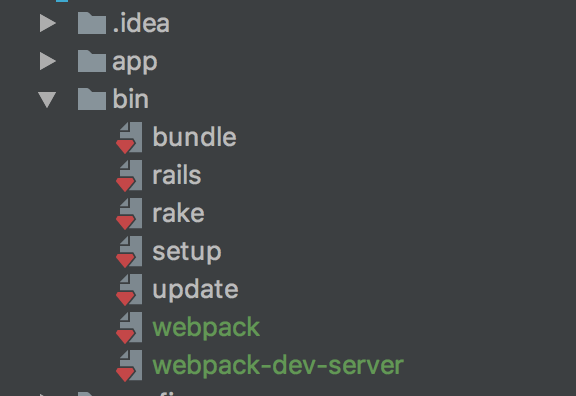
@gauravtiwari nothing. The same error. Is it looking for the webpack file inside the project bin folder? Because I have it there:
sergeyvdovareize
on 7 Nov 2017
I see that it looks for it inside node_modules/.bin/webpack. But there is only webpack-dev-server file there
sergeyvdovareize
on 7 Nov 2017
no, this one is different it's under node_modules/bin. Could you please delete node_modules folder and yarn.lock and install again? Also, what do you have in your package.json?
gauravtiwari
on 7 Nov 2017
{
  "devDependencies": {
    "webpack-dev-server": "^2.9.4"
  },
  "dependencies": {
    "babel-preset-react": "^6.24.1",
    "prop-types": "^15.6.0",
    "react": "^16.0.0",
    "react-dom": "^16.0.0",
    "react_ujs": "^2.4.1"
  }
}
should I add something here?
sergeyvdovareize
on 7 Nov 2017
oh yes, please install yarn add @rails/webpacker
gauravtiwari
on 7 Nov 2017
guess you are moving from older webpacker to new webpacker, strange that instruction from react-rails didn't install this
gauravtiwari
on 7 Nov 2017
Need some time. Have problems with access to the artifactory. I will let you know.
sergeyvdovareize
on 7 Nov 2017
@gauravtiwari i added webpack to the package.json:
{
  "devDependencies": {
    "webpack-dev-server": "^2.9.4",
    "webpack": "^3.8.1"
  },
  "dependencies": {
    "babel-preset-react": "^6.24.1",
    "prop-types": "^15.6.0",
    "react": "^16.0.0",
    "react-dom": "^16.0.0",
    "react_ujs": "^2.4.1"
  }
}
then started yarn install
then ./bin/webpack
Add I see this error:
module.js:538
    throw err;
    ^

Error: Cannot find module '@rails/webpacker'
    at Function.Module._resolveFilename (module.js:536:15)
    at Function.Module._load (module.js:466:25)
    at Module.require (module.js:579:17)
    at require (internal/module.js:11:18)
    at Object.<anonymous> (.../config/webpack/environment.js:1:87)
    at Module._compile (module.js:635:30)
    at Object.Module._extensions..js (module.js:646:10)
    at Module.load (module.js:554:32)
    at tryModuleLoad (module.js:497:12)
    at Function.Module._load (module.js:489:3)
Here is the environment.js content:
const { environment } = require('@rails/webpacker')

module.exports = environment
PS: gem 'webpacker' is in the Gemfile and installed
sergeyvdovareize
on 7 Nov 2017
You don't need to add webpack and dev-server explicitly. Please remove and run this command: bundle exec rails webpacker:install
gauravtiwari
on 7 Nov 2017
Or manually install yarn add @rails/webpacker package and you don't need webpack and dev-server package in package.json
gauravtiwari
on 7 Nov 2017
@gauravtiwari the problem was in the access to the artifactory. webpacker could not be installed completely. It was my local problem. Thank you for you time.
But now I have another issue.
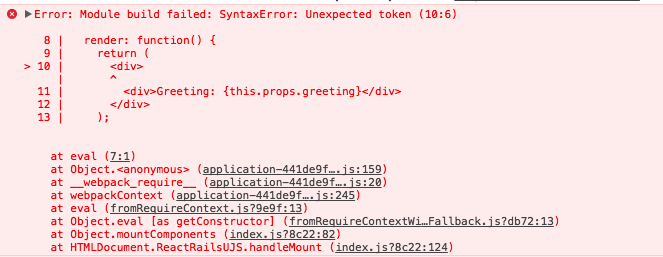
Seems like jsx is not compiled but why? What have I missed now?
sergeyvdovareize
on 7 Nov 2017
Do you have a .babelrc file in root with react preset?
gauravtiwari
on 7 Nov 2017
Please follow installation doc from webpacker README.
gauravtiwari
on 7 Nov 2017
@gauravtiwari everything is working now. thanks for your time
sergeyvdovareize
on 7 Nov 2017
Related issues
 eriknygren
·
3Comments
eriknygren
·
3Comments
 vtno
·
3Comments
vtno
·
3Comments
 naps62
·
3Comments
naps62
·
3Comments
 ilrock
·
3Comments
ilrock
·
3Comments
 ankitrg
·
3Comments
ankitrg
·
3Comments
Most helpful comment
@MatthiasRMS You would need to re-run
bundle exec rails webpacker:installandbundle exec rails webpacker:install:{react, angular, vue}if you have added these too.