Webpack: About Jest import problem
Today, I init my app use vue init vuejs-templates/webpack#develop myApp.
After finish npm i, then I run npm test, the error message is below:
...
SyntaxError: Unexpected token import
So, I add BABEL_ENV=test in "unit": "BABEL_ENV=test jest --config test/unit/jest.conf.js --coverage".
But it doesn't work. And the new error message is:
/Users/g1eny0ung/Work/devo2/src/components/Container.vue:9
    export default {
    ^^^^^^

    SyntaxError: Unexpected token export
I guess this problem is related to vue-jest, and I replace it to jest-vue-preprocessor, in jest.conf.js
transform: {
  '^.+\\.js$': '<rootDir>/node_modules/babel-jest',
  '.*\\.(vue)$': '<rootDir>/node_modules/jest-vue-preprocessor'
},
Then all work fine 😄 . I think maybe this is an unsolved issue in this template?
Hope to get feedback from the repo author.~
 g1eny0ung
All 7 comments
- You are using the
developbranch, I hope you are aware that this branch is not to be considered stable. - I'm not aware of such an issue. The example component
HelloWorld.vueuses ES6 exports / imports as well, and tests run fine.
I would need to see a respository reproducing this.
 LinusBorg
on 20 Nov 2017
LinusBorg
on 20 Nov 2017
I create two repo, one for master and another for develop branch
Still occur import error when run npm test
g1eny0ung
on 20 Nov 2017
Can't reproduce. This is your develop reproduction:
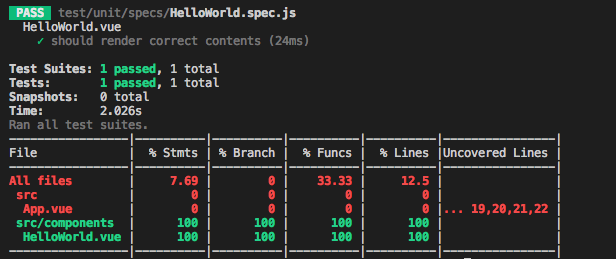
This is from the Jest docs:
Note: If you are using a more complicated Babel configuration, using Babel's env option, keep in mind that Jest will automatically define NODE_ENV as test. It will not use development section like Babel does by default when no NODE_ENV is set.
So:
- Jest will set NODE_ENV to 'test'
- Babel will set BABEL_ENV = NODE_ENV since we did not define it
- BABEL_ENV === 'test'
=> Tests run fine
You should verify that your shell doesn't have a permanent value set for BABEL_ENV accidentally.
Try running printenv | grep BABEL in your terminal.
LinusBorg
on 20 Nov 2017
Morning, I confirm it's my env problem and I will try to solve it... I use another laptop and test run fine. Sorry for bothering you and very thanks for you explaining 😺
g1eny0ung
on 21 Nov 2017
I solved it! It's jest cache problem.
I run ./node_modules/.bin/jest --showConfig | grep cache and rm the cache folder and all work fine!
g1eny0ung
on 21 Nov 2017
I've ran into this same "issue" on a completely clean install: vue init webpack
And then running npm run unit on windows.
Replacing vue-jest to jest-vue-preprocessor "fixed" the issue
versions:
"vue": "^2.5.2",
"vue-jest": "^1.0.2",
 joemanfoo
on 21 Apr 2018
joemanfoo
on 21 Apr 2018
@joemanfoo Huge help. I also replaced vue-jest with jest-vue-preprocessor and finally got jest to work for me. It's worth noting I also needed to use the babel 7 bridge:
npm install --save-dev "babel-core@^7.0.0-bridge.0"
 justin-schroeder
on 3 Oct 2019
justin-schroeder
on 3 Oct 2019
Related issues
 paulgeisler
·
3Comments
paulgeisler
·
3Comments
 Splode
·
3Comments
Splode
·
3Comments
 dtsao
·
3Comments
dtsao
·
3Comments
 ghost
·
3Comments
ghost
·
3Comments
 happy760690
·
3Comments
happy760690
·
3Comments
Most helpful comment
I solved it! It's jest cache problem.
I run
./node_modules/.bin/jest --showConfig | grep cacheand rm the cache folder and all work fine!