Webpack: background image url is wrong
I add background-image in
App.vue (Ex: ./assets/background.jpg)
or Hello.vue (Ex: ./../assets/background.jpg)
When i run dev, anything is working
but when i build product, background image url in CSS is wrong,
it become /dist/static/css/static/img/bg.2d0dc72.jpg
my image is in "assets/bg.jpg"
so sorry, because my english is not good!
tks
 ttquoccuong
All 22 comments
Can you please link to an example repo showing the problem?
 chrisvfritz
on 29 Jul 2016
chrisvfritz
on 29 Jul 2016
https://github.com/ttquoccuong/webpacktemplatedemo
this is repo demo,
In config/index.js, i changed assetsPublicPath to empty or ./ for true url when build production
please help me check it in console, url in css is wrong
ttquoccuong
on 3 Aug 2016
me too.
npm run build
background image url is wrong
 cn-wang
on 29 Aug 2016
cn-wang
on 29 Aug 2016
@ttquoccuong @cn-wang
Could you try this patch
-cp('-R', 'static/', assetsPath)
+cp('-R', 'static/', config.build.assetsRoot)
for build/build.js?
It fixed "static/ path" errors in my project. If it helps you too, I will send a PR.
 UncleBill
on 1 Oct 2016
UncleBill
on 1 Oct 2016
I believe this should be working now. @ttquoccuong @cn-wang @UncleBill Can any of you confirm?
chrisvfritz
on 11 Oct 2016
I have the same issue on my Jew Simulator project.
In dev mode all ok, but on GitHub Pages (mapped to my grawl.ru domain) all paths is broken because of subfolder format of page URL.
(index):1 GET http://grawl.ru/static/css/app.dc454ff2e8238ad1b90c392fa2d58bef.css
(index):13 GET http://grawl.ru/static/js/vendor.9ebc35085301b3fd2a78.js
(index):13 GET http://grawl.ru/static/js/app.1c4025e87bc7c5561961.js
(index):13 GET http://grawl.ru/static/js/manifest.3f7c904ffbdc032d2076.js
(index):13 GET http://grawl.ru/static/js/manifest.3f7c904ffbdc032d2076.js
(index):13 GET http://grawl.ru/static/js/vendor.9ebc35085301b3fd2a78.js
(index):13 GET http://grawl.ru/static/js/app.1c4025e87bc7c5561961.js 404 (Not Found)
So I changed build.assetsPublicPath from '/' to '' in config/index.js#L10 and now all assets is loaded.
But not images used in CSS url().
http://grawl.ru/static/images/SteamBackground.jpg Failed to load resource: the server responded with a status of 404 (Not Found)
There is no grawl.ru/static and I will loose all background-images from CSS so.
Here it is: https://github.com/Grawl/jew-simulator/blob/master/src/app.sass#L48
In hope of underhood magic I change
background-image: url('/static/images/OdessaModeBackground.jpg')
to
background-image: url('../static/images/OdessaModeBackground.jpg')
And I have another problem:
jquery.js:5800 GET http://jew-simulator.local/dist/static/css/static/img/SteamBackground.cad85a4.jpg 404 (Not Found)
It's strange how I got dist/static/css/static/img from just ../
@chrisvfritz
 Grawl
on 5 Dec 2016
Grawl
on 5 Dec 2016
Someone resolve this guys?
I have also the same problem when i run dev.
I start with:
vue init webpack project
and then i only try loading a div with a background-image as INLINE style with the same url of the example logo.png
someone know why?
 sndrgb
on 10 Jan 2017
sndrgb
on 10 Jan 2017
@sndrgb I want to try vbuild. Already migrated and the last part is deploy it on my domain.
Grawl
on 11 Jan 2017
I had similar issues, but my fix was quite easy:
On line 10 of /config/index.js, I changed the assetsPublicPath from / to ./. By doing so, the file locations won't be absolute on the server, but relative to the index.html file they are referenced by.
To me, this appears to be a better default value as it won't cause the errors I and others have.
 Didel
on 23 Jan 2017
Didel
on 23 Jan 2017
just modify the publicPath for url-loader like
 test: /\.(png|jpe?g|gif)(\?.*)?$/,
 loader: 'url-loader',
 options: {
             limit: 10000,
             name: utils.assetsPath('img/[name].[hash:7].[ext]'),
             publicPath: env === 'production' ? '../../' : '/'
}
 githoniel
on 15 Feb 2017
githoniel
on 15 Feb 2017
@githoniel this fixes a very obvious bug in this template, where the production CSS file generates incorrect assets path. Was this ever PR'd?
 adi518
on 30 Aug 2017
adi518
on 30 Aug 2017
I will close this because it's been too long and the template went through a multitude of changes. If such a problem persists, please open a new issue
 LinusBorg
on 2 Sep 2017
LinusBorg
on 2 Sep 2017
thank you so much! i'll check it back with new version.
ttquoccuong
on 5 Sep 2017
What the fuck? "Jew Simulator"? Did nobody see anything incredibly wrong with that? @Grawl what is your deal, bro?
 launchriot
on 5 Nov 2017
launchriot
on 5 Nov 2017
@launchriot it's called humor and sarcasm. sorry if it's a bad jokes for you. now I have to store t anywhere else.
Grawl
on 9 Nov 2017
@Grawl happy to chat about it if you want. you can email me at [email protected].
launchriot
on 9 Nov 2017
I guess the error persists since doing what @githoniel suggested solved the problem for me. I hope it gets fixed for everybody by default someday.
EDIT: Actually, it worked for the css file because the image is relative to the css's file path. But if I would like to load a image directly, it would then fail. It's two different scenarios: images inside .css (they are relative to the file) and image elsewhere (they are relative to assetsPublicPath.
Does anyone have a solution that would work for both cases?
 guilhermeaiolfi
on 14 Jun 2018
guilhermeaiolfi
on 14 Jun 2018
I'm also having the same issue as @guilhermeaiolfi .
I have assetsPublicPath: './'.
if we use <img src="../assets/logo.png"> in the template section of our vue component, the path in app.js looks like this: module.exports = __webpack_require__.p + "static/img/logo.png"; which is good because the static folder is at the same level of the index.html file.
However, if we put background-image: url('../assets/logo.png'); in the style section of our vue component, we see background-image: url(./static/img/logo.png); in the app.css. Since app.css is in static/css/, it will try to load logo.png relatively from app.css so the resulting path is static/css/static/img/logo.png. This is obviously wrong.
We could solve this by putting
publicPath: process.env.NODE_ENV === 'production' ? '../../' : '/'
as option for the url-loader, but then the assets from in our template section of our vue components will also get ../../ prefixed, which means the asset is loaded from 2 folders above index.html which is then wrong.
Looks like the publicPath for assets loaded via the style section of a vue component should be different then the publicPath for assets loaded from the template section of a component.
More specifically, only the assets from the style section should have ../../ prefixed, not all the assets...
edit: our current workaround is to change filename property of ExtractTextPlugin in webpack.prod.conf.js to: filename: '[name].[contenthash].css', so our css ends up in the root instead of in static/css/... Then we don't need the publicPath: process.env.NODE_ENV === 'production' ? '../../' : '/' trick anymore.
 S4mw1s3
on 21 Jun 2018
S4mw1s3
on 21 Jun 2018
Any workaround/solution that doesn't end up determining where our files go or creating others problems? Changing the assetsPublicPath won't do it as I explained in my previously comment.
I've seen that there are other issues opened that are related: #1021, #1284, #1266. But there isn't a perfect solution yet. Just workaround for specific scenarios. I don't know how more people are not complaining about it.
guilhermeaiolfi
on 25 Jul 2018
Workaround that helped me:
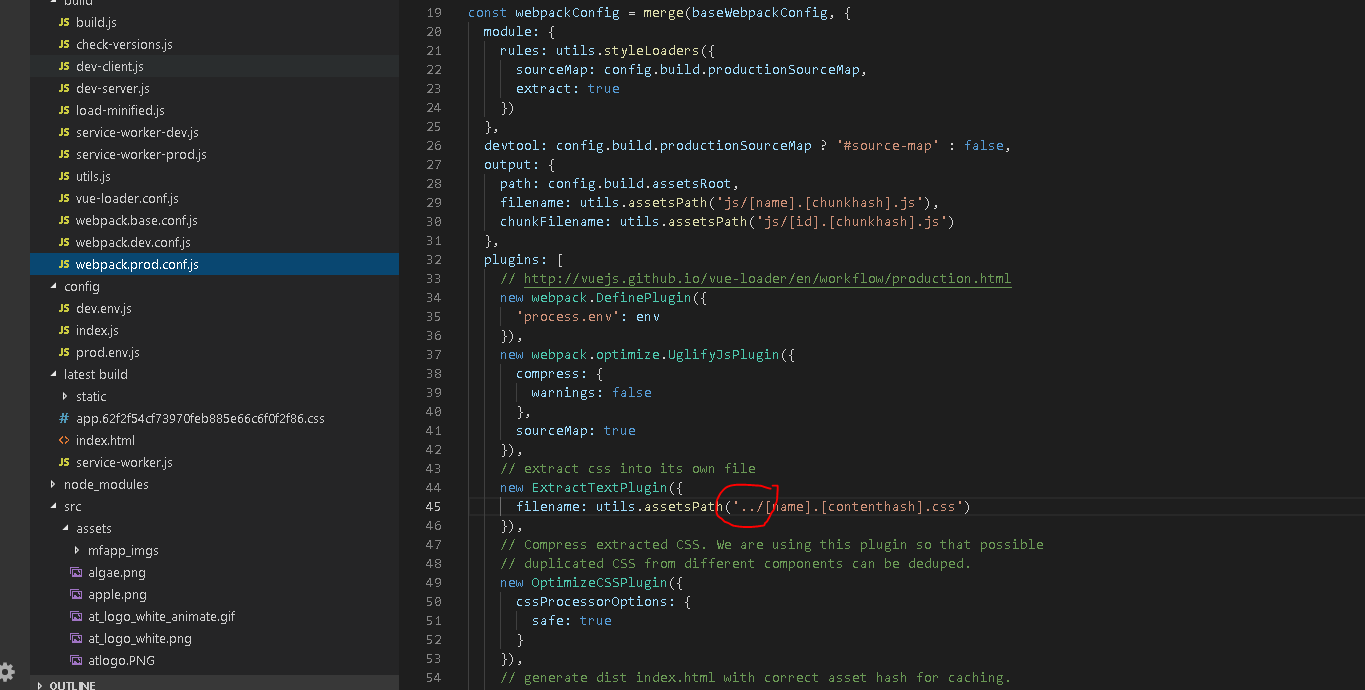
I just remove the css/[name]........
with ../[name]........
now, when run build the css file is right next to the index.html. in the same directory. then it works.
 DainAgritech
on 25 Aug 2018
DainAgritech
on 25 Aug 2018
Using the method @S4mw1s3 still gives me issues. Right now, I can either have publicPath: process.env.NODE_ENV === 'production' ? '../../' : '/' for url-loader and my background images work but my template images don't, or I can change filename property ofExtractTextPlugin in webpack.prod.conf.js and my template images work but my background images do not. Anyone ever get a working solution so I can have BOTH work? @LinusBorg, anything I’m missing? I’ve tracked down a few other related issues but couldn’t find a clear solution.
 bradbotcode
on 29 Jan 2019
bradbotcode
on 29 Jan 2019
@bradbotcode, we are also facing the same issue. Please let us know if you find any solution.
FYI, As a workaround we are setting background url in inline html.
 pavankumar886
on 27 Sep 2019
pavankumar886
on 27 Sep 2019
Related issues
 nicolas-t
·
4Comments
nicolas-t
·
4Comments
 Splode
·
3Comments
Splode
·
3Comments
 paulgeisler
·
3Comments
paulgeisler
·
3Comments
 ghost
·
3Comments
ghost
·
3Comments
 dann95
·
3Comments
dann95
·
3Comments
Most helpful comment
just modify the publicPath for url-loader like