Webpack.js.org: Option output.clean ignored and violating options schema
Bug report
What is the current behavior?
output.cleanoption is ignored.- property output.clean is not allowed according to PHPStorm. "Validates options against webpack options schema". In reality if I build the bundles the option is just ignored without any error, so there's something weird. If I enter a wrong option it would not build.
If the current behavior is a bug, please provide the steps to reproduce.
Just try to add this to webpack.config.js:
    output: {
        clean:  true
    },
Create a dummy file touch dist/dummy and build. The dummy file remains and the JS files remain with the same date.
Same if I add a enabled subkey.
What is the expected behavior?
- The output directory should be cleaned.
- There should not be any Schema violation detected in PHPStorm.
Other relevant information:
webpack version: 5.30.0
Node.js version: 14.10.1
Operating System: Ubuntu under WSL
Additional tools: PHPStorm 2020.3
 herrvigg
All 28 comments
For maintainers only:
- [ ] webpack-4
- [ ] webpack-5
- [ ] bug
- [ ] critical-bug
- [ ] enhancement
- [ ] documentation
- [ ] performance
- [ ] dependencies
- [ ] question
 webpack-bot
on 3 Apr 2021
webpack-bot
on 3 Apr 2021
output.clean remove only webpack assets
property output.clean is not allowed according to PHPStorm. "Validates options against webpack options schema". In reality if I build the bundles the option is just ignored without any error, so there's something weird. If I enter a wrong option it would not build.
You need open an issue in PHPStorm
 alexander-akait
on 3 Apr 2021
alexander-akait
on 3 Apr 2021
Removing external files is not safe, so we don't do it, if you need copy file and allow to remove them please use copy-webpack-plugin
alexander-akait
on 3 Apr 2021
@chenxsan I think we need improve it and write that we only delete the files generated by the webpack, developer can use copy-webpack-plugin if they want to use external files and they will be removed
alexander-akait
on 3 Apr 2021
But this should still clean the output directory (default: dist) when building with webpack?
herrvigg
on 3 Apr 2021
I don't understand what you mean with copy-webpack-plugin. I just want to clean the dist directory as done with CleanWebpackPlugin with minimal options. I thought clean: true would do the job, it doesn't.
Not working as described here:
https://webpack.js.org/guides/output-management/#cleaning-up-the-dist-folder
herrvigg
on 3 Apr 2021
No, files from not webpack will be in place, you can store the necessary files there
alexander-akait
on 3 Apr 2021
Not working as described here:
https://webpack.js.org/guides/output-management/#cleaning-up-the-dist-folder
What is not working?
alexander-akait
on 3 Apr 2021
Not following what you mean with "files from not webpack". From the description of the option:
As you might have noticed over the past guides and code example, our /dist folder has become quite cluttered. Webpack will generate the files and put them in the /dist folder for you, but it doesn't keep track of which files are actually in use by your project.
In general it's good practice to clean the /dist folder before each build, so that only used files will be generated. Let's take care of that with output.clean option.
It seems clean does not clean anything at all. What other files than the generated .js files in dist is it supposed to clean?
herrvigg
on 3 Apr 2021
It seems clean does not clean anything at all
Please stop say loud words :facepalm:
What other files than the generated .js files in dist is it supposed to clean?
Any from webpack
alexander-akait
on 3 Apr 2021
What is the problem? Please describe steps
alexander-akait
on 3 Apr 2021
Create a dummy file touch dist/dummy and build. The dummy file remains and the JS files remain with the same date.
Can contain any sensitive information and removing this file is not safe. You should avoid copy files in dist without copy-webpack-plugin, using copy-webpack-plugin allows to compress/minify/change/etc actions, it has more advantages and clean will work in this case
alexander-akait
on 3 Apr 2021
I'm just building very basic stuff with npm, it produces some .js files in dist. Those files are generated with webpack via npm.
output.clean does not clean the dist folder.
Why would i have to deal with copy-webpack-plugin? It's not relevant at all except for the dummy example maybe.
herrvigg
on 3 Apr 2021
I'm just building very basic stuff with npm, it produces some .js files in dist. Those files are generated with webpack via npm.
output.clean does not clean the dist folder.
Please provide steps, I tested it locally right now and it works
alexander-akait
on 3 Apr 2021
@herrvigg What is the problem provide steps? I don't know your environment so maybe problem in other places. CleanWebpackPlugin will be deprecated and most likely may stop working in the future.
alexander-akait
on 3 Apr 2021
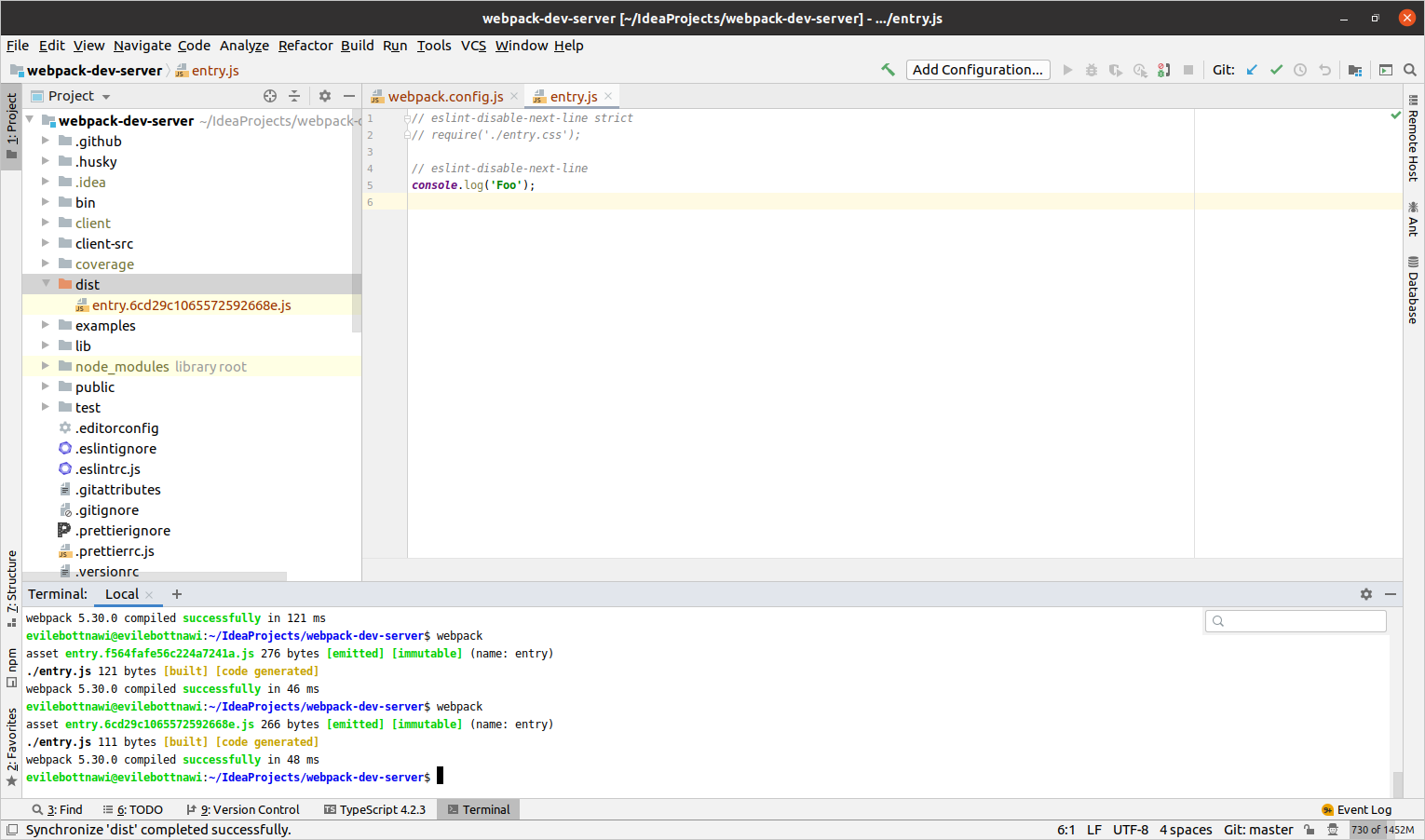
First run:
Second run:
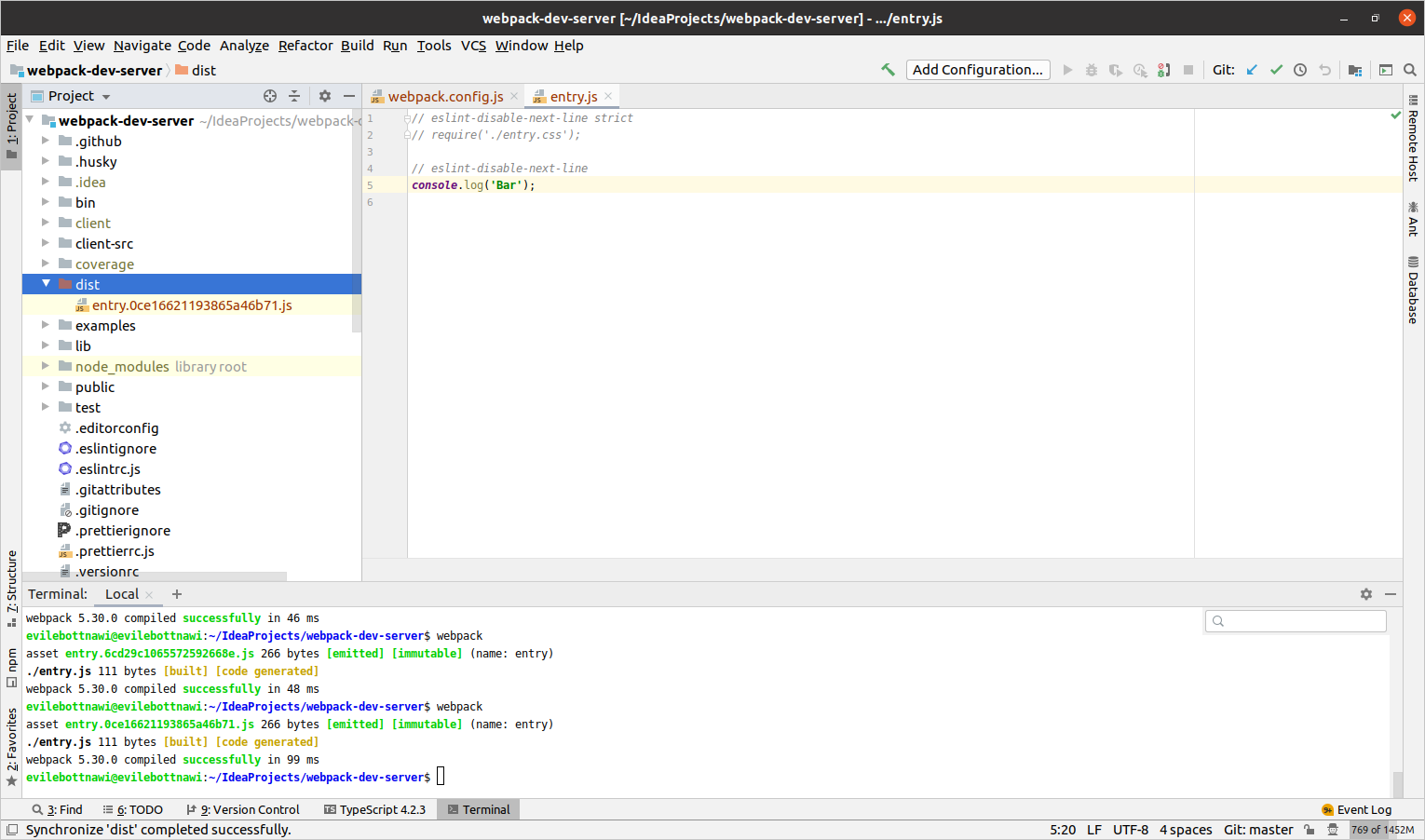
Previously js file was removed as you can see
alexander-akait
on 3 Apr 2021
This is the repo: https://github.com/qtranslate/qtranslate-xt/tree/feature/webpack
In fact i was trying to get rid of CleanWebpackPlugin, by using output.clean: true.
What i do is simply "npm run build" to generate the .js files in dist but the output.clean leaves all the files as they were, while CleanWebpackPlugin would delete them before build so they are generated again.
My environment is WSL Ubuntu. Files are generated with 644 rights so that should work I guess.
herrvigg
on 3 Apr 2021
In my case the target files in dist keep the same name among different runs.
herrvigg
on 3 Apr 2021
output.clean keeps previously webpack assets, why you need remove them, they will be rewritten on the next run, what is use case to remove them?
alexander-akait
on 3 Apr 2021
We avoid unnecessary fs calls, no need to delete them and write again, just rewrite them
alexander-akait
on 3 Apr 2021
Oh... if this is really the expected behavior perhaps it's the description that is quite ambiguous.
In general it's good practice to clean the /dist folder before each build,
By "cleaning a folder", i think most of developers would expect it to be emptied.
Maybe that's overkill but I want to be sure the generated files are fresh. If I use output.clean I expect the previous files to be deleted and generated again. Their creation/changed dates should change (in my mind).
herrvigg
on 3 Apr 2021
So output.clean is actually a bit too smart ;)
herrvigg
on 3 Apr 2021
Maybe that's overkill but I want to be sure the generated files are fresh. If I use output.clean I expect the previous files to be deleted and generated again.
You don't need to worry about this, they are always fresh :star:
By "cleaning a folder", i think most of developers would expect it to be emptied.
so I moved the problem here, we need improve docs
alexander-akait
on 3 Apr 2021
All right, but just a curiosity, if you change your webpack configuration (e.g. entries), how would output.clean be aware of what is generated by webpack or not? How does it differentiate for example the dummy file from previously generated files?
herrvigg
on 3 Apr 2021
In fact it works as you described after understanding the expected behavior.
If I comment an entry, that output target is deleted with output.clean.
So I guess it's based on file information from the previous builds or with some kind of filter (e.g. .js files).
herrvigg
on 3 Apr 2021
For the conclusion, I removed CleanWebpackPlugin, nice :)
An updated description in the documentation may certainly help other developers to understand this behavior.
Thank you for your help and your time!
herrvigg
on 3 Apr 2021
Unfortunately I'm not able to reproduce the issue on macOS. Here's the repository I've set up https://github.com/chenxsan/webpack-js-org-issue-4806.
- Clone it
- Run
yarnto install - Run
npx webpackto build
As you can see, the dist/dummy file will be removed.
Am I misunderstanding the issue?
 chenxsan
on 10 Apr 2021
chenxsan
on 10 Apr 2021
Thanks for testing!
Strangely I can't reproduce this with your project, in that case it removes also the dummy file indeed. How strange!
I was fine with the given explanation but now I see a difference in the behaviors of these two projects. I'll try to investigate to see if we can find a better explanation.
herrvigg
on 10 Apr 2021
Related issues
 pastelsky
·
23Comments
pastelsky
·
23Comments
 arecvlohe
·
21Comments
arecvlohe
·
21Comments
 pksjce
·
18Comments
pksjce
·
18Comments
 chikathreesix
·
21Comments
chikathreesix
·
21Comments
 Pixelatex
·
19Comments
Pixelatex
·
19Comments