Webpack.js.org: Comparison Page Table is Very Difficult to View
What is the current behavior?
Goto https://webpack.js.org/comparison/ see a giant table ... but you can't actually see most of the table because the scroll bars are several pages down, and if you try to use them you've already lost whatever it was you were trying to scroll to see at the top of the table.
If the current behavior is a bug, please provide the steps to reproduce.
See above.
What is the expected behavior?
Either:
A) Remove CSS truncation code and let the browser do the scrolling as God intended, or
B) Use the appropriate table tags so that the table body scrolls naturally, but the table headers are always visible, then cap its height at the page's height.
Other relevant information:
Browser: Latest Chrome
This issue was moved from webpack/webpack#7503 by @evilebottnawi. Original issue was by @machineghost.
 webpack-bot
All 11 comments
Will pick this one up
 FadySamirSadek
on 8 Jun 2018
FadySamirSadek
on 8 Jun 2018
@FadySamirSadek :
This would be nice:
- Vertically fixed header columns, whereas the
Feature Columnis fixed horizontally too. - Feature table-body columns (blue): fixed horizontally, but not vertically
- Bundling tools table-body columns (green): scrolling vertically and horizontally allowed.
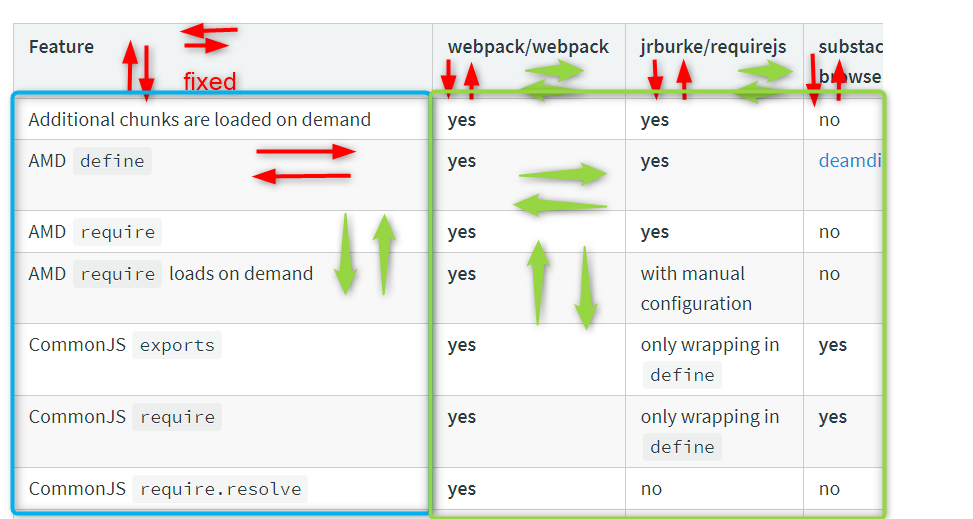
 Legends
on 8 Jun 2018
Legends
on 8 Jun 2018
@Legends sounds like a plan, thank you so much for the diagram
FadySamirSadek
on 8 Jun 2018
yaeh, but I am not sure if this works on mobile...
Legends
on 9 Jun 2018
@Legends it will work if I separated the header row and the features column from the table content and put them in another table but I feel there is definitely nicer solutions that I am not aware of but will do my research ,try to play around and test on multiple devices
FadySamirSadek
on 9 Jun 2018
That makes sense... one of the best html table libs I am aware of is datatables, don't know if it works with React..
Legends
on 9 Jun 2018
@Legends there is something similar in react: react-table.js.org/ will give it a try. They have an example with fixed headers in vertical scrolling so it looks promising
FadySamirSadek
on 9 Jun 2018
@montogeek Do we have a contingent of testing hours on browserstack or similar for webpack/webpack.js.org ? Or how do you test cross-browser support?
Legends
on 9 Jun 2018
I kind of think DataTables, or any plug-in, might be a bit much here. The desired effect can be created vertically just by using the correct HTML elements (thead, tbody, th, etc.) and the horizontal scrolling can be achieved with a relatively small amount of CSS: https://stackoverflow.com/questions/1312236/how-do-i-create-an-html-table-with-fixed-frozen-left-column-and-scrollable-body
 machineghost
on 9 Jun 2018
machineghost
on 9 Jun 2018
@machineghost You're totally right. Another lib for a simple table is too much...
Legends
on 9 Jun 2018
@Legends I am building some tests for rebuild branch
 montogeek
on 9 Jun 2018
montogeek
on 9 Jun 2018
Related issues
 catamphetamine
·
5Comments
catamphetamine
·
5Comments
 skipjack
·
5Comments
skipjack
·
5Comments
 TheLarkInn
·
4Comments
TheLarkInn
·
4Comments
 AlexanderTserkovniy
·
4Comments
AlexanderTserkovniy
·
4Comments
 Maximaximum
·
5Comments
Maximaximum
·
5Comments
Most helpful comment
I kind of think DataTables, or any plug-in, might be a bit much here. The desired effect can be created vertically just by using the correct HTML elements (thead, tbody, th, etc.) and the horizontal scrolling can be achieved with a relatively small amount of CSS: https://stackoverflow.com/questions/1312236/how-do-i-create-an-html-table-with-fixed-frozen-left-column-and-scrollable-body