Webpack.js.org: Flow diagram overview of all stages of webpack
For people coming into making plugins a flow diagram of the webpack process would be invaluable, e.g:
Compiler -> (All pipelines, parse, compile, optimize and order in which they happen) -> Emit
 nehz
nehz
All 4 comments
cc @TheLarkInn
 montogeek
on 6 Jun 2018
montogeek
on 6 Jun 2018
I ended up here from a google search for: _Webpack flow diagram_. Even for regular users trying to configure webpack (not only plugin developers), having a flow diagram would be very helpful to get a big picture view of how webpack works. This is needed because it's really unclear to beginners (and maybe to non-beginners too!) how webpack, babel, loaders, plugins, code in config files, etc. relate to each other and what happens when.
Unfortunately, the usual ways that newbies can figure out what's going on don't work well with webpack:
- running webpack under the debugger is not helpful in understanding data flow because so many calls are async. You can't look up the call stack and understand what's going on because the call stack is like a tiny, incomplete window into the overall data flow.
- using search in GitHub to search the webpack source code for a particular option is also challenging because so much webpack code lives in different npm packages, so you need to search across all of GitHub instead of looking in just one package.
For example, today I'm trying to debug sourcemap generation in my React app. I have a node_modules sourcemap (e.g. /node_modules/foo/dist/index.js.map) that refers to another sourcemap with a relative URL (e.g. ../src/bar.js.map). One of my node_modules dependencies emits sourcemap URLs using the default, namespaced format, e.g. webpack://foo/../src/index.js. This format is not being handled properly by source-map-loader. But source-map-loader doesn't seem to be run for every map file. So now I need to figure out what part of webpack (including all loaders and plugins, notably including source-map-loader and babel) is transforming URLs like webpack://foo/../src/index.js into the URLs bundled in the final bundle's merged sourcemap. It sure would be easier if there was a guide that would show me where those sourcemap URLs were being transformed!
 justingrant
on 16 Apr 2019
justingrant
on 16 Apr 2019
I ended up here from a google search for: _Webpack flow diagram_. Even for regular users trying to configure webpack (not only plugin developers), having a flow diagram would be very helpful to get a big picture view of how webpack works. This is needed because it's really unclear to beginners (and maybe to non-beginners too!) how webpack, babel, loaders, plugins, code in config files, etc. relate to each other and what happens when.
lol I did the same. Most diagrams are manyfileshere -> *magic* -> bundle.js
 clehene
on 2 Oct 2019
clehene
on 2 Oct 2019
Here is the screenshot from Sean's talk
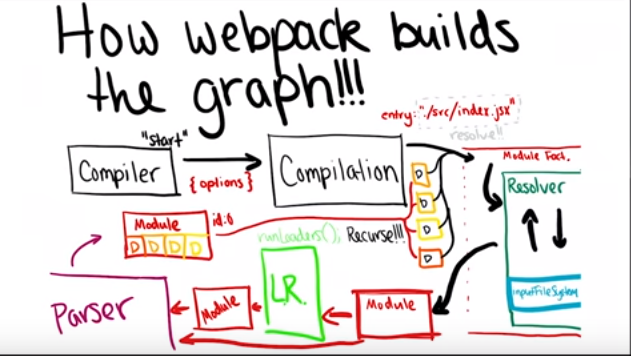
Here is one flow diagram here as well
These are the top-level diagram. A detailed diagram is not available as of now I guess
 anikethsaha
on 12 Feb 2020
anikethsaha
on 12 Feb 2020
Related issues
 gilmoreorless
·
4Comments
gilmoreorless
·
4Comments
 dmackerman
·
5Comments
dmackerman
·
5Comments
 anshumanv
·
4Comments
anshumanv
·
4Comments
 krutoo
·
3Comments
krutoo
·
3Comments
 webpack-bot
·
5Comments
webpack-bot
·
5Comments
Most helpful comment
I ended up here from a google search for: _Webpack flow diagram_. Even for regular users trying to configure webpack (not only plugin developers), having a flow diagram would be very helpful to get a big picture view of how webpack works. This is needed because it's really unclear to beginners (and maybe to non-beginners too!) how webpack, babel, loaders, plugins, code in config files, etc. relate to each other and what happens when.
Unfortunately, the usual ways that newbies can figure out what's going on don't work well with webpack:
For example, today I'm trying to debug sourcemap generation in my React app. I have a node_modules sourcemap (e.g. /node_modules/foo/dist/index.js.map) that refers to another sourcemap with a relative URL (e.g. ../src/bar.js.map). One of my node_modules dependencies emits sourcemap URLs using the default, namespaced format, e.g. webpack://foo/../src/index.js. This format is not being handled properly by source-map-loader. But source-map-loader doesn't seem to be run for every map file. So now I need to figure out what part of webpack (including all loaders and plugins, notably including source-map-loader and babel) is transforming URLs like webpack://foo/../src/index.js into the URLs bundled in the final bundle's merged sourcemap. It sure would be easier if there was a guide that would show me where those sourcemap URLs were being transformed!