Webpack.js.org: Old documentations (3.8)
Do you want to request a feature or report a bug?
Feature
What is the current behavior?
Can't find the documentation of old Webpack versions (3.8). - Especially the API for the webpack.config.js file.
If the current behavior is a bug, please provide the steps to reproduce.
Go to documentation, and don't find the 3.x documentation.
What is the expected behavior?
Go to documentation and find documentation for old versions
This issue was moved from webpack/webpack#6868 by @montogeek. Original issue was by @Erowlin.
 webpack-bot
All 27 comments
Author here!
 Erowlin
on 27 Mar 2018
Erowlin
on 27 Mar 2018
Sorry, due to some of the plugins we are using not yet support version 4, we need to keep staying in version 3. However, our teams have difficulty looking for the version 3 documents.
Please provide the old 3.X documents. Thanks.
 kinyat
on 29 Mar 2018
kinyat
on 29 Mar 2018
Guys if this is an urgent matter you can clone the repo, checkout older revision and then do:
npm i && npm run start-only
Browse to localhost:3000 and there are your docs for any older version just switch the revision
 EugeneHlushko
on 30 Mar 2018
EugeneHlushko
on 30 Mar 2018
Please use https://webpack.js.org/v3/ for webpack 3 docs.
 montogeek
on 30 Mar 2018
montogeek
on 30 Mar 2018
@montogeek amazing. I believe this should be somewhere on the github page. Thanks a lot.
Erowlin
on 30 Mar 2018
https://webpack.js.org/v3/ does not seem to work !
 ApolloTang
on 5 Apr 2018
ApolloTang
on 5 Apr 2018
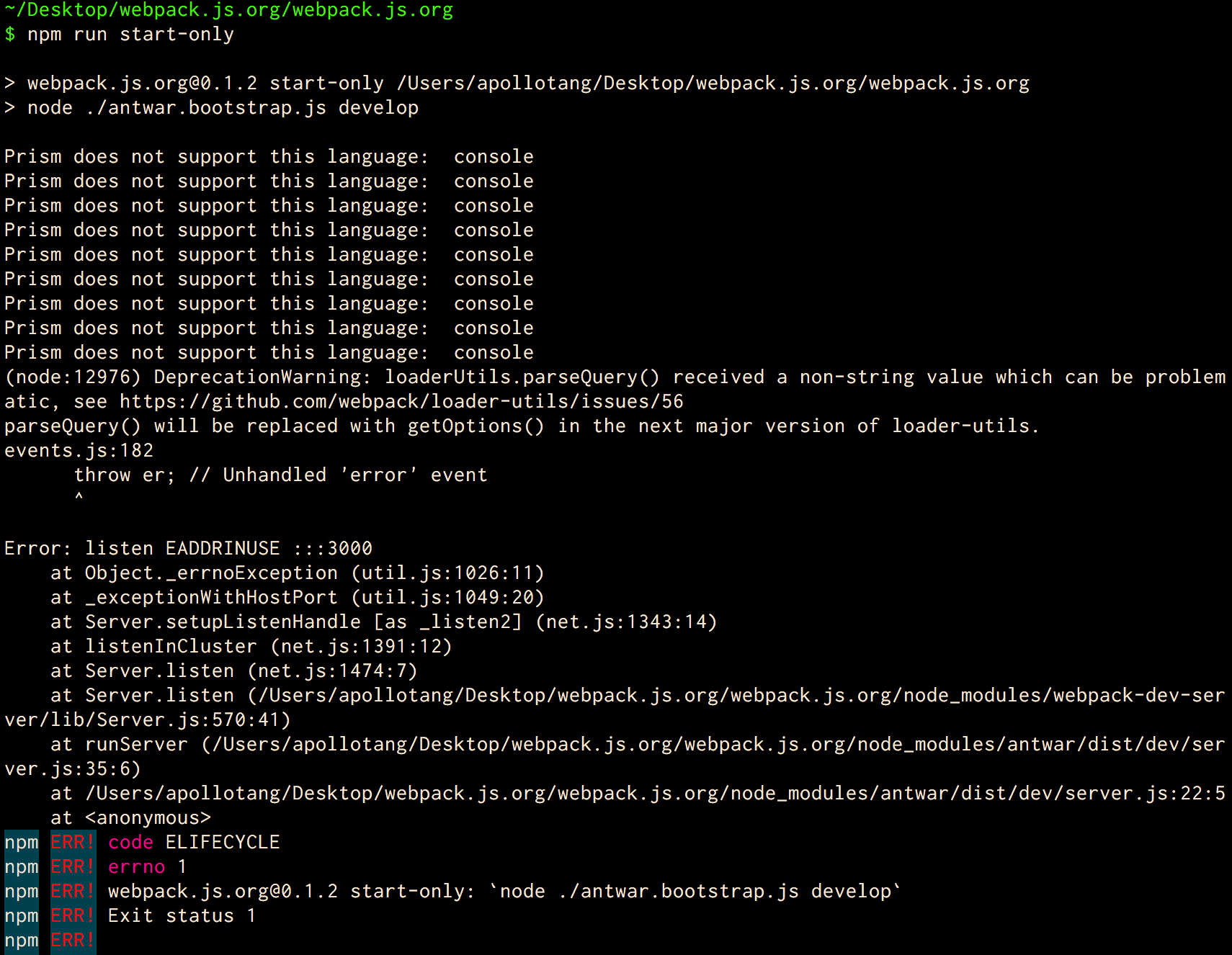
@EugeneHlushko I check out tag v3.11.0, but I can't seem to get it running, would you please help ?
here is the error screen shot:
ApolloTang
on 5 Apr 2018
Please read the errors, something else is using port 3000
montogeek
on 5 Apr 2018
@montogeek thank you
and I apologize for my carelessness. and not reading !!
ApolloTang
on 5 Apr 2018
for other who try to get v3 documentation running locally, instruction are:
git clone [email protected]:webpack/webpack.js.org.git
git checkout tags/v3.11.0
npm i
npm start
note, should be start not start-only
navigate to http://localhost:3000/
ApolloTang
on 5 Apr 2018
https://webpack.js.org/v3/ is down again.
Thanks @ApolloTang for the explanations :)
Erowlin
on 12 Apr 2018
start script is missing in package file...
 sergiubologa
on 23 Apr 2018
montogeek
on 23 Apr 2018
sergiubologa
on 23 Apr 2018
montogeek
on 23 Apr 2018
Ohh, I see. I cloned the webbpack/webpack instead of webpack/webpack.js.org.
Sorry for the misunderstanding. Thanks.
sergiubologa
on 24 Apr 2018
I find it pretty wild that there's no v3 docs available without running your own dev server when create-react-app (and all the bajillions of people who use that project) are still on Webpack 3.
 icopp
on 11 May 2018
icopp
on 11 May 2018
I found a solution on SO:
You can use web archive: https://web.archive.org/web/20180216190554/https://webpack.js.org/concepts/
 atlanteh
on 8 Oct 2018
atlanteh
on 8 Oct 2018
out of the 3 workarounds to this madness.
@ApolloTang solution is the "just works" solution. https://github.com/webpack/webpack.js.org/issues/1961#issuecomment-378963332
Web archive has issue loading some pages https://github.com/webpack/webpack.js.org/issues/1961#issuecomment-427816934
https://webpack.js.org/v3/ is forever down https://github.com/webpack/webpack.js.org/issues/1961#issuecomment-380707633
 lmj0011
on 7 Nov 2018
lmj0011
on 7 Nov 2018
Honestly, I respect the efforts the maintainers put in, but it is really sad that one can't easily view the docs online for an old version. I don't know how such a popular open source project can be maintained with an online docs site with only the current live version showing.
I am on Webpack 2 and can't find a reasonable way to see its documentation. There doesn't seem to be a tag old enough. There doesn't seem to be an online website. Web Archive got nothing that old.
Kindly consider dedicating more effort here. I know its easy to say, but this is well donated to project, so the core maintainers have a responsibility to the community.
 varunarora
on 16 Jan 2019
varunarora
on 16 Jan 2019
Just as a help to anyone else looking for the version I was hunting for (2.2.1), I just tracked the tree through the commits to the day webpack/webpack made a release for that version. The webpack.js.org tree at the end of that day was: https://github.com/webpack/webpack.js.org/tree/7514621056b3c0b126dc17b0dd9bfaa4a783810c
Maintainers, kindly consider just tagging the this repo around the versions as a start.
varunarora
on 16 Jan 2019
Hi @varunarora
Is it working for you when you checkout to it and install/run docs? I can tag that commit as v2.0.0 for future use
EugeneHlushko
on 16 Jan 2019
Yes, @EugeneHlushko, the install/run of the checkout worked just fine :) Note that was 2.2.1 though, not sure how similar or different it is from 2.0.0
varunarora
on 16 Jan 2019
You can now use tag v2.2.1, https://github.com/webpack/webpack.js.org/releases
EugeneHlushko
on 22 Jan 2019
Decided to host it for my own help (tag v3.11.0). Feel free to use https://webpack-v3.jsx.app
 bendtherules
on 31 Jan 2019
bendtherules
on 31 Jan 2019
For Mainland Chinese developers: https://webpack-3.cdn.bcebos.com
 mycoin
on 2 Apr 2019
mycoin
on 2 Apr 2019
Decided to host it for my own help (tag v3.11.0). Feel free to use https://webpack-v3.jsx.app
Thank you!
Top left, the badge indicates "v4.29.6". Have you checkout the proper tag?

Erowlin
on 3 Apr 2019
Thanks for bringing it to notice.
Top left, the badge indicates "v4.29.6". Have you checkout the proper tag?
Actually, the source code has the unversioned badge from shields.io (like https://img.shields.io/npm/v/webpack.svg), which picks up the latest npm version.
It is probably supposed to do exactly that, show the latest webpack npm package version and NOT show the npm package version which the documentation is for.
Maybe, they could have used the tagged version (like https://img.shields.io/npm/v/webpack/webpack-3.svg or https://img.shields.io/github/package-json/v/webpack/webpack/v3.11.0.svg) which would show the version the documentation is for.
I wanted to keep the content untouched and hence didn't change this. But yes, this is the v3.11.0 tag (link: https://github.com/bendtherules/webpack.js.org/tree/tags/v3.11.0).
P.S. This tag is again pushed as a branch with name tags/v3.11.0 in my fork, to help with netlify deployment.
Would you suggest changing (or removing) the badge to remove the confusion?
Also, it might be better to continue the conversation as a issue on the forked repo (https://github.com/bendtherules/webpack.js.org/issues - just enabled).
bendtherules
on 3 Apr 2019
Close in favor https://github.com/webpack/webpack.js.org/issues/1854, same problem for webpack@5, we will try to find solutions in near future
 alexander-akait
on 20 Aug 2020
alexander-akait
on 20 Aug 2020
Related issues
 Legends
·
4Comments
Legends
·
4Comments
 dmackerman
·
5Comments
dmackerman
·
5Comments
 LakinduK
·
4Comments
LakinduK
·
4Comments
 MartinDelille
·
3Comments
MartinDelille
·
3Comments
 TheLarkInn
·
4Comments
TheLarkInn
·
4Comments
Most helpful comment
for other who try to get v3 documentation running locally, instruction are:
note, should be
startnotstart-onlynavigate to http://localhost:3000/