Webpack-hot-middleware: sockjs-node/info?t=1486292316677 404 Error
hi, i try to run webpack-hot-middleware with dev-middleware + webpack2. i got http://localhost:3000/sockjs-node/info?t=1486292316677 404 (Not Found) error and i couldn't fix through the related issues.
my entry included with "webpack-dev-server/client?http://localhost:3000/" (and also server runs on :3000)
error: 
my repo: https://github.com/mkg0/webpack2-starter
also for start:
npm i
gulp
any help would be welcome,
thanks
 mkg0
mkg0
All 11 comments
sorry it was my mistake, confused dev-server/client with hot-reload/client :)
mkg0
on 5 Feb 2017
@mkg0 What was your solution to this?
 omarjackman
on 7 May 2017
omarjackman
on 7 May 2017
I looked through your commit history and found this: https://github.com/mkg0/webpack2-starter/commit/2d2d8ddc892185c42135773c5f88d2c9c9748fa6#diff-11e9f7f953edc64ba14b0cc350ae7b9dL9
So for anyone else googling this your solution might be to swap webpack-dev-server/client?http://localhost:3000/ with webpack-hot-middleware/client?http://localhost:3000/
For me this happens when trying to use the webpack dev middleware instead of running the dev server using the command line.
omarjackman
on 7 May 2017
Thanks this helped out
 jackstine
on 19 May 2017
jackstine
on 19 May 2017
Thank you so much @omarjackman!
 sscaff1
on 29 Jul 2017
sscaff1
on 29 Jul 2017
@omarjackman You just saved my sanity. Thank you.
 animify
on 14 Sep 2017
animify
on 14 Sep 2017
Does anyone know how I would make this change if I'm using webpacker? https://github.com/rails/webpacker
Its configuration.js goes through a paths.yml that looks like the below:
default: &default
  config: config/webpack
  entry: packs
  output: public
  manifest: manifest.json
  node_modules: node_modules
  source: app/javascript
  extensions:
    - .js
    - .jsx
    - .ts
    - .sass
    - .scss
    - .css
    - .png
    - .svg
    - .gif
    - .jpeg
    - .jpg

development:
  <<: *default

test:
  <<: *default
  manifest: manifest-test.json

production:
  <<: *default
 Jacky-Lei
on 18 Sep 2017
Jacky-Lei
on 18 Sep 2017
Hi,
As i am trying to run my application on chrome it is throwing errors as shown below:
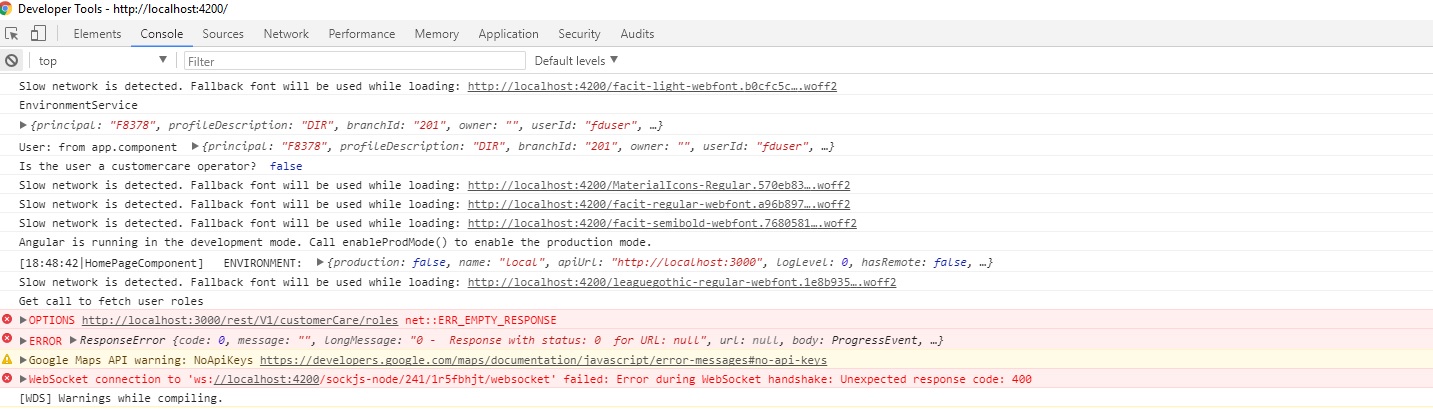
because of it empty response error is coming for all services.
At the same time my application is working perfectly fine in IE & FireFox.
As i am not able to fix the issues any help would be welcome,
thanks
 dineshpahuja
on 1 Feb 2018
dineshpahuja
on 1 Feb 2018
Getting this with following configuration:
"webpack": "^4.16.1",
"webpack-cli": "^3.0.8",
"webpack-dev-server": "^3.1.4"
 aroramayank2002
on 26 Jul 2018
aroramayank2002
on 26 Jul 2018
The same issue to me, I solved my problem by change my code :
var server = new WebpackDevServer(compiler, options)

server.app.listen(port, '0.0.0.0', cb)
to:
var server = new WebpackDevServer(compiler, options)

server.listen(port, '0.0.0.0', cb)
This is because the socket server is created by server.listen not server.app.listen 。
 mgrush
on 12 Apr 2019
mgrush
on 12 Apr 2019
same issue to me, but it disappeared when running the client on localhost port 8080 instead of 8081. server still runs on localhost 3000
 stefkwan
on 29 Jun 2019
stefkwan
on 29 Jun 2019
Related issues
 Cristy94
·
3Comments
Cristy94
·
3Comments
 gartz
·
9Comments
gartz
·
9Comments
 sarincasm
·
6Comments
sarincasm
·
6Comments
 benjarwar
·
10Comments
benjarwar
·
10Comments
 erikakers
·
11Comments
erikakers
·
11Comments
Most helpful comment
I looked through your commit history and found this: https://github.com/mkg0/webpack2-starter/commit/2d2d8ddc892185c42135773c5f88d2c9c9748fa6#diff-11e9f7f953edc64ba14b0cc350ae7b9dL9
So for anyone else googling this your solution might be to swap
webpack-dev-server/client?http://localhost:3000/withwebpack-hot-middleware/client?http://localhost:3000/For me this happens when trying to use the webpack dev middleware instead of running the dev server using the command line.