Webpack-encore: ERROR in Entry module not found: Error: Can't resolve './src'
Just made a clean installation of encore.js, following the documentation in https://symfony.com/doc/current/frontend/encore/simple-example.html however when I attempt to run encore I have the following:
$ yarn encore dev
Running webpack ...


webpack is watching the files…


Insufficient number of arguments or no entry found.
Alternatively, run 'webpack(-cli) --help' for usage info.

Hash: a84b68ef96ae184a7376
Version: webpack 4.41.2
Time: 71ms
Built at: 2019-10-30 12:00:52 PM

WARNING in configuration
The 'mode' option has not been set, webpack will fallback to 'production' for this value. Set 'mode' option to 'development' or 'production' to enable defaults for each environment.
You can also set it to 'none' to disable any default behavior. Learn more: https://webpack.js.org/configuration/mode/

ERROR in Entry module not found: Error: Can't resolve './src' in '/home/pedro.resende/Projects/jsontest'
my webpack.config.js has the following
var Encore = require('@symfony/webpack-encore');

Encore
    // directory where compiled assets will be stored
    .setOutputPath('public/build/')
    // public path used by the web server to access the output path
    .setPublicPath('/build')
    // only needed for CDN's or sub-directory deploy
    //.setManifestKeyPrefix('build/')

    /*
     * ENTRY CONFIG
     *
     * Add 1 entry for each "page" of your app
     * (including one that's included on every page - e.g. "app")
     *
     * Each entry will result in one JavaScript file (e.g. app.js)
     * and one CSS file (e.g. app.css) if your JavaScript imports CSS.
     */
    .addEntry('app', './assets/js/app.js')
    //.addEntry('page1', './assets/js/page1.js')
    //.addEntry('page2', './assets/js/page2.js')

    // will require an extra script tag for runtime.js
    // but, you probably want this, unless you're building a single-page app
    .enableSingleRuntimeChunk()

    .cleanupOutputBeforeBuild()
    .enableSourceMaps(!Encore.isProduction())
    // enables hashed filenames (e.g. app.abc123.css)
    .enableVersioning(Encore.isProduction())

    // uncomment if you use TypeScript
    //.enableTypeScriptLoader()

    // uncomment if you use Sass/SCSS files
    //.enableSassLoader()

    // uncomment if you're having problems with a jQuery plugin
    //.autoProvidejQuery()
;

module.exports = Encore.getWebpackConfig();
and my app.js, inside assets/js folder
export function test()
{
  console.log('hi');
}
 pedroresende
All 5 comments
Hi @pedroresende,
That error usually happens when Webpack doesn't find a webpack.config.js file and fallbacks to its default config.
Are you running yarn encore dev from the same directory?
Does it work when you directly run ./node_modules/.bin/encore dev?
 Lyrkan
on 30 Oct 2019
Lyrkan
on 30 Oct 2019
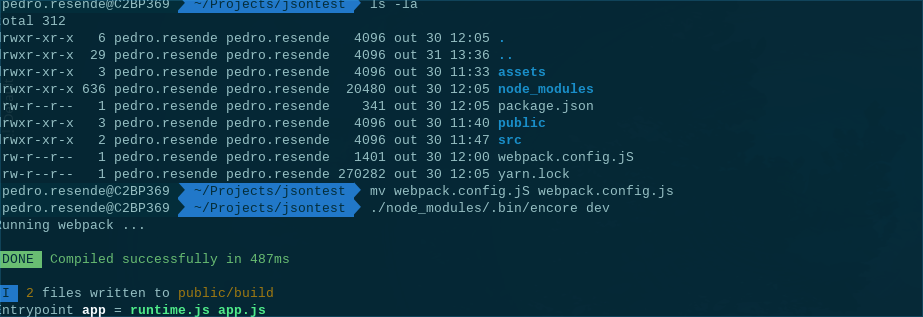
@Lyrkan Thanks for the help, after reading you answer I've re-check my folder and actually it was a typo in the webpack.config.js file...
pedroresende
on 31 Oct 2019
Glad you figured it out 👍
Lyrkan
on 31 Oct 2019
I am getting the same error, can anybody help me out?
[email protected] build /home/pri/Desktop/capstone-udacity-project-7
webpack
Insufficient number of arguments or no entry found.
Alternatively, run 'webpack(-cli) --help' for usage info.
Hash: 68e92918e21845ecd624
Version: webpack 4.43.0
Time: 51ms
Built at: 01/07/2020 14:55:43
WARNING in configuration
The 'mode' option has not been set, webpack will fallback to 'production' for this value. Set 'mode' option to 'development' or 'production' to enable defaults for each environment.
You can also set it to 'none' to disable any default behavior. Learn more: https://webpack.js.org/configuration/mode/
ERROR in Entry module not found: Error: Can't resolve './src' in '/home/pri/Desktop/capstone-udacity-project-7'
npm ERR! code ELIFECYCLE
npm ERR! errno 2
npm ERR! [email protected] build: webpack
npm ERR! Exit status 2
npm ERR!
npm ERR! Failed at the [email protected] build script.
npm ERR! This is probably not a problem with npm. There is likely additional logging output above.
npm ERR! A complete log of this run can be found in:
npm ERR! /home/pri/.npm/_logs/2020-07-01T09_25_43_044Z-debug.log
 Yelpurpriyanka
on 1 Jul 2020
Yelpurpriyanka
on 1 Jul 2020
@Yelpurpriyanka It doesn't look like you are using this project (Webpack Encore).
That being said this error is probably caused by the Webpack config file being missing or not named webpack.config.js (in which case you'd have to call webpack with the --config option).
Lyrkan
on 1 Jul 2020
Related issues
 EliuTimana
·
4Comments
EliuTimana
·
4Comments
 rebangm
·
4Comments
rebangm
·
4Comments
 fanchyfanch
·
3Comments
fanchyfanch
·
3Comments
 wenmingtang
·
4Comments
wenmingtang
·
4Comments
 Kocal
·
3Comments
Kocal
·
3Comments
Most helpful comment
Hi @pedroresende,
That error usually happens when Webpack doesn't find a
webpack.config.jsfile and fallbacks to its default config.Are you running
yarn encore devfrom the same directory?Does it work when you directly run
./node_modules/.bin/encore dev?