Hi,
I installed webpack encore on a SF4 project but my js is not working.
this is my config :
webpack.config.js:
var Encore = require('@symfony/webpack-encore');

Encore
    // directory where compiled assets will be stored
    .setOutputPath('public/build/')
    // public path used by the web server to access the output path
    .setPublicPath('/build')

    .addEntry('app', ['./assets/js/app.js'])

    .enableSingleRuntimeChunk()

    .cleanupOutputBeforeBuild()
    .enableBuildNotifications()
    .enableSourceMaps(!Encore.isProduction())
    // enables hashed filenames (e.g. app.abc123.css)
    .enableVersioning(Encore.isProduction())

    // enables Sass/SCSS support
    .enableSassLoader()

;

module.exports = Encore.getWebpackConfig();
my app.js file :
console.log('Hello world');
and this is the output file :
(window["webpackJsonp"] = window["webpackJsonp"] || []).push([["app"],{

/***/ "./assets/js/app.js":
/*!**************************!*\
  !*** ./assets/js/app.js ***!
  \**************************/
/*! no static exports found */
/***/ (function(module, exports) {

console.log('Hello world');

/***/ }),

/***/ "./node_modules/ansi-html/index.js":
/*!*****************************************!*\
  !*** ./node_modules/ansi-html/index.js ***!
  \*****************************************/
/*! no static exports found */
/***/ (function(module, exports, __webpack_require__) {

"use strict";


module.exports = ansiHTML

// Reference to https://github.com/sindresorhus/ansi-regex
var _regANSI = /(?:(?:\u001b\[)|\u009b)(?:(?:[0-9]{1,3})?(?:(?:;[0-9]{0,3})*)?[A-M|f-m])|\u001b[A-M]/

var _defColors = {
  reset: ['fff', '000'], // [FOREGROUD_COLOR, BACKGROUND_COLOR]
  black: '000',
  red: 'ff0000',
  green: '209805',
  ...
  ...
  ...
but nothin appears in the console...
Does anyone have an idea?
 mathiastm
All 9 comments
Is it really your actually config and app.js file ? The output file seems to have a lot more stuff in it.
 stof
on 14 Nov 2018
stof
on 14 Nov 2018
Yes...
I don't know why there is all this thing. It seems encore generate à lot of code...
mathiastm
on 14 Nov 2018
it looks like dev mode code. i.e., $ encore dev.
 jfcherng
on 14 Nov 2018
jfcherng
on 14 Nov 2018
@mathiastm Stof was talking about the ansi-html part, not the webpack-related code.
I did a quick test with almost the same setup (the only difference being that I passed a string instead of an array as the second argument of addEntry... but it doesn't really matter in this case) and got the following result after running yarn encore dev:
(window["webpackJsonp"] = window["webpackJsonp"] || []).push([["app"],{

/***/ "./app.js":
/*!****************!*\
  !*** ./app.js ***!
  \****************/
/*! no static exports found */
/***/ (function(module, exports) {

console.log('Hello world');

/***/ })

},[["./app.js","runtime"]]]);
//# sourceMappingURL=data:application/json;charset=utf-8;base64,eyJ2ZXJzaW9uIjozLCJzb3VyY2VzIjpbIndlYnBhY2s6Ly8vLi9hcHAuanMiXSwibmFtZXMiOlsiY29uc29sZSIsImxvZyJdLCJtYXBwaW5ncyI6Ijs7Ozs7Ozs7O0FBQUFBLE9BQU8sQ0FBQ0MsR0FBUixDQUFZLGFBQVosRSIsImZpbGUiOiJhcHAuanMiLCJzb3VyY2VzQ29udGVudCI6WyJjb25zb2xlLmxvZygnSGVsbG8gd29ybGQnKTtcbiJdLCJzb3VyY2VSb290IjoiIn0=
As you can see it only contain the "Hello world" code wrapped by some Webpack code.
It also works fine when adding both runtime.js and app.js to an html page:
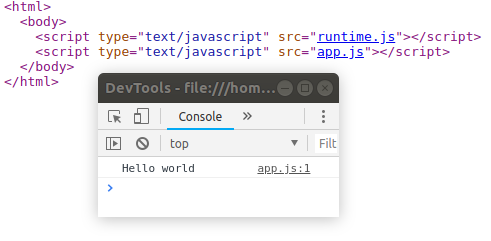
My guess is that you forgot to add runtime.js into your page, which is required after calling Encore.enableSingleRuntimeChunk().
If you use Symfony, the webpack-encore-bundle should handle all that stuff for you: https://github.com/symfony/webpack-encore-bundle
 Lyrkan
on 15 Nov 2018
Lyrkan
on 15 Nov 2018
Think You for your quick reply. I Will try this as soon as possible.
mathiastm
on 15 Nov 2018
thanks a lot! it's finaly working.
i forgot to add runtime.js in my base file....
For the additionnal code, it was because I was runnig encore dev-server for hot reload instead encore dev.
mathiastm
on 15 Nov 2018
Use
yarn add --no-bin-links ./node_modules/@symfony/webpack-encore/bin/encore.js dev
 medymik
on 1 Dec 2018
medymik
on 1 Dec 2018
Perhaps you could check if you have/public/build/as a folder to be ignored from within the .gitignore file, by default adding symfony/webpack-encore-bundle would have added it as below:
> symfony/webpack-encore-bundle
/node_modules/
/public/build/
npm-debug.log
yarn-error.log
< symfony/webpack-encore-bundle
It is likely that all you need to do is to delete it from the .gitignore file or if you fancy, you can simply comment the entry for it (by adding a #symbol at the beginning of the line), for example:
# /public/build/
Once this is being done, you would be able to deploy the JS files from your git repository and you should be able to use the symfony/webpack-encore-bundle as normal.
Also note that you would need to build the JS files prior commiting them into git.
To build use the following command:
yarn encore production
For more information about it all, check:
https://symfony.com/doc/current/frontend/encore/simple-example.html
 dankilev
on 24 Oct 2019
dankilev
on 24 Oct 2019
i had the same issue! so the script & stylesheets should be outside the body Tage like this!
</head>
<body>
    {% block body %}{% endblock %}
</body>
 {% block stylesheets %}
    {{ encore_entry_link_tags('app') }}
 {% endblock %}
 {% block javascripts %}
    {{ encore_entry_script_tags('app') }}
 {% endblock %}
 nassemshabo
on 26 Aug 2020
nassemshabo
on 26 Aug 2020
Related issues
 powerlimit
·
4Comments
powerlimit
·
4Comments
 fanchyfanch
·
3Comments
fanchyfanch
·
3Comments
 EliuTimana
·
4Comments
EliuTimana
·
4Comments
 kegilko
·
3Comments
kegilko
·
3Comments
 Kocal
·
3Comments
Kocal
·
3Comments
Most helpful comment
@mathiastm Stof was talking about the
ansi-htmlpart, not the webpack-related code.I did a quick test with almost the same setup (the only difference being that I passed a string instead of an array as the second argument of
addEntry... but it doesn't really matter in this case) and got the following result after runningyarn encore dev:As you can see it only contain the "Hello world" code wrapped by some Webpack code.
It also works fine when adding both
runtime.jsandapp.jsto an html page:My guess is that you forgot to add
runtime.jsinto your page, which is required after callingEncore.enableSingleRuntimeChunk().If you use Symfony, the webpack-encore-bundle should handle all that stuff for you: https://github.com/symfony/webpack-encore-bundle