Webpack-encore: yarn run encore dev gives error on Windows 10 with git-bash terminal
Running Environment
Windows 10
git-bash terminal
yarn, nodejs and npm are added in $PATH
What works
NodeJs, Yarn and npm can be used without problem.
The command to run encore from node modules also works.
./node_modules/.bin/encore dev
What does not work
yarn run encore dev
gives the following error:
Error: Encore.setOutputPath() cannot be called yet because the runtime environment doesn't appear to be configured. Make sure you're using

the encore executable or call Encore.configureRuntimeEnvironment() first if you're purposely not calling Encore directly.

    at Object.get (C:\users\user\PhpstormProjects\symfony-test\node_modules\@symfony\webpack-encore\index.js:840:23)

    at Object.<anonymous> (C:\users\user\PhpstormProjects\symfony-test\webpack.config.js:7:6)

    at Module._compile (module.js:643:30)

    at Object.Module._extensions..js (module.js:654:10)

    at Module.load (module.js:556:32)

    at tryModuleLoad (module.js:499:12)

    at Function.Module._load (module.js:491:3)

    at Module.require (module.js:587:17)

    at require (internal/module.js:11:18)

    at requireConfig (C:\Users\user\PhpstormProjects\symfony-test\node_modules\webpack\bin\convert-argv.js:97:18)

error Command failed with exit code 1.

info Visit https://yarnpkg.com/en/docs/cli/run for documentation about this command.
I also set the Encore.configureRuntimeEnvironment() in the example here. But the same error is shown.
 pouyana
All 11 comments
It's seems to be Yarn issue:
https://github.com/yarnpkg/yarn/issues/3773#issuecomment-318276298
 vkryukov76
on 24 Jan 2018
vkryukov76
on 24 Jan 2018
Hi @pouyana,
Which version of Yarn are you using?
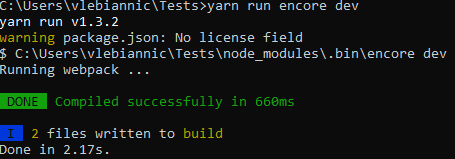
The issue linked by @vkryukov76 has been fixed a while ago and it seems to work fine for me when using Yarn v1.3.2:
 Lyrkan
on 24 Jan 2018
Lyrkan
on 24 Jan 2018
I also have the yarn version 1.3.2, the problem persist. Please see the screenshot. Also if you need more information don't hesitate to tell me.

pouyana
on 25 Jan 2018
I just realized that you were using git-bash (I don't know why my brain ignored that part when reading your post the first time...), still works for me though:
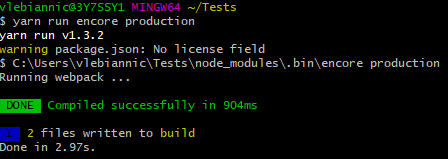
Could you maybe show us the content of your webpack.config.js and package.json files?
Lyrkan
on 25 Jan 2018
Sorry for the delay,
so webpack.config.js has the following data:
var Encore = require('@symfony/webpack-encore');

Encore
// the project directory where all compiled assets will be stored
    .setOutputPath('public/build/')

    // the public path used by the web server to access the previous directory
    .setPublicPath('/build')

    // will create public/build/app.js and public/build/app.css
    //.addEntry('app', './assets/js/app.js')
    .addEntry('app-css', './assets/global.scss')
    // allow sass/scss files to be processed
    .enableSassLoader()

    // allow legacy applications to use $/jQuery as a global variable
    .autoProvidejQuery()

    .enableSourceMaps(!Encore.isProduction())

    // empty the outputPath dir before each build
    .cleanupOutputBeforeBuild()

    // show OS notifications when builds finish/fail
    //.enableBuildNotifications()

// create hashed filenames (e.g. app.abc123.css)
// .enableVersioning();

// export the final configuration
module.exports = Encore.getWebpackConfig();
and package.json has these:
{
  "devDependencies": {
    "@symfony/webpack-encore": "^0.17.1",
    "private-package": "private-git-repo"
  }
}
This issue does not depends on yarn because I had it with npm.
However, I found the issue for me:
Windows is case-insensitive for folder names. So in git bash, you can cd a folder by typing the wrong case without having an error. But then, when you run Encore, you've got this issue. So to solve that, make sure you type the folder path in correct case.
For example, if your project directory is called MyApp and you do cd myapp, it will work OK with git bash, but you'll get that error when launching Encore. So just make sure you type the correct case: cd MyApp when entering your project folder ;)
 Vinorcola
on 16 Nov 2018
Vinorcola
on 16 Nov 2018
Thank you Vinorcola, It's work for me now.
Thank you a lot!
 Liptowin
on 19 Nov 2018
Liptowin
on 19 Nov 2018
for me it was Git Bash. Switched to the IDE's terminal and went fine.
 stanislav-malchev
on 1 Mar 2019
stanislav-malchev
on 1 Mar 2019
@stanislav-malchev Yes the IDE's terminal is working neither git bash nor CMD works.
 aimalamiri
on 14 Mar 2019
aimalamiri
on 14 Mar 2019
This issue does not depends on yarn because I had it with npm.
However, I found the issue for me:
Windows is case-insensitive for folder names. So in git bash, you can
cda folder by typing the wrong case without having an error. But then, when you run Encore, you've got this issue. So to solve that, make sure you type the folder path in correct case.For example, if your project directory is called
MyAppand you docd myapp, it will work OK with git bash, but you'll get that error when launching Encore. So just make sure you type the correct case:cd MyAppwhen entering your project folder ;)
entering dir via sensitive case fixes issue indeed. issue still appearing on current version
 curtchan
on 7 Oct 2019
curtchan
on 7 Oct 2019
I've made no changes in my code and, after one day out, I get this when trying to run "yarn encore dev --watch":
Error: Missing output path: Call setOutputPath() to control where the files will be written.

  - validator.js:36 Validator._validateBasic
    [www]/[@symfony]/webpack-encore/lib/config/validator.js:36:19

  - validator.js:25 Validator.validate
    [www]/[@symfony]/webpack-encore/lib/config/validator.js:25:14

  - validator.js:83 module.exports
    [www]/[@symfony]/webpack-encore/lib/config/validator.js:83:15

  - index.js:1347 Encore.getWebpackConfig
    [www]/[@symfony]/webpack-encore/index.js:1347:9

  - EncoreProxy.js:51 Proxy.parameters
    [www]/[@symfony]/webpack-encore/lib/EncoreProxy.js:51:53

  - webpack.config.js:6 Object.<anonymous>
    C:/Aptor/Projetos/Other/RedeEducacao/www/webpack.config.js:6:21

  - v8-compile-cache.js:192 Module._compile
    [www]/[v8-compile-cache]/v8-compile-cache.js:192:30

  - module.js:663 Object.Module._extensions..js
    module.js:663:10

  - module.js:565 Module.load
    module.js:565:32

  - module.js:505 tryModuleLoad
    module.js:505:12

  - module.js:497 Function.Module._load
    module.js:497:3

  - module.js:596 Module.require
    module.js:596:17

  - v8-compile-cache.js:161 require
    [www]/[v8-compile-cache]/v8-compile-cache.js:161:20

  - convert-argv.js:114 WEBPACK_OPTIONS
    [www]/[webpack-cli]/bin/utils/convert-argv.js:114:13

  - convert-argv.js:116 requireConfig
    [www]/[webpack-cli]/bin/utils/convert-argv.js:116:6

  - convert-argv.js:123
    [www]/[webpack-cli]/bin/utils/convert-argv.js:123:17

  - Array.forEach

  - convert-argv.js:121 module.exports
    [www]/[webpack-cli]/bin/utils/convert-argv.js:121:15

  - cli.js:71 yargs.parse
    [www]/[webpack-cli]/bin/cli.js:71:45

  - yargs.js:567 Object.parse
    [www]/[webpack-cli]/[yargs]/yargs.js:567:18

  - cli.js:49
    [www]/[webpack-cli]/bin/cli.js:49:8

  - cli.js:366 Object.<anonymous>
    [www]/[webpack-cli]/bin/cli.js:366:3

  - module.js:652 Module._compile
    module.js:652:30

  - module.js:663 Object.Module._extensions..js
    module.js:663:10

  - module.js:565 Module.load
    module.js:565:32

  - module.js:505 tryModuleLoad
    module.js:505:12

  - module.js:497 Function.Module._load
    module.js:497:3

  - module.js:596 Module.require
    module.js:596:17

  - module.js:11 require
    internal/module.js:11:18

  - webpack.js:156 Object.<anonymous>
    [www]/[webpack]/bin/webpack.js:156:2

  - module.js:652 Module._compile
    module.js:652:30

  - module.js:663 Object.Module._extensions..js
    module.js:663:10

  - module.js:565 Module.load
    module.js:565:32

  - module.js:505 tryModuleLoad
    module.js:505:12

  - module.js:497 Function.Module._load
    module.js:497:3

  - module.js:596 Module.require
    module.js:596:17


error Command failed with exit code 1.
PS: I've tried to re-open git-bash and also cd with the exact same letter's case and folder's names. I'll possibly try a computer reboot next, but this is pretty weird and I don't think this will solve it.
Does anyone has any idea why I'm getting this error?
---- Edit ----
Actually I've tried to restart, tried to clear yarn's cache and also run this through cmd and powershell. Nothing worked so far....
---- Edit 2 ----
Solved it. My problem was that I had
// export the final configuration
var config = Encore.getWebpackConfig();
before:
    // the project directory where all compiled assets will be stored
    .setOutputPath('web/build/')

    // the public path used by the web server to access the previous directory
    .setPublicPath('/build')

    // will create web/build/app.js and web/build/app.css
    .addEntry('base', './assets/js/common/base.js')

    // allow legacy applications to use $/jQuery as a global variable
    //.autoProvidejQuery()

    // enable source maps during development
    .enableSourceMaps(!Encore.isProduction())

    // empty the outputPath dir before each build
    .cleanupOutputBeforeBuild()

    // show OS notifications when builds finish/fail
    .enableBuildNotifications()

    // create hashed filenames (e.g. app.abc123.css)
    // .enableVersioning()

    // allow sass/scss files to be processed
    .enableSassLoader()
;
 Marcelo-Petrucelli
on 4 Dec 2019
Marcelo-Petrucelli
on 4 Dec 2019
Related issues
 Aerendir
·
4Comments
Aerendir
·
4Comments
 mstrom
·
3Comments
mstrom
·
3Comments
 Growiel
·
3Comments
Growiel
·
3Comments
 fanchyfanch
·
3Comments
fanchyfanch
·
3Comments
 o-alquimista
·
3Comments
o-alquimista
·
3Comments
Most helpful comment
This issue does not depends on yarn because I had it with npm.
However, I found the issue for me:
Windows is case-insensitive for folder names. So in git bash, you can
cda folder by typing the wrong case without having an error. But then, when you run Encore, you've got this issue. So to solve that, make sure you type the folder path in correct case.For example, if your project directory is called
MyAppand you docd myapp, it will work OK with git bash, but you'll get that error when launching Encore. So just make sure you type the correct case:cd MyAppwhen entering your project folder ;)