Webpack-encore: "encore dev --watch" doesn't work properly
./node_modules/.bin/encore dev --watch On first run it works fine,
but when you change files again - nothing happens.
It seems related to issue #121
I've already tried all the steps from this comment - it doesn't help.
webpack.config.js
// webpack.config.js
var Encore = require('@symfony/webpack-encore');

Encore
// directory where all compiled assets will be stored
    .setOutputPath('web/build/')

    // what's the public path to this directory (relative to your project's document root dir)
    .setPublicPath('/build')

    // empty the outputPath dir before each build
    .cleanupOutputBeforeBuild()

    // will output as web/build/app.js
    .addEntry('app', './assets/js/main.js')

    .enableVueLoader()

    // will output as web/build/global.css
    .addStyleEntry('global', './assets/css/global.scss')

    // allow sass/scss files to be processed
    .enableSassLoader()

    .enableSourceMaps(!Encore.isProduction())

// create hashed filenames (e.g. app.abc123.css)
// .enableVersioning()
;

// export the final configuration
module.exports = Encore.getWebpackConfig();
package.json
{
  "devDependencies": {
    "@symfony/webpack-encore": "^0.16.0",
    "node-sass": "^4.5.3",
    "sass-loader": "^6.0.6",
    "vue": "^2.5.2",
    "vue-loader": "^13.3.0",
    "vue-template-compiler": "^2.5.2"
  }
}
 ghost
ghost
All 14 comments
Hi @mtrklb,
Could you elaborate a bit more on "nothing happens"?
Do you have an error message such as the one in #121?
If you don't then that's probably not related (especially since that issue was fixed some months ago), and in this case I've got some more questions for you:
- Does that happen with all files?
- If you change
main.jsorglobal.scss, does Webpack detect it?
 Lyrkan
on 29 Oct 2017
Lyrkan
on 29 Oct 2017
Hi @Lyrkan,
here is console output after i run ./node_modules/.bin/encore dev --watch and changed main.js and global.scss
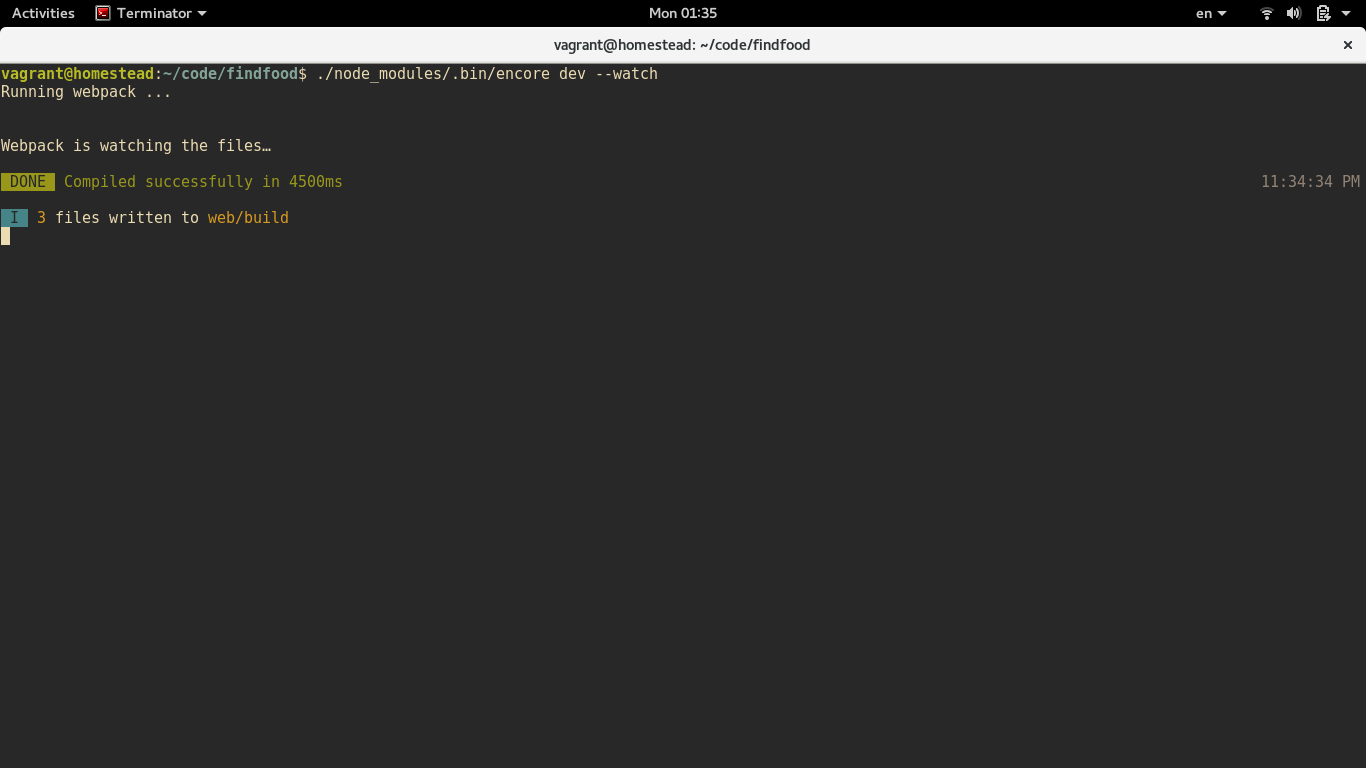
As you can see there is no new messages about files was changed or some types of errors.
So webpack doesn't detect changes in files.
I added new files to project for issue testing, so webpack.config.js now looks like that:
var Encore = require('@symfony/webpack-encore');
Encore
// directory where all compiled assets will be stored
.setOutputPath('web/build/')
// what's the public path to this directory (relative to your project's document root dir)
.setPublicPath('/build')
// empty the outputPath dir before each build
.cleanupOutputBeforeBuild()
// will output as web/build/app.js
.addEntry('app', './assets/js/main.js')
.addEntry('app1', './assets/js/test1.js')
.addEntry('app2', './assets/js/test2.js')
.enableVueLoader()
// will output as web/build/global.css
.addStyleEntry('global', './assets/css/global.scss')
.addStyleEntry('global1', './assets/css/test1.scss')
.addStyleEntry('global2', './assets/css/test2.scss')
// allow sass/scss files to be processed
.enableSassLoader()
.enableSourceMaps(!Encore.isProduction())
// create hashed filenames (e.g. app.abc123.css)
// .enableVersioning()
;
// export the final configuration
module.exports = Encore.getWebpackConfig();
Changed and saved all files listed in webpack.config.js and still have same output.
So i can say it happen with all files.

ghost
on 30 Oct 2017
@mtrklb Thanks for these screenshots, I can see that you are using Vagrant, maybe with a shared folder? You could try using polling instead of the default method used by Webpack to watch files (inotify):
// webpack.config.js
const Encore = require('@symfony/webpack-encore');

Encore
    .setOutputPath('web/build/')
    .setPublicPath('/build')
    // (...)
;

// Use polling instead of inotify
const config = Encore.getWebpackConfig();
config.watchOptions = {
    poll: true,
};

// Export the final configuration
module.exports = config;
@Lyrkan yes, Homestead v6.5.0 with shared folder, VirtualBox 5.1.28 r117968, Fedora 26 as a base system, nfs is not enabled. Tried using polling - doesn't help.
ghost
on 30 Oct 2017
Hmm... dang... the polling was exactly what I was going to suggest. We don't do anything special with "watch" inside encore - we're using Webpack's native "watch" functionality (which is cool, because there's no weirdness being added by Encore). And this is a known "issue" with Webpack in a VM - https://www.andrewhfarmer.com/webpack-watch-in-vagrant-docker/.
Just to be sure, can you paste your final webpack.config.js file here (with the poll option set)?
 weaverryan
on 30 Oct 2017
weaverryan
on 30 Oct 2017
@weaverryan sure,
// webpack.config.js
var Encore = require('@symfony/webpack-encore');

Encore
// directory where all compiled assets will be stored
    .setOutputPath('web/build/')

    // what's the public path to this directory (relative to your project's document root dir)
    .setPublicPath('/build')

    // empty the outputPath dir before each build
    .cleanupOutputBeforeBuild()

    // will output as web/build/app.js
    .addEntry('app', './assets/js/main.js')
    .addEntry('app1', './assets/js/test1.js')
    .addEntry('app2', './assets/js/test2.js')

    .enableVueLoader()

    // will output as web/build/global.css
    .addStyleEntry('global', './assets/css/global.scss')
    .addStyleEntry('global1', './assets/css/test1.scss')
    .addStyleEntry('global2', './assets/css/test2.scss')

    // allow sass/scss files to be processed
    .enableSassLoader()

    .enableSourceMaps(!Encore.isProduction())

// create hashed filenames (e.g. app.abc123.css)
// .enableVersioning()
;


const config = Encore.getWebpackConfig();
config.watchOptions = {
    poll: true,
};

// export the final configuration
module.exports = Encore.getWebpackConfig();
Also tried example from demo - have no luck.
So it must be something related to vagrant, but i can't figure out what exactly.
ghost
on 30 Oct 2017
@mtrklb You actually need to export config in this case, not Encore.getWebpackConfig()
Lyrkan
on 30 Oct 2017
@Lyrkan @weaverryan sry, my bad. That helped. Thanks a lot, guys!
Replaced
module.exports = Encore.getWebpackConfig();
to
module.exports = config;
// Use polling instead of inotify
const config = Encore.getWebpackConfig();
config.watchOptions = {
poll: true,
};// Export the final configuration
module.exports = config;
I really think this is a bad practice to hardcode such option into webpack.config.js, as this file is usually tracked and should be platform independant. Also poll option is good to specify milliseconds (e.g. 300 instead of true) to significantly reduce CPU usage.
Use --watch-poll in addition to --watch
Your command should be:
$ encore dev --watch --watch-poll
or
$ encore dev --watch --watch-poll=300
 venimus
on 16 Feb 2018
venimus
on 16 Feb 2018
Well, using inotify by default is also kinda platform dependent.
I'd say that depends entirely on your project, sometimes you know that the other people working on it will have a similar environment to yours and will face the same issue. Changing the default setting in this case wouldn't really be a bad decision, especially since the polling method will also work on other environments.
Lyrkan
on 16 Feb 2018
Yes, but you stop the people that have inotify support to use it (as it is much better than polling). If you hardcode this you won't be able to turn it off unless you change the file. Much better solution is to add a note to developers (as #194 suggests), or at least make it configurable someway that is not tracked in repository. Furthermore devs should be familiar with the tools they use. If you are concerned about it, just add some docs with simple examples, links and usecases.
venimus
on 16 Feb 2018
If I recall correctly you can disable polling by using --watch-poll=0, so it doesn't really stop people from using inotify (that could probably also be done by having a second configuration file overriding that part of the first one).
Anyway I'm still convinced that if you really want a "platform-independent" config file (which was the only concern expressed in your first response), using polling is probably a better choice than inotify.
Inotify being better than polling is another topic: let's imagine that tomorrow Webpack introduces a new option that makes builds 50x faster on Windows but not work on Linux anymore. Would you still enable it and ask Linux user to add an option everytime they start a new build?
I know that's a bit of a stretch but as I said before there are cases for which you know from the start that the other developers will face the same issue (for instance because the company you work for always uses vagrant). In this situation would you ask everyone to add an option everytime they want to watch their files? just because one day someone may use an environment that supports inotify and could have better performance?
I'm going to repeat myself but I think that choice depends entirely on your project and isn't necessarily a bad practice (doing it everytime would be one).
Lyrkan
on 16 Feb 2018
Inotify being better than polling is another topic: let's imagine that tomorrow Webpack introduces a new option that makes builds 50x faster on Windows but not work on Linux anymore. Would you still enable it and ask Linux user to add an option everytime they start a new build?
Indeed that is why it is best to leave the defaults, not to override an overriden option.
My argument is not to make the project platform-independent but rather the purpose of webpack.config is to specify the project configuration not the platform configuration or the developer environment.
venimus
on 16 Feb 2018
Same here, nodemon which is similar, uses --legacy parameter to solve this, but I don't see any similar parameter here.
But solved with --watch-poll
 imsergiobernal
on 1 Oct 2018
imsergiobernal
on 1 Oct 2018
Related issues
 mstrom
·
3Comments
mstrom
·
3Comments
 heitorvrb
·
4Comments
weaverryan
·
4Comments
heitorvrb
·
4Comments
weaverryan
·
4Comments
 JohnnyEvo
·
3Comments
JohnnyEvo
·
3Comments
 BackEndTea
·
3Comments
BackEndTea
·
3Comments
Most helpful comment
@mtrklb Thanks for these screenshots, I can see that you are using Vagrant, maybe with a shared folder? You could try using polling instead of the default method used by Webpack to watch files (inotify):