Webpack-dev-server: getting `request of a dependency is an expression` warning
I'm trying to get webpack dev server running for a project. I've got it working for the most part, but I'm getting the following warning messages when loading in the browser:
(undefined) (webpack)-dev-server/~/socket.io-client/~/engine.io-client/~/ws/~/utf-8-validate/~/bindings/bindings.js
Critical dependencies:
76:22-40 the request of a dependency is an expression
76:43-53 the request of a dependency is an expression
 @ (webpack)-dev-server/~/socket.io-client/~/engine.io-client/~/ws/~/utf-8-validate/~/bindings/bindings.js 76:22-40 76:43-53
(undefined) (webpack)-dev-server/~/socket.io-client/~/engine.io-client/~/ws/~/bufferutil/~/bindings/bindings.js
Critical dependencies:
76:22-40 the request of a dependency is an expression
76:43-53 the request of a dependency is an expression
 @ (webpack)-dev-server/~/socket.io-client/~/engine.io-client/~/ws/~/bufferutil/~/bindings/bindings.js 76:22-40 76:43-53
Some notes about my configuration that might be out of the ordinary, but shouldn't matter (i don't think):
- I'm "combining with an existing server"
- My webpack config has module.exports as an array, importing 2 separate configs (one for node/server app and another for web/client bundles).
Here is my webpack.client.config.js:
var path = require('path');
var webpack = require('webpack');
var ExtractTextPlugin = require("extract-text-webpack-plugin");
var StatsPlugin = require('stats-webpack-plugin');
var ISPROD = process.env.NODE_ENV == "production";
var ISDEV = !ISPROD;

var plugins = [
    new webpack.DefinePlugin({
        __CLIENT__: true,
        __SERVER__: false,
        __DEV__: ISDEV
    }),
    new webpack.NoErrorsPlugin(),
    new ExtractTextPlugin("[name].css")
];
module.exports = {
    cache: ISDEV,
    debug: ISDEV,
    profile: ISDEV,
    bail: ISPROD,
    target: "web",
    devtool: 'source-map',
    entry: {
        Client: './src/Client',
        Admin: './src/Admin'
    },
    devServer: {
        contentBase: './build'
    },
    output: {
        path: path.join(__dirname, 'build', 'client'),
        publicPath: 'http://localhost:9090/assets/',
        filename: '[name].js',
        chunkFilename: '[chunkhash].js',
        sourceMapFilename: 'debugging/[file].map'
    },
    module: {
        loaders: [
            {
                test: /\.jsx?$/,
                exclude: /node_modules/,
                loader: 'babel',
                query: {
                    optional: [
                        'runtime',
                        'es7.decorators',
                        'es7.classProperties',
                        'es7.objectRestSpread',
                        'es7.comprehensions',
                        'es7.functionBind',
                        'utility.inlineEnvironmentVariables',
                        'minification.propertyLiterals'
                    ],
                    loose: 'all'
                }
            },
            {
                test: /\.(less|css|scss)$/,
                loader: ExtractTextPlugin.extract("style-loader", "css!less")
            },
            {
                test: /\.json$/,
                loader: "json"
            }
        ],
        noParse: /\.min\.js/
    },
    resolve: {
        modulesDirectories: ['node_modules'],
        extensions: ['', '.js', '.jsx', '.json']
    },
    plugins: plugins,
    externals: {
        "react": "React",
        "moment": "moment",
        "immutable": "Immutable"
    }
};
It looks like it's outputting code that was meant to be run only in node.
Anyone have any idea what could be going on? Any help is much appreciated. Thanks.
 lelandrichardson
All 17 comments
I just started getting this error
 bluedaniel
on 15 Jul 2015
bluedaniel
on 15 Jul 2015
I just figured this out.
For me, the problem was my webpack-dev-server was configured to run on both me Server.js file that i'm generating and my bundled files for the client. I had to change my scripts such that i have 2 terminals open, one running webpack-dev-server for the client-side bundles, and another running webpack --watch for the server bundle. Kind of a bummer, but it got rid of the errors...
lelandrichardson
on 15 Jul 2015
@lelandrichardson Can you elaborate in more detail (maybe gist) on how you did this? I'm having the same problem currently.
 cgrossde
on 27 Aug 2015
cgrossde
on 27 Aug 2015
@cgrossde i'm not in a position to get the code back super easily, but the general idea of it was:
- I was using webpack to handle builds for BOTH my server-side and client-side code.
- webpack-dev-server really only works for client-side bundles (and doesn't really make sense otherwise)
- in order to remedy #1 and #2, I had to make sure that my "dev server" configuration was separate from my server configuration
lelandrichardson
on 28 Aug 2015
Just found out that if you use target: 'atom', that can cause the same problems.
 kevinsimper
on 23 Oct 2015
kevinsimper
on 23 Oct 2015
@lelandrichardson I am getting that error as well when paking for node webkit. Could you kindly provide both your webpack.config.js? Thanks.
 CxRes
on 27 Oct 2015
CxRes
on 27 Oct 2015
I also get this, and in the most awkward fashion. Here is a simple proof of concept:
This works:
function loadIcon() {
return require('babel!svg-react!../../svg/Cog.svg?name=Icon');
}
var icon = loadIcon();
...
This doesn't:
function loadIcon(param) {
return require(param);
}
var icon = loadIcon('babel!svg-react!../../svg/Cog.svg?name=Icon');
...
 joaocunha
on 9 Dec 2015
joaocunha
on 9 Dec 2015
There is definitely a problem here and it's even more specific than @joaocunha described.
Given:
function load(param) {
return require(param);
}
Success (require directly passing a path with parent reference):
var loaded = require('./../someparentfile.json');
Success (require using function param without parent operator):
var loaded = load('./somefile.json');
Break (require using function param with parent operator):
var loaded = load('./../someparentfile.json');
and reports:
the request of a dependency is an expression
and
Error: Cannot find module './../someparentfile.json').
Using:
"webpack": "1.12.6",
"json-loader": "0.5.4"
 parker0phil
on 29 Jan 2016
parker0phil
on 29 Jan 2016
Also having the same problems, the file itself is imported perfectly, but I get the warning!
 hutber
on 7 Jun 2016
hutber
on 7 Jun 2016
Adding to the pile :)
Works:
const createBlurb = (featureObject) => {
return (
<div>
<img
src={require("routes/Home/assets/two-people-icon.svg")}
/>
</div>
)
};
Does not work (throws: Critical dependencies: 11-28 the request of a dependency is an expression):
const iconPath: "routes/Home/assets/two-people-icon.svg";
const createBlurb = (featureObject) => {
return (
<div>
<img
src={require(iconPath)}
/>
</div>
)
};
After some trial/error, it seems it fails whenever a var is passed to require().
I assume this isn't functioning as intended, but I'm a little hazy on require().
A workaround for my purposes, I was storing icon paths in a separate file and importing them, then creating a series of components. So, if I went into the file w/ icon paths, and changed the icon path string to a require() call, it worked & didn't apparently screw up anything:
const iconPath: require("routes/Home/assets/two-people-icon.svg");
const createBlurb = (featureObject) => {
return (
<div>
<img
src={iconPath}
/>
</div>
)
};
 brandonmp
on 5 Jul 2016
brandonmp
on 5 Jul 2016
Thanks @brandonmp. Helped a lot!
 rubensbiork
on 19 Jul 2016
rubensbiork
on 19 Jul 2016
+1 just encoutered this too ...
It does seem to work if not the entire argument to require() is built from variables and there is at least some fixed string.
Im my case something like this works:
private requireFn(obj: Object, pathprefix: string = 'assets') {
  obj[svgpath] = require('../' + pathprefix + '/' + obj[svgpath]);
  }
... while this does not:
private requireFn(obj: Object, pathprefix: string = '../assets/') {
  obj[svgpath] = require(pathprefix + obj[svgpath]);
  }
Running an Angular2 project with [email protected] and [email protected].
 ansemjo
on 21 Jul 2016
ansemjo
on 21 Jul 2016
This is by design, and is not related to dev-server. Webpack needs to be able to read all require paths statically, so you can't use dynamic requires (e.g. by using a parameter). This is nicely documented.
 SpaceK33z
on 25 Aug 2016
SpaceK33z
on 25 Aug 2016
I need require for a variable to be able tun run my code. is there a solution for this? can i somehow suppress the warning?
 sittingbool
on 1 Dec 2016
sittingbool
on 1 Dec 2016
@sittingbool Is possible to replace the dynamic requiring with a require.context. This way you make the webpack pre load a context for those files you have to load programatically later.
var req = require.context("./templates", true, /^\.\/.*\.jade$/);

var tableTemplate = req("./table.jade");
// tableTemplate === require("./templates/table.jade");
http://webpack.github.io/docs/context.html#context-module-api
 maxcnunes
on 16 Jan 2017
maxcnunes
on 16 Jan 2017
@lelandrichardson I try to run my index.js using "node index.js" and it just works but not when I use webpack.
I get this weird error.

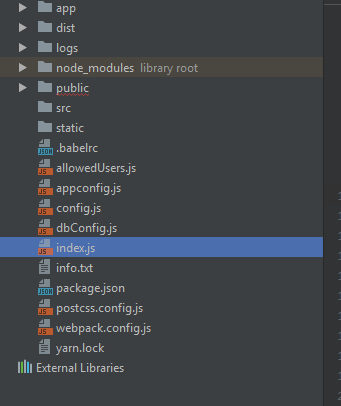
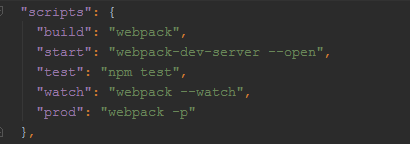

Could you help me out please? I just run "npm start" for now.
 a2441918
on 12 Sep 2017
a2441918
on 12 Sep 2017
getting same issue in nuxt application. basically inside a function i wanted to get json data (Don't want to use axios). so my workaround was -
var jsonData  = require('../plugins/somedata.json')
console.log(jsonData)
However, i am getting the data but with warning.
even After spending hours, didn't find proper solution so what i did is that -
in json file -
module.exports = {
    "users": {}
     ...
}
and imported this file as import base from '../plugins/base.js'
then inside function just calling var a = base;
However Problem has been solved but yet not sure that is it correct way to load any json file?
Please guide
Thanks.
 sudhir600
on 28 Dec 2018
sudhir600
on 28 Dec 2018
Related issues
 mrdulin
·
3Comments
mrdulin
·
3Comments
 Jack-Works
·
3Comments
Jack-Works
·
3Comments
 adiachenko
·
3Comments
adiachenko
·
3Comments
 eyakcn
·
3Comments
eyakcn
·
3Comments
 uMaxmaxmaximus
·
3Comments
uMaxmaxmaximus
·
3Comments
Most helpful comment
+1 just encoutered this too ...
It does seem to work if not the entire argument to
require()is built from variables and there is at least some fixed string.Im my case something like this works:
... while this does not:
Running an Angular2 project with
[email protected]and[email protected].