Webpack-dev-server: SockJS Cannot read property 'NODE_ENV' of undefined
Do you want to request a feature or report a bug?
Bug report.
What is the current behavior?
When I start the dev server everything works fine, but once in a while it refuses to load any pages with the following error: Cannot read property 'NODE_ENV' of undefined (proccess.env is undefined for some reason).
I've already tried setting the node env to development but that change anything.
If the current behavior is a bug, please provide the steps to reproduce.
What is the expected behavior?
The webpack dev server should run as expected.
Please mention your webpack and Operating System version.
I'm on Windows 10, running webpack-dev-server version 2.7.1.
 stavlocker
All 8 comments
@stavlocker the issue templates are not optional and removing their content is generally frowned upon. from the issue template:
Please ask questions on StackOverflow or the webpack Gitter (https://gitter.im/webpack/webpack). Questions will be closed.
As such, we'll be closing this issue. Please try one of the other outlets for your question.
 shellscape
on 16 Aug 2017
shellscape
on 16 Aug 2017
@shellscape My apologies. I updated the original issue. This isn't really a question, but (potentially) a bug. Am I wrong?
stavlocker
on 16 Aug 2017
I'm having the same problem.
It happens after some re-compilations; I don't know exactly how many, but it's something like after 20~30.
@shellscape
 rdsedmundo
on 28 Aug 2017
rdsedmundo
on 28 Aug 2017
@shellscape I updated the issue to match the template. This is not a question but a bug that as you can see ^^ others are suffering from. Can you open the issue?
stavlocker
on 1 Sep 2017
@stavlocker I'm watching the issue but I'm not convinced that it's a bug. Many strange issues of this type are due to errant loaders, config issues, or edge cases with a particular environment. Given that process.env is the offending party here, I'm leaning towards this being a combo of those three in some way. I'll keep an eye on this (I see all issue activity and never ignore notifications) but please do continue to try and triage the source of the problem. For now we're going to keep this one closed as a question.
shellscape
on 1 Sep 2017
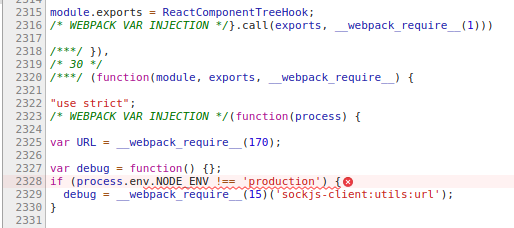
That's the code (compiled) where the error happens. After some re-compilations, it doesn't receive the process.env property properly anymore. It's definitely a bug and not a configuration problem, as it works perfectly previously, and start bugging randomly then.
rdsedmundo
on 4 Sep 2017
@rdsedmundo I understand that in your environment, in your project, with your config that you see this behaving badly. however, we've not seen this behavior in any of our tests nor examples, which would suggest that it's an issue isolated to an edge case among those with some common element either in platform, setup, or config. That's impossible for us to triage from our end, please understand that. I'd recommend starting with one of the examples for webpack-dev-server that matches your project the closest, and slowly adding elements of your project to that example. That process should yield which party/component is causing the issue for you. It's tedious, but I'm afraid that may be the only way you're able to get to the bottom of it.
as a side note, giving me a 👎 is a real bummer. I'm giving you my time gratis to try and help guide you through diagnosing a tough issue. please bear that in mind moving forward.
shellscape
on 4 Sep 2017
This is just a guess but I think your problem @stavlocker might be in how you are using webpack.DefinePlugin I don't have any of your code to go off off it but I have ran into this problem a lot. If you look at the documentation for webpack define plugin. You will see this
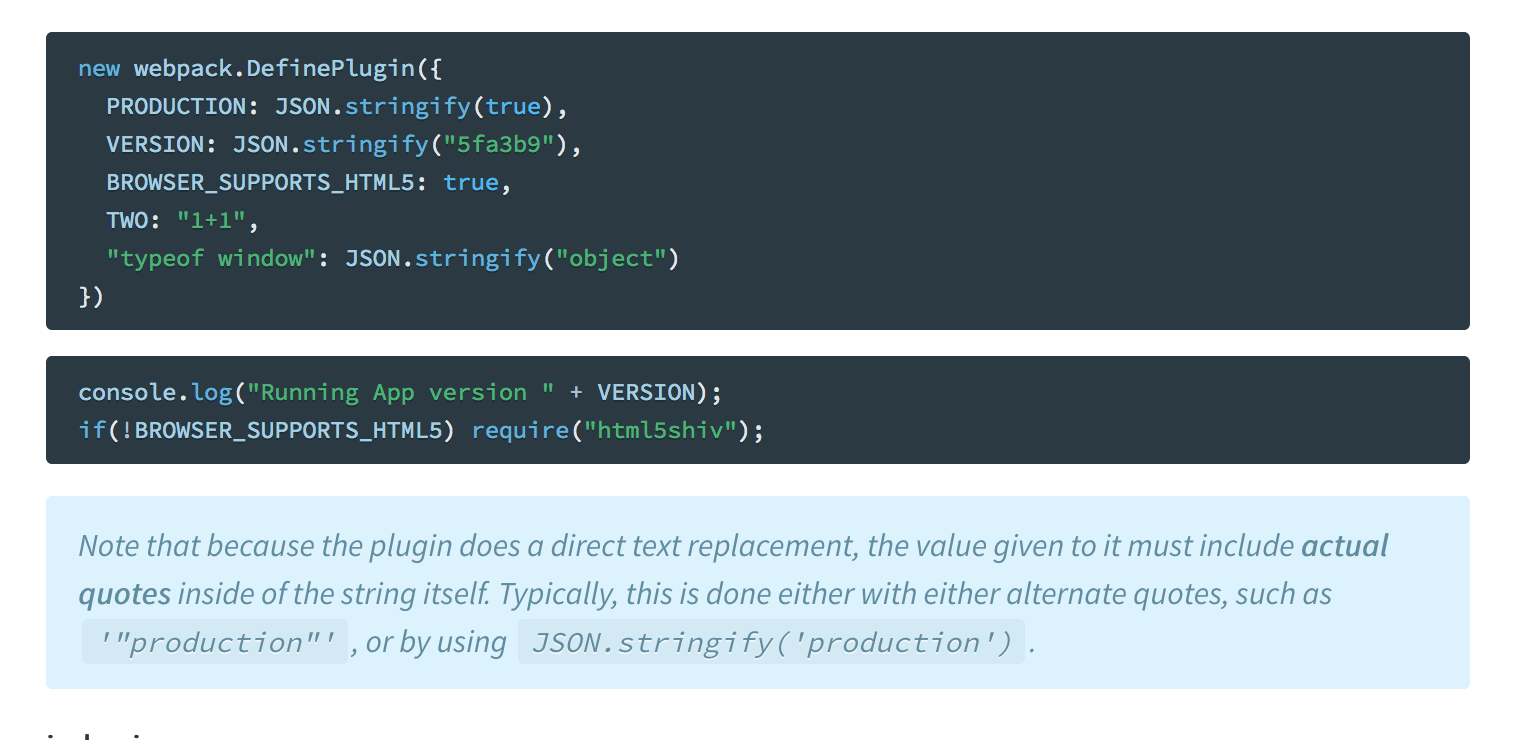
I have had the situation where my node_env gets set to a variable (I didn't add the quotes) and that variable isn't defined so it chokes.
So something like this wont work
new webpack.DefinePlugin({
  'process.env': {
    NODE_ENV: JSON.stringify(process.env.NODE_ENV) ||'development' // breaks
    BASE_URL: "http://localhost:3000"  // breaks
  }
 })
You have to do this
new webpack.DefinePlugin({
   'process.env': {
     NODE_ENV: JSON.stringify(process.env.NODE_ENV || 'development')
     BASE_URL: "'http://localhost:3000'"
   }
})
Hope that helps
 skbolton
on 9 Oct 2017
skbolton
on 9 Oct 2017
Related issues
 MJ111
·
3Comments
MJ111
·
3Comments
 wojtekmaj
·
3Comments
wojtekmaj
·
3Comments
 tulika21-zz
·
3Comments
tulika21-zz
·
3Comments
 adiachenko
·
3Comments
adiachenko
·
3Comments
 Jack-Works
·
3Comments
Jack-Works
·
3Comments
Most helpful comment
@rdsedmundo I understand that in your environment, in your project, with your config that you see this behaving badly. however, we've not seen this behavior in any of our tests nor examples, which would suggest that it's an issue isolated to an edge case among those with some common element either in platform, setup, or config. That's impossible for us to triage from our end, please understand that. I'd recommend starting with one of the examples for webpack-dev-server that matches your project the closest, and slowly adding elements of your project to that example. That process should yield which party/component is causing the issue for you. It's tedious, but I'm afraid that may be the only way you're able to get to the bottom of it.
as a side note, giving me a 👎 is a real bummer. I'm giving you my time gratis to try and help guide you through diagnosing a tough issue. please bear that in mind moving forward.