Webpack-dev-server: Disconnected and looping in latest chrome
"webpack-dev-server": "2.4.1",
Using these configurations:
devServer: {
historyApiFallback: true,
stats: 'minimal',
https: true,
module.exports = webpackMerge(commonConfig, {
devtool: 'cheap-module-eval-source-map',
//devtool: 'inline-source-map', //fix for IE sourcemaps 404??
Browser console.error:
client?fc09:45 [WDS] Disconnected!
Bug:
[WDS] Disconnected! happens multiple times when historyApiFallback = true
and host is not set.
This will happen about 5 times or more when the ng2 spa is refreshed either through browser or code edit in latest chrome. The server starts fine.
I'm on windows 10 pro v1607 build 14393.953
 rmanuel200
All 80 comments
Actually the fix may have been to add a host:
host:"10.0.....",
but https://localhost:3000 will spin a lot after [WDS] Disconnected!. This problem seems to be somewhat project specific but I can't narrow down what it is outside of webpack-dev-server 2 using inline. For instance I removed proxy:{..., vpn, route guards etc. Setting wds option inline:false also fixes the problem but we want the page refreshes on code change.
rmanuel200
on 17 Mar 2017

rmanuel200
on 19 Mar 2017
Does updating to 2.4.2 fix your issue? If not this might be a dupe of #848.
 SpaceK33z
on 19 Mar 2017
SpaceK33z
on 19 Mar 2017
Upgrading 2.4.2 didn't fix it. I don't have hot module enabled but it may be the same problem, it seems similar. I ran one of angular's seed projects and it worked fine but the project is simplistic. Not sure why binding to a specific host does the trick. BTW my chrome was updated by IT remotely and I just upgraded to latest webpack and started using localhost so there are many changes occuring at once.
rmanuel200
on 19 Mar 2017
I'm seeing this also. Just since the latest Chrome. Spins a few times "recompiling" and eventually settles down.
 joewood
on 20 Mar 2017
joewood
on 20 Mar 2017
I made a project skeleton that demos the issue. https://github.com/rmanuel200/testwds
rmanuel200
on 20 Mar 2017
I'm having this issue as well on [email protected]. The webpack-dev-server client code fails to establish a websocket connection or the websocket is disconnected unexpectedly. Refresh ensues, whole processes starts over and repeats indefinitely. The issue only seems to occur with https enabled. Setting --host localhost per #592 did not resolve the issue.
 cwharris
on 4 May 2017
cwharris
on 4 May 2017
I think I resolved this because I was using - - watch on the command line, but also using a watch plug-in. I dropped the command argument.
joewood
on 5 May 2017
the same on Chrome 58.0.3029.110 (64-bit)。
webpack-dev-server version 2.4.5。
windows 7。
 stevexy
on 2 Jun 2017
stevexy
on 2 Jun 2017
Have the same issue here on Chrome 59.0.3071.86 (32-bit)
webpack-dev-server is the latest version - 2.4.5
OS - Win 7
 langshu
on 6 Jun 2017
langshu
on 6 Jun 2017
have the same issue here on Chrome 59.0.3071.86 (32-bit)
webpack-dev-server is the latest version - 2.5.1
OS - win 10
 laizimo
on 19 Jul 2017
laizimo
on 19 Jul 2017
Have the same issue here on Chrome 59.0.3071.115 (64-bit)
webpack-dev-server version - 2.5.1
webpack version - 2.7.0
OS - Win 10
 Sayan751
on 20 Jul 2017
Sayan751
on 20 Jul 2017
Any updates on the issue @Sayan751 posted? Facing the same issue for the same configurations
 SofiyaNiaz
on 21 Jul 2017
SofiyaNiaz
on 21 Jul 2017
Having same issue as well, any updates?
chrome version is: 59.0.3071.115 (Official Build) (64-bit)
webpack version is: 2.6.1
webpack-dev-server version is: 2.4.5
OS is: macOS
 izziewong
on 22 Jul 2017
izziewong
on 22 Jul 2017
[WDS] Disconnected all the same In Chrome 59, Chrome 58, Firefox 54, webpack no compile.
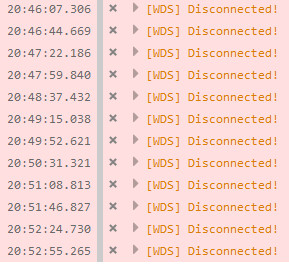
webpack: 3.4.1
webpack-dev-server: 2.6.1
 ywzhaiqi
on 3 Aug 2017
ywzhaiqi
on 3 Aug 2017
If anyone can post a link to a simple repo using current dependencies/versions, with vanilla js and without using a framework, that consistently reproduces these symptoms, we'll be happy to take a look and attempt triage. At present none of our tests or examples reproduce this behavior.
We're going through issues to try and get the number of them under control so we can more effectively help folks. Closing this one due to age and lack of ability to reproduce, but the discussion is still open. If someone can provide that sample repo, we'd be happy to reopen.
 shellscape
on 9 Aug 2017
shellscape
on 9 Aug 2017
just add this code to your hosts file, everything will be ok
127.0.0.1 localhost
 lirongfei123
on 22 Aug 2017
lirongfei123
on 22 Aug 2017
having same problems in Chrome 60.0.3112.113 64bit/Windows10
webpack-dev-server --open --inline --hot --content-base dist/ --config ./config/webpack.config.js --env.dev --env.serve
"webpack": "^3.5.5",
"webpack-dev-server": "^2.7.1"
webpack.config.js
devServer: {
headers: {
'Access-Control-Allow-Origin': '*',
},
},
However it works in Firefox
 madaz
on 5 Sep 2017
madaz
on 5 Sep 2017
I also have this issue in Chrome Version 61.0.3163.91 (Official Build) (64-bit) (Win 10).
webpack 3.5.6
webpack-dev-server 2.7.1
 Reverbe
on 15 Sep 2017
Reverbe
on 15 Sep 2017
The work around with Chrome and windows 10 is to create your own self
signed certificate and install that as a trusted certificate. Then use that
certificate with webpack-dev-server. I used the self signed certificate
that came with IIS/IIS Express by exporting as pfx. There are articles on
the web on how to trust that certificate.
On 15 Sep. 2017 21:04, "Reverbe" notifications@github.com wrote:
I also have this issue in Chrome Version 61.0.3163.91 (Official Build)
(64-bit) (Win 10).webpack 3.5.6
webpack-dev-server 2.7.1—
You are receiving this because you commented.
Reply to this email directly, view it on GitHub
https://github.com/webpack/webpack-dev-server/issues/851#issuecomment-329751414,
or mute the thread
https://github.com/notifications/unsubscribe-auth/ABFkvUQTLmKsb1msYWSikWdapuHYkPgVks5silmlgaJpZM4MhKqR
.
madaz
on 15 Sep 2017
We resolved this on Chrome/Win10/IIS/https by removing the script tag from the page, and instead use the inline:true flag in the webpackdevserver config. Your mileage may vary.
 lukace
on 25 Sep 2017
lukace
on 25 Sep 2017
Which script tag?
 dennisoelkers
on 26 Sep 2017
dennisoelkers
on 26 Sep 2017
WORKAROUND
"webpack-dev-server": "^2.8.2"
Specifically for the infinite refresh issue ([WDS] Disconnected) - I believe the issue is this (after deeper review):
the request for a websocket can timeout (transport). webpack-dev-server/client/socket.js sock.onclose eventhandler calls for a reload if this was the "first" connection attempt (retries == 0), when I think we just want to reconnect.
for a temproary fix, I manually changed these blocks in the webpack-dev-server/client/socket.js code:
sock.onclose = function onclose({ code }) { //catch the code from the event
//bypass the abort if the code is the transporttimeout
//likely should just be: retries > 10, but didn't verify and didn't review cases for retries ===0
if(code !== 1006 && retries === 0) { handlers.close(); };
if(code === 1006) {
timedout = true; //defined private @filelevel
}
// Try to reconnect.
sock = null;
// After 10 retries stop trying, to prevent logspam.
if (retries <= 10) {
// Exponentially increase timeout to reconnect.
// Respectfully copied from the package `got`.
// eslint-disable-next-line no-mixed-operators, no-restricted-properties
const retryInMs = 1000 * Math.pow(2, retries) + Math.random() * 100;
retries += 1;
setTimeout(function cb() {
socket(url, handlers);
}, retryInMs);
}
};
sock.onmessage = function onmessage(e) {
// This assumes that all data sent via the websocket is JSON.
const msg = JSON.parse(e.data);
//special handling for this case, as it triggers a reload.
if(timedout && msg.type == 'ok') {
timedout = false;
handlers['ok'](true);
}
else if (handlers[msg.type]) { handlers[msg.type](msg.data); }
};
and this in webpack-dev-server/client/index.js
ok: function msgOk(to) {
sendMsg('Ok');
if (useWarningOverlay || useErrorOverlay) overlay.clear();
if (to || initial) return initial = false; // eslint-disable-line no-return-assign
reloadApp();
},
These changes fix my particular issue
lukace
on 26 Sep 2017
Your snippet is missing the definition of timedout, probably happening in the same scope as sock?
dennisoelkers
on 27 Sep 2017
You got it (outside of the function "socket")
lukace
on 27 Sep 2017
@shellscape Here is a minimal repro of this issue: https://github.com/jonaskello/wds-disconnect-loop-repro
 jonaskello
on 30 Nov 2017
jonaskello
on 30 Nov 2017
@jonaskello thanks for putting that together. I have a backlog to get through so it might take me until next week to get to debugging this one. Please ping me again if more than 7 days goes by. And as always we'd be happy to review a PR.
shellscape
on 30 Nov 2017
@lucaspaiva1 what you say? no sense.
 svtfrancisco
on 30 Nov 2017
svtfrancisco
on 30 Nov 2017
@shellscape Any progress on this one? Cheers
 dannyskoog
on 9 Dec 2017
dannyskoog
on 9 Dec 2017
@dannyskoog thanks for the ping. unfortunately not. still working on the backlog. that shouldn't discourage anyone from looking into it and opening a PR in the meantime.
For what it's worth, you can also try webpack-dev-server@next for the latest alpha of v3 to see if this still happens on that branch. /cc @jonaskello
shellscape
on 9 Dec 2017
Alright @shellscape. Thanks for the info.
Sure, I’ll have a look at the alpha of v3. I’ll also try to create a PR if I find the time for it.
Have a nice day
dannyskoog
on 9 Dec 2017
@shellscape I tried the webpack-dev-server@next (3.0.0-alpha2), but I got the error below. Seems it has a missing dependency:
ERROR in (webpack)-dev-server/lib/client/js/overlay.js
Module not found: Error: Can't resolve 'style-loader' in 'C:\code\github\jonaskello\wds-disconnect-loop-repro\node_modules\webpack-dev-server\lib\client\js'
@ (webpack)-dev-server/lib/client/js/overlay.js 3:0-54
@ (webpack)-dev-server/lib/client/js?https://localhost:8080
@ multi (webpack)-dev-server/lib/client/js?https://localhost:8080 babel-polyfill ./src/index.j
Tried to install css-loader in my project to resolve it but then I got this error:
RROR in ./node_modules/css-loader!(webpack)-dev-server/lib/client/css/overlay.css
Module build failed: Error: Cannot find module './data/iu-mappings.json'
at Function.Module._resolveFilename (module.js:536:15)
at Function.Module._load (module.js:466:25)
at Module.require (module.js:579:17)
at require (internal/module.js:11:18)
...
Also tried my repro on my macbook but there it works fine so it seems to be a windows only problem (which was also indicated in earlier posts).
jonaskello
on 9 Dec 2017
@jonaskello style-loader was in devDeps, which is why it was passing in our CI. I moved that to deps and published alpha3, which should clear that error up.
shellscape
on 9 Dec 2017
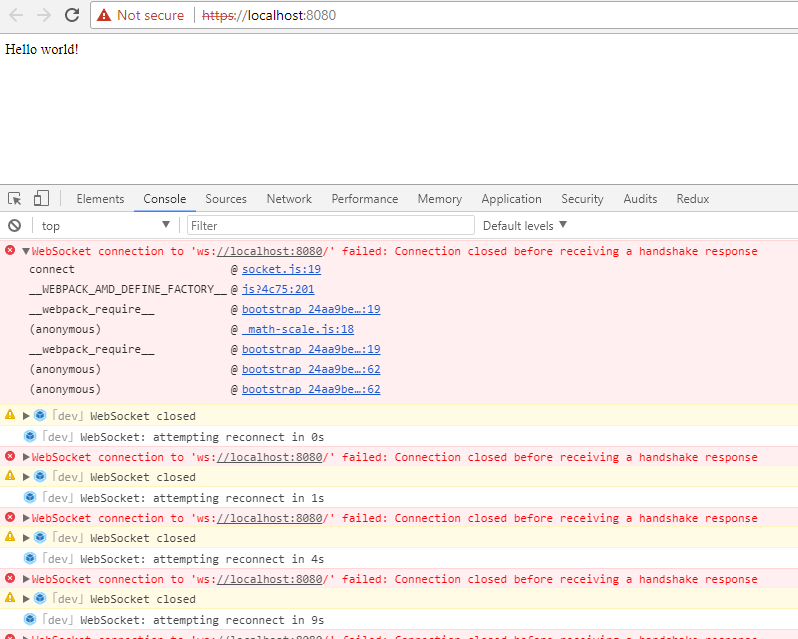
@shellscape I was able to run with alpha3. It still does not work but the behavior is a bit different. Instead of getting stuck in an infinite reload loop it says it cannot connect and retries. See screenshot below:
jonaskello
on 9 Dec 2017
Have you had the chance to look into the issue in more detail @jonaskello ?
dannyskoog
on 9 Dec 2017
@jonaskello any errors in the terminal you can see? the only way the socket server closes is if there's an error or something is closing the devserver. if there was an issue building the script on the backend that might also be an issue, but there'd be an error for that in the terminal as well.
On a side note, alpha4 just went up because we had to move css-loader into the deps as well. should be the last dependency issue.
shellscape
on 10 Dec 2017
I was able to take a look at the same repo. The issue with 3.0.0-alpha3/4 was that the client WebSocket was assuming the ws:// protocol, and for https we have to use wss://. I've got that fixed and also added some logging for the WebSocketServer in the event of an error on the backend. Pretty solid fix/update for v3. @jonaskello please give alpha5 a test to confirm it's working on your end as well.
shellscape
on 10 Dec 2017
@shellscape I just tested out alpha5, using Windows 10 and Webpack 3.8.1. And I can confirm that it works like a charm, compared to version <=2.9.7. I don't have any disconnect issues anymore, nor the issue that @jonaskello found in alpha3
dannyskoog
on 10 Dec 2017
Great news. The issue is going to be wholly different in 2.x than it was in 3.0.0 due to the large changes and move away from SockJS. I don't want to close this issue since the issue still exists and 3.0.0 hasn't been officially released yet. So we'll still accept a PR for 2.x (even though it's unlikely). Once 3.0.0 is out the door, we'll recommend that version to anyone running into the issue. Thanks for checking and confirming @dannyskoog
shellscape
on 10 Dec 2017
Sounds like a plan @shellscape :) Sure thing. Anytime!
dannyskoog
on 10 Dec 2017
I can confirm too that my repro is no longer having the issue in alpha5. Nice work @shellscape!
jonaskello
on 10 Dec 2017
I have the same problem with @angular/cli: ^1.6.1 and @angular/core: ^5.1.1
More details:
https://stackoverflow.com/questions/47852633/angular-5-1-1-infinite-refresh-loop-after-set-proxy-for-signalr
 Mds92
on 17 Dec 2017
Mds92
on 17 Dec 2017
Okay, anyone else having this issue, it may be due to having a self-signed cert that google does not like. I got around this by always trusting my cert in Keychain Access.
EDIT: This post will be helpful
 jminnick
on 2 Jan 2018
jminnick
on 2 Jan 2018
Just to chime in with a small correction on @jonaskello's comment above about this being Windows 10 only - I'm experiencing this on macOS as well (High Sierra). Running webpack-dev-server 2.9.5 over HTTPS.
Briefly, our setup is:
- A Rails server running on https://localhost:3000
- Webpack Dev Server running on https://localhost:8080
<script src="https://localhost:8080/webpack-dev-server.js"></script>in the head of the page served by Rails.- Rails is using a self-signed certificate that's been trusted in Chrome/Keychain.
- Webpack Dev Server is using the certificate it generates itself when you use HTTPS, also added/trusted in Chrome/Keychain. (Put another way, outside of this WDS Disconnected message and the reloading, Chrome appears to be 100% happy with the certificates - Green locks on the address bar and no warnings/messages.)
I'll give it a shot in the alpha and see if I'm in better shape. 👍 Update: Yup, works fine now in alpha5. 🍻
 davidjoy
on 5 Jan 2018
davidjoy
on 5 Jan 2018
Same problem on Win10, Chrome Version 63.0.3239.132 (Official Build) (64-bit), Angular Cli 1.6.4. Seems it only happens when running as https(ng serve --aot --ssl). Sometimes, just the page refresh helps, sometimes opening a page in a new tab :(
 skorunka
on 15 Jan 2018
skorunka
on 15 Jan 2018
As noted above this is fixed in 3.0 which from what i understand will not be released.
jonaskello
on 15 Jan 2018
WORKAROUND for Chrome:
Go to chrome://flags
Activate flag "Allow invalid certificates for resources loaded from localhost"
 cattermo
on 25 Jan 2018
cattermo
on 25 Jan 2018
In development.js file try to use the following settings for dev_server:
dev_server: {
host: '127.0.0.0'
port: 8080
https: false
disableHostCheck: true
}
 k1r8r0wn
on 1 Feb 2018
k1r8r0wn
on 1 Feb 2018
@k1r8r0wn What is development.js file?
skorunka
on 2 Feb 2018
I've meant .config.js file. development.js in Rails app, actually.
k1r8r0wn
on 2 Feb 2018
This issue is somewhat device specific and it all falls back to your host. Webpack assumes you use "localhost" on your dev, and so if you use its IP equivalent say 127.0.1.1, you would get that error. Find out the host you are using and then you can make a change to the "host" on your webpack config like so... snippet from Vue webpack config
devServer: {
clientLogLevel: 'warning',
historyApiFallback: {
rewrites: [
{ from: /.*/, to: path.posix.join(config.dev.assetsPublicPath, 'index.html') },
],
},
hot: true,
compress: true,
host: '127.0.1.1' || config.dev.host, // Change the host here
port: PORT || config.dev.port,
 chuks-o
on 22 Feb 2018
chuks-o
on 22 Feb 2018
Since trying to use SSL, I am having the same problem. I am using the latest components.
 klanglie
on 7 Apr 2018
klanglie
on 7 Apr 2018
I encountered the same issue with the following context:
- Developing on a remote host (VPS server running Ubuntu 16, vue/vue-cli, webpack/webpack-simple template)
- Nginx proxy redirecting domain name to localhost and custom port
When I would run npm run dev and refresh my browser I would get the same [WDS] Disconnected! error and looping GET XHR http://localhost/path/
Adding the following line in webpack.config.js worked to fix this for me:
devServer {
...
public: 'actualdomain.com',
...
}
 cwdott
on 19 Apr 2018
cwdott
on 19 Apr 2018
I am facing the same issue even though I can see green padlock in my localhost. I am using -
"webpack": "^3.10.0",
"webpack-dev-server": "~2.7.1",
Do we have any fix in latest release? Or is it not resolved yet?
 ChapalBarua
on 18 Jun 2018
ChapalBarua
on 18 Jun 2018
I'm on webpack 4.12 and also using webpack-dev-server 3.1.4. Setting my publicPath to '/' worked for me removing these [WDS] Disconnected! errors.
output: {
path: path.resolve(__dirname, 'deploy'),
filename: 'deploy.js',
publicPath: '/'
},
 blachawk
on 21 Jun 2018
blachawk
on 21 Jun 2018
same issue still
 dvakatsiienko
on 12 Jul 2018
dvakatsiienko
on 12 Jul 2018
@cattermo 's suggestion worked for me! 👍
 aipi
on 25 Jul 2018
aipi
on 25 Jul 2018
@cattermo 's good sulution, works for me!
 KingMaks
on 8 Aug 2018
KingMaks
on 8 Aug 2018
FYI: Switching to webpack-serve solved the disconnects and security errors for me. It uses a native websocket implementation, so removes the socket.js dependency that causes these errors on certain browsers (see https://github.com/OfficeDev/office-js/issues/209).
 rvanlaak
on 14 Aug 2018
rvanlaak
on 14 Aug 2018
@evilebottnawi this was one of the issues that moved me to webpack-serve since it completely broke webpack-dev-server with https for me.
 blackshadev
on 17 Aug 2018
blackshadev
on 17 Aug 2018
Had this problem for a while and solved it in a odd way.
Dev server starts with 2 adress:
App running at:
- Local: https://localhost:8085/
- Network: https://192.168.0.151:8085/
I was using https://localhost:8085/ in browser, but the sock was connecting with Network.
Request URL: https://192.168.0.151:8085/sockjs-node/info?t=1535198535563
[WDS] Disconnected!
When i used https://192.168.0.151:8085 in browser instead of localhost, chrome shown the window to accept certificate and proceed.
Now everything is ok, on both localhost, and ip.
No need for flag. It was not working when i tryed.
I never bothered to try Network adress.. /bonk. This was too simple.
 Rouche
on 25 Aug 2018
Rouche
on 25 Aug 2018
@Rouche This wasn't the case for me. My sockjs is connecting to locahost. Moreover my webpack-dev-server doesn't even listen on an ipaddress besides localhost.
Even if it would, that work-around wouldn't work for me, because I use an external service which has a CORS header for a local development setup, but this doesn't work with the IP address because multiple devs (with other IPs connect to it) and a CORD wildcard doesn't work because Chrome just drops CORS wildcards with SSL .
blackshadev
on 27 Aug 2018
using 127.0.0.1 instead of localhost fixed this for me 🤷♂️
 ckarcz
on 12 Sep 2018
ckarcz
on 12 Sep 2018
I have fixed this issue by switching to webpack-serve instead of webpack-dev-server. pretty neat package btw
dvakatsiienko
on 12 Sep 2018
@ckarcz, running webpack-dev-server with --https --host 127.0.0.1 fixed the problem for me as well.
I can even access my site with https://localhost without problems.
//cc: @Rouche
 simardo
on 19 Sep 2018
simardo
on 19 Sep 2018
Today after chrome update bang!
Self signed certificate altName is now mendatory.
No choice to use host.
With vue-cli3 config:
module.exports = {
...
devServer: {
open: process.platform === 'darwin',
host: 'localhost',
port: 8444,
https: true,
hotOnly: false,
},
}
Yo @simardo 👍
Rouche
on 19 Sep 2018
I tried many of the above suggestions, and I could very much have gotten some things wrong, but here's what worked for me. (I call this "guns a'blazin" mode, where you try anything, out of desperation....)
(And note that the following efforts are not listed chronologically. I'm not sure I was sane during the last two days since this issue benighted my life.)
I started on Angular 6, ended up Angular 7.0.0-rc1 ---> WDS disconnect still there.
I started on webpack-dev-server I.don't.know and ended up on 3.1.5 ---> WDS disconnect still there.
I started on sockjs-client I.don't.know and ended up on 1.1.5 ---> WDS disconnect still there.
I tried all the above IP solutions. ---> WDS disconnect still there.
And by there, I mean endless looping. Quoth the raven: Disconnected!
Finally out of sheer desperation, the country bunkin tried brain surgery using the manual. I have NO idea what I did, but I did exactly what @lukace said he/she did, modifying socket.js and index.js.
And....
It worked.
What I would like to know is whether the code @lukace modified should be considered a bug to be fixed. For my project, EVERYTHING works now, and it didn't before. All my project was trying to do was redirect to an OAuth2 server to get a security token, and all I was getting was endless looping.
All that to say, my project was dead in the water, using all the latest releases. I don't think I had a bug, but this fix was required for my Angular project to work with OAuth2 security.
For the sake of the next soul, I log these reflections, but am wondering if an issue should be opened somewhere. Is this a sockjs-client bug? webpack-dev-server bug? @lukace I'm sure what you said was enough to go on, but I'm not a brain surgeon, so I can't discern whether your fix is a global good for all or just a good workaround that has its downsides for other users. As for me I think it's REQUIRED, but hey, I might be biased.
I end with these words of gratitude: @lukace you saved my bacon. I'll name my next dog after you. If my wife ever lets me buy one.
 WellspringCS
on 4 Oct 2018
WellspringCS
on 4 Oct 2018
We have a Vue app using webpack-dev-server and encountered the same issue (using version 2.11.3, but it persisted with newer versions as well). After a lot of digging, turns out our problem was multiple websocket connections, specifically SockJS instances, spawning on application load and causing each other to time out and disconnect. The SockJS documentation even points out this problem:
An important SockJS limitation is the fact that you're not allowed to open more than one SockJS connection to a single domain at a time. This limitation is caused by an in-browser limit of outgoing connections - usually browsers don't allow opening more than two outgoing connections to a single domain. A single SockJS session requires those two connections - one for downloading data, the other for sending messages. Opening a second SockJS session at the same time would most likely block, and can result in both sessions timing out.
The cause as a badly configured html-webpack-plugin which created dummy JS files instead of loading CSS. Still not entirely sure why/how this happened, though. The way I caught it was by adding a console.trace to webpack-dev-server/client/socket.js right under the line sock = new SockJS(url); and then tracing what files created new SockJS instances during runtime.
 mayacoda
on 30 Nov 2018
mayacoda
on 30 Nov 2018
Somebody can create minimum reproducible test repo?
 alexander-akait
on 6 Dec 2018
alexander-akait
on 6 Dec 2018
Not sure when this started happening, but it seems to happen in every browser. Here's a repro.
 silvenon
on 21 Dec 2018
silvenon
on 21 Dec 2018
Works for me, webpack.confg.js:
module.exports = {
  devServer: {
    headers:          { 'Access-Control-Allow-Origin': '*' },
    https:            false,
    disableHostCheck: true
  },
  [...rest]
}
 c80609a
on 22 Dec 2018
c80609a
on 22 Dec 2018
Works for me when I downgrade to 3.1.10, without any additional options. https://github.com/webpack/webpack-dev-server/issues/1604#issuecomment-449550096
silvenon
on 22 Dec 2018
@c80609a's solution worked for me - actually simply adding disableHostCheck: true to devServer options worked.
 panzelva
on 23 Dec 2018
panzelva
on 23 Dec 2018
In our case the issue was due to a mismatch between the host name that webpack-dev-server was using to serve the asset, and the host name the application was running from.
Specifically, our local application was running from https://dev.resumize.me, but webpack-dev-server was serving the asset from 127.0.0.1.
You can control the host name used by webpack-dev-server with the option --host. So in our case, we had to launch it with:
webpack-dev-server.js --host dev.resumize.me --https
Hope this helps.
 monteiz
on 3 Jan 2019
monteiz
on 3 Jan 2019
On chrome works, but I've the same problem on the firefox (64.0) 😢
 laryssamagalhaes
on 3 Jan 2019
laryssamagalhaes
on 3 Jan 2019
issue resolved after adding below in polyfills.ts file:
import 'core-js/es7/object';
import 'core-js/es7/array';
 chowdam
on 22 Jan 2019
chowdam
on 22 Jan 2019
What worked for me was adding config for allowedHosts https://webpack.js.org/configuration/dev-server/#devserverallowedhosts
 TSMMark
on 20 Feb 2019
TSMMark
on 20 Feb 2019
Issue has a lot of post with difference issue, please confirm what issue exists and provide minimum reproducible test repo, thanks!
alexander-akait
on 22 Feb 2019
Issue was closed due a lot of difference issues in one, also problem should be solved in latest version, anyway feel free to open new issue with reproducible test repo, thanks!
alexander-akait
on 15 Mar 2019
Related issues
 MJ111
·
3Comments
MJ111
·
3Comments
 hnqlvs
·
3Comments
hnqlvs
·
3Comments
 wojtekmaj
·
3Comments
wojtekmaj
·
3Comments
 uMaxmaxmaximus
·
3Comments
uMaxmaxmaximus
·
3Comments
 tulika21-zz
·
3Comments
tulika21-zz
·
3Comments
Most helpful comment
Works for me,
webpack.confg.js: