webpack-cli@4 exits with 0 even when failing
Bug report
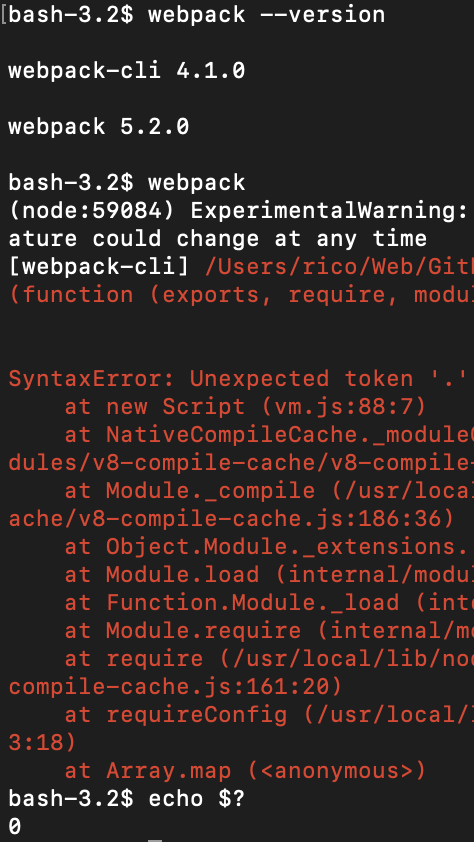
$ webpack should exit with a non-0 code when it finds an error in webpack.config.js
What is the current behavior?
$ webpack exits with 0 even if it throws a fatal error:
If the current behavior is a bug, please provide the steps to reproduce.
npm install -g webpack webpack-cli@4
echo '.' > webpack.config.js
webpack
Notice that webpack’s version is irrelevant. webpack-cli is the problem
What is the expected behavior?
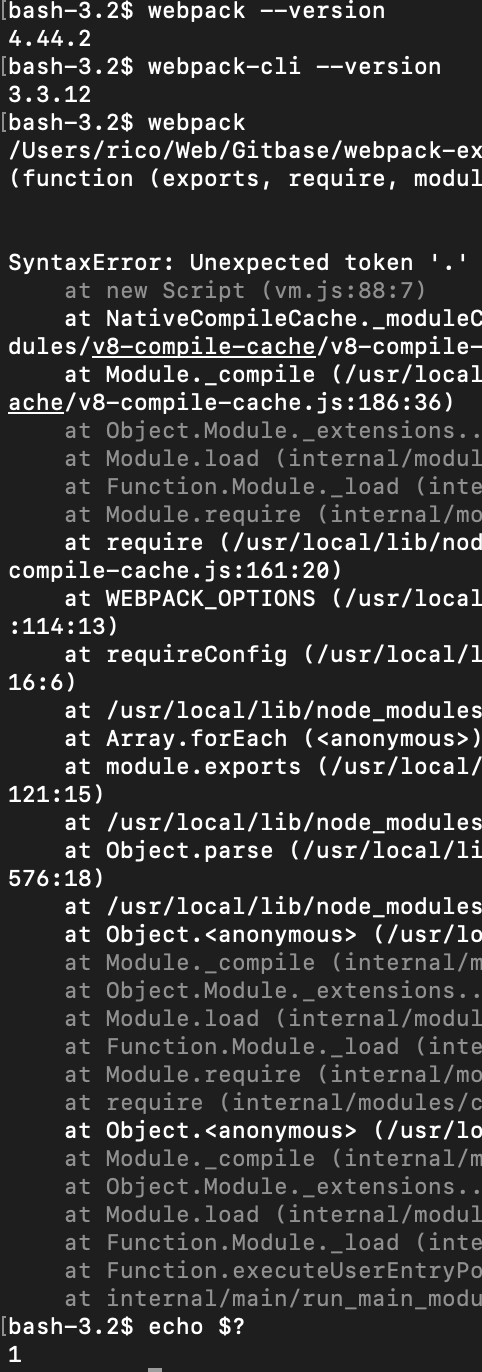
webpack-cli@3 worked correctly, it exited with 1.
Other relevant information:
webpack version: 4 or 5 (webpack version irrelevant)
webpack-cli version: 4.1.0
Node.js version: v13.8.0
Operating System: macOS 10.15.4
Additional tools:
 fregante
All 14 comments
For maintainers only:
- [ ] webpack-4
- [ ] webpack-5
- [ ] bug
- [ ] critical-bug
- [ ] enhancement
- [ ] documentation
- [ ] performance
- [ ] dependencies
- [ ] question
 webpack-bot
on 23 Oct 2020
webpack-bot
on 23 Oct 2020
Thanks for the report I'm looking into it.
 snitin315
on 23 Oct 2020
snitin315
on 23 Oct 2020
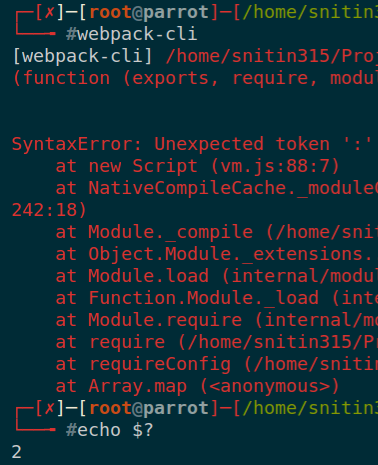
Working fine for me.
snitin315
on 23 Oct 2020
I don't know where you're testing because it doesn't work anywhere for me. Here's a plain GitHub Action workflow where CI passes even if webpack fails: https://github.com/fregante/webpack-issue-11789/runs/1296100000?check_suite_focus=true
name: CI
on: [push]
jobs:
  build:
    runs-on: ubuntu-latest
    steps:
      - run: npm install webpack webpack-cli@4
      - run: echo '.' > webpack.config.js
      - run: npx webpack

fregante
on 23 Oct 2020
Just added a test case for the same in webpack/webpack-cli#1979
snitin315
on 23 Oct 2020
The tests in that PR pass while my repro code still shows the issue on both GitHub Actions and my computer.
This means that the test effectively isn’t testing the same thing/environment.
fregante
on 23 Oct 2020
Here’s another workflow testing every major version of webpack-cli. Every version correctly fails except v4
https://github.com/fregante/webpack-issue-11789/runs/1297087059?check_suite_focus=true
fregante
on 23 Oct 2020
It's possible that https://github.com/webpack/webpack-cli/pull/1971 fixed it just a couple of days ago but hasn't been pushed yet 🍰
fregante
on 23 Oct 2020
can you try with the master branch?
snitin315
on 23 Oct 2020
I tried but it's a monorepo, I don't know how to npm install that
fregante
on 23 Oct 2020
You can create a symlink with npm link webpack-cli
snitin315
on 23 Oct 2020
@fregante Can you create reproducible test repo, i think fixed in master
 alexander-akait
on 23 Oct 2020
alexander-akait
on 23 Oct 2020
@evilebottnawi it's https://github.com/fregante/webpack-issue-11789
The repro is in GitHub Actions, it's only 3 lines:
npm install webpack webpack-cli@4
echo '.' > webpack.config.js
npx webpack
Just ran into this problem. Upgraded to 4.2.0 and verified it worked. Thanks for the fix @snitin315!
 benmvp
on 9 Nov 2020
benmvp
on 9 Nov 2020
Related issues
 heyalbert
·
3Comments
heyalbert
·
3Comments
 RobotnickIsrael
·
5Comments
RobotnickIsrael
·
5Comments
 AjayPoshak
·
5Comments
AjayPoshak
·
5Comments
 anshumanv
·
3Comments
anshumanv
·
3Comments
 logo749
·
4Comments
logo749
·
4Comments