First, thank to all the community for making Weblate a useful tool.
Second, here's my issue :
I am trying to translate a .js file (imported from a gitlab repo) which is currently not supported by TTKit and Weblate.
The .js file look like a normal .json file, he just have 2 lines more, like this ->
 define({

     "addToLayerPopup": {
         "addToLayer": "Ajouter à la couche",
         "errorHeightLength": "La taille de l'attribut \"height\" de l'objet excède le nombre de caractères maximum requis pour ce champ.",
         "selectLayer": "Sélectionnez une couche",
         "title": "Ajouter un objet à la couche"
    },
 });
I am trying to add a new supported file format to weblate, making a JavascriptFormat class herited from JSonFormat, through /weblate/formats/external.py .
I am trying to cut the first and the last line, translate the file, then paste the first and last line.
I can't modify the .js before put it on my gitlab, i want weblate do this for me (with a custom script or others things.. ) .
But i really don't understand how to add a new supported format..
Here's my JavascriptFormat file ->
 class JSFormat(JSONFormat):
        name = 'JavaScript'
        format_id = 'js'
        monolingual = None
        loader = JsonFile
        unit_class = TTKitUnit
        autoload = ('.json')
        new_translation = '{}\n'

        @property
        def mimetype(self):
            """Return most common mime type for format."""
            return 'application/js'

        @property
        def extension(self):
            """Return most common file extension for format."""
           return 'js'
When i try to make a new component with .js file, i got the error :
ValueError: 'ComponentInitCreateForm' has no field named 'file_format'.
If anyone would help me pass through this little issue it would be great :)
 TheeoSchiavi
All 11 comments
Posting full traceback could help to understand the issue, I don't remember seeing this error.
 nijel
on 16 Apr 2019
nijel
on 16 Apr 2019
I re-writed the class JSFormat, following the XLSX format example , here is the new one ->
The log is attached.
from __future__ import unicode_literals

import os
import re

import six
from django.utils.translation import ugettext_lazy as _

from weblate.formats.helpers import BytesIOMode
from weblate.formats.ttkit import JSONFormat

class JavascriptFormat(JSONFormat):
  name = _('Javascript')
  format_id = 'js'
  autoload = ('.js', )

# transforme un fichier.json en.js
def save_content(self, handle):
    with open(storefile, "rw+") as fichier:
        text = fichier.read()
        fichier.seek(0)
        fichier.write("define({ \n")
        fichier.seek(0,2)
        fichier.write(")}")
        fichier.close()

@staticmethod
def serialize(store): #store is JSon file here
      output = six.BytesIO()
      JavascriptFormat(store).save_content(output)
      return output.getvalue()

@classmethod #transforme un fichier.js en.json
def parse_store(cls, storefile):
      output = six.StringIO()

      texte=[]

      with open(storefile, "r+") as fichier: #on enleve la premiere et derniere ligne
        num_line=0
        lignes = fichier.readlines()
        for line in lignes:
          if(num_line!=0 and num_line!=(len(lignes)-1) and num_line!=(len(lignes) )):
            texte.append(line)
            num_line+=1
         else:
            num_line+=1
        fichier.close()

      with open(storefile, "w") as fichier: #on ecrit la modification
        for element in texte:
          fichier.write(element)
        fichier.close()
>
     if isinstance(storefile, six.string_types):
        name = os.path.basename(storefile) + ".json"
      else :
        name = os.path.basename(storefile.name) + ".json"

      #on ecrit le fichier json dans output
      with open(output,"w") as fichier:
           for element in texte:
      fichier.write(element)

    # return the new Json file as bytes
      content = output.getvalue().encode("utf-8")

    # Load the file as json
      return super(JSONFormat, cls).parse_store(BytesIOMode(name, content))

@property
def mimetype(self):
  """Return most common mime type for format."""
  return 'application/javascript'

@property
def extension(self):
  """Return most common file extension for format."""
  return 'js'

@classmethod
def create_new_file(cls, filename, language, base):
  """Handle creation of new translation file."""
  if not base:
    raise ValueError('Not supported')# Parse file
  store = cls.parse_store(base)
  cls.untranslate_store(store, language)
  with open(filename, 'wb') as handle:
    JavascriptFormat(store).save_content(handle)
The previous error appears when I write :
WEBLATE_FORMATS = {
             "weblate.formats.[path_to_my_JS_class]"
}
to settings.py
If i don't modify settings.py the error don't appear, but then when i select Javascript in the dropdown list of component type's choice i got the following error ->
Échec d’analyse de 1 fichiers correspondants ! strings.js: 'JSONDecodeError' object has no attribute
'message'
log.txt
I am probably making a stupid mistake, but i don't find it, thank you for further help :)
TheeoSchiavi
on 17 Apr 2019
For the first error, it looks like you're on some revision with incomplete fix for https://github.com/WeblateOrg/weblate/issues/2660, you're probably missing 84aa67be28a96febd203da1555d5670e129d2653.
The message attribute is bug in error handling in the translate-toolkit, I've fixed it in https://github.com/translate/translate/commit/177b6c1220a102daee8de2e5113571509443da77 via https://github.com/translate/translate/pull/3839, but still that means that what you pass to the json parser is not valid json.
nijel
on 17 Apr 2019
PS: Please use triple backtick for quoting code, that way it's readable (I've edited your post), see https://help.github.com/en/articles/basic-writing-and-formatting-syntax#quoting-code for more info.
nijel
on 17 Apr 2019
Thank you, and I apologize for bad formatting.
I had modified file for fix #2660, and fix #3839 like you've done, now i havn't the previous error. :)
In fact, the json file (the .js "converted" with my script) seems to be invalid.
Can you tell me where is created the "temporary" file which is created in my parse_store function? I searched it but didn't find anywhere, the script seems to not create it..
I tested my script , it works (remove first and last line, and create a .json file) but did seems not to work with Weblate.
TheeoSchiavi
on 17 Apr 2019
It's stored in memory only (using StringIO). You can print content variable to see what is there.
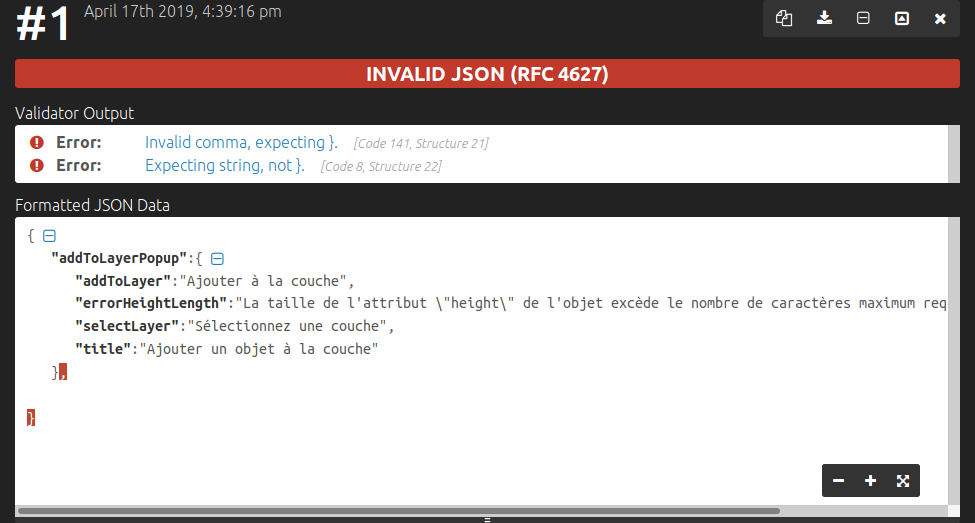
PS: Looking at the example you've posted above, the trailing comma is invalid in JSON:
nijel
on 17 Apr 2019
Yes the example I gave was containing an error, here is my last (and functional in theory!) script :
from __future__ import unicode_literals

import os
import re

import six
from django.utils.translation import ugettext_lazy as _

from weblate.formats.helpers import BytesIOMode
from weblate.formats.ttkit import JSONFormat

class JavascriptFormat(JSONFormat):
  name = _('Javascript')
  format_id = 'js'
  autoload = ('.js', )

# transforme un fichier.json en.js
def save_content(self, handle):
  with open(storefile, "rw+") as fichier:
    fichier.seek(0)
    fichier.write("define({ \n")
    fichier.seek(0,2)
    fichier.write("});")
    fichier.close()

@staticmethod
def serialize(store): #store is JSon file here
  output = six.BytesIO()
  JavascriptFormat(store).save_content(output)
  return output.getvalue()

@classmethod
#transforme un fichier.js en.json
def parse_store(cls, storefile):

  output = six.StringIO()

  texte=[]

  with open(storefile, "r+") as fichier: #on récupère le contenu du fichier sans la premiere et derniere
    num_line=0
    lignes = fichier.readlines()
    for line in lignes:
      if(num_line!=0 and num_line!=(len(lignes)-1) and num_line!=(len(lignes) )):
        texte.append(line)
        num_line+=1
      else:
        if(num_line==0):
          texte.append('{ \n')
        num_line+=1
  texte.append('}')
  fichier.close()

  if isinstance(storefile, six.string_types):
    name = os.path.basename(storefile) + ".json"
  else :
    name = os.path.basename(storefile.name) + ".json"

  with open(name, "w+") as fichier: #on ecrit ce qu'on a extrait juste au dessus
    for element in texte:
      fichier.write(element)
    fichier.close()

# return the new Json file as bytes
  content = output.getvalue().encode("utf-8")
  print(content)
# Load the file as json
  return super(JSONFormat, cls).parse_store(BytesIOMode(name,content))
Moreover, the print() function in my parse_store function is not printing anything in my console, I don't understand why..
TheeoSchiavi
on 17 Apr 2019
Ah okay, that's another problem - you should write to the output handle instead of opening new file.
nijel
on 17 Apr 2019
Indeed. I am now following your logic in the /external.py.. writing to the ouput handle etc.. I 'll succeed.. I hope :x
But i am wondering (that's my final question, i'm going to stop wasting your time), if i use the following function in the /external.py file
with open( [a file that doesn't exist so it will be created] , 'w+' ) as fic:
    fic.write('test')
fic.close()
Where will my file be created? I am searching and searching again, and I don't found him.
I have the feeling that it will be create.. nowhere .. ?
TheeoSchiavi
on 17 Apr 2019
No open needed there, use following instead:
    for element in texte:
      output.write(element)
It works, thanks a lot! I wrote my JavascriptFormat class in a new file named "external2.py", and that's didn't worked. I added this class in "external.py" (same file which contains the XLSXFormat class) and it works, don't know why, but nevermind!
Thanks again
TheeoSchiavi
on 18 Apr 2019
Related issues
 tariver
·
4Comments
tariver
·
4Comments
 nblock
·
3Comments
tariver
·
4Comments
nblock
·
3Comments
tariver
·
4Comments
 agaida
·
4Comments
agaida
·
4Comments
 BoFFire
·
4Comments
BoFFire
·
4Comments