Webiny-js: RFC - Resource naming and state storage
This is a discussion of a related issue #603.
The problem
Currently, when we deploy resources, Lambdas are named like this 6289fia-o023ffl, which is pretty much useless. It is especially useless if you use a tool like Lumigo:
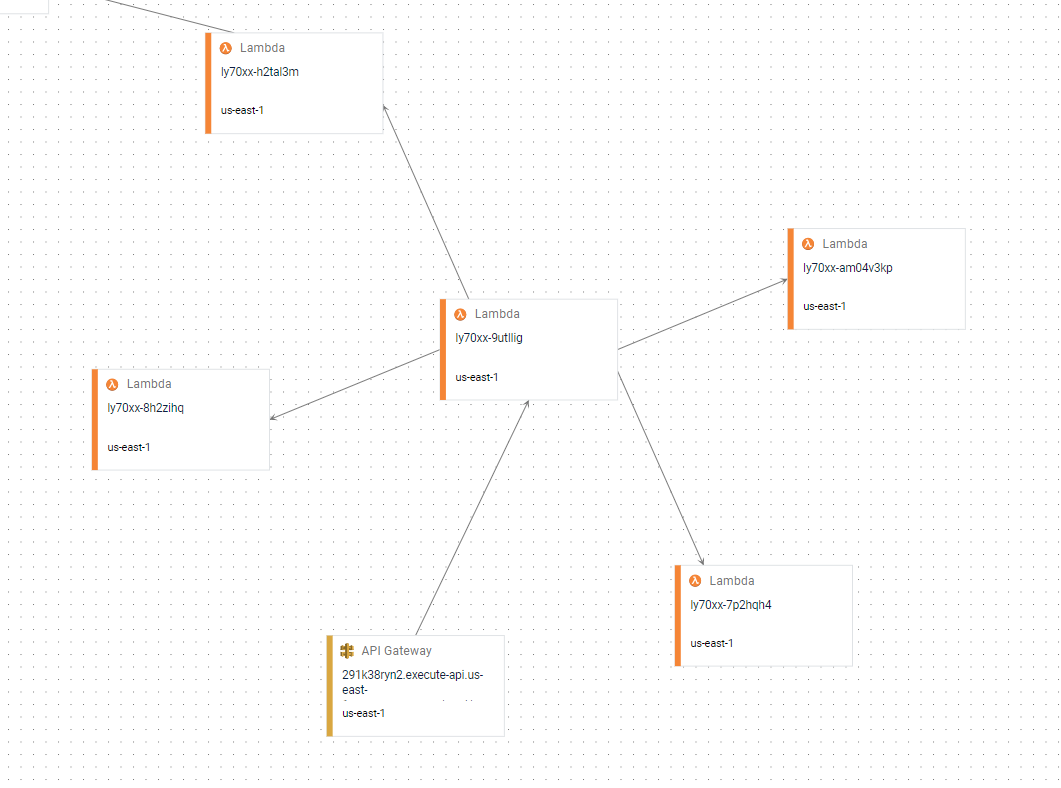
There is no way you could debug this and stay sane. The problem with naming comes from the internals of serverless components and @serverless/aws-lambda component in particular. I've forked the aws-lambda component to fix a bug with naming, but that doesn't solve everything.
Solution in development
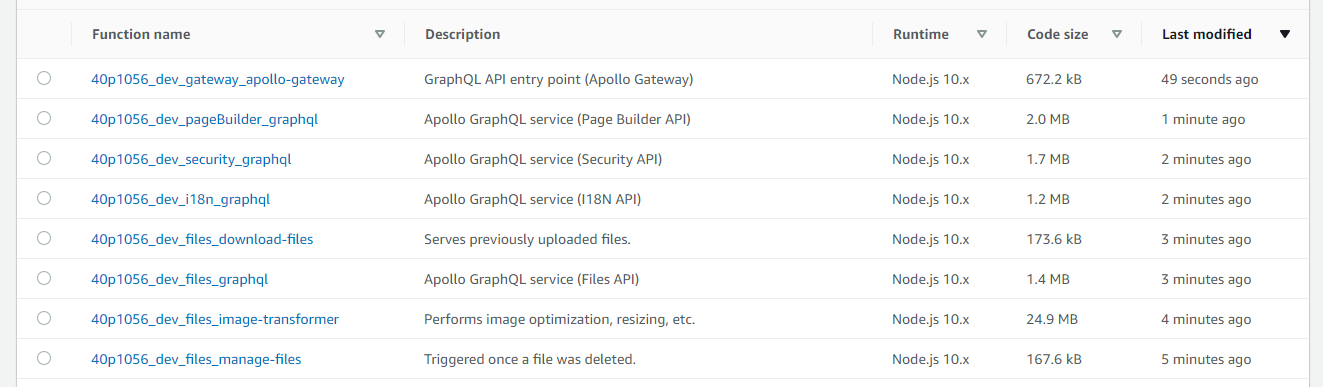
Since in Webiny we have our own template component, we know when a particular alias is being deployed, and we know the env being deployed. This results in a more informative resource name structure: 40p1056_dev_cognito_webiny-pool. So the pattern is {project_id}_{env}_{alias}_{optional-name}.
Now when you open Lambda console you can actually see what each Lambda represents:
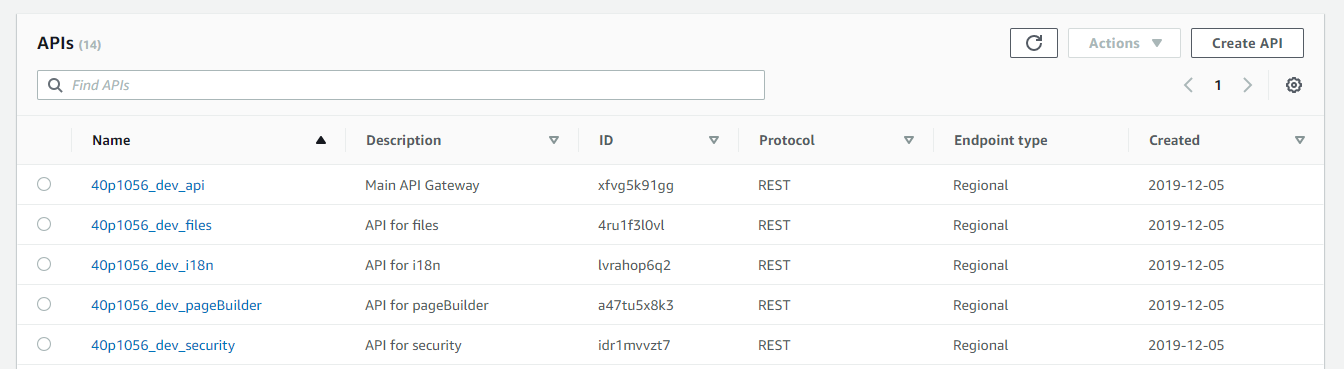
Same goes for API Gateway:
The remaining part of the problem
As @SvenAlHamad pointed out, this naming is much better, but it still lacks an important piece of context - which project exactly is it? Where is it in my computer? What if you deploy 3 projects, how do you know which one you're looking at?
First we though using the project's folder name as part of the resource name, but a folder name can be very long, so maybe adding a projectName config parameter to webiny.js?
module.exports = {
    apps: [{ name: "admin", location: "./apps/admin" }, { name: "site", location: "./apps/site" }],
    projectName: "webiny-js"
};
So a resource name pattern would look like this: {project_id}_{projectName}_{env}_{alias}_{optional-name}. Here's an example of resource names:
40p1056_gadgets-webshop_dev_cognito_webiny-pool40p1056_gadgets-webshop_dev_site40p1056_gadgets-webshop_dev_api40p1056_gadgets-webshop_dev_files_image-transformer40p1056_gadgets-webshop_dev_page-builder_graphql
Another thought
The solution to this entire debate could also solve the problem with having 2 separate IDs for api and apps folder (located in the .serverless/_.json). I think (!), now that we have proper resource names, we can have the same project ID for all Webiny project resources. So basically we only generate 40p1056 and store that in both api and apps serverless state.
Conclusion
So I need some thoughts on this idea with naming @SvenAlHamad @doitadrian and anybody willing to take part in the discussion :)
 Pavel910
All 16 comments
Why we still need project_id if we will have projectName? I think much more human friendly/readable if everything starts simple with the projectName. Dont you think? May be by default projectName can be auto generated but user can configure it if he wants in webiny.js
 fodurrr
on 5 Dec 2019
fodurrr
on 5 Dec 2019
@fodurrr While writing this I was constantly going back to your scenario where you want to work on 2 computers, but cloning the same repo.
Let's think about this: for the sake of example let's say our project name is coffee-machine. So if we only use that as our project name, resource names would be:
coffee-machine_dev_security_graphql, etc.
Say you deployed it on your PC, and you committed and pushed the project, but not the .serverless folder (which is the state of the infrastructure).
Now you clone it on your laptop, and you get the same project name (from webiny.js). You run webiny deploy-api --env=dev, and since there is no state, the deploy process tries to create a new resource with the name coffee-machine_dev_security_graphql, but AWS says it's a no-go. Duplicate name (this is especially true for Lambdas).
So to somehow bypass this problem, we need to let serverless create a unique ID if state doesn't exist (that's the default behavior), and append the project name + other resource name parts. Thus the 40p1056_coffee-machine_dev_security_graphql.
I know it's not ideal, but this allows the same repo to be "reused" on multiple machines and each machine would deploy its own instance of the project.
Does this make sense?
Pavel910
on 5 Dec 2019
If project (id/name) already exist in cloud AND we dont have the state stored locally (example: cloned a project but we do not have the .serverless folder) then it should throw error anyway because we do not know that the intent of the user is working on same project by cloning or this is a totally different user who just accidentally want to use an already used (project id/ projectname)
So actually we say almost the same thing but I would use unique projectName in the same fashion as the project_id used today and the project can be "reused" on other computer when you have "access" to the .serverless folder.
fodurrr
on 5 Dec 2019
That would force you as a single developer working on 2 computers to copy .serverless folder or push it to the repo. Is that what you're saying?
Pavel910
on 5 Dec 2019
Yes.
Why would I want to have 2 different deployments to the cloud for the same project? I would like to have one instance of cloud deployment and use it on different computers by using.serverless folder)
If i want to have new deployment then I simply deploy a new project with a different projetName.
And of course the stage (env) can still differ like dev, test or prod deployments.
fodurrr
on 5 Dec 2019
Ok. Let's assume we go that route. What happens to the other devs on your team working on the same project? The project name would be the same for them as well. This is something I'm trying to wrap my head around for some time now.
The moment they try to deploy the project, they hit the same naming problem because one of you have already deployed an S3 bucket with a certain name 🤔
Pavel910
on 5 Dec 2019
I think it depends what they/team want.
If they want to use the same deployment then they use the same projectName AND the same .serverless folder. If they want to use different then they can create either their own environment (stage) or even a different projecName (by the way my thinking is that stage can be used like a kind of branching on github, still same project just different branch/stage). Still everybody has the flexibility to go both way. Simply put if they work with the same state/ .serverless folder AND projectName then they work on the same cloud deployment if any of those differs then they work on "different cloud" deployment OR it is an unintentional mistake so during deployment error must be thrown anyway that the specific projectName already exists.
May be the different use cases can be included in the docs later. If i remember well this is a whole separate topic in the AWS amplify library.
fodurrr
on 5 Dec 2019
Here's a summary of what we're trying to achieve:
- have readable resource names
- multiple developers must be able to work on the same code base (of course each developer MUST deploy into his own account, thus each one of them has his own state)
- state is not shared among developers because if 2 people perform a deploy they can break the state for each-other, also if they share state the AWS IAM will explode since each developer has his own account and the same resource IDs can not be accessed from other accounts
- the same developer should be able to migrate between 2 computers
The latest idea is to sync state to your S3 bucket, so you can move between computers and reuse the same state bucket. This requires each developer to have his own state bucket in .env.json. So the only thing you would need to copy over to another computer is your .env.json files. The state would then be synced by the CLI (something like webiny state pull).
Please keep the ideas coming 🚀
Pavel910
on 5 Dec 2019
One comment they can share environment (state) if they are working on the same AWS account.
Here is the link for AWS amplify about environments: ASW Amplify Environments and Teams
fodurrr
on 5 Dec 2019
I like the idea of "branching" you mentioned @fodurrr, which can be achieved with stages.
I'm reading the link you provided, looks interesting.
 doitadrian
on 5 Dec 2019
doitadrian
on 5 Dec 2019
@fodurrr not sure if we should count on the entire team to share the AWS account 🤔
I'll read through the provided link, really interested in a potential solution.
Pavel910
on 5 Dec 2019
Just a general comment:
Webiny project seems to me a more flexible project than many others. Meaning that for example AWS Amplify is just for AWS but Webiny has the potential to be "Cloud" agnostic and also kinda framework agnostic. When Webiny has a very good cloud backend support who knows when somebody writes a frontend in VUE or Angular?
Therefore I think it is very important to take lessons learned from other somewhat similar open source projects as much as possible to help newcomers to this project migrate easily for example from AWS amplify.
To be able to migrate easily sometimes the best thing if for example the API (webiny CLI) similar and familiar to a certain extent to other projects.
fodurrr
on 5 Dec 2019
Agreed. Don't get me wrong, I'm not against anything you suggested, I'm just trying to find a convincing and robust way of supporting the aforementioned goals. So we're not in a hurry, we'll just continue to brainstorm and see where it leads us :) 🍻
Please feel free to share more links if you find something related to the conversation ❤️
Pavel910
on 5 Dec 2019
We just had an in-depth discussion with the entire team and we came to what we think is a solution that could work nicely. So here is a summary for later reference:
Dev 1 is creating a new project:
webiny create coffee-machine
This writes the project name into webiny.js.
It also generates a name for files bucket to include the project name coffee-machine-files-47dt882, since now we will actually have a project name.
Moving to another PC
To push your state and .env.json files to the state storage:
webiny push
> Created a state bucket `coffee-machine-state-47dt882` <-- this is a unique ID for the state bucket
This will store the generated bucket name into root .env.json:
"STATE_STORAGE": "coffee-machine-47rt643",
Now your state and env files are pushed to coffee-machine-state-47dt882/api|apps/*.json.
env is part of the state file name so we don't need subfolders per env.
Now on another PC, you'll just clone the repo and pull the state:
git clone git@github... my-project
cd my-project
webiny pull --from=coffee-machine-state-47dt882
Now when you run a deploy, you'll be using the resources from the state files.
This assumes that your AWS credentials on this other computer have access to the resources from the state.
Sharing your state with other developers
So this is basically the same as moving your project to another computer. The only difference is you have to somehow give your team member access to your resources; be it an IAM User, or sharing resources via IAM Policies between accounts, that's up to you.
Once your team member clones the repo and pulls your state, he'll be working on your resources. this is beneficial when another developer needs to help you with your project or maybe you go on vacation and somebody jumps in to continue your work.
Another developer deploying to his own account
If another developer just wants to use the same repo, but deploy into his own account, he'll simply clone the repo, configure .env.json files and run webiny deploy-api. This will create a new state for him, but the project name will still remain the same. For the sake of uniqueness of resource names, we will still keep the instanceId created by serverless so resources will be named like this: 40p1056_coffee-machine_dev_files_graphql
@SvenAlHamad @doitadrian please confirm I got it right. @fodurrr what do you think?
NOTE TO SELF: part of this is implemented in https://github.com/Pavel910/webiny-js/tree/sls-app-plugins.
Pavel910
on 6 Dec 2019
Quick update: resource naming is already implemented in our latest release. Resources are now named like this: {project_id}_{env}_{alias}_{optional-name}.
There is also another issue that requested an improvement on resource naming for multiple projects: #701. This one is still opened.
Pavel910
on 18 Feb 2020
Closing this issue as most of it was implemented in the meantime.
The last thing to implement is a CLI plugin to push/pull the state, but that is now also easily doable with the recent addition of deploy hooks.
Pavel910
on 16 Jul 2020
Related issues
Pavel910
·
6Comments
 icy-meteor
·
4Comments
doitadrian
·
7Comments
Pavel910
·
5Comments
icy-meteor
·
4Comments
doitadrian
·
7Comments
Pavel910
·
5Comments
 akve
·
6Comments
akve
·
6Comments
Most helpful comment
Agreed. Don't get me wrong, I'm not against anything you suggested, I'm just trying to find a convincing and robust way of supporting the aforementioned goals. So we're not in a hurry, we'll just continue to brainstorm and see where it leads us :) 🍻
Please feel free to share more links if you find something related to the conversation ❤️