Webdriveragent: Provisioning profile "iOS Team Provisioning Profile: xxxxxxx" doesn't match the entitlements file's value for the get-task-allow entitlement.
I was able to run it without issue before, yesterday I found this issue.

 MarkSunPWC
All 19 comments
I had met the same error,waiting for solution......
 RyanLee0210
on 15 Mar 2019
RyanLee0210
on 15 Mar 2019
I have got the same error, and couldn't find .Entitlements files. In my PP, the get-task-allow is false.
 KangarooChen
on 15 Mar 2019
KangarooChen
on 15 Mar 2019

the same error!!!
 sanren99999
on 15 Mar 2019
sanren99999
on 15 Mar 2019
I have the exact same issue. Please help!!
 jdussan88
on 15 Mar 2019
jdussan88
on 15 Mar 2019
I am also facing same issue, i am using free account.
 71year
on 16 Mar 2019
71year
on 16 Mar 2019
I have got the same error, and couldn't find .Entitlements files. In my PP, the get-task-allow is false.
Hi, I've zero IOS dev experience. You have found the 'get-task-allow' flag in PP? What will happen if you set it to true. Are you using pay account? I can't find a way to edit my PP yet using my free account.
MarkSunPWC
on 18 Mar 2019
I am also facing same issue, i am using free account too. Please help!
 jianghua09
on 18 Mar 2019
jianghua09
on 18 Mar 2019
I have got the same error, and couldn't find .Entitlements files. In my PP, the get-task-allow is false.
Hi, I've zero IOS dev experience. You have found the 'get-task-allow' flag in PP? What will happen if you set it to true. Are you using pay account? I can't find a way to edit my PP yet using my free account.
I'm also a rookie and using a non-development account. The Provisioning Profile can't be edit due to that is generated by Apple and sent. I don't get the previous value of get-task-allow because I cleaned the files to try to resolve the problem. You can go to /Librarr/MobileDevices/Provisoining Profiles and check the older files.
KangarooChen
on 18 Mar 2019
I just had this problem, but I don't know how to solve it
 testerSunshine
on 18 Mar 2019
testerSunshine
on 18 Mar 2019
I am also facing same issue, i am using free account.
 yolandaZhangYi
on 18 Mar 2019
yolandaZhangYi
on 18 Mar 2019
Is this an issue with Apple? I am also facing the same issue.
 climbwithme
on 18 Mar 2019
climbwithme
on 18 Mar 2019
Same here, I guess after a 'brew update', don't think anything else changed since it was working...
Tried a lot of things since then, but no luck :(
 dverbiest
on 18 Mar 2019
dverbiest
on 18 Mar 2019
I've contacted Apple support and their first reply was saying "You are not in our support scope because you don't pay a nickel for your free account" in a very nice way and give me a few links of documents. I was hoping they can simply tell me if this issue is caused by my free account or not so I can decide what to do next.
MarkSunPWC
on 19 Mar 2019
Hello, I was able to fix this, creating a Entitlements.plist
So I was able to create bundle Id, but then when I run my test, I got this error "Failed to initialize for UI testing: Error Domain=XCTDaemonErrorDomain Code=41 "Not authorized for performing UI testing actions.""
I don't know if it's a problem with my free account.
 Anvirego
on 19 Mar 2019
Anvirego
on 19 Mar 2019
The only way I was able to fix this was by getting a paid account. As soon as I changed the team ID to that of my paid account, and changed the WDA product bundle ID to a unique random one I had not used before, the issue was resolved immediately.
It seems to me that something changed on Apple's side, which now requires us to use paid accounts to work with WebDriverAgent. The change must have come into effect last Friday, because I was able to use my free account just fine all day Thursday, but next Friday morning I started getting this error, without making any updates or any changes at all to my project.
Hope this helps.
jdussan88
on 19 Mar 2019
When I was debugging free users this morning, His good!!!! . Maybe there was something wrong with apple's certificate system
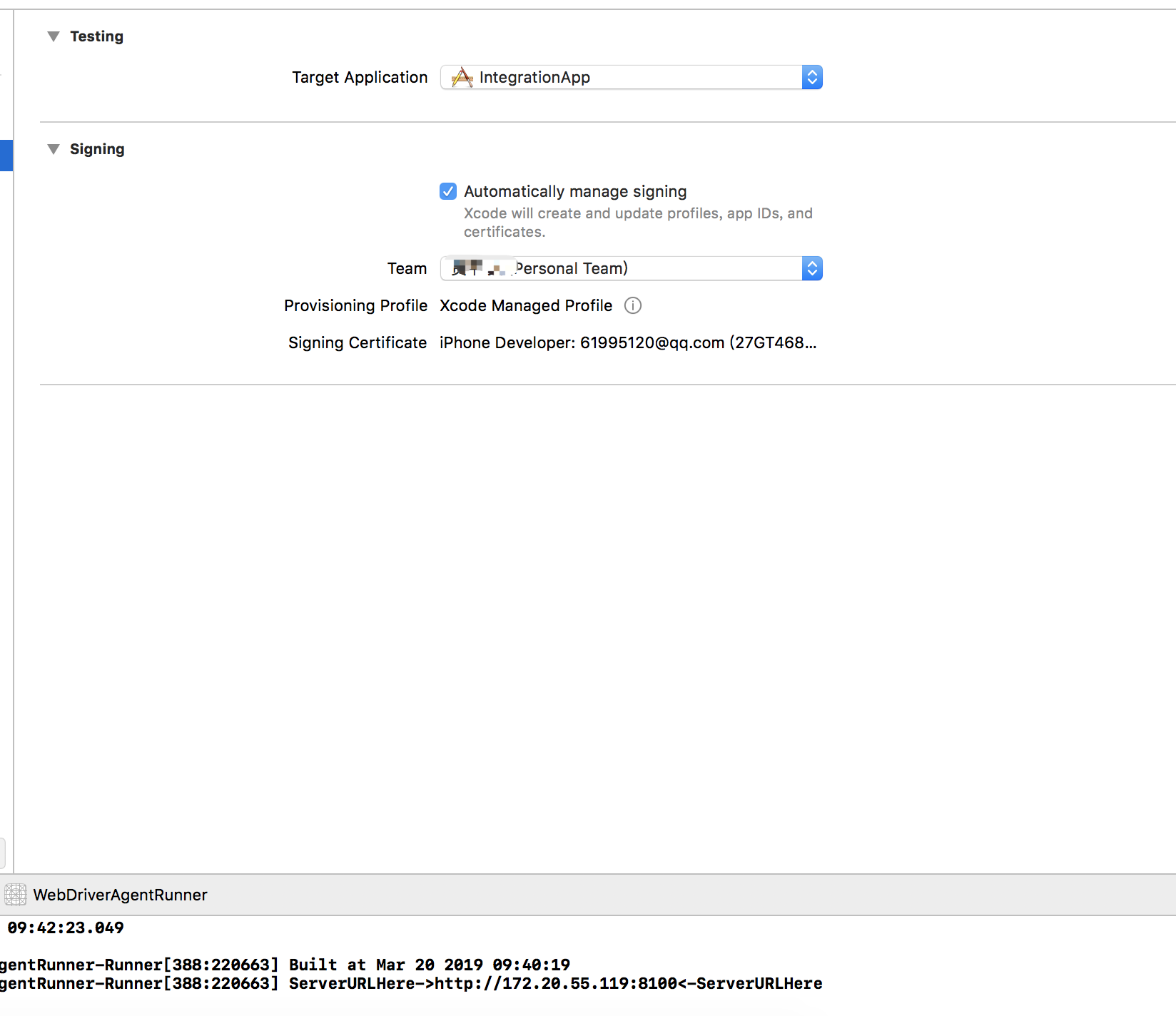
testerSunshine
on 20 Mar 2019
When I was debugging free users this morning, His good!!!! . Maybe there was something wrong with apple's certificate system
thanks for your information,now i can run it too!!!with nothing to do,and i use the free account
RyanLee0210
on 20 Mar 2019
Looks fixed now.
Steps to retry
- Uncheck "Automatically manage signing" in Xcode
- Delete .mobileprovision files in ~/Library/MobileDevice/Provisioning Profiles
- Delete certificate from keychain access (iPhone Developer: [email protected] (XXXXXXXXXX))
- Recheck "Automatically manage signing" in Xcode & select your Team details
- New certificate and Mobile Provision files will be created.
You will notice that the mobile provision is generated with "get-task-allow" true.
climbwithme
on 20 Mar 2019
So yes for me as well the error has gone, but when I actually run it installs the driver but the test doesn't run and crashes. Is this still happened with anyone?
 Norphy
on 22 Mar 2019
Norphy
on 22 Mar 2019
Related issues
 rajfidel
·
11Comments
rajfidel
·
11Comments
 fabb
·
5Comments
fabb
·
5Comments
 garie
·
10Comments
garie
·
10Comments
 Terrdy
·
8Comments
Terrdy
·
8Comments
 Azuer
·
3Comments
Azuer
·
3Comments
Most helpful comment
Looks fixed now.
Steps to retry
You will notice that the mobile provision is generated with "get-task-allow" true.