Webdriveragent: iOS 10.x + Appium 1.7.0beta + iPhone SE PageSource has error value 'AX error -25205' for some attribute values
The problem
PageSource has issues on iPhone SE + Appium 1.7.0 beta + iOS 10.x. It displays some of the values as 'AX error -25205'
Non-iPhone SE + iOS 11 + Appium 1.7.0 beta works fine.
Couldn't check iPhone SE with iOS 11 since I do not have a device with this configuration to check.
iPhone SE + Appium 1.6.5 + iOS 10.x works fine as well.
Logs
The following logs were captured on the iOS Settings app (com.apple.Preferences)
On Appium 1.7.0 beta
iPhone 6s, Appium Logs here, Page Source here
iPhone SE, Appium Logs here, Page Source here
Confirmed on another iPhone SE as well to be the same case.
From the above logs can be seen that only iPhone SE exhibits this issue with Appium 1.7.0 beta.
On Appium 1.6.5
iPhone SE, Appium Logs here, Page Source here
From the above logs can be seen that iPhone SE does not exhibit this issue with Appium 1.6.5
Environment
- Appium version (or git revision) that exhibits the issue: 1.7.0 beta
- Last Appium version that did not exhibit the issue (if applicable): 1.6.5
- Desktop OS/version used to run Appium: macOS Sierra 10.12.6
- Node.js version (unless using Appium.app|exe): 8.1.4
- Mobile platform/version under test: 10.2.1
- Real device or emulator/simulator: Real device
- Appium CLI or Appium.app|exe: Appium CLI
 rajfidel
All 54 comments
any update? same problem
 broven
on 25 Sep 2017
broven
on 25 Sep 2017
Same here, but only happens on iPad, iOS9 and iOS10
Appium1.7.1 + Xcode9
 huaius
on 2 Oct 2017
huaius
on 2 Oct 2017
I had the same problem. The solution is to use iOS 11 with XCode 9, for now.
 seavan
on 4 Oct 2017
seavan
on 4 Oct 2017
Am also facing the same issue with iPad Air + iOS 11 + XCode 9 + Appium 1.7.1
(It works fine with iPhone 6 Plus though, along with the above config. Issue observed with iPads only)
 spv007
on 5 Oct 2017
spv007
on 5 Oct 2017
+1 - I'm running iPhone 5 + iOS 9.2.1 + XCode 9 + Appium 1.7.1
 JasonArm
on 9 Oct 2017
JasonArm
on 9 Oct 2017
Occurs for every element for me. Iphone 5, iOS 11.0, Appium 1.7.1. Was working fine earlier today, now loading the exact same app with the same conditions in the inspector results in
 kdthomas2121
on 12 Oct 2017
kdthomas2121
on 12 Oct 2017
Also, +1 - on iPhone 6 + iOS 10.1.1 + XCode 9 + Appium 1.7.1
JasonArm
on 16 Oct 2017
any update? same problem
 niclaforge
on 18 Oct 2017
niclaforge
on 18 Oct 2017
I have the same issue with an IPhone SE 11.0,10.0 + Appium 1.7.1 and as well on an IPhone 8 11.0 + Appium 1.7.1, so any help would be appriciated
 Seijan
on 19 Oct 2017
Seijan
on 19 Oct 2017
Is this same issue as in https://github.com/facebook/WebDriverAgent/issues/372?
 marekcirkos
on 23 Oct 2017
marekcirkos
on 23 Oct 2017
- +1 - I'm running iPhone 6p + iOS 10.3.3 + XCode 9 + Appium 1.7.1
update 2017.10.25:
- The issue is resolved after when I update to ios 11.
 darkmanno6
on 24 Oct 2017
darkmanno6
on 24 Oct 2017
Facing the same issue. Any updates yet ?
 rakeshsukla53
on 24 Oct 2017
rakeshsukla53
on 24 Oct 2017
[UPDATE] : - This issue is resolved after updating to iOS 10.3 simulator
rakeshsukla53
on 24 Oct 2017
Still not resolved when using real devices
kdthomas2121
on 25 Oct 2017
Have upgraded the IOS version to 11 in IPhone 6 and it works fine. Able to inspect the elements.
The XCode version used is 9.X
 LakshminarayananG
on 26 Oct 2017
LakshminarayananG
on 26 Oct 2017
+1, faced the same issue.
Upgraded the IOS version to 11 in IPhone 6 and it works fine. Able to inspect the elements.
The XCode version used is 9.X
 gargvishal
on 27 Oct 2017
gargvishal
on 27 Oct 2017
Pb on iPhone 10.2.1 / XCode 9.
I need to automate tests on real devices from iOS 9 to 11.
 appiumnovice
on 30 Oct 2017
appiumnovice
on 30 Oct 2017
Testobject free devices are running iOS 9, so I need to automate for 9 also
kdthomas2121
on 31 Oct 2017
any update regarding this issue?
 levyshachar2
on 13 Nov 2017
levyshachar2
on 13 Nov 2017
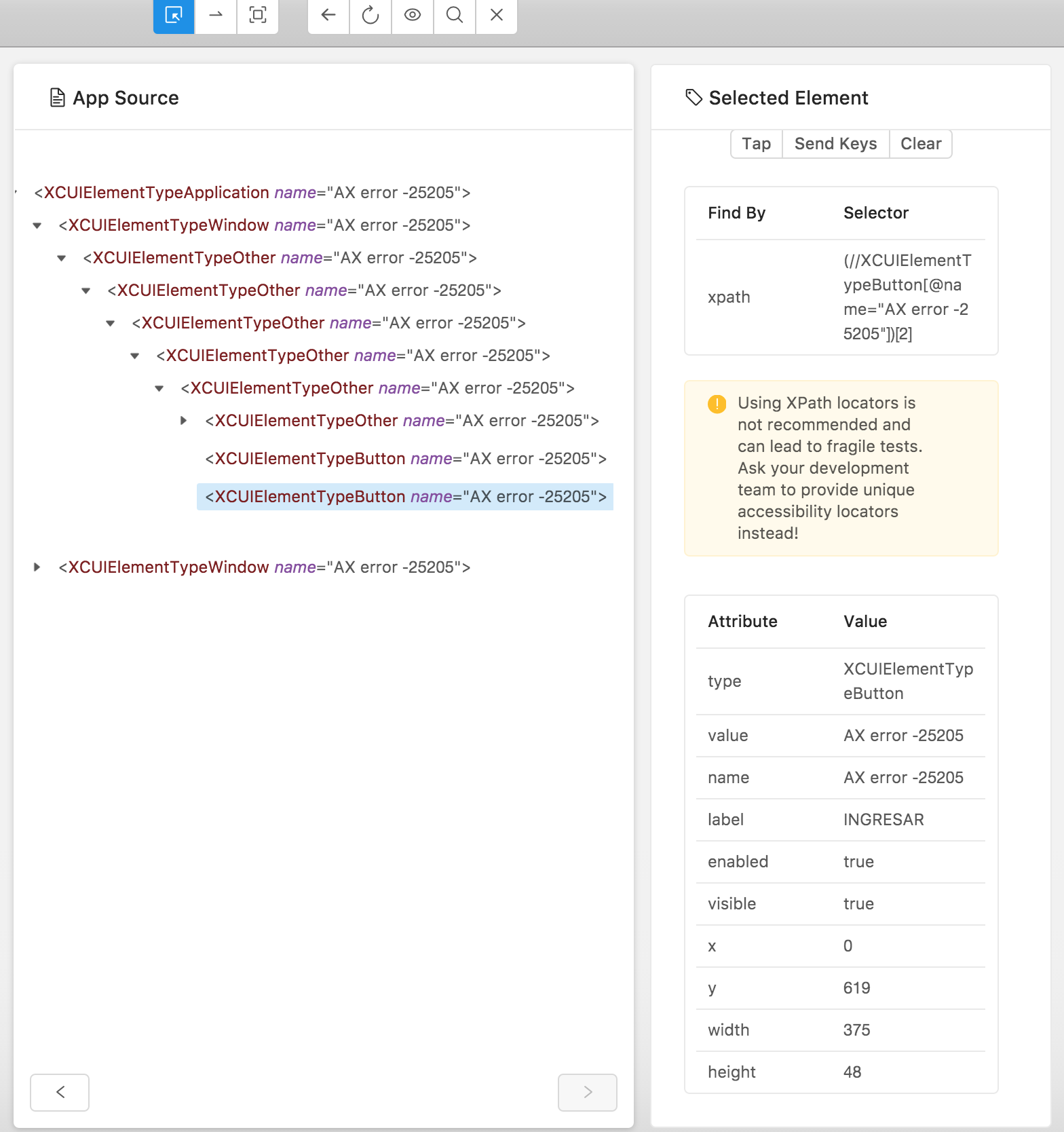
Hi guys, I'm having exact same issue, do you have any update?
I'm working with XCode 9.1, Appium 1.7.1, iPhone 6s with iOS 10.2
 sdanerib
on 20 Nov 2017
sdanerib
on 20 Nov 2017
If this helps anyone, I'm not having issues when trying with:
XCode 9.1,
Appium 1.7.1,
Appium Desktop 1.2.5 and
iPhone 6s or X with iOS 11.1 😃
sdanerib
on 20 Nov 2017
@mykola-mokhnach Any update on this issue, multiple scenarios are getting failed coz of this for a very long time.
 Dilip-M
on 20 Nov 2017
Dilip-M
on 20 Nov 2017
I am also facing the same issue with below configuration
Appium 1.2.6 desktop
iPhone Simulator 5s
Xcode 9.1 -OS 10.0
 ashwinibaisutrave
on 20 Nov 2017
ashwinibaisutrave
on 20 Nov 2017
facing the same issue using the latest wda + xcode9.1 + ios9/ios10
@mykola-mokhnach could you had a look at this problem? Thanks.
 jmei08
on 24 Nov 2017
jmei08
on 24 Nov 2017
This is an issue for me as well on all iOS device below 11. @mykola-mokhnach Please help us resolve this issue.
 sasasa42
on 28 Nov 2017
sasasa42
on 28 Nov 2017
iOS 9.3.5 also met
 Kitty2014
on 1 Dec 2017
Kitty2014
on 1 Dec 2017
@marekcirkos can we pls release the solution to this problem soon!
 bhavikviks
on 1 Dec 2017
bhavikviks
on 1 Dec 2017
iPod 6, iOS 10.1:
with XCode 9.x there're 'AX error -25205' in almost all elements.
with XCode 8.x - everything works just fine. So I keep 2 XCodes (8 and 9) for iOS 10 and 11 respectively.
 dcnt
on 12 Dec 2017
dcnt
on 12 Dec 2017
Using xcode9.x + ios11.x with iPhone7Plus,It takes a very long time in the snapshot accessibility hierarchy for app and returns nothing.
[AXValidations] UIAccessibility Error adding -[CAMLightingControl accessibilityLabel]
jmei08
on 14 Dec 2017
Hi Everyone,
Any update on this issue yet ?
 jeremygenbook2
on 21 Dec 2017
jeremygenbook2
on 21 Dec 2017
Hi All,
Who does solve the issue?
 sl1991
on 27 Dec 2017
sl1991
on 27 Dec 2017
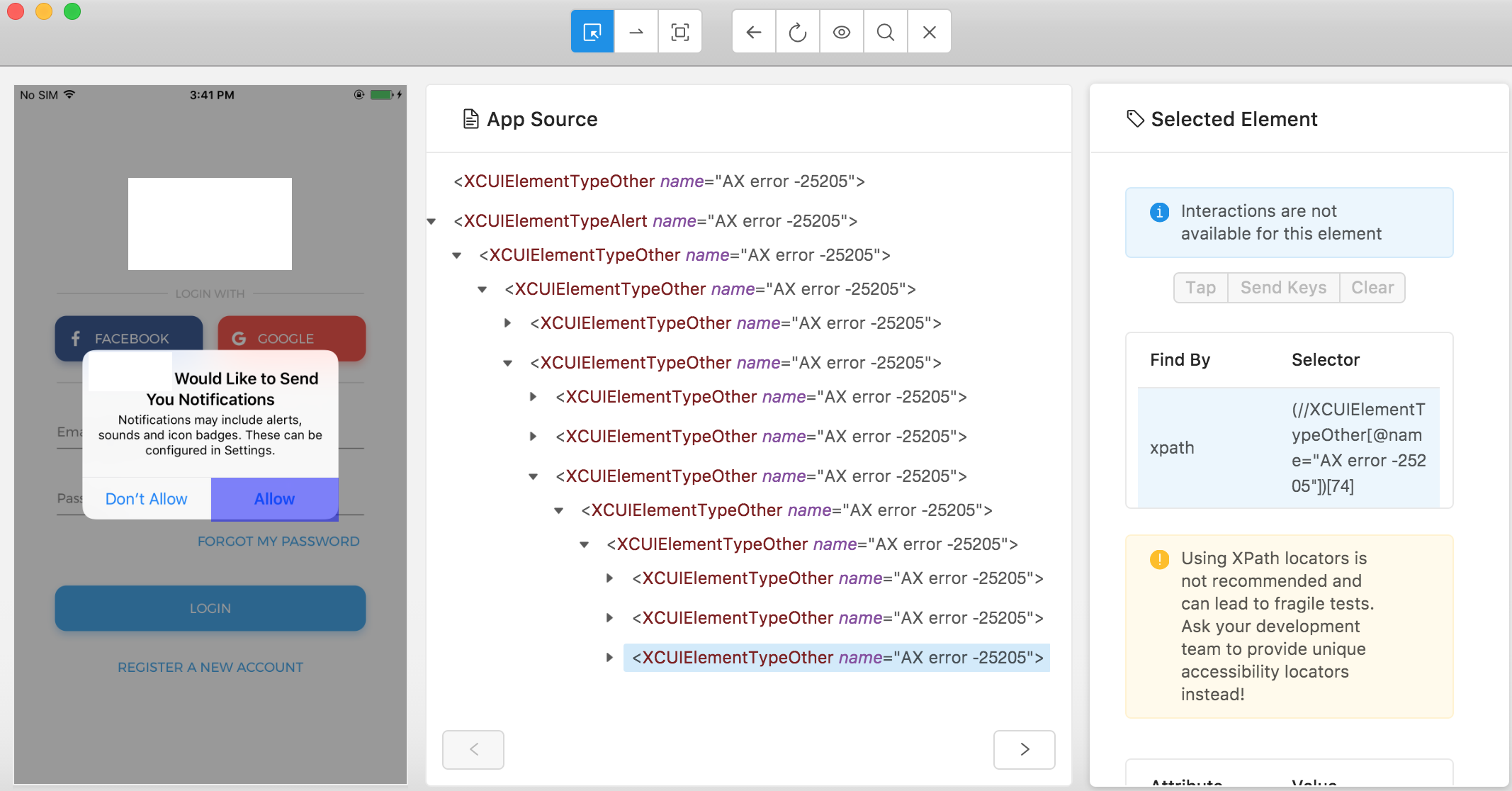
Hi all, I am also facing the same issue with real device iPhone 7 plus iOS 10.2.1, Xcode Version 9.2 and appium.app Version 1.2.7.
Anyone found solution or work around for it?
 SamyQAZ
on 29 Dec 2017
SamyQAZ
on 29 Dec 2017
The only working combination for me is Xcode 9.2 + iOS simulator version platform 11.2
 olyv
on 2 Jan 2018
olyv
on 2 Jan 2018
should use xcode 8.3.3
Kitty2014
on 5 Jan 2018
Try the patch https://github.com/appium/WebDriverAgent/pull/31, which is going to be merged to Appium beta soon
 mykola-mokhnach
on 9 Jan 2018
mykola-mokhnach
on 9 Jan 2018
@mykola-mokhnach When will it be available to try?
SamyQAZ
on 10 Jan 2018
Added the following as a postinstall script to my automation project:
#!/bin/bash

rm -fr WebDriverAgent-window_based_xml_source
rm -f WebDriverAgent_window_based_xml_source.zip

curl https://codeload.github.com/appium/WebDriverAgent/zip/window_based_xml_source > WebDriverAgent_window_based_xml_source.zip
unzip WebDriverAgent_window_based_xml_source.zip -d WebDriverAgent-window_based_xml_source

for webdrivercopy in `find node_modules|grep WebDriverAgent$`; do
  echo rm -rv $webdrivercopy
  echo cp -rv WebDriverAgent-window_based_xml_source/WebDriverAgent-window_based_xml_source $webdrivercopy
done
 peritus
on 12 Jan 2018
peritus
on 12 Jan 2018
@mykola-mokhnach Thank you for the update on this one!
Doing so (believe i'm using xcode 9.2 + ios9.3 + appium 1.7.1 + https://github.com/appium/WebDriverAgent/pull/31/commits/e88a6c7ca31cbf52f14b0c6e603d6fdb79ba0a57 as described above) my tests start working again, except for:
iOS 9.3 + iPhone 6 simulator
When the app asks for camera permissions using the system dialog, i'm still seeing AX error -25205. All other ui elements can be found (again! thank you!).
iOS 11 + iPhone X simulator:
is there an upper limit on the maximum depth of the xml tree building ? I'm seeing
                          <XCUIElementTypeOther type="XCUIElementTypeOther" name=" Willkommen zurück!  Login.email   Login.password  Login.forgotPassword   Login.button[disabled]" label=" Willkommen zurück!  Login.email   Login.password  Login.forgotPassword   Login.button[disabled]" enabled="true" visible="true" x="0" y="88" width="375" height="724">
                            <XCUIElementTypeOther type="XCUIElementTypeOther" name="Login.button[disabled]" label="Login.button[disabled]" enabled="true" visible="true" x="0" y="471" width="375" height="50">
                              <XCUIElementTypeOther type="XCUIElementTypeOther" name="Login.button[disabled]" label="Login.button[disabled]" enabled="true" visible="true" x="0" y="471" width="375" height="50"/>
                            </XCUIElementTypeOther>
                          </XCUIElementTypeOther>
but no text input with name="Login.email" label="Login.email" :(
..
..
Is this the right place to report this ? Happy to help debugging, let me know how.
peritus
on 12 Jan 2018
Thanks for reporting this @peritus. Currently I have no solutions for the problems above.
is there an upper limit on the maximum depth of the xml tree building
No, there is no limit. We display everything we can get from XCTest.
but no text input with name="Login.email" label="Login.email"
Is this input present on other iOS versions? Perhaps, your AUT code just does not define these elements as accessible properly.
mykola-mokhnach
on 12 Jan 2018
@mykola-mokhnach Updated to Appium CLI - 1.7.2 and appium.app to 1.3.0 still the above issue exist.
Cannot interact with UI elements. Throws 'AX error -25205'.
When run test from command line throws below error,
Real device: iphone5C - 10.3.2
WebDriverException: Message: An unknown server-side error occurred while processing the command. Original error: Cannot get 'xml' source of the current application
Did anyone tried to upgrade to new version and check this issue?
SamyQAZ
on 12 Jan 2018
@mykola-mokhnach Thanks!
As for the iPhone 6 + iOS9.3 case with giving camera permission mentioned above, looked at the source further, this is how it looks like (my webdriver script is trying to tap name="Ja" (_Ja_ → _Yes_ in german):
                  <XCUIElementTypeOther type="XCUIElementTypeOther" value="AX error -25205" name="AX error -25205" label="AX error -25205" enabled="true" visible="true" x="187" y="373" width="136" height="44">
                    <XCUIElementTypeButton type="XCUIElementTypeButton" value="AX error -25205" name="AX error -25205" label="Ja" enabled="true" visible="true" x="187" y="373" width="136" height="44"/>
                  </XCUIElementTypeOther>
but it only finds
name="AX error -25205" label="Ja"
while that used to be
name="Ja" label="Ja"
in previous versions of XCode.
As for the other case I mentioned ("Login.email"), that works in iOS 9.3, will supply more logs as I get ahold of them.
peritus
on 12 Jan 2018
@mykola-mokhnach
so, had a few more test runs, here is the xml rendering (both with your window_based_xml_source branch, both the same application, but different iOS / phone model):
iOS 9.3 - iPhone 5s
Automation works beautifully, all the elements are there
  <XCUIElementTypeOther type="XCUIElementTypeOther" value="AX error -25205" name="AX error -25205" label=" Willkommen zurück!  Login.email   Login.password  Login.forgotPassword   Login.button[disabled]" enabled="true" visible="true" x="0" y="64" width="375" height="603">
    <XCUIElementTypeOther type="XCUIElementTypeOther" value="AX error -25205" name="AX error -25205" label=" Willkommen zurück!  Login.email   Login.password  Login.forgotPassword  " enabled="true" visible="false" x="0" y="64" width="375" height="0">
      <XCUIElementTypeOther type="XCUIElementTypeOther" value="AX error -25205" name="AX error -25205" label=" Willkommen zurück!  Login.email   Login.password  Login.forgotPassword  " enabled="true" visible="true" x="0" y="64" width="375" height="337">
    <XCUIElementTypeScrollView type="XCUIElementTypeScrollView" value="AX error -25205" name="AX error -25205" label="AX error -25205" enabled="true" visible="true" x="0" y="64" width="375" height="337">
      <XCUIElementTypeImage type="XCUIElementTypeImage" value="AX error -25205" name="AX error -25205" label="AX error -25205" enabled="true" visible="false" x="369" y="25" width="3" height="36"/>
      <XCUIElementTypeOther type="XCUIElementTypeOther" value="AX error -25205" name="AX error -25205" label=" Willkommen zurück!  Login.email   Login.password  Login.forgotPassword" enabled="true" visible="true" x="0" y="64" width="375" height="327">
        <XCUIElementTypeOther type="XCUIElementTypeOther" value="AX error -25205" name="AX error -25205" label=" Willkommen zurück! " enabled="true" visible="true" x="0" y="64" width="375" height="158">
          <XCUIElementTypeOther type="XCUIElementTypeOther" value="AX error -25205" name="AX error -25205" enabled="true" visible="true" x="152" y="64" width="71" height="70">
        <XCUIElementTypeImage type="XCUIElementTypeImage" value="AX error -25205" name="AX error -25205" label="AX error -25205" enabled="true" visible="true" x="152" y="64" width="71" height="70"/>
          </XCUIElementTypeOther>
          <XCUIElementTypeOther type="XCUIElementTypeOther" value="AX error -25205" name="AX error -25205" label="Willkommen zurück! " enabled="true" visible="true" x="49" y="134" width="278" height="88">
        <XCUIElementTypeStaticText type="XCUIElementTypeStaticText" value="AX error -25205" name="AX error -25205" label="Willkommen zurück!" enabled="true" visible="true" x="69" y="149" width="238" height="30"/>
        <XCUIElementTypeStaticText type="XCUIElementTypeStaticText" value="AX error -25205" name="AX error -25205" enabled="true" visible="false" x="188" y="183" width="0" height="14"/>
          </XCUIElementTypeOther>
        </XCUIElementTypeOther>
        <XCUIElementTypeOther type="XCUIElementTypeOther" value="AX error -25205" name="AX error -25205" label="Login.email   Login.password " enabled="true" visible="true" x="0" y="222" width="375" height="90">
          <XCUIElementTypeOther type="XCUIElementTypeOther" value="AX error -25205" name="AX error -25205" label="Login.email  " enabled="true" visible="true" x="0" y="222" width="375" height="45">
        <XCUIElementTypeOther type="XCUIElementTypeOther" value="AX error -25205" name="AX error -25205" label="Login.email" enabled="true" visible="true" x="0" y="222" width="375" height="45">
          <XCUIElementTypeTextField type="XCUIElementTypeTextField" value="Deine E-Mail" name="Login.email" label="Login.email" enabled="true" visible="true" x="15" y="233" width="355" height="22"/>
        </XCUIElementTypeOther>
        <XCUIElementTypeOther type="XCUIElementTypeOther" value="AX error -25205" name="AX error -25205" label=" " enabled="true" visible="true" x="0" y="266" width="375" height="1">
          <XCUIElementTypeOther type="XCUIElementTypeOther" value="AX error -25205" name="AX error -25205" enabled="true" visible="true" x="0" y="266" width="15" height="1"/>
          <XCUIElementTypeOther type="XCUIElementTypeOther" value="AX error -25205" name="AX error -25205" enabled="true" visible="true" x="15" y="266" width="360" height="1"/>
        </XCUIElementTypeOther>
          </XCUIElementTypeOther>
          <XCUIElementTypeOther type="XCUIElementTypeOther" value="AX error -25205" name="AX error -25205" label="Login.password " enabled="true" visible="true" x="0" y="267" width="375" height="44">
        <XCUIElementTypeOther type="XCUIElementTypeOther" value="AX error -25205" name="AX error -25205" label="Login.password " enabled="true" visible="true" x="0" y="267" width="375" height="44">
          <XCUIElementTypeOther type="XCUIElementTypeOther" value="AX error -25205" name="AX error -25205" enabled="true" visible="false" x="0" y="267" width="0" height="0"/>
          <XCUIElementTypeOther type="XCUIElementTypeOther" value="AX error -25205" name="AX error -25205" label="Login.password" enabled="true" visible="true" x="0" y="267" width="375" height="44">
            <XCUIElementTypeSecureTextField type="XCUIElementTypeSecureTextField" value="Dein Passwort" name="Login.password" label="Login.password" enabled="true" visible="true" x="15" y="278" width="355" height="21"/>
          </XCUIElementTypeOther>
        </XCUIElementTypeOther>
          </XCUIElementTypeOther>
        </XCUIElementTypeOther>
        <XCUIElementTypeOther type="XCUIElementTypeOther" value="AX error -25205" name="Login.forgotPassword" label="Login.forgotPassword" enabled="true" visible="true" x="0" y="311" width="375" height="80"/>
      </XCUIElementTypeOther>
      <XCUIElementTypeImage type="XCUIElementTypeImage" value="AX error -25205" name="AX error -25205" label="AX error -25205" enabled="true" visible="false" x="-39" y="395" width="36" height="3"/>
    </XCUIElementTypeScrollView>
      </XCUIElementTypeOther>
    </XCUIElementTypeOther>
    <XCUIElementTypeOther type="XCUIElementTypeOther" value="AX error -25205" name="AX error -25205" label="Login.button[disabled]" enabled="true" visible="true" x="0" y="401" width="375" height="50">
      <XCUIElementTypeOther type="XCUIElementTypeOther" value="AX error -25205" name="Login.button[disabled]" label="Login.button[disabled]" enabled="true" visible="true" x="0" y="401" width="375" height="50"/>
    </XCUIElementTypeOther>
  </XCUIElementTypeOther>
</XCUIElementTypeOther>
</XCUIElementTypeOther>
</XCUIElementTypeOther>
</XCUIElementTypeOther>
</XCUIElementTypeOther>
iOS 11 - iPhone X
Automation can not find name="Login.email" - tests fail
<XCUIElementTypeOther type="XCUIElementTypeOther" name=" Willkommen zurück!  Login.email   Login.password  Login.forgotPassword   Login.button[disabled]" label=" Willkommen zurück!  Login.email   Login.password  Login.forgotPassword   Login.button[disabled]" enabled="true" visible="true" x="0" y="88" width="375" height="724">
    <XCUIElementTypeOther type="XCUIElementTypeOther" name="Login.button[disabled]" label="Login.button[disabled]" enabled="true" visible="true" x="0" y="471" width="375" height="50">
      <XCUIElementTypeOther type="XCUIElementTypeOther" name="Login.button[disabled]" label="Login.button[disabled]" enabled="true" visible="true" x="0" y="471" width="375" height="50"/>
    </XCUIElementTypeOther>
  </XCUIElementTypeOther>
</XCUIElementTypeOther>
Notes
- this is a React Native application, so I'm trying to map the XCTest concepts on what I understand how RN maps views to XCUIELements.
- The top level element in both snippets above has
name=" Willkommen zurück! Login.email Login.password Login.forgotPassword Login.button[disabled]", that's why I think they are the representation of the same UI elements. I'm not sure whether this is a feature of XCTest or React Native, but it seems to me that if a XCUElement does not have an explicitnameit will get one that is a concatenation of all thenames of child elements)). - For the iOS 11 case, the parent element seems to have the proper
name, but of all the child elements, only thename=Login.button[disabled]seems to be visible, all the other elements are missing from the representation (hence my suspicion of a maximum depth in rendering this tree).
@mykola-mokhnach LMK if this is helpful, or whether I can provide more / different info.
peritus
on 14 Jan 2018
@peritus Try to get the format=description representation of the page source for both cases. I'd like to see how XCTest sees the hierarchy. Also, it will be useful to get the device debug logs for the period while WDA builds the tree. They may contain quite useful information.
mykola-mokhnach
on 14 Jan 2018
@mykola-mokhnach Here's the information in a separate gist: https://gist.github.com/peritus/edf951873036342e380115df746aea6d (same application / same setup as before)
peritus
on 22 Jan 2018
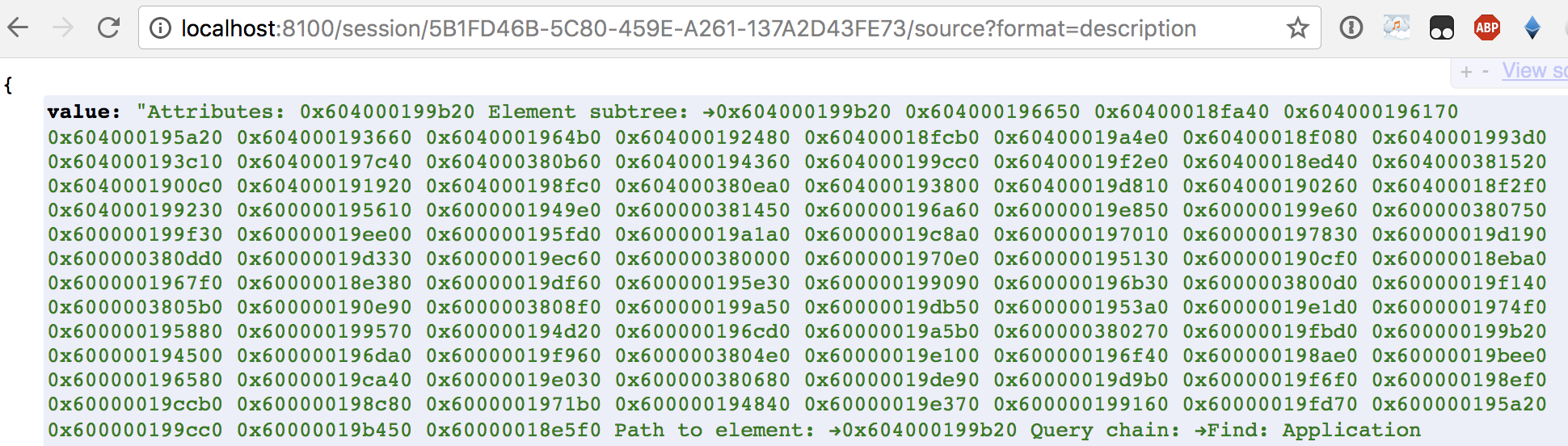
it's not the source I wanted to see. I need to call https://github.com/facebook/WebDriverAgent/blob/52512a7fb39a697fc727d372c8765a43c74f6d37/WebDriverAgentLib/Commands/FBDebugCommands.m#L51
mykola-mokhnach
on 22 Jan 2018
@mykola-mokhnach I added both the content of http://localhost:8100/session/3A1824AF-A152-4307-A82A-697FCD76C9F9/source and http://localhost:8100/session/3A1824AF-A152-4307-A82A-697FCD76C9F9/source?format=description to the gist above. There's 6 files in the gist, debug log, format=xml source + format=description source * 2 device configurations
Not knowing too much details, I think this should trigger the line of code you mentioned. If not: Where I can learn how to provide the debug info you need ?
peritus
on 23 Jan 2018
That's weird. http://localhost:8100/session/3A1824AF-A152-4307-A82A-697FCD76C9F9/source?format=description should provide different output, since it tries to get children windows first and then print their debug descriptions. But here it only prints the description of the application itself, which is useless, since it only contains snapshot addresses in memory.
mykola-mokhnach
on 23 Jan 2018
I've now updated to 02887c171699821314c1928642303c36f037ae8a but it make no difference.
peritus
on 23 Jan 2018
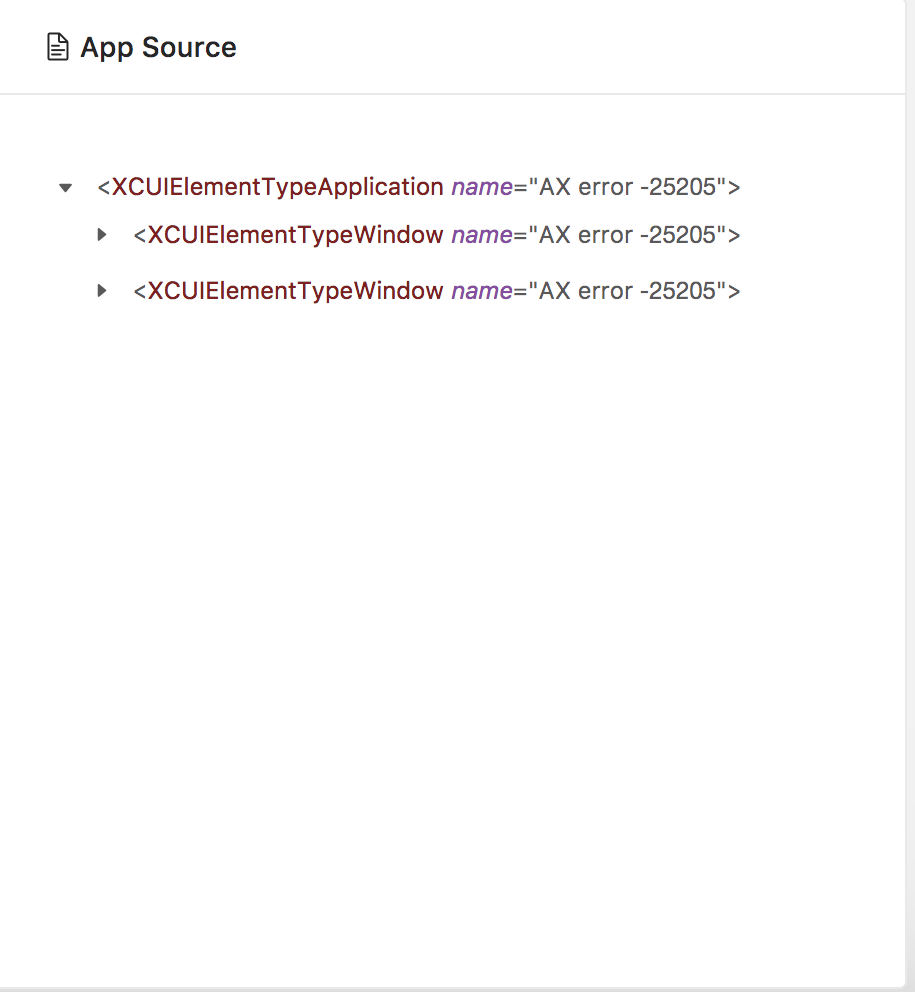
@mykola-mokhnach Updated to the latest appium inspector, still seeing this issue: tried with different os's 11.2, 10.2, 10.3 . still the same
 lavanyaLife360
on 24 Jan 2018
lavanyaLife360
on 24 Jan 2018
There was no issue with Appium inspector on iphon8 (iOS 11.0.2) until yesterday. Since this morning I am unable to launch app using Appium inspector. :disappointed:
Appium inspector logs gist:
SamyQAZ
on 24 Jan 2018
I am facing above same issue, can any one get solution please update
 gunnamnandu
on 9 Feb 2018
gunnamnandu
on 9 Feb 2018
@gunnamnandu It works currently for only one real device in my list. iOS 10.XX still same result 'AX error -25205'
Able to inspect elements on iPhone8(11.0.2) - using Appium.app(1.3.0) and CLI(1.7.2)
SamyQAZ
on 12 Feb 2018
Same issue, only works on XCode 9.3 with IOS 11.2.
 SenhorCastor
on 19 Feb 2018
SenhorCastor
on 19 Feb 2018
Closing since this is iOS 10.x related issue on Apple side.
marekcirkos
on 28 Feb 2018
Related issues
 monleylu
·
16Comments
monleylu
·
16Comments
 prudhvialahari
·
16Comments
prudhvialahari
·
16Comments
 Azuer
·
3Comments
Azuer
·
3Comments
 lucasdaniele1
·
15Comments
lucasdaniele1
·
15Comments
 pkulkarnii
·
4Comments
pkulkarnii
·
4Comments
Most helpful comment
@gunnamnandu It works currently for only one real device in my list. iOS 10.XX still same result 'AX error -25205'
Able to inspect elements on iPhone8(11.0.2) - using Appium.app(1.3.0) and CLI(1.7.2)