Webapi: [feature/netcore] $select executes on client side
After upgrading from Microsoft.AspNetCore.OData Version=7.0.0-beta1 to Microsoft.AspNetCore.OData Version=7.0.0-beta2 $select gets all entity properties from database and produces correct result on client side. This also occurs in nightly builds.
Assemblies affected
Microsoft.AspNetCore.OData Version=7.0.0-beta2
Microsoft.AspNetCore.OData Version=7.0.0-Nightly*
Reproduce steps
Url: http://localhost:61734/api/values/?$select=Age&$top=1
Controller:
[Route("api/[controller]")]
public class ValuesController : Controller
{
    private readonly Context _ctx;

    public ValuesController(Context ctx)
    {
        _ctx = ctx;
    }

    [HttpGet]
    public async Task<IActionResult> Get(ODataQueryOptions<User> queryOptions)
    {
        var users = _ctx.Users.Select(x => x);
        return Ok(queryOptions.ApplyTo(users));
    }
}
Context model:
public class User
{
    [Key]
    public int Id { get; set; }
    [Required]
    public string UserName { get; set; }
    public string FirstName { get; set; }
    public string LastName { get; set; }
    public int Age { get; set; }
    public virtual ICollection<UserRole> UserRoles { get; set; }
}
Expected result
Return value:
[{"Age": 50}]
Sql profiler:
exec sp_executesql N'SELECT TOP(@__TypedProperty_0)
[x].[Age] AS [Value]
FROM [User] AS [x] N'@__TypedProperty_0 int',@__TypedProperty_0=1
Actual result
Return value:
[{"Age": 50}]
Sql profiler:
exec sp_executesql N'SELECT TOP(@__TypedProperty_0)
[x].[Id],
[x].[Age],
[x].[FirstName],
[x].[LastName],
[x].[UserName]
FROM [User] AS [x] N'@__TypedProperty_0 int',@__TypedProperty_0=1
 vsopko
All 45 comments
@vsopko - What backend DB are you using?
 robward-ms
on 16 Apr 2018
robward-ms
on 16 Apr 2018
@robward-ms Microsoft SQL Server Express (64-bit) 14.0.1000.169 on Windows 10 Pro
vsopko
on 16 Apr 2018
@vsopko - What is ".Select(x => x);" doing for you? I think this might be forcing the evaluation of _ctx.Users before the application of the query.
robward-ms
on 17 Apr 2018
@robward-ms It's just a mark of projection experiments. Without it (var users = _ctx.Users;) SQL Server Profiler show the same query, with all columns. Anyway, i think evaluation of IQueriable occurs in Ok result, after ApplyTo method.
vsopko
on 17 Apr 2018
@robward-ms - Have you managed to reproduce this issue? It's a large perfomance problem for our projects.
vsopko
on 24 Apr 2018
@vsopko I took a look.
From the Linq, we have the following highlight projection:
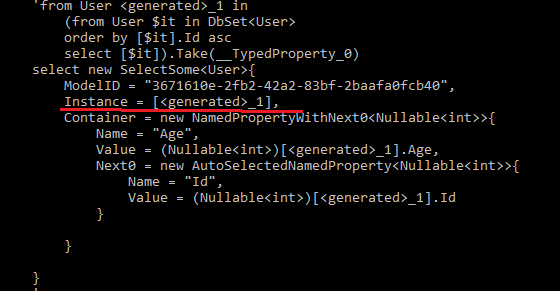
I have a separate test, it seem if i remove the "Instance", it will only return the given property.
However, i am still looking whether it's ok to remove it from our source code.
 xuzhg
on 8 Jun 2018
xuzhg
on 8 Jun 2018
@vsopko
I built a nightly with some codes changed. Would you please try it and let us know the performance?
Also, I created a sample project based on the above nightly, it show me the different query. Feel free to clone and try. Please let me know your found. Thanks.
xuzhg
on 9 Jun 2018
@xuzhg
My tests with 7.0.0-Nightly201806082048 and above configuration:
Url http://localhost:61734/api/values/?$select=UserName&$top=5&$orderby=Age%20desc
Test 1.
return Ok(queryOptions.ApplyTo(_ctx.Users));
Sql result: Partially correct (extra Id column)
exec sp_executesql N'SELECT TOP(@__TypedProperty_1) [$it].[UserName] AS [Value0], [$it].[Id] AS [Value]
FROM (
SELECT [Age], [FirstName], [Id], [LastName], [UserName] FROM [User]
) AS [$it]
ORDER BY [$it].[Age] DESC',N'@__TypedProperty_1 int',@__TypedProperty_1=5
Test 2.
return Ok(queryOptions.ApplyTo(_ctx.Users.Select(x => new User
{
    Age = x.Age,
    FirstName = x.FirstName,
    Id = x.Id,
    LastName = x.LastName,
    UserName = x.UserName
})));
Sql result: Fetch all columns
exec sp_executesql N'SELECT TOP(@__TypedProperty_0) [x].[Age], [x].[FirstName], [x].[Id], [x].[LastName], [x].[UserName]
FROM [User] AS [x]
ORDER BY [x].[Age] DESC',N'@__TypedProperty_0 int',@__TypedProperty_0=5
Then i've changed model to:
    public class BaseUser
    {
        public int Age { get; set; }
        [Key]
        public int Id { get; set; }
    }

    public class User : BaseUser
    {
        //public int Age { get; set; }
        //[Key]
        //public int Id { get; set; }
        public string UserName { get; set; }
        public string FirstName { get; set; }
        public string LastName { get; set; }
    }
Test 3.
return Ok(queryOptions.ApplyTo(_ctx.Users));
Sql result: Partially correct, and the same as in Test 1, but without FROM SELECT
exec sp_executesql N'SELECT TOP(@__TypedProperty_0) [$it].[UserName] AS [Value0], [$it].[Id] AS [Value]
FROM [User] AS [$it]
ORDER BY [$it].[Age] DESC',N'@__TypedProperty_0 int',@__TypedProperty_0=5
Test 4.
return Ok(queryOptions.ApplyTo(_ctx.Users.Select(x => new User
{
    Age = x.Age,
    FirstName = x.FirstName,
    Id = x.Id,
    LastName = x.LastName,
    UserName = x.UserName
})));
Sql result: Completely bypass odata
SELECT [x].[Age], [x].[FirstName], [x].[Id], [x].[LastName], [x].[UserName]
FROM [User] AS [x]
Model builder was not changed
    public class EFSampleODataModelBuilder
    {
        public IEdmModel DefineEdmModel(IServiceProvider services)
        {
            ODataConventionModelBuilder builder = new ODataConventionModelBuilder(services);
            builder.EntitySet<User>("Users");
            return builder.GetEdmModel();
        }
    }
All test prodeces the same ouptput for client
[{ UserName: "UserName30" }, { UserName: "UserName28" }, { UserName: "UserName29" }, { UserName: "UserName26" }, { UserName: "UserName27" }]
same problem here
requesting the following url: https://localhost:44356/odata/Groups(1)?$expand=Teams($select=Name)
results with all entities of Team
public class Team
{
    public int Id { get; set; }
    public int GroupId { get; set; }

    public string Name { get; set; }
    public int Rank { get; set; }

    // Navigation properties
    public Group Group { get; set; }
    public ICollection<Player> Players { get; set; }
}
exec sp_executesql N'SELECT [t0].[Id], [t0].[GroupId], [t0].[Name] AS [Value], [t0].[Rank]
FROM [Teams] AS [t0]
WHERE @_outer_Id = [t0].[GroupId]',N'@_outer_Id int',@_outer_Id=1
 eyalkapah
on 12 Jun 2018
eyalkapah
on 12 Jun 2018
@vsopko @eyalkapah
I have a test project named "BasicEFCoreTest" that you can find https://github.com/xuzhg/WebApiSample/tree/master/AspNetCore
When i issue a request like:

I can get the following logging:

It seems only retrive the Age and Id.
If i issue a request as:


Would you please test on my project? or would you please share me your repro project?
xuzhg
on 12 Jun 2018
@xuzhg With your samples everything is okay. The point is that you are not using any projections in your test project. In real app we want to get IQueryiable<T>, then project it to dto (that exists in IEdmModel), then process dto with OData, and only then execute sql. With this sample there is noting to make client side evaluation of IQueryable but with this changes in your CustomersController.cs:
[EnableQuery]
        public IActionResult Get()
        {
            var iqueryable = _db.Customers.Select(x => new Customer
            {
                Age = x.Age,
                FavoriateColor = x.FavoriateColor,
                FirstName = x.FirstName,
                HomeAddress = x.HomeAddress,
                Id = x.Id,
                LastName = x.LastName,
                Order = x.Order,
                UserName = x.UserName
            });

            return Ok(iqueryable);
        }
we have all columns fetched, where it looks like OData understand projected IQueryable but process only $top and $orderby clauses
exec sp_executesql N'SELECT TOP(@__TypedProperty_0) [x.Order].[Id], [x.Order].[Price], [x].[Id], [x].[HomeAddress_City], [x].[HomeAddress_Street], [x].[Age], [x].[FavoriateColor], [x].[FirstName], [x].[Id] AS [Id0], [x].[LastName], [x].[UserName]
FROM [Customers] AS [x]
LEFT JOIN [Orders] AS [x.Order] ON [x].[OrderId] = [x.Order].[Id]
ORDER BY [Id0]',N'@__TypedProperty_0 int',@__TypedProperty_0=1
vsopko
on 12 Jun 2018
@xuzhg I put a sample project in my github
https://github.com/eyalkapah/OdataSample
please run
https://localhost:44349/odata/Teams?$select=Name
and see the sql generated is
SELECT [t].[Id], [t].[GroupId], [t].[Name] AS [Value], [t].[Rank]
FROM [Teams] AS [t]
for
https://localhost:44349/odata/Groups(1)?$expand=Teams($select=Name)
the sql is
exec sp_executesql N'SELECT [t0].[Id], [t0].[GroupId], [t0].[Name] AS [Value], [t0].[Rank]
FROM [Teams] AS [t0]
WHERE @_outer_Id = [t0].[GroupId]',N'@_outer_Id int',@_outer_Id=1
so all properties are queried...
eyalkapah
on 13 Jun 2018
@xuzhg After upgrade to 7.0.0-Nightly201806181242, SelectAllAndExpand not work.
Throws exception:
System.InvalidOperationException: The EDM instance of type '[Satellite.BDA.Models.Request Nullable=True]' is missing the property 'Id'.
If add $select clause work fine.
Add back Instance property for SelectAllAndExpand.
 genusP
on 19 Jun 2018
genusP
on 19 Jun 2018
@genusP Would you please try the latest nightly version: 7.0.0-Nightly201806192313
xuzhg
on 20 Jun 2018
@eyalkapah I created a PR for your project. https://github.com/eyalkapah/OdataSample/pull/1
Would you please take a look and try it?
For the detail information about my changes and testing, I added a Readme.md file in my PR. Please take a try and let me know any problem?
xuzhg
on 20 Jun 2018
@xuzhg 7.0.0-Nightly201806192313 work fine. SelectAll work and retrieve only need fields.
genusP
on 20 Jun 2018
@xuzhg with 7.0.0-Nightly201806192313, your BasicEFCoreTest app and dto simulation as desribed in my previous comment, i have this results:
http://localhost:2361/odata/customers?$select=Age
SELECT [x].[Age] AS [Value0], [x].[Id] AS [Value] FROM [Customers] AS [x]http://localhost:2361/odata/customers?$select=Age&$top=2
exec sp_executesql N'SELECT TOP(@__TypedProperty_0) [x.Order].[Id], [x.Order].[Price], [x].[Id], [x].[HomeAddress_City], [x].[HomeAddress_Street], [x].[Age], [x].[FavoriateColor], [x].[FirstName], [x].[Id] AS [Id0], [x].[LastName], [x].[UserName]
FROM [Customers] AS [x]
LEFT JOIN [Orders] AS [x.Order] ON [x].[OrderId] = [x.Order].[Id]
ORDER BY [Id0]',N'@__TypedProperty_0 int',@__TypedProperty_0=2http://localhost:2361/odata/customers?$select=Age&$filter=Id gt 1
exec sp_executesql N'SELECT [x].[Age] AS [Value0], [x].[Id] AS [Value]
FROM [Customers] AS [x]
WHERE [x].[Id] > @__TypedProperty_0',N'@__TypedProperty_0 int',@__TypedProperty_0=1
Looks like now it generates incorrect SQL (with all columns) only for paging scenarios.
vsopko
on 20 Jun 2018
@genusP Thank for your verification. Would you please take a look my PR at: #1493?
xuzhg
on 20 Jun 2018
@vsopko
_1, I think that's correct. It retrieves the "Age" and "Id". "Age" is in the $select, "Id" is by design to make sure the stable sorting.
_2, I will test it.
_3, What's the problem?
xuzhg
on 20 Jun 2018
@xuzhg incorrect is only #_2 with $top param
vsopko
on 20 Jun 2018
@xuzhg this build not from PR?
genusP
on 20 Jun 2018
@genusP this build is from the PR. But the PR is not merged, there's some test cases failed need to fix.
xuzhg
on 20 Jun 2018
@vsopko Interesting. I am testing your project, you're using my project.
With your project, when i issue http://localhost:5009/odata/Teams?$select=Name&$top=3

For my project, would you please create a PR with your changes to me to dig more?
xuzhg
on 20 Jun 2018
@xuzhg I have tested with the latest nightly and now seems like it's working good.
thanks
eyalkapah
on 21 Jun 2018
@xuzhg There is no my project, you are using eyalkapah ) I've proposed a PR for yours, please test it with $top clause.
vsopko
on 21 Jun 2018
@vsopko Sorry, I can't understand why you did a mapping as below:
`
var query = _db.Customers.Select(x => new Customer
{
Age = x.Age,
FavoriateColor = x.FavoriateColor,
FirstName = x.FirstName,
HomeAddress = x.HomeAddress,
Id = x.Id,
LastName = x.LastName,
Order = x.Order,
UserName = x.UserName
});
`
I have a test without using OData, just using EFCore.
```C#
var aa = db.Customers.Select(e => new Customer
{
FirstName = e.FirstName,
LastName = e.LastName,
UserName = e.UserName
})
.Take(1).Select(e => new CusomterDto { FullName = e.FirstName + " " + e.LastName });

if I test as:
```C#
var aa = db.Customers.Take(1).Select(e => new CusomterDto { FullName = e.FirstName + " " + e.LastName });

So, i think: Owing that you have a mapping before take, it will retrieve all the properties given in the mapping".
xuzhg
on 21 Jun 2018
@xuzhg this query without using OData (IQueryable projection, then another projection and then take first)
var query = _db.Customers.Select(x => new Customer
{
    Age = x.Age,
    FavoriateColor = x.FavoriateColor,
    FirstName = x.FirstName,
    HomeAddress = x.HomeAddress,
    Id = x.Id,
    LastName = x.LastName,
    Order = x.Order,
    UserName = x.UserName
}).Select(e => new CusomterDto { FullName = e.FirstName + " " + e.LastName }).Take(1);
executes with this sql:
exec sp_executesql N'SELECT TOP(@__p_0) ([x].[FirstName] + N'' '') + [x].[LastName] AS [FullName]
FROM [Customers] AS [x]',N'@__p_0 int',@__p_0=1
So I guess OData in your app with my query should work this way, or am i missing something?
Why I consider such tests: In our application we have a lot of dtos, that used as business objects, projected from ef core FromSql raw sql queries, OData model builder contains information about those dtos, instead of ef core context models. So we want to query those dtos with OData and evaluate produced IQueryable on sql server side.
vsopko
on 22 Jun 2018
@vsopko
Why do i get the different log:
```C#
var aa = db.Customers.Select(e => new Customer
                {
                    FirstName = e.FirstName,
                    LastName = e.LastName,
                    UserName = e.UserName
                })
                .Select(e => new CusomterDto { FullName = e.FirstName + " " + e.LastName }).Take(1);
```

xuzhg
on 22 Jun 2018
@vsopko My test project can be found here
xuzhg
on 22 Jun 2018
@xuzhg Interesting, with last query from your new project
var aa = db.Customers.Select(e => new Customer
{
FirstName = e.FirstName,
LastName = e.LastName,
UserName = e.UserName
})
.Select(e => new CusomterDto { FullName = e.FirstName + " " + e.LastName }).Take(1);
I have this in SQL Profiler:
exec sp_executesql N'SELECT TOP(@__p_0) ([e].[FirstName] + N'' '') + [e].[LastName] AS [FullName]
FROM [Customers] AS [e]',N'@__p_0 int',@__p_0=1
and this in project logs:
==========================================
dbug: Microsoft.EntityFrameworkCore.Infrastructure[10401]
      An 'IServiceProvider' was created for internal use by Entity Framework.
dbug: Microsoft.EntityFrameworkCore.Model[10600]
      The property 'OrderId' on entity type 'Customer' was created in shadow state because there are no eligible CLR members with a matching name.
info: Microsoft.EntityFrameworkCore.Infrastructure[10403]
      Entity Framework Core 2.1.1-rtm-30846 initialized 'CustomerOrderContext' using provider 'Microsoft.EntityFrameworkCore.SqlServer' with options: None
dbug: Microsoft.EntityFrameworkCore.Query[10101]
      => Microsoft.EntityFrameworkCore.Query.RelationalQueryModelVisitor
      Compiling query model:
      '(from Customer e in DbSet<Customer>
      select new CusomterDto{ FullName = [e].FirstName + " " + [e].LastName }
      ).Take(__p_0)'
warn: Microsoft.EntityFrameworkCore.Query[10102]
      => Microsoft.EntityFrameworkCore.Query.RelationalQueryModelVisitor
      Query: '(from Customer e in DbSet<Customer> select new CusomterDto{ FullName = [e].FirstName + " " + [e].Las...' uses a row limiting operation (Skip/Take) without OrderBy which may lead to unpredictable results.
dbug: Microsoft.EntityFrameworkCore.Query[10104]
      => Microsoft.EntityFrameworkCore.Query.RelationalQueryModelVisitor
      Optimized query model:
      '(from Customer e in DbSet<Customer>
      select new CusomterDto{ FullName = [e].FirstName + " " + [e].LastName }
      ).Take(__p_0)'
dbug: Microsoft.EntityFrameworkCore.Query[10107]
      => Microsoft.EntityFrameworkCore.Query.RelationalQueryModelVisitor
      (QueryContext queryContext) => IEnumerable<CusomterDto> _InterceptExceptions(
          source: IEnumerable<CusomterDto> _ShapedQuery(
              queryContext: queryContext,
              shaperCommandContext: SelectExpression:
                  SELECT TOP(@__p_0) ([e].[FirstName] + N' ') + [e].[LastName] AS [FullName]
                  FROM [Customers] AS [e],
              shaper: TypedProjectionShaper<ValueBufferShaper, ValueBuffer, CusomterDto>),
          contextType: EFCoreLinqTest.CustomerOrderContext,
          logger: DiagnosticsLogger<Query>,
          queryContext: queryContext)
dbug: Microsoft.EntityFrameworkCore.Database.Connection[20000]
      Opening connection to database 'Demo.ODataEfCoreTestCustomerOrder' on server '(localdb)\mssqllocaldb'.
dbug: Microsoft.EntityFrameworkCore.Database.Connection[20001]
      Opened connection to database 'Demo.ODataEfCoreTestCustomerOrder' on server '(localdb)\mssqllocaldb'.
dbug: Microsoft.EntityFrameworkCore.Database.Command[20100]
      Executing DbCommand [Parameters=[@__p_0='?' (DbType = Int32)], CommandType='Text', CommandTimeout='30']
      SELECT TOP(@__p_0) ([e].[FirstName] + N' ') + [e].[LastName] AS [FullName]
      FROM [Customers] AS [e]
info: Microsoft.EntityFrameworkCore.Database.Command[20101]
      Executed DbCommand (125ms) [Parameters=[@__p_0='?' (DbType = Int32)], CommandType='Text', CommandTimeout='30']
      SELECT TOP(@__p_0) ([e].[FirstName] + N' ') + [e].[LastName] AS [FullName]
      FROM [Customers] AS [e]
Sam Peter
Done
dbug: Microsoft.EntityFrameworkCore.Database.Command[20300]
      A data reader was disposed.
dbug: Microsoft.EntityFrameworkCore.Database.Connection[20002]
      Closing connection to database 'Demo.ODataEfCoreTestCustomerOrder' on server '(localdb)\mssqllocaldb'.
dbug: Microsoft.EntityFrameworkCore.Database.Connection[20003]
      Closed connection to database 'Demo.ODataEfCoreTestCustomerOrder' on server '(localdb)\mssqllocaldb'.
dbug: Microsoft.EntityFrameworkCore.Infrastructure[10407]
      'CustomerOrderContext' disposed.
@vsopko The version referencing to EFCore is different. EFCore 2.0 vs EFCore 2.1.
xuzhg
on 22 Jun 2018
@xuzhg i have the same query result with EFCore 2.0, 2.1 and 2.1.1
exec sp_executesql N'SELECT TOP(@__p_0) ([e].[FirstName] + N'' '') + [e].[LastName] AS [FullName]
FROM [Customers] AS [e]',N'@__p_0 int',@__p_0=1
Please tell me, we are looking for common ground to solve the problem or in my tests there is some fundamental misunderstanding of what I would like to achieve from the OData?
vsopko
on 22 Jun 2018
@vsopko Sorry, please allow me to summary it:
- if we do
Select(...).Take(...).Select(...)

- If we put the Take(…) at the end, for example,
Select(….).Select(…).Take(…)
we get different SQL as:
```C#
SELECT TOP(@__p_0) ([e].[FirstName] + N' ') + [e].[LastName] AS [FullName]
FROM [Customers] AS [e]
```
So, what i am thinking is that:
- At OData side, it's better to switch the Linq and put the Take(...) at end.
- At EFCore side, (I don't know), but maybe be we can file an issue for them to investigate.
Thoughts?
xuzhg
on 22 Jun 2018
@xuzhg for OData apply Take after all Selects would resolve this issue for me. I think OData url means this: firstly select, expand, filter and then count and take top what was selected. But i'm not shure that its logically right for everyone. May be the order of $top and $select params in the url must be significant, but if i remember there was and old issue where people asks to make params order irrelevant.
For EFCore i don't know the right answer, and currently there are some issues about Take() streaming and evaluation. Your tests with Take in the middle of selects looks strange for me and i'm not shure what happens with this inside EFCore linq query processing, but i think its an issue because Take() returns IQueryable and its assumed that subsequent queries must be evaluated on sql side some way.
vsopko
on 22 Jun 2018
@vsopko I create an issue at EFCore side. See: https://github.com/aspnet/EntityFrameworkCore/issues/12453
Would you please help us file a new issue at: webapi/issues for OData part.
xuzhg
on 23 Jun 2018
@xuzhg what do you mean under "file a new issue"? My thoughts on the order of the $top and $select url params, or to move linq Take() at the end? For the order of params i don't know what the people need and I guess it is about OData url conventions and specifications, i believe this is up to you. For making Take() on final query i think this issue enough, isn't it? Without digging in EFCore linq composition it was simple for me - i have IQueriable<T>, type <T> defined in OData Edm model and i want to get correct sql with OData url params, relevant to <T>.
vsopko
on 23 Jun 2018
@vsopko Sorry to confusing you. What I mean a new issue is related to adjust the "Take()" because I think a new issue is easy for us to track the "Take()" order problem. However, if you think this issue is enough, I am ok.
By the way, I got the following respond from EFCore team in aspnet/EntityFrameworkCore#12453
_This is by design, Take operator forces us to produce a subquery, which complicates the overall query. You should still get correct results for both queries, difference is that in first case the second projection is performed on the client.
In general you will get better queries if operators like Skip/Take/Distinct are used as late as possible_
xuzhg
on 23 Jun 2018
Great, waiting for fix, thanks a lot. Recommendations of the EFCore team are completely in the mainstream of our conversation: "In general you will get better queries if operators like Skip/Take/Distinct are used as late as possible"
vsopko
on 23 Jun 2018
@xuzhg, nothing changes in 7.0.0-Nightly201806261242, projected query with $select and $top fetch all columns.
vsopko
on 26 Jun 2018
@vsopko
Below is my test for the latest nightly.
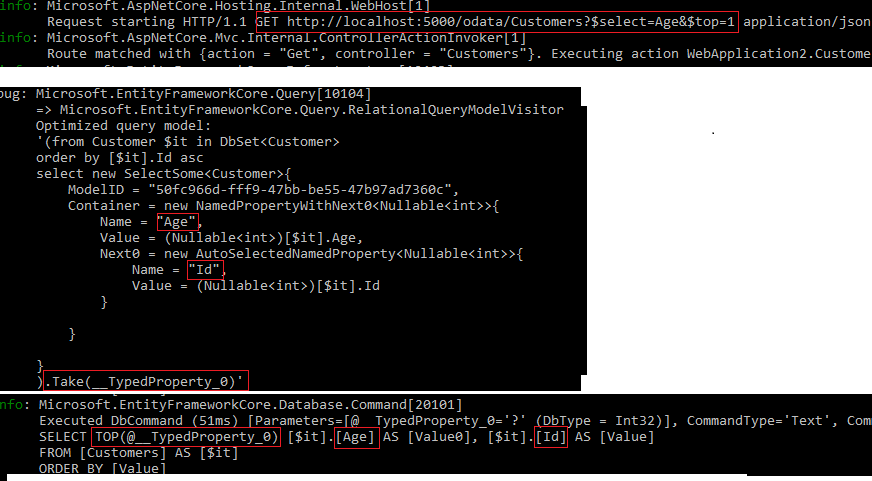
However, if you have a mapping in the controller, it will retrieve all the given properties.
xuzhg
on 26 Jun 2018
@xuzhg of course i have mapping in controller, your test app was not changed and i have mapping as explained in this comment (also was proposed as PR for your test app). Moreover, we are working here with a simplest case of organizing a sequence of projections. In our real app we've generate complex projections in external dll and everything works fine except $select $top bunch of url params. Under your words
At OData side, it's better to switch the Linq and put the Take(...) at end.
i expected that PR, wich closes this issue, would contain a solution with above discussion.
Please explain why we must get appropriate columns if we don't use $top and all with $top (and also with $skip)?
vsopko
on 26 Jun 2018
@vsopko I closed it accidently.
xuzhg
on 27 Jun 2018
@vsopko:
Let’s look at the Linq expression from Web API OData, the Red number in the picture is same as the items in the “Investigation”.
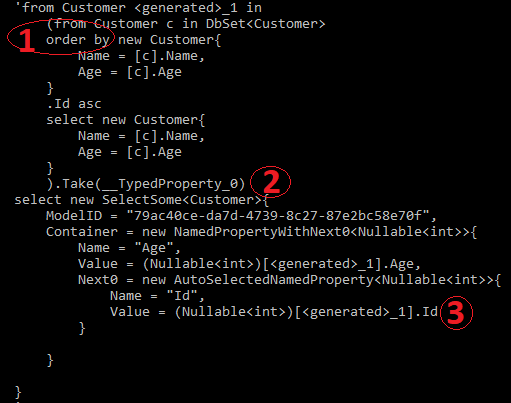
The final SQL execution is as follows (it retrieves “Name” along with “Age” )

Investigation:
- By default, Web API OData assume to do stable sorting if $top or $skip used in query option. (1)
- Web API OData covert $top before $select & $expand. (2)
- Web API OData always add “keys” into the final project if we have $select. (3)
However, “Keys” value is necessary to generate the function/action url if we have$select=Default.MyFunction
Experiment:
Only I do the following:
- Disable stable sorting
- Move $top to the end. (See https://github.com/aspnet/EntityFrameworkCore/issues/12453, We should put Take(..) as late as possible)
- Remove the keys in the $select.
I can get the following Linq expression (left) and the final SQL execution (Right, see only “Age” is retrieved):
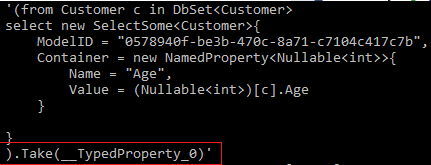
Then i can get the following result:

However, if I remove the “keys”, “$select=Default.MyFunction” can’t work, if I add “keys”, Property “Name” will be retrieved.
xuzhg
on 27 Jun 2018
@xuzhg those currently OData have two mutually exclusive situations to fix this issue:
- If Take() will be at the end of query - OData functions would not work?
- If Take() beetwen select statement for columns from $select and select statement needed for OData functions to work - we'll get all columns because of EF Core #12453? By the way - ef core team reopen this issue to investigation.
What do you think to overcome this problem (if I understand it correctly) in the current state of affairs? May be to check OData url for compliance with functions defined in edm model and if there is no match move Take() to end of query? Or why not just move Take() after all selects?
vsopko
on 28 Jun 2018
@xuzhg can be closed, thanks.
vsopko
on 19 Jul 2018
Related issues
 christiannagel
·
4Comments
christiannagel
·
4Comments
 LianwMS
·
5Comments
LianwMS
·
5Comments
 khodaie
·
4Comments
khodaie
·
4Comments
 suadev
·
3Comments
suadev
·
3Comments
 sheam
·
3Comments
sheam
·
3Comments